


PlayHT text to speech is an AI-powered speech synthesis platform that converts written text into ultra-realistic, human-like audio using advanced neural network models. It offers over 200 voices across 30+ languages with sub-150ms streaming latency, voice cloning capabilities, and multi-speaker dialogue generation. Developers can integrate PlayHT through its REST API, and platforms like VideoSDK's AI Voice Agent pipeline can connect PlayHT as a TTS provider for real-time conversational applications.
Introduction
As of 2026, the gap between synthetic and human speech has narrowed dramatically. What once sounded robotic and disjointed now carries emotional weight, natural pacing, and conversational nuance. This shift matters because voice quality directly affects how users interact with your content, your agents, and your brand.
Whether you are building an e-learning platform, a podcast production pipeline, or an interactive voice response system, the quality of your text-to-speech output determines whether users stay engaged or tune out. Synthetic-sounding voices drive users away. Natural, expressive voices keep them listening.
PlayHT has positioned itself as a leading provider in this space, focusing on ultra-realistic voice generation that rivals human narration. Their models handle emotional inflection, pacing, and multi-speaker conversations with a level of nuance that traditional concatenative TTS systems cannot match.
By the end of this guide, you will understand how PlayHT text to speech works under the hood, what features it offers, how to set it up without writing code, where it outperforms competitors, and what production considerations matter when you ship to real users.
What Is PlayHT Text-to-Speech?
PlayHT text to speech is defined as a cloud-based AI speech synthesis service that transforms written text into natural-sounding human speech using deep learning models. Unlike older TTS systems that stitched together pre-recorded audio fragments, PlayHT generates speech entirely through neural inference, which means every word, pause, and intonation is produced by a model trained on thousands of hours of human speech.
PlayHT works by sending text input to its inference API, where the request is processed by one of its proprietary models. The two primary models are PlayDialog and 3.0 mini. PlayDialog is designed for conversational multi-turn dialogue, handling multiple speakers with distinct voices and emotional tones. The 3.0 mini model is optimized for speed and low-latency streaming, making it suitable for interactive applications where response time is critical.
The platform supports over 200 voices across 30+ languages, including regional accents and dialects. Developers can also clone custom voices from short audio samples, creating branded voice identities for their applications. For teams building real-time voice agents, VideoSDK's AI Voice Agent SDK can integrate PlayHT as a TTS provider within its pipeline, connecting speech-to-text, large language models, and TTS into a unified conversational flow.
Key Features of PlayHT TTS
PlayHT's voice library includes over 200 AI voices spanning 30+ languages, each carrying distinct personality traits and emotional ranges.
Ultra-Realistic Voice Library
Each voice in PlayHT's library is designed for a specific use case. You can select voices optimized for narration, casual conversation, formal presentations, or dramatic reading. The library includes voices with specific regional accents, which matters when you are localizing content for markets like British English, Latin American Spanish, or Indian Hindi. Emotional style controls let you adjust tone to be cheerful, somber, authoritative, or empathetic without switching to a different voice entirely. This flexibility means a single voice can serve multiple content contexts, reducing the need to manage dozens of voice assets.
Real-Time Streaming and Low Latency
PlayHT supports real-time streaming with sub-150ms response times for its low-latency models. This matters for interactive applications where a user speaks or acts and expects an immediate audio response. Traditional TTS systems buffer the entire audio file before returning it, which introduces noticeable delays. PlayHT's streaming mode begins returning audio chunks as soon as the first tokens are processed, so the user hears the beginning of the response while the rest is still being generated. This is particularly valuable for voice agent applications, where conversational latency directly impacts user satisfaction.
Voice Cloning and Custom Voices
Voice cloning allows you to create a custom AI voice from a short audio sample, typically a few minutes of clean recording. PlayHT processes the sample, extracts vocal characteristics including pitch, timbre, pacing, and pronunciation patterns, and creates a reusable voice model. This is useful for brands that want a consistent voice identity across all their content, or for creators who want to generate speech in their own voice without recording every script. The cloned voice can then be used across any text input, supporting multiple languages even if the original sample was in a single language.
Multi-Voice Conversations
PlayHT's PlayDialog model enables multi-speaker dialogue generation from a single text input. You define which parts of the text belong to which speaker, assign a voice to each speaker, and the model generates a natural conversation with appropriate turn-taking, pauses, and emotional responses. This eliminates the need to generate each speaker's lines separately and stitch them together manually. For podcast producers and dialogue-heavy content creators, this feature significantly reduces production time and eliminates the audio editing burden of aligning separate clips.
API and Integration Options
PlayHT provides a REST API for programmatic access, along with SDKs for popular programming languages. The API follows a standard authentication flow where you exchange your API key and secret for a JSON Web Token, then include that token in subsequent requests. The API accepts text input, voice selection, language, speed, and emotional style parameters, and returns either a streaming audio response or a URL to the generated audio file. For developers building AI voice agents, VideoSDK's agent pipeline supports TTS provider integration, allowing you to connect PlayHT alongside your STT and LLM components in a single orchestrated flow.
How PlayHT TTS Works: Architecture Overview
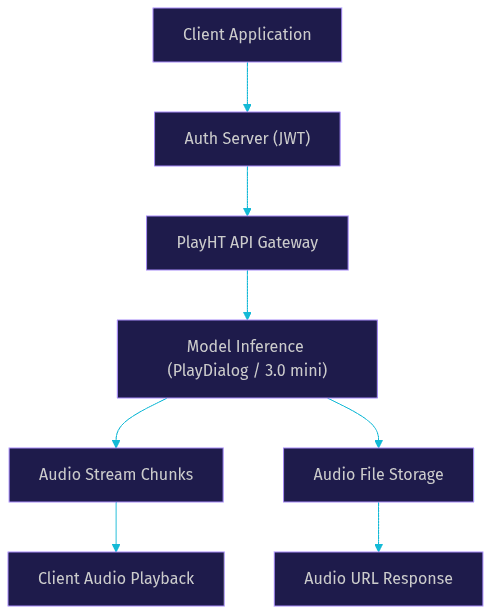
Understanding the internal flow of PlayHT text to speech helps you debug integration issues and optimize performance. The process begins when your client application sends a text request to the PlayHT API. Before the request reaches the inference engine, it passes through an authentication layer that validates your JSON Web Token.
Once authenticated, the request payload is parsed and routed to the appropriate model. If you selected the 3.0 mini model, the text is processed for low-latency streaming. If you selected PlayDialog, the text is analyzed for speaker assignments and conversational context. The model then generates audio data through neural inference, producing audio chunks that are either streamed back to the client in real time or assembled into a complete file.
The following diagram illustrates this flow:
For developers integrating PlayHT into a real-time voice agent pipeline, the architecture extends to include speech-to-text and large language model components. VideoSDK's AI Voice Agent SDK orchestrates this entire flow, managing the connection between user input, LLM processing, and TTS output within a single session.
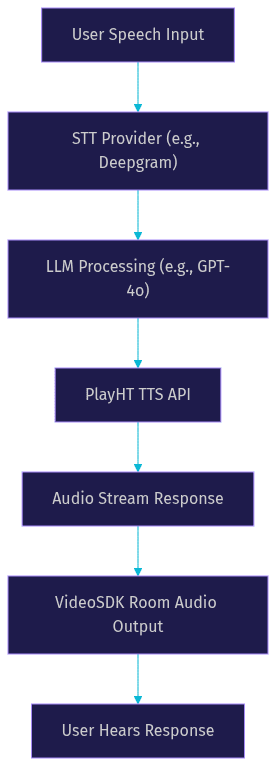
This pipeline architecture is what powers conversational AI agents, where latency between user input and audio response must stay under one second for natural interaction. VideoSDK manages the session lifecycle, handles reconnection logic, and coordinates the timing between each pipeline stage so the developer can focus on conversation design rather than infrastructure.
Setting Up PlayHT TTS: A No-Code Walkthrough
Start by registering for a PlayHT account on their official website. The setup process is straightforward but requires attention to authentication details that many tutorials skip.
Step 1: Create Your PlayHT Account
Register for a PlayHT account on their official website. After registration, navigate to the API settings section of your dashboard. Here you will find your API key and API secret. These credentials are required for all programmatic access. Store them securely in your environment variables or a secrets manager. Never expose them in client-side code or public repositories, as anyone with these credentials can generate speech using your account and consume your quota.
Step 2: Generate a Secure Authentication Token
PlayHT uses JSON Web Tokens for API authentication. The concept is straightforward: your backend server takes your API key and secret, sends them to PlayHT's authentication endpoint, and receives a temporary token in return. This token is then included in the header of every subsequent API request. The token has an expiration time, so your backend should implement a refresh mechanism that requests a new token before the current one expires. This approach keeps your secret credentials on the server and only exposes short-lived tokens to the client, which is the standard security pattern for API authentication.
Step 3: Choose a Voice and Language
Browse the PlayHT voice library to select a voice that matches your use case. Each voice has a unique identifier that you will include in your API request. Consider the language, accent, gender, and emotional style of the voice. For multi-language applications, test the same voice across different languages to ensure quality remains consistent. PlayHT also provides voice previews, so you can hear how a voice sounds before committing to it in production.
Step 4: Submit Your Text via the API
Construct your API request with the required fields: the text you want converted to speech, the voice identifier, the language code, and optional parameters like speed, emotional style, and output format. If you are using the streaming endpoint, specify that you want chunked audio delivery. For the PlayDialog model, include speaker assignments within the text using the format specified in PlayHT's documentation. Send the request to the appropriate endpoint with your authentication token in the header.
Step 5: Retrieve and Use the Audio Output
For non-streaming requests, the API returns a URL pointing to the generated audio file. You can embed this URL directly in your application's audio player or download the file for storage. For streaming requests, your client receives audio chunks that should be played sequentially as they arrive. Implement buffering logic to handle network variability and ensure smooth playback without gaps or stuttering.
Common Pitfalls to Avoid
The most frequent integration errors stem from authentication issues. An expired or invalid token will cause all requests to fail with an unauthorized error. Implement proactive token refresh logic rather than waiting for failures. Another common issue is selecting a voice that does not support the target language, which produces unexpected output or errors. Always verify voice-language compatibility before deploying to production. Finally, watch for rate limiting on higher tiers. If you exceed your plan's concurrency limits, requests will be throttled. Monitor your usage and upgrade your plan before hitting hard limits.
Real-World Use Cases
Educational content demands clarity and engagement, and PlayHT text to speech delivers both across multiple industries and application types.
E-Learning Narration
A monotone voice causes learners to disengage, regardless of how good the course material is. PlayHT solves this by providing voices that sound like real instructors, complete with natural pacing, emphasis on key terms, and the ability to adjust tone for different content types. A lecture on complex technical topics can use a calm, authoritative voice, while an interactive quiz module can switch to an upbeat, encouraging tone. For e-learning platforms serving multiple regions, PlayHT's 30+ language support means you can localize course narration without hiring voice actors for each language.
Podcast Production
Podcast creators face a time-consuming production process. Writing scripts, recording, editing, and publishing can take hours per episode. PlayHT's multi-voice conversation feature allows creators to generate full podcast episodes from text scripts, assigning different voices to each host and guest. This reduces production time from hours to minutes. While AI-generated podcasts may not fully replace human-hosted shows, they are valuable for informational content, daily news summaries, and experimental formats where rapid iteration matters more than human personality.
Interactive Voice Response (IVR)
Traditional IVR systems use robotic, pre-recorded prompts that frustrate callers. PlayHT's low-latency streaming enables dynamic IVR systems that generate responses in real time based on caller input. Instead of navigating rigid menu trees, callers can interact with a system that understands their request and responds with a natural-sounding voice. Sub-150ms latency ensures the conversation feels immediate rather than stilted. For businesses handling high call volumes, this reduces customer frustration and improves first-call resolution rates. When combined with VideoSDK's telephony integration, developers can bridge traditional phone lines with AI-powered voice agents that use PlayHT for natural speech output.
Gaming and Virtual Worlds
Game developers need dynamic voice content for non-player characters, but recording dialogue for every possible player interaction is impractical. PlayHT enables procedural dialogue generation, where NPC lines are generated from text at runtime. This allows for branching storylines, contextual responses, and personalized interactions without ballooning audio asset budgets. Different voices can be assigned to different character types, and emotional styles can shift based on game state. A shopkeeper might sound cheerful during a peaceful chapter and fearful during an invasion, all from the same voice model with different style parameters.
Comparing PlayHT with Other TTS Providers
Choosing a TTS provider depends on your specific requirements for voice quality, latency, language coverage, pricing, and integration ecosystem. The table below compares PlayHT with three major alternatives: Google Cloud Text-to-Speech, Amazon Polly, and Azure Speech Services.
| Provider | Languages | Latency | Voice Quality | Pricing Model | Best For |
|---|---|---|---|---|---|
| PlayHT | 30+ | Sub-150ms (streaming) | Ultra-realistic, emotional | Free tier, pay-as-you-go | Real-time apps, podcasts, voice agents |
| Google Cloud TTS | 40+ | ~200-300ms | High, natural | Pay per character | Google Cloud ecosystem users |
| Amazon Polly | 29 | ~150-250ms | Good, standard | Pay per character | AWS ecosystem, serverless apps |
| Azure Speech | 40+ | ~200ms | High, neural | Pay per character | Enterprise, Microsoft ecosystem |
PlayHT excels in scenarios where voice realism and low latency are the top priorities. Its ultra-realistic models produce speech that is difficult to distinguish from human recordings, and the sub-150ms streaming latency makes it suitable for interactive voice applications where response time directly affects user experience. The multi-voice conversation feature is also unique among these providers, giving PlayHT an edge for dialogue-heavy content.
However, there are scenarios where a competitor may be preferable. If your application is already deeply integrated with Google Cloud Platform, using Google Cloud Text-to-Speech simplifies authentication, billing, and infrastructure management. Similarly, Amazon Polly integrates natively with AWS Lambda and other AWS services, which reduces operational complexity for teams already invested in the AWS ecosystem. Azure Speech Services offers strong enterprise compliance certifications and on-premise deployment options that may be required for highly regulated industries.
For developers building AI voice agents, VideoSDK's AI Voice Agent SDK supports multiple TTS providers, so you can switch between PlayHT, Google, Amazon, or Azure based on your latency, quality, and cost requirements without rebuilding your pipeline.
Production-Ready Considerations
When integrating any third-party TTS service, API key management is your first security concern. Store credentials in a secure secrets manager, not in source code or environment files that might be committed to version control. Rotate keys periodically and implement access controls that limit which services can request tokens.
Security and Compliance
PlayHT complies with GDPR and SOC 2 standards, which matters for applications handling European user data or serving enterprise clients with strict compliance requirements. Review their current compliance documentation before deploying to production, as certification statuses can change. For applications processing sensitive information like healthcare records or financial data, verify that PlayHT's data handling policies align with your regulatory obligations. If they do not, consider on-premise deployment or a provider with stronger compliance guarantees.
Scaling and Rate Limits
PlayHT enforces rate limits based on your subscription tier. Free tier users face stricter concurrency limits, while paid tiers allow higher throughput. If your application experiences traffic spikes, implement request queuing on your backend to smooth out bursts. Monitor your API usage through PlayHT's dashboard and set up alerts for approaching rate limits. For applications requiring high concurrency, consider caching generated audio for repeated requests. If the same text is converted to speech multiple times, storing the audio file and serving it from cache reduces API calls and costs.
On-Premise Deployment
For organizations with strict data residency requirements, PlayHT offers on-premise deployment options. This allows you to run the TTS inference models within your own infrastructure, ensuring that text data never leaves your network. On-premise deployment requires more operational overhead, including model hosting, GPU provisioning, and maintenance, but it provides the highest level of data control. Evaluate whether your use case truly requires on-premise deployment or whether a cloud deployment with proper encryption and compliance controls is sufficient for your needs.
Cost Optimization
PlayHT offers a free tier that allows you to test the service before committing to a paid plan. The free tier has character limits and may restrict access to premium voices. For production applications, the pay-as-you-go pricing model means you only pay for what you use. To optimize costs, cache frequently requested audio, batch process content during off-peak hours, and select the appropriate model for each use case. The 3.0 mini model is cheaper and faster than PlayDialog, so use it for simple narration tasks and reserve PlayDialog for multi-speaker conversations where its capabilities are needed. Verify current pricing details on PlayHT's official pricing page before budgeting your production deployment.
Definitions Glossary
Text-to-Speech (TTS): A technology that converts written text into spoken audio using computational models, ranging from simple concatenative systems to advanced neural network-based generators like PlayHT.
PlayDialog: PlayHT's conversational AI model designed for multi-speaker dialogue generation, handling turn-taking, emotional context, and speaker-specific voice assignment within a single inference call.
3.0 Mini: PlayHT's low-latency streaming model optimized for real-time applications, prioritizing speed over the conversational complexity offered by PlayDialog.
Voice Cloning: The process of creating a custom AI voice model from a short audio sample, extracting vocal characteristics like pitch, timbre, and pacing for reuse across any text input.
JSON Web Token (JWT): A compact, secure token format used for API authentication, where a server exchanges credentials for a time-limited token that clients include in subsequent requests.
Streaming Latency: The time between sending a TTS request and receiving the first audio chunk, which determines how quickly a user hears a response in interactive applications.
Key Takeaways
- PlayHT text to speech generates ultra-realistic human-like audio using neural network models, supporting over 200 voices across 30+ languages with emotional style controls.
- The platform offers two primary models: PlayDialog for multi-speaker conversations and 3.0 mini for low-latency streaming with sub-150ms response times.
- Voice cloning enables brands to create custom voice identities from short audio samples, reusable across multiple languages and content types.
- PlayHT excels in voice realism and latency compared to Google Cloud TTS, Amazon Polly, and Azure Speech, though ecosystem integration may favor competitors in specific technology stacks.
- Developers building real-time voice agents can integrate PlayHT as a TTS provider within VideoSDK's AI Voice Agent pipeline, connecting it with STT and LLM components for end-to-end conversational AI.
Conclusion
PlayHT text to speech stands out in the crowded TTS market by prioritizing voice realism, streaming latency, and multi-speaker conversation capabilities. Whether you are building an e-learning platform, producing podcasts at scale, deploying interactive voice response systems, or creating dynamic game dialogue, PlayHT's neural models deliver audio quality that approaches human narration. The free tier lets you experiment without commitment, and the pay-as-you-go pricing scales with your usage. For developers building real-time voice applications, combining PlayHT with VideoSDK's AI Voice Agent SDK creates a complete pipeline from user speech input to natural AI-generated voice output. You can start building today by signing up at app.videosdk.live/login and exploring the VideoSDK documentation. What are you building with PlayHT text to speech? Drop a comment below, I would love to hear what kind of voice application you are working on.
Free $20 Balance for AI Voice Agents & Video Calls
FAQ