


Amazon Polly text to speech is an AWS cloud service that converts UTF-8 text into lifelike spoken audio using standard, neural, long-form, and generative voice engines. It supports dozens of languages, multiple audio formats, and SSML-based pronunciation control, making it a common choice for IVR systems, e-learning, and media production. If you need real-time voice output inside a live application, pairing Polly with a real-time communication SDK such as VideoSDK lets you deliver synthesized speech directly into interactive sessions.
Most teams discover Amazon Polly text to speech the same way: they need a voice in their product, and recording human narration for every possible sentence is impossible. A support chatbot cannot pre-record answers it has never heard. A language-learning app cannot ship audio for every vocabulary combination. Polly solves this by turning any text into speech on demand, through a simple request-response API inside the AWS ecosystem.
By the end of this guide, you will understand how the service works, which voice engine fits which use case, how to control pronunciation with SSML, what audio format to pick, and the pitfalls that trip up production deployments.
What Is Amazon Polly Text-to-Speech?
Amazon Polly text to speech is defined as a fully managed AWS service that synthesizes natural-sounding speech from text input. It works by accepting UTF-8 text through an API request, processing it through a selected voice engine, and returning an audio stream in a format such as MP3, OGG, or raw PCM. There is no infrastructure to run; AWS handles the synthesis, scaling, and delivery.
The service sits alongside other AWS machine-learning offerings, and it integrates naturally with the rest of the platform. You authenticate with standard AWS credentials and IAM permissions, call it through the AWS SDKs (including Boto3 for Python), or the AWS CLI, and you can combine it with Lambda, S3, and CloudWatch for fully automated speech pipelines.
The core promise is simple: any text, any supported language, spoken aloud in seconds. That promise covers short phrases for interactive voice response systems as well as long documents for audiobook-style narration, depending on the engine you choose.
Core Features and Voice Options
Amazon Polly's flexibility comes from its four voice engines, each tuned for a different balance of quality, latency, and cost.
Voice Engines: Standard, Neural, Long-Form, and Generative
Standard voices use concatenative synthesis, stitching recorded speech segments together. They are the cheapest and fastest option, and they remain perfectly serviceable for IVR prompts and short notifications where maximum naturalness is not required.
Neural voices use deep-learning models to produce far more human-like prosody, pitch variation, and emphasis. They cost more per character but are the default recommendation for customer-facing applications.
Long-form voices are optimized for extended narration such as news articles, blogs, and audiobooks, maintaining consistent tone across many paragraphs.
Generative voices, the newest tier, produce the most expressive and conversational output, with natural pacing that suits podcasts and brand voices. They carry the highest per-character cost, so reserve them for content where voice quality is the product.
Language and Voice Diversity
Polly supports dozens of languages across major language families, with multiple voice IDs per language, offering both male and female options and regional accents such as US, UK, Indian, and Australian English. You select a voice by its voice ID, and you can mix voices across a single application: one voice for English content, another for Spanish, a third for a brand mascot. Multilingual voices go further, automatically detecting and switching between languages within a single piece of text, which is valuable for bilingual education content and international news feeds.
How the Service Works Behind the Scenes
Understanding the request-response flow helps you debug latency and design your integration correctly the first time.
Request-Response Flow
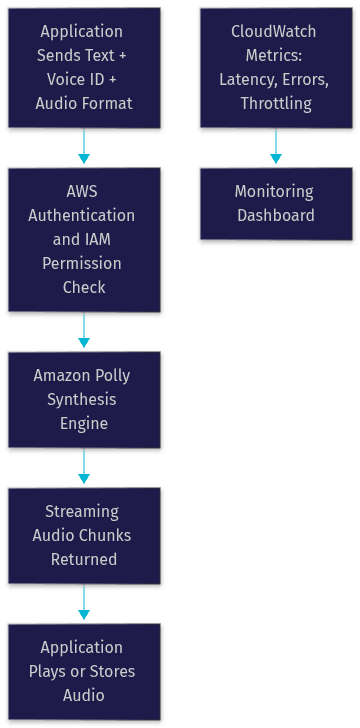
A Polly request follows a predictable path: your application authenticates with AWS credentials, sends text plus a chosen voice ID and output format, and receives synthesized audio back in the response body. For short text, the response returns in a single payload. For longer content, you can use streaming synthesis, where audio chunks arrive as they are generated rather than waiting for the entire clip to finish. This matters enormously for real-time applications, because streaming can cut perceived latency dramatically.
Speech Synthesis Markup Language (SSML)
SSML is an XML-based markup language that lets you control how text is spoken. With SSML you can insert pauses of exact duration, emphasize specific words, adjust pitch and speaking rate, spell out acronyms letter by letter, and switch speaking styles, such as a news-anchor delivery versus a conversational one. For example, you can tell Polly to pronounce "AWS" as individual letters, add a half-second pause before a key statistic, or soften the volume of a disclaimer. SSML is the difference between robotic readouts and speech that sounds directed and intentional, and most production-quality Polly integrations rely on it heavily.
Choosing the Right Audio Format and Sample Rate
Polly returns audio in several formats, and the right choice depends on your delivery channel. MP3 is the safe default: universally supported, well compressed, and fine for web playback and downloads. OGG with Vorbis compression offers similar quality at smaller sizes, though browser support is narrower. Raw PCM output is uncompressed and intended for telephony and real-time pipelines, where you need to feed audio directly into a phone system or a streaming session without decoding overhead.
Sample rate is the second lever. Higher rates such as 22 kHz or 24 kHz deliver fuller, richer sound for music-quality playback, while 8 kHz matches telephony standards and keeps bandwidth minimal for IVR. A common mistake is shipping 16 kHz audio to a phone system that expects 8 kHz, producing distorted or rejected playback. Match the sample rate to the destination, not to the source text.
Practical Use Cases
Accessibility and E-learning
Polly is a workhorse for accessibility. Applications use it to vocalize dynamic content for visually impaired users, where pre-recorded audio cannot cover ever-changing interfaces. In e-learning, Polly narrates lesson text, pronunciation examples in language apps, and quiz feedback. Speech marks, timestamp data returned alongside audio that maps each word to its position in the audio stream, let developers synchronize captions and karaoke-style text highlighting with the spoken word.
Media Production and Podcasting
Content creators use Polly to generate voice-overs for explainer videos, narrate written articles as audio editions, and produce multilingual podcast versions without booking studio time. Long-form and generative voices are built for exactly this workload. A publisher can turn every article into an audio edition automatically, storing the results in S3 and serving them through a CDN, creating a podcast pipeline that scales with the content calendar rather than the recording budget.
Real-Time Applications
IVR systems, phone bots, and live chatbots need speech generated on the fly with minimal delay. Polly's streaming synthesis mode, combined with low-latency standard or neural voices, keeps conversational turn-taking natural. Teams building interactive voice experiences increasingly pair Polly with real-time communication platforms; for instance, an AI voice agent built on VideoSDK's AI agent infrastructure can use Polly-class TTS providers to speak responses directly into a live session with sub-second perceived latency.
Cost Considerations and Pricing Model
Polly prices per million characters of text processed, and the rate depends on the engine. Standard voices are the least expensive tier, neural voices cost several times more, long-form voices sit above neural, and generative voices are the premium tier. Check the current AWS pricing page before budgeting, as rates change and vary by region.
The free tier is generous for evaluation: AWS has historically included a monthly allowance of free standard and neural characters for the first year of a new account, which is enough to prototype an entire product voice experience. After that, cost discipline comes from three habits: caching synthesized audio for repeated phrases, using standard voices for internal or non-customer-facing content, and pre-generating long-form content in batches rather than synthesizing it on every request.
Best Practices for High-Quality Output
Selecting Voice Engine and Language
Match the engine to the audience, not to the demo. Standard voices are fine for internal notifications and simple IVR menus. Neural voices should be your default for anything a customer hears. Reserve generative voices for brand-critical content where the voice itself carries the experience. When supporting multiple regions, prefer a voice ID native to each locale rather than one accent across all markets; users notice.
Fine-Tuning Speech with SSML
Start with the plain text, listen to the output, then add SSML only where the default rendering fails. Common wins: explicit pauses around numbers and lists, phoneme tags for company names and unusual proper nouns, and prosody adjustments to slow down dense technical passages. Avoid over-marking; too much SSML can make speech sound choppy and unnatural. Test SSML changes with the same text you ship, because emphasis that works in one sentence can sound wrong in another.
Managing Latency and Streaming
For interactive applications, use streaming synthesis so playback can begin before the full clip is ready. Pre-synthesize anything predictable: IVR menus, greeting messages, and common responses should be generated once, cached, and served as static audio. For unpredictable text, keep requests short, since synthesis time scales with input length. When delivering synthesized speech into live sessions over WebRTC, network variability matters as much as synthesis time; platforms like VideoSDK handle network-adaptive delivery so the audio you generate arrives smoothly even on poor connections.
Monitoring and Analytics
CloudWatch exposes Polly metrics including response latency, error rates, and throttling events. Track these from day one. A rising latency trend often signals that request sizes have grown; a spike in throttling means you are hitting service quotas and need to request increases or add caching.
Common Pitfalls and How to Avoid Them
Unsupported Characters and Alphabets
Not every language and alphabet is supported by every voice, and some scripts require phoneme-level SSML to render correctly. If you feed mixed-script text to a monolingual voice, Polly may skip or garble the unsupported portions. Audit your content for emoji, special punctuation, and mixed scripts, and either clean the text before synthesis or use a multilingual voice that handles language switching automatically.
Lexicon Misconfiguration
Custom lexicons let you override pronunciation for domain terms, product names, and acronyms. The classic failure is uploading a lexicon with a mismatched language code: a lexicon stored for US English will not apply to a UK English voice, and the mispronounced word silently persists. Verify that the lexicon's language matches the voice ID in the request, and test the specific words you added rather than assuming the upload succeeded.
Rate Limits and Throttling
Polly enforces service quotas on requests per second, which vary by region and engine. Bursty workloads, such as batch-generating hundreds of clips at once, will hit throttling errors. The fix is standard engineering hygiene: implement exponential backoff and retry on throttled requests, request a quota increase through AWS Support for sustained production load, and smooth batch jobs over time rather than firing them in a single burst.
Future Trends and Roadmap for Amazon Polly
The clear trajectory is toward generative and expressive speech. Expect continued expansion of generative voices across more languages, richer emotional control through SSML and new style parameters, and deeper integration with the broader AWS AI stack, including transcription and translation services that enable fully automated multilingual content pipelines. The industry-wide shift toward conversational AI is also pushing TTS latency down; real-time voice agents that respond in under a second are becoming the baseline, and services like Polly are evolving to meet that bar. For developers, the practical implication is to architect for engine flexibility now, so swapping in a newer, more expressive voice later is a configuration change rather than a rewrite.
Quick Recap and Actionable Checklist
Amazon Polly text to speech converts text into natural speech through four engine tiers, dozens of languages, and SSML-driven control, priced per character with a meaningful free tier for evaluation.
Your launch checklist:
- Pick the cheapest engine that meets your quality bar; neural for customer-facing, standard for internal.
- Match the audio format and sample rate to the destination channel before writing any synthesis code.
- Cache repeated phrases and pre-generate predictable content to control both latency and cost.
- Use SSML surgically for pronunciation fixes, pauses, and emphasis, and test with real production text.
- Verify lexicon language codes match voice IDs.
- Set up CloudWatch monitoring for latency, errors, and throttling from day one.
- Implement backoff and retry logic for throttled requests before you need it.
Definitions Glossary
Voice ID: The named identifier for a specific Polly voice, such as a particular neural English voice, which you pass in every synthesis request to select the speaker.
SSML (Speech Synthesis Markup Language): An XML-based markup language that controls how text is spoken, enabling pauses, emphasis, pitch changes, phonetic spellings, and speaking styles.
Speech Marks: Metadata returned by Polly that maps each word or sentence in the input text to its timestamp in the generated audio, used for captioning and text highlighting.
Custom Lexicon: A pronunciation override file you upload to Polly so that domain-specific terms, product names, and acronyms are spoken the way your organization intends.
Streaming Synthesis: A Polly mode that returns audio in chunks as it is generated, allowing playback to begin before the entire clip is complete, which reduces perceived latency in real-time applications.
Key Takeaways
- Amazon Polly text to speech offers four engine tiers, standard, neural, long-form, and generative, each balancing cost, latency, and naturalness for different use cases.
- SSML is the primary tool for turning acceptable synthesis into production-quality speech through controlled pauses, emphasis, and pronunciation overrides.
- Format and sample-rate selection must match the delivery channel; MP3 for web, PCM at telephony rates for IVR.
- Caching, pre-generation, and streaming synthesis are the three levers that keep both latency and per-character costs under control.
- For real-time voice experiences, Polly pairs naturally with RTC platforms like VideoSDK, which deliver synthesized audio into live interactive sessions with network-adaptive streaming.
Conclusion
Amazon Polly text to speech remains one of the most practical ways to give any application a voice: a managed API, predictable per-character pricing, and enough engine and language options to cover everything from IVR menus to multilingual podcasts. The teams that get the most out of it are the ones that treat voice as a designed experience, choosing engines deliberately, tuning SSML with real content, and monitoring latency from the first day in production. If you are building interactive voice applications, explore how VideoSDK's real-time communication SDKs can deliver synthesized speech into live sessions, and start experimenting with the free tier on VideoSDK. What are you building with text to speech? Drop a comment, I'd love to hear what kind of voice experience you're working on.
Free $20 Balance for AI Voice Agents & Video Calls
FAQ