



TLDR: Video calls fail in low-connectivity areas primarily because of unoptimized WebRTC configurations that assume stable, high-bandwidth connections. Developers can fix this by implementing adaptive bitrate streaming, selecting the right video codec, deploying edge servers geographically close to users, and configuring robust TURN server fallback logic. This guide walks through each layer of that solution systematically.
Introduction
If your video application fails in rural Rajasthan or a high-rise in Riyadh with spotty 4G, it will fail everywhere that matters. Tier 2 and tier 3 cities, defined in this guide as emerging global urban centers outside major metro areas, including secondary cities in India (Jaipur, Surat, Nagpur, Coimbatore), MENA (Manama, Aden, Meknes, Zarqa), LATAM (Pereira, Chimbote), and Southeast Asia (Davao, Battambang), represent the fastest-growing user bases for real-time video applications.
These markets share a common infrastructure reality: network conditions are variable, last-mile connectivity is inconsistent, and users expect the same call quality as their counterparts in London or Singapore. Closing that gap is an engineering problem, not a market limitation.
This guide is written for developers and product teams building scalable video applications. It covers the full optimization stack for low bandwidth WebRTC tier 2 tier 3 cities: from codec selection and adaptive bitrate logic to TURN server architecture and edge routing. If you are evaluating video infrastructure for global deployment, treating India and MENA as your primary stress-test environments is the most reliable path to a product that works everywhere.
Understanding low-connectivity: a global infrastructure challenge
Why India and MENA are the definitive stress tests
India has 1,002.85 million internet subscribers as of April–June 2025, yet a significant share of that base connects via 3G or congested 4G networks, particularly in states like Uttar Pradesh, Bihar, Jharkhand, and Odisha. Average mobile download speeds in tier 2 and tier 3 Indian cities can fall below 5 Mbps during peak hours, according to Ookla's Speedtest Intelligence data.
MENA presents a different but equally demanding profile. Countries like Yemen, Iraq, and parts of North Africa face infrastructure gaps rooted in political instability and underinvestment. Gulf states like Saudi Arabia and the UAE have high average speeds but extreme density in urban cores that creates localized congestion, particularly in commercial districts and residential towers.
Both regions share three structural constraints that define the low-bandwidth problem:
| Constraint | India (Tier 2/3) | MENA (Secondary Cities) |
|---|---|---|
| Average mobile speed | 5–15 Mbps | 8–20 Mbps (variable) |
| Packet loss rates | 2–8% under load | 1–6% under load |
| Network type | Predominantly 4G, 2G pockets | Mixed LTE and 3G |
| Latency to nearest CDN | 60–120ms | 40–100ms |
| Primary failure mode | Congestion at cell tower | Routing inefficiency |
Why optimizing for these markets guarantees global stability
A WebRTC configuration that sustains a 480p call at 300 Kbps with 5% packet loss will perform flawlessly on a congested hotel Wi-Fi network in Tokyo, a rural clinic in Nairobi, or a slow corporate VPN in São Paulo. The engineering ceiling required to serve emerging markets is higher than what most Western infrastructure assumptions demand. Meeting it creates a product that is inherently more resilient everywhere.
[→ related: Global Edge Network Architecture for Real-Time Video]
Core framework for low-bandwidth WebRTC
The four-layer optimization model
There is no single fix for video calling in poor networks. Reliable performance requires coordinated decisions across four layers:
Layer 1 Encoding layer: Controls how video is compressed before transmission. This includes codec selection, resolution caps, and frame rate limits.
Layer 2 Transport layer: Controls how data moves across the network. This includes packet loss handling, jitter buffer configuration, and RTCP feedback loops.
Layer 3 Infrastructure layer: Controls where and how media is routed. This includes TURN server placement, SFU selection, and edge proximity.
Layer 4 Monitoring layer: Controls real-time awareness of network conditions. This includes bandwidth estimation, congestion detection, and fallback triggers.
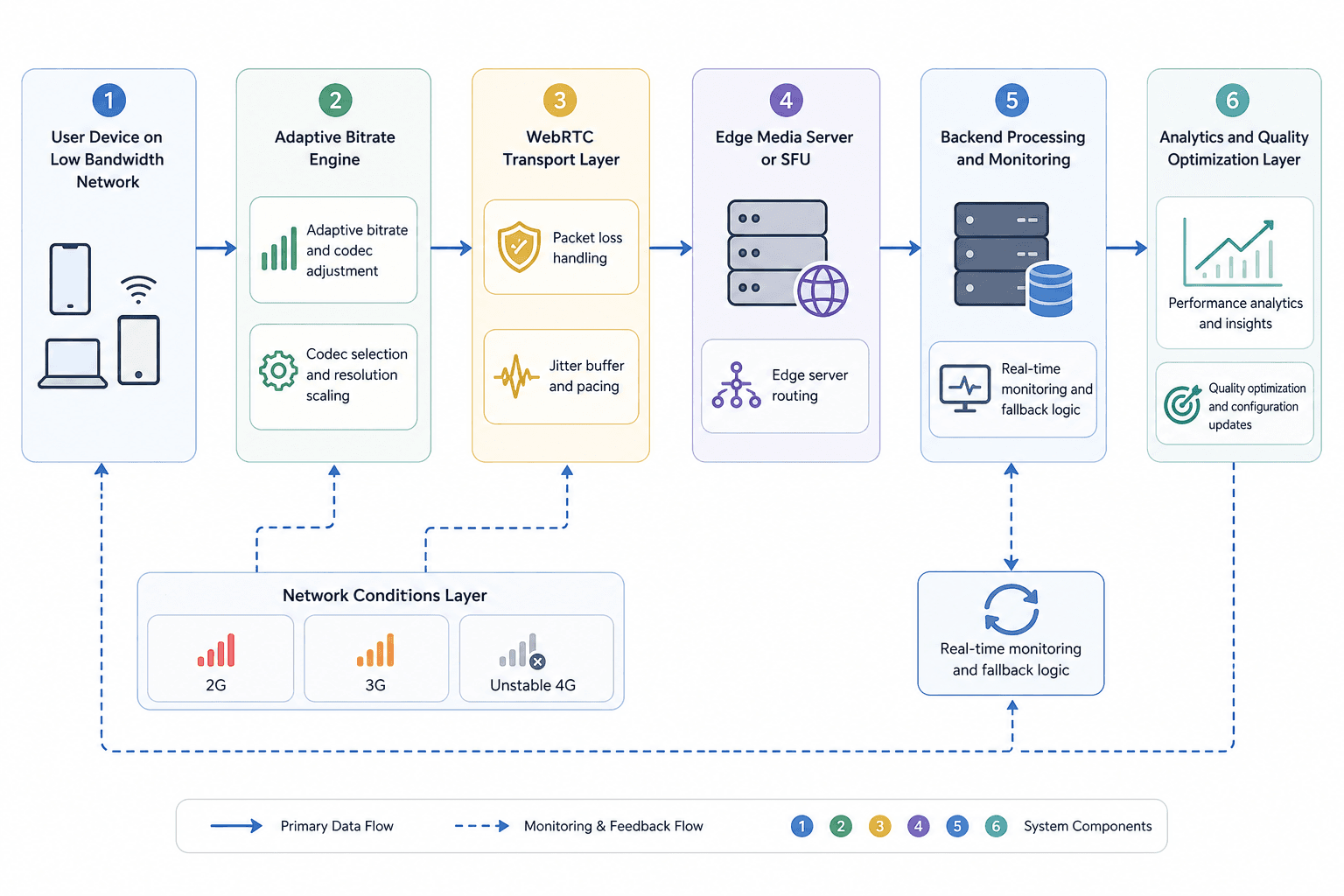
Each layer interacts with the others. A well-tuned encoder cannot compensate for a TURN server on the wrong continent. A perfectly placed edge server cannot overcome a codec that consumes three times the necessary bandwidth. The framework only works when all four layers are addressed together.
Minimum viable bandwidth targets
Set explicit floor targets for each call quality tier before writing any configuration:
| Quality Tier | Minimum Bandwidth | Resolution | Frame Rate |
|---|---|---|---|
| Audio-only fallback | 30–50 Kbps | — | — |
| Low-quality video | 150–250 Kbps | 240p | 15 fps |
| Standard video | 300–500 Kbps | 480p | 24 fps |
| High quality | 800 Kbps–1.2 Mbps | 720p | 30 fps |
Design your adaptive bitrate logic to move between these tiers smoothly, not abruptly. A call that drops from 720p to 480p in one step feels broken. A call that gradually reduces resolution while maintaining audio continuity feels stable.
Optimization techniques for WebRTC low bandwidth
Adaptive bitrate WebRTC: the core mechanism
Adaptive bitrate (ABR): Adaptive bitrate is a technique where the encoder continuously adjusts the video bitrate in response to real-time network feedback, ensuring that transmission rate never exceeds available bandwidth.
WebRTC's built-in congestion control mechanism Google Congestion Control (GCC): Google Congestion Control is an algorithm that estimates available bandwidth using RTCP feedback and adjusts the sending bitrate accordingly provides a foundation for adaptive bitrate. However, GCC alone is insufficient for highly variable networks.
To improve on default behavior:
- Set explicit minimum and maximum bitrate bounds. Do not let the encoder attempt 1 Mbps on a 300 Kbps link.
- Configure degradation preference. Prioritize maintaining frame rate over resolution when bandwidth drops, unless your use case (medical imaging, document sharing) requires the opposite.
- Implement a resolution ladder with at least four discrete steps rather than continuous scaling, which reduces encoder complexity.
- Use RTCP receiver reports to detect packet loss trends before they compound into call failure.
[→ related: Bandwidth Estimation and Congestion Control in WebRTC]
Codec selection: VP8, VP9, and AV1 compared
VP8: VP8 is an open-source video codec developed by Google, widely supported across browsers and devices, with moderate compression efficiency and low decode complexity.
VP9: VP9 is Google's successor to VP8, offering roughly 40–50% better compression at the same quality level, making it significantly more efficient for low-bandwidth scenarios.
AV1: AV1 is an open, royalty-free codec developed by the Alliance for Open Media that achieves better compression than VP9 but requires substantially more CPU for encoding and decoding.
For low-connectivity markets, the practical codec decision matrix looks like this:
| Codec | Bandwidth Efficiency | Device CPU Load | Browser Support | Recommended For |
|---|---|---|---|---|
| VP8 | Moderate | Low | Universal | Default fallback, older devices |
| VP9 | High | Moderate | Wide (not Safari < 16) | Primary codec for most use cases |
| AV1 | Highest | High | Limited (growing) | Future-ready, high-end devices only |
| H.264 | Moderate | Low (HW accel) | Universal | iOS and hardware-constrained devices |
For India and MENA deployments, VP9 with VP8 as a negotiated fallback is the most defensible configuration as of 2025. AV1 is appropriate for select use cases where you control the device environment.
Simulcast versus SVC: choosing the right multi-stream strategy
Simulcast: Simulcast is a technique where the sender encodes and transmits multiple versions of the video stream at different resolutions and bitrates simultaneously, allowing the media server to forward the appropriate version to each receiver.
Scalable Video Coding (SVC): Scalable Video Coding is a video encoding approach that encodes a single stream with multiple embedded quality layers, enabling the receiver or media server to decode only the subset of layers appropriate for current bandwidth.
| Factor | Simulcast | SVC |
|---|---|---|
| Sender CPU | Higher (multiple encodes) | Lower (single layered encode) |
| Server complexity | Lower | Higher |
| Bandwidth flexibility | Per-stream switching | Fine-grained layer selection |
| Browser support | Excellent | Improving (VP9 SVC supported in Chrome) |
| Best for | Stable networks, multi-participant calls | Variable networks, bandwidth-sensitive scenarios |
For low-bandwidth WebRTC optimization in tier 2 and tier 3 city deployments, simulcast with three layers (high, medium, low) gives the media server enough flexibility to serve each participant appropriately without requiring SVC support on the client.
[→ related: SFU Architecture and Stream Routing]
Infrastructure and architecture considerations
Edge servers and geographic proximity
Selective Forwarding Unit (SFU): An SFU is a media server that receives multiple media streams and selectively forwards the appropriate streams to each participant without mixing or decoding them, minimizing server-side processing while maintaining scalability.
Latency between a participant and the nearest SFU directly affects perceived call quality. For every 100ms of additional one-way latency, audio synchronization degrades and lip-sync errors become perceptible. For users in Jaipur calling a server in Singapore, that latency can exceed 150ms on a poor routing day.
Infrastructure requirements for low-connectivity markets:
- Deploy SFU nodes in Mumbai (covering western and central India), Chennai or Hyderabad (southern India), and Delhi NCR (northern India) for comprehensive tier 2/3 city coverage.
- For MENA, nodes in Dubai, Riyadh, Cairo, and Casablanca provide reasonable coverage across the Gulf, Levant, and North Africa.
- Use Anycast routing where possible to automatically direct participants to the nearest healthy node.
- Implement cross-region fallback so that a node failure in one city reroutes through the next-closest node within 1–2 seconds.
Platforms like VideoSDK operate distributed edge infrastructure with nodes across India and MENA, which reduces the engineering burden of building and maintaining this geographic footprint independently.
[→ related: VideoSDK Global Infrastructure and Edge Routing]
TURN server strategy for restrictive networks
TURN server: A TURN (Traversal Using Relays around NAT) server is a relay server that forwards media traffic between peers when direct peer-to-peer or STUN-based connections fail due to firewall or NAT restrictions.
In corporate environments, university networks, and mobile carrier networks across India and MENA, direct peer-to-peer connections frequently fail. A TURN server acts as a guaranteed relay. Without it, calls in these environments will fail silently during the ICE negotiation phase.
TURN server deployment checklist:
- Deploy TURN servers in the same geographic regions as your SFU nodes
- Use UDP as the primary TURN transport, TCP port 443 as fallback
- Implement TURN over TLS for environments that block non-HTTPS traffic
- Configure bandwidth limits per TURN relay connection to prevent single users from saturating the server
- Monitor TURN allocation success rate rates below 95% indicate routing or firewall issues
- Test TURN-only mode explicitly as part of your pre-launch QA
Jitter buffer and packet loss handling
Jitter buffer: A jitter buffer is a mechanism in the receiver that stores incoming media packets temporarily to compensate for variable network delay, smoothing out delivery before audio or video is rendered.
WebRTC includes a built-in adaptive jitter buffer, but its default configuration is tuned for typical Western network conditions. For high-jitter networks common in tier 2 and tier 3 cities:
- Increase the maximum jitter buffer size. Default values (60–80ms) are insufficient for networks where jitter regularly exceeds 100ms.
- Enable audio packet loss concealment (PLC). The Opus audio codec the default in WebRTC provides strong PLC up to approximately 20% loss.
- Implement NACK (Negative Acknowledgement) for video packet retransmission on networks where latency is low enough for retransmission to arrive before the render deadline.
- Use FEC (Forward Error Correction) on audio for networks where loss is consistent but latency is too high for NACK to help.
Opus: Opus is an open, royalty-free audio codec standardized by the IETF that supports a wide range of bitrates (6–510 Kbps) and includes built-in features for packet loss concealment and variable bandwidth operation.
[→ related: Packet Loss Recovery Strategies in WebRTC]
Common mistakes to avoid
1. Assuming symmetric bandwidth
Most bandwidth estimation tools measure download speed. WebRTC calls require symmetric upload and download capacity. A user with 10 Mbps down and 500 Kbps up common on mobile networks in tier 2 Indian cities will experience severe upload degradation that standard speed tests miss entirely.
Always test both directions independently during development, and configure your bitrate caps based on the lower of the two values.
2. Over-relying on GCC without custom guardrails
Google Congestion Control will adapt, but it adapts reactively. On networks with sudden congestion spikes typical of cell tower handoffs and congested mobile networks GCC can take 3–5 seconds to stabilize after a bandwidth drop. During that window, the call degrades significantly.
Add proactive guardrails: set hard bitrate ceilings for each network type (2G, 3G, 4G), detect network type via the Network Information API where available, and pre-configure encoding parameters rather than waiting for GCC to discover the limit.
3. Deploying a single TURN region
A TURN server in Virginia cannot efficiently serve a user in Lucknow. Round-trip latency through a distant TURN relay adds 200–400ms to every media packet. This makes the call feel like a satellite call, even when local network conditions are adequate.
TURN server geographic placement is not optional for global deployments. Match TURN regions to your user geography.
4. Ignoring audio quality in pursuit of video quality
In low-bandwidth conditions, the user experience degrades more noticeably from audio failure than from reduced video resolution. A pixelated but audible call is far more functional than a clear video feed with broken audio.
Configure your quality degradation sequence to protect audio bandwidth first. Drop video resolution and frame rate before touching audio bitrate.
5. Not testing on real devices in real conditions
Simulated network throttling in Chrome DevTools does not reproduce the behavior of a real 3G connection in a moving vehicle in Pune. The burst loss patterns, handoff interruptions, and NAT behavior of real mobile networks differ substantially from simulated environments.
Use real SIM cards in target markets for QA. Consider remote device testing services that provide access to physical devices on real carrier networks in India and MENA.
Key takeaways
- Low-connectivity markets especially tier 2 and tier 3 cities in India and MENA expose every weakness in WebRTC infrastructure. Optimizing for them produces applications that are more resilient globally.
- Adaptive bitrate control, VP9 codec selection with VP8 fallback, and explicit minimum bitrate floors are the highest-leverage encoding decisions for low-bandwidth scenarios.
- TURN server geographic placement is non-negotiable. A TURN server more than 100ms away from the user will degrade call quality even when local conditions are adequate.
- Protect audio bandwidth before video bandwidth. Users tolerate low-resolution video; they abandon calls with broken audio.
- Test on real devices in real network conditions. Simulated throttling does not reproduce the packet loss patterns and NAT behavior of real carrier networks in emerging markets.
FAQ
Q1. What is the minimum bandwidth required for a WebRTC video call?
A functional WebRTC video call requires approximately 150–250 Kbps for low-resolution 240p video and 300–500 Kbps for standard 480p video. Below 150 Kbps, most implementations should fall back to audio-only mode to maintain call continuity. These figures assume VP9 encoding; VP8 requires approximately 20–30% more bandwidth at equivalent quality.
Q2. How does adaptive bitrate help in low bandwidth WebRTC scenarios? Adaptive bitrate continuously adjusts the video encoding rate based on real-time network feedback, preventing the encoder from transmitting more data than the network can carry. Without it, packet loss accumulates until the connection degrades catastrophically. With it, the call degrades gracefully reducing resolution or frame rate while maintaining connectivity.
Q3. What is a TURN server and why is it critical for tier 2 tier 3 city deployments?
A TURN server is a relay that forwards media when direct peer connections fail due to NAT or firewall restrictions. In corporate networks, university campuses, and mobile carrier environments common in tier 2 and tier 3 cities, direct connections fail frequently. A correctly placed TURN server within 60–80ms of the user is the difference between a call that connects and one that silently fails during ICE negotiation.
Q4. Which video codec is best for low bandwidth real-time communication?
VP9 is the most practical choice for low-bandwidth WebRTC as of 2025. It offers 40–50% better compression than VP8 at equivalent quality, has strong browser support across Chrome, Firefox, and Edge, and does not impose the hardware acceleration requirements that make H.264 preferable on iOS. Use VP8 as a negotiated fallback for older devices and browsers.
Q5. How do I handle packet loss in WebRTC for rural or unstable networks?
Configure a combination of NACK for video retransmission, FEC for audio protection, and increase the jitter buffer size beyond the default 60–80ms ceiling. The Opus audio codec provides strong packet loss concealment up to approximately 20% loss. For video, ensure your simulcast configuration includes a low-resolution layer that remains transmissible even when packet loss reduces effective bandwidth significantly.
Q6. What is the difference between simulcast and SVC for low-bandwidth optimization?
Simulcast encodes multiple full streams at different quality levels simultaneously, while SVC encodes a single layered stream from which subsets can be extracted. For low-bandwidth WebRTC in tier 2 and tier 3 city deployments, simulcast with three layers is more practical because it has universal browser support and gives the SFU server sufficient flexibility to route each participant the appropriate stream without requiring SVC-capable clients.
Q7. How should I structure my infrastructure for a video app targeting India and MENA?
Deploy SFU nodes in Mumbai, Delhi, and Hyderabad for India coverage, and in Dubai, Riyadh, and Cairo for MENA coverage. Pair each SFU location with a co-located TURN server. Use Anycast routing to direct users to the nearest healthy node automatically. Implement cross-region fallback logic that reroutes within 1–2 seconds of a node failure. This architecture keeps one-way latency below 60ms for the vast majority of users in both regions.
Q8. Can I rely on browser-native WebRTC for low-bandwidth optimization, or do I need a platform?
Browser-native WebRTC provides the foundational transport and codec negotiation, but it does not handle SFU selection, geographic routing, TURN server management, or advanced bandwidth estimation. For production deployments serving tier 2 and tier 3 city populations, an infrastructure platform handles those layers so engineering teams can focus on application logic rather than media server operations.