


WebRTC low latency refers to the minimal delay between a sender capturing media and a receiver rendering it, typically targeting a glass-to-glass latency under 200 milliseconds. Achieving this requires optimizing every stage of the media pipeline, from hardware-accelerated encoding to edge-aware SFU routing and minimal jitter buffers. VideoSDK provides network-adaptive streaming and global edge infrastructure to help developers hit these sub-200ms targets without managing raw WebRTC complexity.
Building a real-time communication app that feels truly live means waging war on milliseconds. If you are building a telemedicine platform, a live betting interface, or a remote robotics control system, every millisecond of delay changes how users perceive and interact with your product. Developers often start with raw WebRTC, only to discover that hitting consistent WebRTC low latency requires deep optimization across the entire media pipeline. By the end of this guide, you will understand the six stages of the WebRTC latency budget, how to measure and optimize each one, and how platforms like VideoSDK abstract away the hardest infrastructure challenges.
Understanding WebRTC Low Latency Fundamentals
End-to-end latency in WebRTC, often called glass-to-glass latency, measures the time from when light hits a camera sensor to when that image appears on the viewer's screen. According to the W3C WebRTC specification, the protocol is designed for real-time interactive communication, but achieving ultra-low latency requires careful management of a strict latency budget. Every millisecond spent in capture, encoding, network transit, or rendering eats into that budget. Developers building with VideoSDK benefit from a managed architecture that automatically optimizes these pipeline stages, but understanding the underlying mechanics helps you make informed decisions about codecs, network configurations, and scaling strategies.
The Six Latency Stages
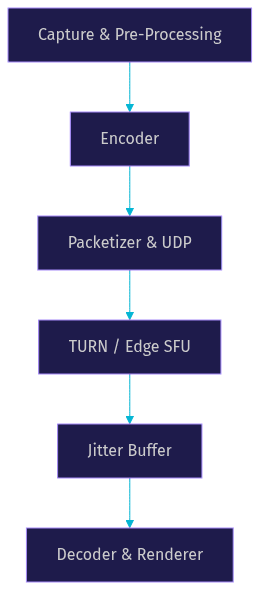
The WebRTC media pipeline consists of six primary stages where latency accumulates. First, capture and pre-processing grabs frames from the camera and mic. Second, encoding compresses those frames using codecs like H.264 or AV1. Third, packetization and network transit send the compressed data over UDP. Fourth, media server routing occurs if you are using an SFU (Selective Forwarding Unit) to distribute media to multiple participants. Fifth, the jitter buffer holds incoming packets to smooth out network irregularities. Sixth, decoding and rendering converts the packets back to video and displays them on the screen. Each stage adds latency, and optimizing WebRTC low latency means minimizing the delay at every step.
Why Sub-200 ms Matters
Hitting sub-200 ms WebRTC low latency is the gold standard for interactive applications. Human perception begins to notice delays above 200 milliseconds, causing conversations to feel unnatural and remote control to feel sluggish. For latency-critical use cases like telemedicine, where a doctor guides a remote physician, or live betting, where odds update in real time, exceeding this threshold directly impacts user safety and revenue. Remote robotics applications demand even stricter tolerances, often requiring sub-100 ms latency to prevent catastrophic control errors. If your application falls into these categories, optimizing for WebRTC low latency is not a feature, it is a requirement.
Measuring and Benchmarking Latency
You cannot optimize what you cannot measure. Measuring WebRTC low latency involves tracking both network-level metrics and application-level glass-to-glass timing. Developers typically rely on diagnostic tools built into browsers, such as the WebRTC internals page, which exposes real-time statistics about candidate pairs, packet loss, and jitter. Network traces using tools like Wireshark can reveal UDP packet flow and identify bottlenecks at the transport layer. Key metrics to monitor include Round-Trip Time (RTT), jitter, and packet loss percentiles (p50 and p99). A low p50 latency is good, but a high p99 indicates that some users experience severe delays, which ruins the real-time experience. Platforms like VideoSDK expose these metrics through session analytics, allowing you to monitor real-time communication performance without building custom instrumentation.
Quick-Check Checklist
Before diving into deep optimizations, verify these baseline configurations. Ensure your application is served over HTTPS, as browsers restrict WebRTC APIs on insecure origins. Check that your TURN servers are properly configured and geographically distributed. Verify that you are using UDP for media transport rather than falling back to TCP. Confirm that hardware acceleration is enabled for encoding and decoding. Ensure your jitter buffers are not set to overly conservative defaults that prioritize smoothness over latency.
Optimizing Media Capture and Encoding
Media capture and encoding represent the first major battleground for WebRTC low latency. The choices you make here ripple through the rest of the pipeline. Frame rate selection is critical: capturing at 60 frames per second doubles the data volume compared to 30 fps, but it also halves the interval between frames, which can reduce perceived latency. However, if your encoder or network cannot keep up, you will introduce frame drops and queueing delays. Hardware acceleration is essential for minimizing encoding delay. By leveraging GPU-based encoding paths, you can offload the intensive work of compressing video frames from the CPU, significantly reducing the time spent in the encoding stage. VideoSDK supports custom video tracks that let you inject hardware-accelerated or pre-processed streams directly into the room.
Choosing the Right Codec
Codec selection directly impacts your WebRTC latency budget. H.264 is the most widely supported codec and offers fast encoding with hardware acceleration on almost all devices. VP9 provides better compression efficiency, which reduces bandwidth requirements, but it can introduce higher encoding latency without dedicated hardware support. AV1 is the newest standard, offering superior compression and low-latency tuning, but hardware support is still rolling out across consumer devices as of 2026. For audio, the Opus codec is the undisputed champion for low-latency audio pipelines, offering excellent quality at low bitrates with built-in support for discontinuous transmission. Choose H.264 for maximum compatibility and speed, and reserve VP9 or AV1 for scenarios where bandwidth is severely constrained and hardware support is confirmed.
Hardware-Accelerated Paths
Utilizing hardware-accelerated encoding and decoding paths is non-negotiable for achieving sub-200 ms WebRTC low latency. Software encoding on a CPU introduces variable and often high latency, especially at higher resolutions. GPUs and dedicated media chips encode frames in a fraction of the time. When configuring your media pipeline, ensure that the encoder is set to use hardware capabilities rather than software fallbacks. This reduces the encoding stage from tens of milliseconds to just a few milliseconds. The same principle applies to the decoding stage on the receiver side. VideoSDK automatically negotiates the best available codec and hardware path between participants, removing the guesswork from this optimization step.
Network-Level Tweaks
Network transit is the most unpredictable component of the WebRTC latency budget. Optimizing this stage involves strategic placement of relay servers, tuning UDP socket behavior, and managing congestion. TURN server round-trip time is a common culprit for high latency. If a participant falls back to a TURN server located across an ocean, latency will spike. Deploying TURN servers at the edge, close to your users, ensures that relay paths remain short. Congestion control algorithms in WebRTC, such as Google Congestion Control (GCC), continuously estimate available bandwidth and adjust bitrates to prevent packet loss. However, these algorithms can sometimes be too conservative, throttling quality unnecessarily. Understanding when to trust these built-in algorithms and when to override them is key to maintaining WebRTC low latency.
Edge-Aware SFU Deployment
Using a Selective Forwarding Unit (SFU) is standard for multi-party calls, but the geographic location of that SFU dramatically affects latency. An edge-aware SFU deployment places media servers in multiple regions worldwide. When a user joins a VideoSDK room, the SDK routes them to the nearest edge node, minimizing the network transit time between the participant and the media server. This cuts the round-trip time significantly compared to routing all traffic through a centralized server. For global applications, edge-aware SFU deployment is the single most effective network-level optimization for WebRTC low latency.
Adaptive Bitrate and Congestion Control
WebRTC includes built-in network-adaptive streaming mechanisms that adjust resolution and bitrate based on real-time bandwidth estimation. When network conditions degrade, the encoder reduces bitrate to prevent packet loss, which prevents lag but lowers visual quality. When conditions improve, it scales the bitrate back up. In most cases, you should let these algorithms run autonomously. Overriding them manually often leads to buffer bloat or packet loss, which increases latency. However, for latency-critical use cases where smooth motion matters more than resolution, you can cap the maximum resolution and frame rate, allowing the congestion control algorithm to focus on maintaining a steady, low-latency stream rather than chasing higher fidelity.
Jitter Buffer and Playback Strategies
The jitter buffer is the mechanism that smooths out packet arrival times. Network packets do not arrive at perfectly regular intervals; they arrive in bursts and gaps. The jitter buffer holds packets briefly and releases them at a steady rate to the decoder. While this prevents choppy playback, it directly adds to your glass-to-glass latency. A larger buffer handles network jitter better but increases delay. A smaller buffer reduces latency but risks frame drops if packets arrive late. Tuning the jitter buffer is a delicate trade-off between smooth playback and WebRTC low latency.
Minimal Buffer Configurations
For applications targeting sub-200 ms latency, you must configure minimal jitter buffers. This means setting the buffer to hold only the absolute minimum number of packets required to prevent immediate underflow. If your network path is highly stable, you can aggressively reduce buffer size. If the network is unpredictable, a minimal buffer will result in frequent stuttering. VideoSDK handles this dynamically, using network-adaptive streaming to adjust buffer sizes on the fly based on real-time packet arrival statistics, ensuring the lowest possible latency without sacrificing playback continuity.
Audio-First vs Video-First Paths
In scenarios where bandwidth is tight, you must decide whether to prioritize audio or video. For interactive communication, audio-first paths are almost always the right choice. Humans tolerate low-quality video far better than we tolerate choppy or delayed audio. By prioritizing the audio stream, you ensure that the conversation remains natural even if the video stream degrades. This means allocating the minimal necessary bandwidth to Opus audio and allowing the video stream to absorb the remaining bandwidth fluctuations. This strategy preserves the perception of WebRTC low latency even under poor network conditions.
Architecture Diagram
The following diagram illustrates the end-to-end WebRTC media pipeline and the stages where latency accumulates. Visualizing this flow helps identify which optimizations will have the highest impact on your specific deployment.
Production-Ready Best Practices
Moving from a local development environment to a production deployment introduces new challenges for WebRTC low latency. You must ensure your infrastructure can handle real-world network variability and scale. Serve your application over HTTPS to ensure browser permissions for camera and microphone access. Size your TURN server pools adequately to handle peak concurrent relays, and monitor their CPU and bandwidth usage closely. Implement fallback strategies, such as dropping to audio-only mode if video latency exceeds a threshold. VideoSDK manages these production concerns automatically, providing a globally distributed TURN infrastructure and automatic fallback mechanisms to maintain low latency under varying load conditions.
Monitoring and Alerting
In production, you need real-time visibility into your WebRTC performance. Key metrics to watch on your dashboards include RTT, packet loss rate, jitter, and active bitrate. Set up alerts for when p99 latency exceeds your target threshold, such as 250 ms. Monitor the percentage of participants falling back to TURN servers versus direct P2P connections, as a high TURN usage rate might indicate network configuration issues. VideoSDK provides session analytics and real-time transcription data that expose these metrics, allowing you to build comprehensive monitoring dashboards without instrumenting the WebRTC APIs directly.
Scaling Considerations
Maintaining WebRTC low latency as participant count grows requires a scalable SFU architecture. In a multi-party call, the SFU must process and forward multiple incoming and outgoing streams. As the number of participants increases, the CPU and bandwidth demands on the SFU rise exponentially if using a mesh-like forwarding model. To maintain low latency, use cascaded SFUs or regional clusters that distribute the load. VideoSDK scales horizontally by spinning up new media server instances automatically as room capacity grows, ensuring that the SFU processing delay remains minimal even for large virtual events or webinars.
Common Pitfalls and How to Avoid Them
Several common mistakes sabotage WebRTC low latency. Over-buffering is the most frequent offender; developers set large jitter buffers to ensure smooth playback, inadvertently adding hundreds of milliseconds of delay. Mismatched codec settings between sender and receiver can force transcoding, which introduces massive encoding and decoding delays. Ignoring network variance by testing only on fast, local networks leads to catastrophic latency spikes in production when users join from mobile networks. Finally, neglecting TURN server placement forces users onto distant relay servers, destroying any gains made in encoding or jitter optimization. Avoid these pitfalls by testing under realistic network conditions and leveraging a managed platform like VideoSDK that handles codec negotiation and edge routing automatically.
Future Trends in Low-Latency WebRTC
The landscape of WebRTC low latency is evolving. Emerging standards like the WebRTC Realtime API are making it easier to integrate ultra-low latency streaming into web applications without plugins. AI-assisted bitrate control is becoming more prevalent, using machine learning models to predict network conditions and adjust streaming parameters more aggressively than traditional congestion control algorithms. On the hardware front, dedicated neural processing units (NPUs) and advanced media engines in modern silicon are pushing encoding and decoding latency even lower. As these trends mature, platforms like VideoSDK are integrating them to offer developers sub-100 ms latency capabilities out of the box.
Definitions Glossary
Glass-to-glass latency: The total time from when a camera captures a frame to when that frame is displayed on the viewer's screen. In VideoSDK, this metric defines the real-time communication performance boundary.
Jitter buffer: A temporary buffer that holds incoming network packets to smooth out arrival times and prevent choppy playback. VideoSDK dynamically adjusts this buffer to balance smoothness and latency.
SFU (Selective Forwarding Unit): A media server that receives a single media stream from each participant and forwards it to all other participants. VideoSDK uses edge-aware SFUs to minimize network transit latency.
Network-adaptive streaming: The process of automatically adjusting video bitrate and resolution based on real-time bandwidth estimation. VideoSDK implements this to maintain WebRTC low latency under varying network conditions.
RTT (Round-Trip Time): The time it takes for a network packet to travel from the sender to the receiver and back. Monitoring RTT is essential for diagnosing WebRTC latency issues in production.
Key Takeaways
- Achieving WebRTC low latency requires optimizing a strict latency budget across six pipeline stages, from capture to rendering.
- Sub-200 ms glass-to-glass latency is critical for interactive use cases like telemedicine, live betting, and remote robotics.
- Hardware-accelerated encoding and minimal jitter buffers are non-negotiable for hitting sub-200 ms targets.
- Edge-aware SFU deployment and geographically distributed TURN servers minimize the unpredictable network transit stage.
- VideoSDK abstracts these optimizations by providing network-adaptive streaming, global edge infrastructure, and automatic codec negotiation.
Conclusion
Optimizing WebRTC low latency is a multi-layered challenge that spans media capture, encoding, network routing, and playback buffering. Hitting that sub-200 ms glass-to-glass target requires careful codec selection, hardware acceleration, edge-aware infrastructure, and dynamic jitter buffer tuning. While you can build this from scratch using raw WebRTC APIs, platforms like VideoSDK handle the heaviest lifting automatically. You can explore the VideoSDK React SDK quickstart to see how quickly you can deploy a production-ready, low-latency video calling experience. What are you building with WebRTC? Drop a comment below, I would love to hear what kind of latency-critical use case you are working on.
Free $20 Balance for AI Voice Agents & Video Calls
FAQ