


Low latency is the practice of keeping round-trip delay between a user action and the system's response small enough that interaction feels immediate, typically under 100 milliseconds for interactive applications. In real-time communication, VideoSDK delivers sub-300ms WebRTC latency through edge-scaled media routing and network-adaptive streaming. This guide covers where latency comes from, how to measure it, and how to reduce it across every layer of your stack.
Milliseconds decide whether a product feels instant or broken. A competitive gamer loses the duel at 150 milliseconds of input delay. A trader loses the arbitrage at 10. A video call turns into a frustrating walkie-talkie session when round-trip delay crosses half a second. Modern users judge software by its responsiveness before they judge anything else, and they abandon products that feel sluggish within seconds.
Low latency, in networking terms, is the state of keeping the delay between sending a signal and receiving a response as small as the use case demands. That definition is deliberately relative: a content website is fine at 300 milliseconds, a voice conversation is not. This article gives you a unified view of latency across the network, application, and infrastructure layers, shows you how to measure it honestly, and walks through concrete tactics to reduce it, ending with a real architecture case study using VideoSDK's real-time communication platform.
What Is Low Latency?
Low latency is defined as a network or system response time low enough that the delay between action and result is imperceptible or acceptable for the given use case. It is most commonly measured as round-trip time (RTT), the total delay for a packet to travel from source to destination and back, often approximated by the familiar ping utility. One-way latency is roughly half of RTT, though asymmetric routing can skew that.
Physics sets the floor. Light in fiber travels at roughly two-thirds of its speed in vacuum, which means a signal crossing the continental United States needs around 20 milliseconds one way, and a transatlantic round trip costs 50 to 60 milliseconds before any equipment adds delay. Copper is slower. No amount of engineering removes the speed-of-light tax, so the first rule of low latency design is simple: shorten the distance.
Different domains draw the line at different thresholds. Competitive online gaming targets under 30 milliseconds of RTT. Real-time video and interactive streaming aim for under 60 milliseconds so conversation feels natural. Financial trading systems chase single-digit milliseconds, and high-frequency trading firms measure in microseconds. Voice calls stay comfortable below roughly 150 milliseconds, the point where the ITU's published guidance says conversational flow starts to degrade. Knowing your domain's threshold is the first step, because it tells you how much budget you have to spend everywhere else.
Sources of Latency in a Modern Stack
Latency in a modern application never comes from one place. It accumulates across the network path, through processing hops, and inside your own code. Diagnosing it requires separating these layers, because the fix for each is different.
Network-Level Latency
Network latency has four main components. Propagation delay is the speed-of-light travel time over the physical distance, and it is irreducible except by moving endpoints closer together. Transmission delay is the time to push a packet's bits onto the link, which matters for large payloads on slow links. Queuing delay occurs when packets wait in router buffers, and it is the most variable component, spiking during congestion. Processing delay is the time each router or switch spends deciding where to forward a packet.
Queuing is where most bad latency experiences originate. A path that normally delivers 30 milliseconds can deliver 300 during peak congestion, and this variance, called jitter, is often more damaging to real-time media than raw latency itself. ISP peering arrangements matter too: if your provider exchanges traffic with the destination network through a congested interconnect three states away, your effective edge distance is much larger than the map suggests. This is why content delivery networks and edge providers obsess over peering quality, not just point-of-presence count.
Application-Level Latency
Application latency is everything your software adds on top of the network. It includes server processing time, synchronous call chains where one request blocks on another, database round-trips, serialization and deserialization of payloads, and client-side rendering.
The classic offender is the synchronous chain: a request handler that calls an external API, waits for the response, then queries the database, then calls another service, serializing three network round-trips into one user-visible delay. Each hop might only cost 20 milliseconds, but they stack. Database round-trips deserve special attention, because a handler that issues queries in a loop can quietly generate dozens of sequential round-trips. On the client, heavy rendering work, large JavaScript bundles, and blocking layout calculations add their own delay between data arrival and visible response. The user experiences the sum of all of it.
Measuring Latency Accurately
You cannot improve what you cannot measure, and latency measurement has to happen at multiple layers to be honest. Ping and traceroute give you raw network path characteristics from a single vantage point, which is useful for baseline path discovery but blind to what real users experience. Real user monitoring (RUM) instruments actual browser sessions and reports timing metrics from your users' own networks, capturing the diversity that synthetic tests miss. Synthetic monitoring runs automated probes from multiple geographic regions on a schedule, catching regressions before users do.
For real-time media applications, protocol-level metrics matter more than generic web timing. WebRTC exposes standard statistics through its built-in monitoring surface, including current round-trip time per connection, jitter, and packet loss ratio. The W3C WebRTC statistics specification defines these metrics precisely, and sites like webrtcstats.com aggregate real-world connection data that helps you benchmark your numbers against the ecosystem.
Interpreting the numbers requires reading them together, not in isolation. A 40-millisecond average latency with 30 milliseconds of jitter is worse for a voice call than a stable 80 milliseconds, because jitter forces receiver-side buffering that adds delay. Packet loss above roughly one percent triggers retransmissions or forward error correction, both of which cost time. Judge latency, jitter, and loss as a trio, and always look at percentile distributions rather than averages, since the tail is where user complaints come from.
Reducing Network Latency
Network latency reduction is about shortening paths, protecting sensitive traffic from congestion, and choosing protocols that fail fast.
QoS and Traffic Prioritization
Quality of Service mechanisms let networks treat latency-sensitive traffic differently from bulk traffic. The dominant approach on IP networks is Differentiated Services, or DiffServ, in which packets are marked with a DSCP (Differentiated Services Code Point) value in their header, and each router along the path applies per-hop behavior based on that mark. Voice packets marked for expedited forwarding get queued ahead of a large file download, so a congested link degrades the download instead of the call.
DiffServ is probabilistic prioritization, and it only works where you control the marking and the routers honor it, which is typically inside enterprise networks and managed backbones. When you need guaranteed bounds rather than best-effort priority, deterministic networking takes over. DetNet, the IETF's deterministic networking architecture, and TSN, time-sensitive networking standardized by IEEE for local networks, provide bounded latency and low packet loss for industrial and automotive systems. In cellular, 5G URLLC (ultra-reliable low-latency communication) targets sub-millisecond radio latency for applications like remote machinery control. Use DiffServ for soft real-time needs like voice and video on networks you manage, and reserve deterministic networking for hard real-time systems where a missed deadline is a failure, not a degradation.
Edge Computing and CDN Strategies
The most reliable way to cut network latency is to shorten the physical path. Edge computing places compute and storage in data centers geographically close to users, so a request that once crossed a continent now crosses a city. Geo-routing directs each user to their nearest healthy edge location, and edge caching serves repeat content from that nearby point instead of origin infrastructure.
For real-time media, the same principle applies to media servers. A selective forwarding unit (SFU) placed near participants means each user's audio and video hops a short distance to the edge and back, rather than traversing long-haul links to a central region. VideoSDK applies this pattern directly: its WebRTC-based rooms are served from edge-scaled infrastructure, which is how interactive live streaming sessions sustain sub-second interaction between hosts and audiences, a latency class that traditional HLS streaming, with its 10 to 30 second delay, cannot reach. When viewers can react, vote, and be promoted to speak in real time, the media path has to be short and adaptive, and that is an edge-routing problem before it is a codec problem.
Protocol Choices
Protocol selection sets your latency ceiling. TCP's reliability comes from retransmission and congestion control, which adds delay under loss. UDP-based transports, including WebRTC's media stack, skip retransmission for real-time frames where a stale frame is worth less than a late one. Newer standards like WHIP and WHEP standardize low-latency ingest and playback over WebRTC, and L4S (low latency, low loss, scalable throughput) updates congestion control so interactive traffic keeps its low queueing delay even alongside bulk transfers. For interactive media, choose UDP-based protocols; reserve TCP for content where completeness beats freshness.
Optimizing Application-Level Latency
Once the network path is short, your own code becomes the biggest latency contributor. Application-level optimization targets the delays you fully control.
Code Path and Async Design
The core principle is eliminating blocking. Audit every request handler for sequential waits: an external API call followed by a database query followed by another service call should become concurrent operations where dependencies allow, collapsing three round-trips into one. Connection pooling removes the handshake cost of establishing fresh connections for every request, which matters enormously for databases and external services, since a new TLS connection can cost tens of milliseconds before any data flows. Batching small operations into fewer larger ones reduces per-request overhead, and background processing moves slow work like notifications and analytics off the user-facing path entirely.
Database and Storage Tuning
Database latency is round-trip latency plus query execution time, and both respond to tuning. Proper indexing turns a full-table scan into a targeted lookup, often cutting query time by orders of magnitude. Read replicas let you route read-heavy traffic to servers closer to the application tier or geographically nearer to users. In-memory caches like Redis absorb repeated reads entirely, answering in sub-millisecond time without touching the database at all. Payload discipline matters too: selecting only needed columns and avoiding large blob fetches keeps transmission delay low. For write-heavy paths, batching commits and avoiding synchronous cross-service transactions keeps latency predictable.
Front-End Performance
On the client, perceived latency is render latency plus network latency. Minified and compressed assets reduce transfer time, lazy loading defers non-critical work until after first paint, and service workers can serve cached responses instantly while fresh data loads in the background. For real-time interfaces, rendering only what changed, rather than re-rendering whole views on every incoming event, keeps the UI responsive even when events arrive at high frequency.
Case Study: Sub-Second Video Calls with VideoSDK
A practical example ties these layers together. Consider a telehealth startup building a consultation product where a doctor and patient need natural, uninterrupted conversation. The product's viability depends on keeping end-to-end media latency under roughly 300 milliseconds, because beyond that, speakers start talking over each other and the consultation feels strained.
The architecture that achieves this looks like the following:
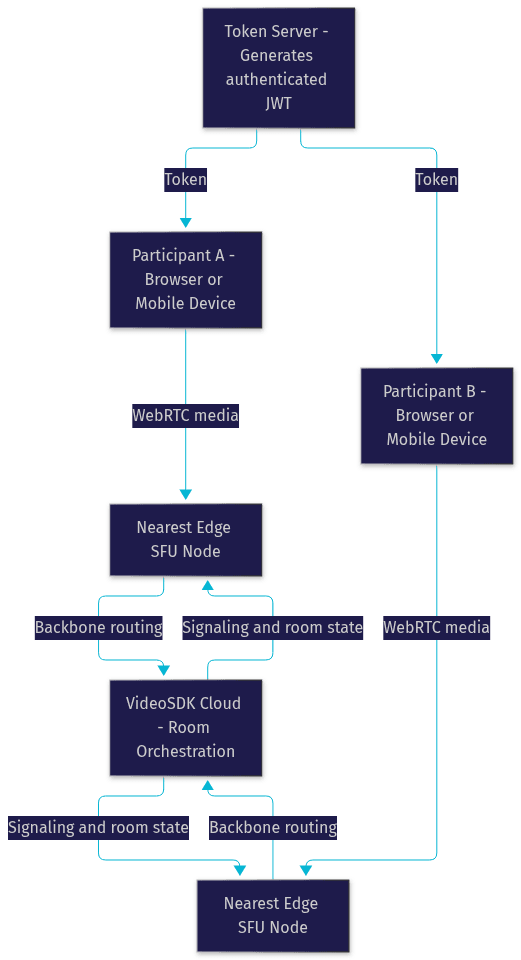
Each participant connects to the nearest edge forwarding node, so their media travels a short hop rather than a long-haul route. The VideoSDK cloud orchestrates the room, handling signaling, participant state, and recording without sitting in the media path. Authentication happens through a token generated server-side, keeping the API secret off the client while letting participants join in a single authenticated step.
Two VideoSDK capabilities do the heavy lifting on latency. First, geo-distributed edge routing keeps the propagation component small for every participant, wherever they are. Second, network-adaptive streaming continuously monitors available bandwidth and adjusts bitrate and resolution in real time, so when a participant's connection degrades, the stream downshifts gracefully instead of stalling, which protects against the jitter and queuing spikes that ruin call quality. The result is sub-300ms interactive latency, the threshold where conversation flows naturally.
For developers integrating this pattern, the practical checklist is short. Generate tokens server-side and never expose your API secret. Create rooms through the REST API before participants join, so join latency is just authentication plus media setup. Test on realistic networks, not just office broadband, and verify behavior on 3G and congested Wi-Fi. Handle participant disconnect events with reconnection logic, because mobile users switch networks mid-call constantly. And monitor per-participant connection quality through the SDK's participant events so you can surface warnings before users complain.
Checklist: Low-Latency Readiness
Before launching any latency-critical product, run through this list:
- Define your latency budget per interaction type, and write it down as a product requirement.
- Measure real user latency with RUM, not just synthetic tests from one region.
- Track the 95th and 99th percentiles, not averages, and alert on the tail.
- Read jitter and packet loss alongside latency, since they compound.
- Move latency-sensitive services to edge locations near your user base.
- Choose UDP-based transport for interactive media, and TCP only for completeness-critical data.
- Apply QoS marking on networks you control, and consider deterministic networking for hard real-time requirements.
- Eliminate sequential blocking calls in request handlers, and pool all outbound connections.
- Index database queries, add read replicas, and cache hot reads in memory.
- Minify and lazy-load front-end assets, and render incrementally in real-time UIs.
- Rehearse degraded-network scenarios, including mobile handoffs and congestion spikes.
- Set up automated latency regression alerts in your deployment pipeline.
Definitions Glossary
Round-Trip Time (RTT): The total time for a packet to travel from source to destination and back, the most common single measure of network latency.
Jitter: The variation in latency between successive packets, which forces real-time receivers to buffer and therefore adds effective delay.
DiffServ: A QoS architecture where packets carry a DSCP mark and each router applies per-hop forwarding behavior based on that priority mark.
Edge Computing: Deploying compute and storage in data centers geographically close to users so requests traverse short physical paths.
SFU (Selective Forwarding Unit): A media server that receives streams from participants and forwards only the necessary tracks to others, the standard topology for low-latency multi-party calls.
Network-Adaptive Streaming: Automatic adjustment of bitrate and resolution based on real-time bandwidth detection, used by VideoSDK to keep streams stable on degrading connections.
Interactive Live Streaming (ILS): A low-latency streaming mode where the audience can interact, vote, and be promoted to speak in real time, unlike high-delay HLS delivery.
Key Takeaways
- Low latency is relative to your use case: gaming needs under 30 milliseconds, interactive video under 60, and conversation degrades past roughly 150.
- Latency accumulates across network, application, and rendering layers, so measure each separately before optimizing anything.
- Jitter and packet loss matter as much as raw latency, and percentile distributions reveal problems that averages hide.
- Shortening physical distance through edge placement is the most reliable network-level fix, and UDP-based protocols set the right ceiling for interactive media.
- VideoSDK's edge-scaled WebRTC rooms with network-adaptive streaming deliver sub-300ms interactive latency for video calls and interactive live streaming, without building media infrastructure yourself.
Conclusion
Low latency is not one optimization but a budget you spend across physics, networks, protocols, and code. Start by defining the threshold your product actually needs, measure the real numbers at every layer, then attack the biggest contributor first, whether that is edge distance, a blocking call chain, or an unindexed query. Teams that treat latency as a first-class product requirement ship experiences that feel instant, and that perception compounds into retention. If real-time video or interactive streaming is part of your roadmap, explore VideoSDK's documentation and try the free tier at app.videosdk.live to see sub-second interaction in your own app. What are you building where milliseconds matter? Drop a comment, I'd love to hear what kind of low latency use case you're working on.
Free $20 Balance for AI Voice Agents & Video Calls
FAQ