


A STUN server test verifies that a STUN server responds correctly to binding requests and returns your public IP address as a server reflexive (srflx) candidate. This is the single most reliable way to confirm that WebRTC NAT traversal will work before users hit connection failures. You can run a browser-based test in under a minute, and the results tell you whether to fix your server, your network, or your firewall.
Every WebRTC call that fails to connect traces back to the same first question: did the client discover its own public network address? That discovery is the job of a STUN server, and when it fails, nothing downstream works. No media flows, no peer connection forms, and your users see an endless "connecting" spinner.
The problem is that most teams never test their STUN infrastructure until something breaks in production. A STUN server can accept network traffic on its listening port while simultaneously failing to answer binding requests, which means shallow health checks give false confidence.
By the end of this article, you will know how a STUN server test actually works, how to run one from a browser, how to interpret every outcome from clean srflx candidates to silent timeouts, and how to set up ongoing monitoring so NAT traversal problems surface before your users report them.
What Is a STUN Server?
A STUN server is defined as a lightweight network service that helps a client behind a NAT (Network Address Translation) device discover its public IP address and port as seen from the internet. It works by receiving a STUN binding request over UDP (typically on port 3478) and replying with the source address it observed, which becomes the client's server reflexive candidate in the ICE framework.
STUN differs from TURN in a fundamental way. STUN only reveals addresses; it never carries media. TURN is a relay that receives and forwards all traffic when direct peer-to-peer connectivity is impossible, such as behind symmetric NATs or strict corporate firewalls. A typical production WebRTC setup uses both: STUN first for cheap direct connections, TURN as the expensive fallback. Because STUN is cheap and stateless, it is often the least monitored piece of the whole stack.
Why Simple Ping Checks Aren't Enough
Ping tells you a host is reachable, not that a service is functioning. A STUN server test must go deeper than an ICMP echo or a TCP port scan, because STUN is a UDP application protocol with its own request and response semantics.
Three limitations make port-only checks misleading. First, many public STUN servers respond to pings while their STUN daemon is misconfigured or crashed, since the operating system answers the ping, not the application. Second, UDP is connectionless, so an open UDP port proves nothing about whether datagrams are actually processed and answered. Third, ping measures ICMP round-trip time, which frequently differs from the UDP path your binding request actually takes.
The real health indicator is ICE candidate gathering. When a browser or SDK creates a peer connection, it queries every configured STUN server and expects a valid srflx candidate back from each. If gathering completes with host candidates but no srflx candidates, your STUN layer is broken even though every ping succeeds. That is the signal a proper STUN server test captures.
Core Components of a STUN Server Test
A complete STUN server test exercises the full binding request cycle, not just network reachability. It verifies the request path, the response content, and the timing, which together determine whether the server can support real-time communication.
The test begins when the client sends a STUN binding request to the server's address and port, usually UDP 3478. The server receives the datagram, inspects the source address of the packet as it arrived, and constructs a binding response containing that observed public IP and port. The client compares this against its local address, and if they differ, it knows it sits behind a NAT and records the returned address as its server reflexive candidate.
Expected outcomes fall into three categories. A healthy test returns a srflx candidate quickly, typically within tens of milliseconds for a nearby server. A degraded test returns a candidate but with high latency, which signals routing problems or server overload. A failed test returns nothing, producing a timeout in the gathering log.
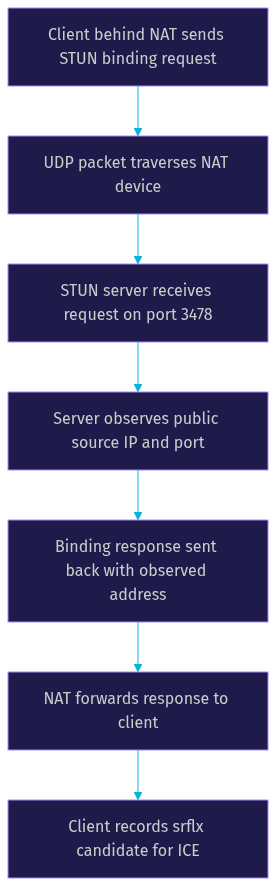
This cycle repeats for every STUN server in your ICE configuration, and the resulting candidate list feeds directly into connectivity checks between peers.
How to Perform a STUN Server Test in the Browser
The fastest way to verify a STUN server is a browser-based test, because the browser runs the exact same ICE gathering machinery your production app will use. No separate tooling matches this fidelity.
Start by opening a browser-based STUN test page, such as the widely used icebreaker.network tool or any equivalent candidate gathering visualizer. These pages create a temporary peer connection with your chosen STUN servers configured, trigger gathering, and display the resulting candidates in a readable log.
Next, select the STUN server you want to verify. Most tools let you enter a custom address, so paste your own server in the standard form of host and port, or pick a well-known public server like Google's or Cloudflare's for baseline comparison. Initiate the test and watch the log fill with candidates as gathering progresses.
Interpreting the log is straightforward once you know the labels. Host candidates show your local network interfaces. Srflx candidates show the public address a STUN server returned, and each srflx entry names the server that produced it. If your target server appears next to a srflx candidate, it passed. If it appears with an error or never appears at all, it failed.
For accurate results, test from a real user network, not a developer machine behind a permissive office firewall. Disconnect any VPN, since VPN tunnels often bypass the NAT conditions your users actually experience and can mask failures. Run the test more than once, because intermittent UDP loss looks identical to a dead server in a single sample. Finally, test from multiple geographic locations if your users are distributed, since STUN latency is highly regional.
Interpreting Test Results: From srflx Candidates to Timeouts
Interpreting a STUN server test means matching each outcome to its underlying network cause. A successful srflx candidate means the entire path works: your NAT allowed the outbound UDP request, the server processed it, and the response found its way back through the NAT's mapping. This is the green light for direct peer-to-peer connectivity, at least as far as address discovery goes.
A timeout with no candidate is the most common failure, and it has several distinct causes worth separating. If every STUN server times out, the problem is local: a firewall, VPN, or security suite is blocking outbound UDP entirely. If only one server times out while others respond, that server is down, overloaded, or blocked specifically. If gathering completes instantly with only host candidates and no srflx at all, UDP egress is being silently dropped somewhere between the client and the internet.
Latency matters as much as availability. A STUN response arriving in 20 to 80 milliseconds is healthy for a regional server. Responses above 200 milliseconds suggest the server is distant, overloaded, or routed poorly, and while gathering will still succeed, every connection setup inherits that delay. In production WebRTC, slow STUN responses directly slow down call setup time, which users perceive as the app being sluggish.
Consider two real-world contrasts. A good result: a test from a home network in Berlin against a European STUN server returns a srflx candidate in 35 milliseconds, and a video call connects in under a second. A poor result: the same test against a server in another continent returns a candidate in 480 milliseconds, and on some runs times out entirely, causing intermittent one-way audio as ICE falls back to slower paths.
Use this decision tree on every test run, and you will pinpoint the failing layer in seconds instead of guessing.
Common STUN Test Failures and How to Troubleshoot Them
Most STUN server test failures cluster into five root causes, and each has a distinct signature in the gathering log. Learning these signatures turns a vague "calls don't connect" bug report into a precise diagnosis.
A misconfigured address or port is the most frequent self-inflicted problem. Administrators commonly type the wrong port, assume a nonstandard port is open when it is not, or point at a hostname whose DNS resolves to a retired server. The signature is a consistent timeout against one specific server while others respond. Verify the address and port against the provider's current documentation, since public STUN endpoints do change.
Wrong protocol causes subtler failures. STUN defaults to UDP, but some servers also listen on TCP for clients behind UDP-blocking networks. If your configuration requests TCP transport from a UDP-only server, or vice versa, you get timeouts despite the server being perfectly healthy. Match the transport in your ICE configuration to what the server actually supports.
Firewalls and carrier-grade NAT produce the hardest failures. Some mobile carriers and enterprise networks block or rate-limit UDP 3478 specifically, and symmetric NATs can make STUN-discovered addresses useless for direct connection even when the test succeeds. The signature is a passing STUN test but persistent connection failures afterward. The fix is not a better STUN server; it is adding a TURN relay as fallback, which is exactly why the STUN vs TURN distinction matters in production.
Credential problems appear when your test configuration mixes in TURN servers. TURN requires authentication with short-lived credentials, and expired or malformed credentials produce authorization errors that look like server failures. Check credential generation and expiry windows first before blaming the server.
Finally, verify against multiple public STUN servers before concluding anything. Testing against Google's public STUN, Cloudflare's STUN, and your own server in the same run isolates the variable: if two of three respond, your network is fine and the third server is the problem. This triangulation is the single most valuable habit in STUN troubleshooting.
Best Practices for STUN Server Monitoring
A one-time STUN server test proves health at a moment in time. Production reliability requires continuous monitoring, because public STUN servers have no uptime guarantees and network conditions change constantly.
Schedule regular browser-based tests from representative locations, ideally the same regions where your users concentrate. A weekly manual check catches most degradation, but automation catches it faster. Conceptually, an automated monitor is a lightweight client that periodically performs candidate gathering against your configured servers, records whether srflx candidates appear, and logs the response time for each. Any scheduled task runner or monitoring platform can host this loop, and the key design decision is running it from user-like networks rather than datacenter networks, since datacenter tests miss NAT and firewall conditions entirely.
Set alerting thresholds on two signals: missing candidates and latency spikes. A server that stops returning srflx candidates is down for your purposes, regardless of what its host metrics say. A server whose response time climbs well beyond its historical baseline is heading toward failure or overload. Alert on both, and treat sudden regional divergence, where one geography degrades while others stay healthy, as a routing problem rather than a server problem.
Build redundancy into your ICE configuration from day one. Configure at least two STUN servers from different providers in different regions, so a single provider outage becomes invisible to users. Redundancy costs nothing at the STUN layer, since STUN is stateless and cheap, and it is the highest-reliability-per-effort improvement available in the entire WebRTC stack.
Choosing the Right STUN Provider
Choosing a STUN provider comes down to four factors: geographic coverage relative to your users, measured latency, historical reliability, and cost. For most apps, public free servers are sufficient for the STUN role, with budget reserved for TURN relays where the real expense lives.
Google's public STUN server is the long-standing default choice, offering global anycast coverage and no registration. Its main drawback is that it carries no uptime guarantee, which matters if you depend on it exclusively. Cloudflare's STUN service inherits Cloudflare's global edge network, typically delivering very low latency worldwide, and is a strong modern default. Twilio operates STUN endpoints alongside its TURN service, which is convenient if you already run Twilio infrastructure, though the STUN endpoints are best treated as part of a broader paid ecosystem rather than a standalone choice.
The practical recommendation for a production WebRTC app is to configure two providers from this set, verify both with a browser-based STUN server test from your primary user regions, and monitor both continuously. If you are building on a managed platform, check what it provides first: VideoSDK, for example, handles ICE, STUN, and TURN infrastructure as part of its video calling SDK, including network-adaptive streaming that adjusts to poor conditions, so many teams never need to operate their own STUN layer at all.
Definitions Glossary
STUN Server: A stateless network service that lets a client behind NAT discover its public IP address and port by echoing back the source address it observes in a binding request, typically over UDP port 3478.
Server Reflexive Candidate (srflx): The ICE candidate representing a client's public address as reported by a STUN server; its presence in a gathering log is the primary success signal of a STUN server test.
ICE Candidate Gathering: The process where a WebRTC client collects host, srflx, and relay candidates from local interfaces and configured STUN and TURN servers before attempting peer connectivity.
TURN Server: A relay server that forwards all media between peers when direct connectivity fails, used as the fallback when STUN-based NAT traversal cannot establish a path, such as behind symmetric NATs.
NAT Traversal: The set of techniques, including STUN and TURN, that allow two peers behind different NAT devices to discover usable addresses and establish a direct or relayed connection.
Key Takeaways
- A STUN server test must exercise the full binding request cycle and confirm a returned srflx candidate, because ping and port checks cannot detect application-level STUN failures.
- Timeouts against all servers indicate local UDP blocking, while timeouts against one server indicate that specific server is down, misconfigured, or blocked.
- STUN response latency directly affects call setup time, so monitor response trends, not just availability, and alert on both missing candidates and latency spikes.
- Always configure at least two STUN providers from different regions, since STUN is stateless and redundancy is effectively free reliability.
- Managed platforms like VideoSDK handle STUN, TURN, and ICE infrastructure as part of their real-time communication SDKs, removing the need to operate and monitor your own traversal layer.
Conclusion
Thorough STUN server testing is the difference between discovering NAT traversal problems in a monitoring dashboard and discovering them in angry user reviews. Run a browser-based test now against every STUN server in your configuration, interpret the results with the decision tree above, and put continuous monitoring in place so failures surface before users feel them.
If you would rather not operate STUN and TURN infrastructure at all, explore VideoSDK's built-in ICE diagnostics and network handling, which manage traversal automatically alongside sub-300ms video calling. You can start free at app.videosdk.live and join the VideoSDK Discord community to compare notes with other developers.
What are you building with WebRTC? Drop a comment, I'd love to hear what kind of connectivity issues you're debugging.
Free $20 Balance for AI Voice Agents & Video Calls
FAQ