


A STUN server port is the network port, 3478 by default, on which a STUN server listens for binding requests over UDP or TCP so clients can discover their public IP address and NAT port mapping. Choosing, configuring, and securing this port correctly is essential for reliable NAT traversal in WebRTC, SIP, and other real-time communication systems. This guide covers the default port, alternate ports, firewall rules, and troubleshooting for production deployments.
Every real-time communication stack, from WebRTC video calls to SIP trunking, depends on one quiet piece of infrastructure: the STUN server. And the single most common deployment mistake teams make is getting the STUN server port wrong. A misconfigured port means binding requests never reach the server, NAT discovery fails, and calls silently degrade or never connect at all.
The STUN protocol, defined in RFC 5389 and updated by RFC 8489, uses a well-known default port of 3478 over UDP and TCP. But production networks rarely leave it that simple. Port conflicts, security policies, multi-tenant environments, and full-mode NAT diagnostics all push teams toward custom and alternate port configurations.
By the end of this article, you will understand how STUN server ports work at the protocol level, when to keep the default 3478, when and how to configure alternate ports, how to write firewall rules that keep STUN reachable without exposing your infrastructure, and how to troubleshoot the port-related failures that break NAT traversal.
What Is a STUN Server Port?
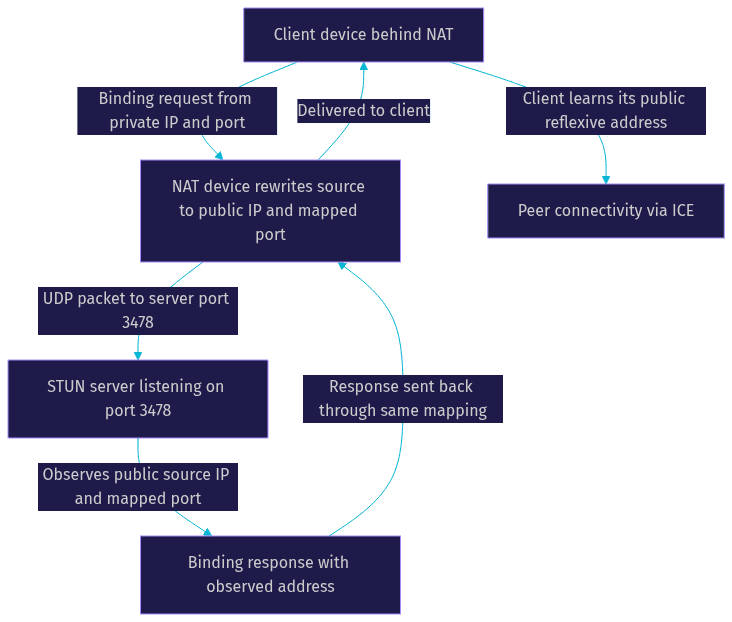
A STUN server port is defined as the UDP or TCP port on which a STUN (Session Traversal Utilities for NAT) server listens for incoming binding requests from clients. When a client sends a binding request to that port, the server observes the source IP address and source port as seen from its side of the network, and returns that observed address in the response. That observed address is exactly what the client needs to advertise to peers for direct media flow.
The default STUN port is 3478, registered with IANA for both UDP and TCP. Common alternatives include 3479, 5349 (used for STUN over TLS), and arbitrary high ports chosen by operators in restricted environments. The port itself carries no protocol magic; any port between 1 and 65535 can technically serve STUN traffic, provided clients are configured to target it.
How STUN Uses Ports: Protocol Mechanics
STUN is a simple request-response protocol, and its port behavior is central to how NAT discovery works. The client sends a STUN binding request from a local IP address and port toward the server's IP address and port, typically 3478 over UDP. The request passes through the client's NAT device, which rewrites the source address and port to a public mapping. The STUN server receives the request on its listening port, inspects the packet's actual source address and port, and echoes that information back in the binding response.
The critical insight is that the NAT's port mapping is only observable from the outside. The client cannot see its own public mapping; only the STUN server, receiving traffic on its port, can report it. This is why the server's port must be reachable, correctly configured, and using the same transport protocol the client expects. A client sending UDP binding requests to a server listening only on TCP will get silence.
NAT behavior also varies by how the device allocates mappings. Some NATs reuse the same external port for all destinations (endpoint-independent mapping), while others allocate a new external port per destination (address-dependent or address-and-port-dependent mapping). This matters because the port the STUN server observes may differ from the port a peer would observe, which is why ICE candidates gather from multiple STUN and TURN servers.
Choosing the Right Primary Port
The default port 3478 should be your first choice in almost every deployment. It is the port every STUN client knows how to target, it is the port documented across RFC 5389 and RFC 8489, and it is the port most firewall administrators expect when you request access for real-time media. Keeping the default reduces configuration surface area and eliminates a whole class of client misconfiguration bugs.
Custom primary ports become necessary in three common scenarios. First, port conflicts: if another service on the same host already binds 3478, such as a TURN server colocated on the same box, you must move one of them. Second, security policy: some hardened environments prohibit well-known service ports to reduce automated scanning exposure, pushing STUN onto an unregistered high port. Third, multi-tenant deployments: running multiple STUN instances on one host for different customers often means assigning each instance a distinct port.
When choosing a custom port, stay within the valid range of 1 to 65535 but avoid privileged ports below 1024, which require elevated permissions and frequently collide with system services. Ports in the 49152 to 65535 range are designated for dynamic and private use, but they can also collide with ephemeral outbound connections on some systems. A middle range, roughly 10000 to 40000, tends to offer the fewest conflicts for dedicated STUN listeners. Whatever you choose, document it, because every client configuration must match it exactly.
Full-Mode STUN: Using Alternate Ports
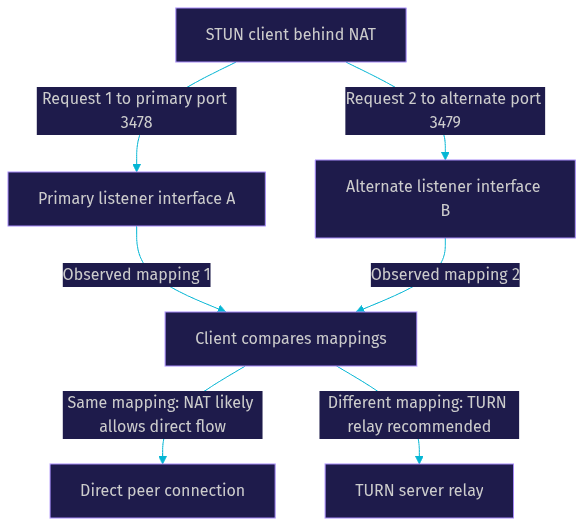
STUN servers operate in two modes: basic mode and full mode. In basic mode, the server listens on a single port and answers binding requests. In full mode, the server listens on a primary port and an additional alternate port, typically on a different IP address as well. The alternate port exists to help clients determine NAT filtering behavior.
The mechanism works like this: the client sends a binding request to the primary port and receives the observed address. Then the client sends a second request to the alternate port. If the NAT changes the external port between the two requests, the client knows it is behind an address-and-port-dependent mapping NAT, which predicts that direct peer-to-peer connections will likely fail and TURN relaying will be required. If the mapping stays stable, direct connectivity prospects are better. This diagnostic capability is why RFC 5389 defines the alternate server and alternate port mechanisms explicitly.
Configuring primary and alternate ports together means running the server with two listeners, one on the primary port and one on the alternate, ideally bound to different network interfaces so the NAT sees genuinely different destination addresses. The alternate port is conventionally 3479 when the primary is 3478, but any valid port pair works as long as clients are told both addresses.
Configuring STUN Server Ports on Popular Implementations
Most production STUN deployments use one of a handful of server implementations, and each exposes port configuration through its own settings. Understanding the intent behind those settings matters more than memorizing syntax, since the concepts transfer across tools.
The classic stunserver utility (the original seastar-based implementation) exposes a primary port setting and an alternate port setting. The primary port controls where the main listener binds, defaulting to 3478. The alternate port, defaulting to 3479, enables full-mode operation when combined with an alternate IP address. When you start the server, it binds both listeners, and the startup log confirms which addresses and ports are active. Reviewing that log is the fastest way to verify the configuration took effect.
Lightweight implementations such as ministun follow the same pattern with primary and alternate port parameters. Because ministun is intentionally minimal, it is a popular choice for embedded and containerized deployments where you control the port layout explicitly. In containers, remember that the internal listening port and the externally published port can differ; the port mapping at the container layer must forward to the STUN listener correctly or binding requests will arrive at a port nobody is serving.
SIP-focused platforms like OpenSIPS expose STUN through a module with its own primary and alternate port parameters. When STUN is embedded in a SIP proxy this way, the STUN ports must not collide with the proxy's own SIP listening ports, typically 5060 and 5061. A common production mistake is enabling the STUN module on a host where another process already claimed 3478, causing the module to fail silently at startup.
To verify active ports after configuration, check the server's startup logs for the bound addresses, confirm the listening sockets using standard network inspection tools available on your operating system, and then send a test binding request from an external client. A successful round trip, where the client receives its public address in the response, confirms the full path: client, NAT, firewall, and server port are all working. If you are building real-time communication with a managed platform, VideoSDK handles this entire layer for you; its video calling SDKs manage STUN, TURN, and media routing infrastructure so your application never has to worry about port configuration or NAT traversal edge cases.
Firewall and Security Considerations
A STUN server port is only useful if traffic can actually reach it. The first firewall rule to get right is allowing inbound UDP, and optionally TCP, on your chosen port from the general internet. STUN is inherently a public-facing service; clients can be behind any NAT anywhere, so you cannot restrict source addresses to a known list without breaking discovery for legitimate users.
That said, you can still reduce exposure. Apply rate limiting on the STUN port so a single source address cannot flood the server with binding requests, a common and cheap DDoS mitigation. If your STUN deployment serves only your own applications, you can restrict access to the IP ranges of your application servers or cloud regions, though this breaks the model for end-user clients connecting directly. In that case, front the STUN service with a load balancer that enforces access control while the backend listeners stay private.
Port choice itself affects your DDoS surface. The default 3478 is continuously scanned by automated tooling across the internet, so it receives a constant background level of junk traffic. Moving to a nonstandard port reduces casual scanning but provides no real security, since any determined attacker can discover the port through traffic observation. Treat port obscurity as noise reduction, not protection. Real protection comes from rate limiting, capacity planning, and running STUN as a stateless, easily replaceable service. For teams that want to avoid operating this surface entirely, managed real-time platforms such as VideoSDK's interactive live streaming abstract the entire STUN and TURN layer behind their global infrastructure.
Troubleshooting Common Port-Related Issues
The most common symptom is simple: the client sends binding requests and receives nothing back. When this happens, work through the port path systematically rather than guessing.
First, confirm the server is actually listening on the expected port. Check the startup logs for the bound address and port, and verify the listening socket exists using your operating system's network inspection tools. A server that failed to bind, often due to a port conflict with another process, will log the failure at startup, and that log line is the answer.
Second, verify the transport protocol matches. STUN over UDP is the norm, and a client configured for UDP against a TCP-only listener produces silent failure with no error on either side. Confirm both sides agree on UDP, or that TCP is enabled where you need it.
Third, check firewall rules in both directions. Inbound rules must allow the STUN port, and if the server sits behind a cloud security group or NAT gateway, the published external port must map to the internal listener. A frequent container and load balancer mistake is publishing a different external port than the internal one without updating client configurations.
Fourth, rule out port conflicts. If another service claimed the port first, the STUN process either fails to start or binds to nothing. Compare the process list against your intended port assignments.
Finally, test from outside using any public STUN test client. These tools send a binding request to your server and display the response, including your observed public address. A successful external test proves the entire chain works; a failure localizes the problem to the network path rather than the client application. For deeper NAT behavior analysis, test against both the primary and alternate ports and compare the returned mappings, which is exactly the diagnostic full-mode STUN was designed for.
Best Practices and Recommendations
Keep the default port 3478 unless you have a concrete reason not to. Defaults are documented, expected by every client library, and easiest for future team members to reason about. Every deviation from the default should be a deliberate, documented decision.
Use the alternate port only when you genuinely need full-mode NAT behavior diagnostics. Most application-level deployments, especially those using ICE with multiple STUN and TURN servers, get sufficient NAT intelligence without running their own full-mode server. Public STUN infrastructure already covers the common cases.
Document every chosen port in your deployment guide, including the transport protocol, the external-to-internal port mapping, and the firewall rules that accompany it. Undocumented port choices are the root cause of a surprising share of "mysterious" connectivity failures months after launch.
Audit firewall rules around your STUN ports regularly. Rules accumulate over time, and an audit every quarter catches stale allowances, accidental duplicates, and rate-limit settings that no longer match your traffic profile.
Definitions Glossary
STUN server port: The UDP or TCP port, 3478 by default, on which a STUN server listens for binding requests so clients can discover their public IP address and NAT port mapping.
NAT traversal: The set of techniques, including STUN, TURN, and ICE, that allow devices behind NAT devices to establish direct peer-to-peer connections.
Binding request: The STUN message a client sends to the server's port, asking the server to report the source IP address and port it observes.
Alternate port: A second listening port, typically 3479, used in full-mode STUN to help clients detect NAT mapping and filtering behavior.
TURN server: A relay server, often colocated with STUN on port 3478, that forwards media when direct NAT traversal fails; VideoSDK deployments include TURN handling automatically.
Key Takeaways
- The default STUN server port is 3478 over UDP and TCP, registered with IANA and defined in RFC 5389 and RFC 8489, and it should remain your primary choice unless a specific conflict or policy forces a change.
- Full-mode STUN uses a primary port plus an alternate port, typically 3479, to let clients detect NAT mapping behavior and predict whether direct connections will succeed or TURN relaying is needed.
- Custom ports must stay in the 1 to 65535 range, avoid privileged ports below 1024, and be documented everywhere clients are configured, because a mismatch produces silent failure.
- Firewall rules must allow inbound UDP on the STUN port from the general internet, with rate limiting as the primary DDoS mitigation rather than port obscurity.
- Troubleshooting no-response failures follows a fixed path: verify the listener, match the transport protocol, check firewall and port mappings, rule out conflicts, and confirm with an external test client.
Conclusion
Proper STUN server port configuration is a small detail with outsized consequences: the right port, correctly opened through your firewalls and matched on every client, is the difference between seamless NAT traversal and calls that never connect. Keep 3478 as your default, add an alternate port only when you need full-mode NAT diagnostics, and audit your firewall rules regularly. If you would rather never think about STUN ports, TURN servers, or NAT edge cases again, VideoSDK's real-time communication platform handles the entire traversal layer for you, and you can start free at app.videosdk.live/login. What STUN or NAT traversal problems have you hit in production? Drop a comment, I'd love to hear how your deployment handles port configuration.
Free $20 Balance for AI Voice Agents & Video Calls
FAQ