


Introduction to Raspberry Pi Speech Recognition
Speech recognition technology has revolutionized how we interact with computers and smart devices. By enabling machines to understand and process human language, it opens doors to intuitive voice controls and automation. The compact, affordable Raspberry Pi is a perfect platform for speech recognition projects, letting makers, engineers, and hobbyists build custom voice assistants, automate home appliances, and enhance robotics—all with open-source tools. In 2025, Raspberry Pi speech recognition is more powerful and accessible than ever, offering opportunities for both learning and innovation.
Understanding Speech Recognition Technology
What Is Speech Recognition?
Speech recognition is the technology that enables computers to listen to spoken language, process it, and convert it into text or commands. On Raspberry Pi, speech recognition involves capturing audio input, running it through algorithms, and returning usable data for your applications. Common uses include Raspberry Pi voice control, speech-to-text conversion, and building voice assistants. For developers looking to add advanced voice capabilities to their projects, integrating a Voice SDK can streamline the process of building robust audio features.
How It Works
- Audio Capture: A microphone captures analog sound waves.
- Preprocessing: The audio signal is digitized, filtered, and normalized.
- Speech-to-Text Engine: Algorithms analyze the audio and match it to known language patterns, producing text.
Online vs Offline Speech Recognition Engines
- Online Engines (e.g., Google Speech API, Wit.ai): Process audio in the cloud, offering high accuracy and support for many languages, but require internet access and may raise privacy concerns.
- Offline Engines (e.g., CMU Sphinx, Vosk): Run locally on the Pi, ensuring privacy and low latency, but may have lower accuracy and limited language support. Offline speech recognition on Pi is ideal for privacy-focused projects or those without reliable internet connectivity.
Required Hardware and Software for Raspberry Pi Speech Recognition
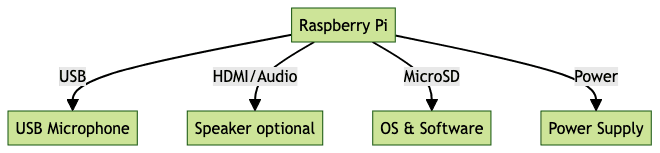
Hardware List
- Raspberry Pi Model: Pi 4, Pi 3B+, or Pi Zero 2 W are recommended.
- USB Microphone: Essential for clear audio input.
- MicroSD Card: 16GB or larger, for the OS and software.
- Power Supply: Official Pi power adapter.
- (Optional) Speakers: For audio feedback.
Software Requirements
- Raspberry Pi OS (32-bit or 64-bit)
- Python 3.x
- Speech Recognition Libraries:
SpeechRecognition,pyaudio,pocketsphinx(CMU Sphinx), Google Speech API,vosk, orwit - For those interested in adding real-time communication features, consider using a python video and audio calling sdk to enable both video and audio interactions within your Raspberry Pi applications.
Hardware Setup Diagram
Setting Up Your Raspberry Pi for Speech Recognition
Installing the Operating System and Dependencies
Start with a fresh install of Raspberry Pi OS:
- Download Raspberry Pi Imager and flash Raspberry Pi OS to your microSD card.
- Insert the card, connect peripherals, and power up the Pi.
- Update the system:
1sudo apt update && sudo apt upgrade -y- Install Python and development tools:
1sudo apt install python3 python3-pip python3-dev python3-venv build-essential -y- Install audio and speech libraries:
1sudo apt install portaudio19-dev python3-pyaudio
2pip3 install SpeechRecognition pocketsphinx vosk wit
Configuring Audio Input
- Plug in your USB microphone. List audio devices:
1arecord -l- Test audio recording:
1arecord --format=S16_LE --duration=5 --rate=16000 --file-type=wav test.wav
2aplay test.wav
If you can hear your recording, your setup is correct. For troubleshooting, check the audio device index in your Python code or ensure the microphone is not muted. If you plan to expand your project to include phone-based communication, integrating a phone call api can allow your Raspberry Pi to make or receive calls programmatically.
Choosing the Right Speech Recognition Engine
Offline vs Online Engines
- Offline Engines (e.g., CMU Sphinx, Vosk):
- Pros: Full privacy, no internet needed, real-time response.
- Cons: May have lower recognition accuracy; limited language models.
- Online Engines (e.g., Google Speech API, Wit.ai):
- Pros: High accuracy, ongoing improvements, wide language support.
- Cons: Requires internet, may have usage limits or costs, privacy considerations.
For projects that require seamless integration of voice features across devices, a Voice SDK can help you build scalable and interactive voice applications.
Popular Options: Google, CMU Sphinx, Vosk, Wit.ai
- Google Speech API: Best accuracy, easy integration, but needs API key and connection.
- CMU Sphinx: Open-source, runs offline, suitable for basic projects.
- Vosk: Modern offline engine, good accuracy, supports multiple languages.
- Wit.ai: Free, online, supports complex voice commands and intents.
If your use case extends beyond speech recognition to include video communication, leveraging a Video Calling API can provide a unified solution for both voice and video interactions on Raspberry Pi.
Implementing Speech Recognition with Python
Installing and Using the SpeechRecognition Library
The
SpeechRecognition library abstracts multiple engines and makes Python speech recognition on Pi straightforward. For developers looking to add live audio rooms or interactive voice features, integrating a Voice SDK can further enhance your application's capabilities.Install the Library
1pip3 install SpeechRecognitionBasic Speech-to-Text Example
1import speech_recognition as sr
2
3recognizer = sr.Recognizer()
4with sr.Microphone() as source:
5    print("Speak something...")
6    audio = recognizer.listen(source)
7    try:
8        text = recognizer.recognize_google(audio)
9        print("You said: {}".format(text))
10    except sr.UnknownValueError:
11        print("Could not understand audio.")
12    except sr.RequestError as e:
13        print("Error with API: {}".format(e))
Using CMU Sphinx for Offline Recognition
You can use CMU Sphinx as the offline backend, avoiding the need for internet access.
1import speech_recognition as sr
2
3recognizer = sr.Recognizer()
4with sr.Microphone() as source:
5    print("Say something...")
6    audio = recognizer.listen(source)
7    try:
8        text = recognizer.recognize_sphinx(audio)
9        print("Sphinx recognized: {}".format(text))
10    except sr.UnknownValueError:
11        print("Could not understand audio.")
Integrating with Home Automation or IoT
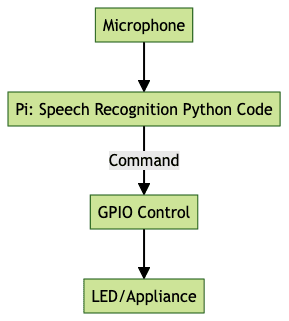
Trigger GPIO pins (e.g., turn on a light) based on voice commands:
1import speech_recognition as sr
2import RPi.GPIO as GPIO
3import time
4
5# GPIO setup
6GPIO.setmode(GPIO.BCM)
7GPIO.setup(18, GPIO.OUT)
8
9def trigger_action(command):
10    if "turn on the light" in command.lower():
11        GPIO.output(18, GPIO.HIGH)
12        print("Light ON")
13    elif "turn off the light" in command.lower():
14        GPIO.output(18, GPIO.LOW)
15        print("Light OFF")
16
17recognizer = sr.Recognizer()
18with sr.Microphone() as source:
19    print("Say a command...")
20    audio = recognizer.listen(source)
21    try:
22        cmd = recognizer.recognize_google(audio)
23        print("Command: {}".format(cmd))
24        trigger_action(cmd)
25    except sr.UnknownValueError:
26        print("Could not understand audio.")
For projects that require interactive live events or broadcasts, integrating a Live Streaming API SDK can enable real-time streaming capabilities directly from your Raspberry Pi.
Data Flow Diagram
Advanced Projects and Use Cases
Building a Raspberry Pi Voice Assistant
A full Raspberry Pi voice assistant can include wake word detection (push-to-talk), integration with cloud APIs, and response generation. Push-to-talk can be implemented using a button on a GPIO pin.
1import RPi.GPIO as GPIO
2import speech_recognition as sr
3
4BUTTON_PIN = 17
5GPIO.setmode(GPIO.BCM)
6GPIO.setup(BUTTON_PIN, GPIO.IN, pull_up_down=GPIO.PUD_UP)
7recognizer = sr.Recognizer()
8
9while True:
10    input_state = GPIO.input(BUTTON_PIN)
11    if input_state == False:
12        print("Button pressed, listening...")
13        with sr.Microphone() as source:
14            audio = recognizer.listen(source)
15            try:
16                text = recognizer.recognize_google(audio)
17                print("Assistant heard: {}".format(text))
18            except sr.UnknownValueError:
19                print("Could not understand audio.")
For advanced features, you can connect to cloud LLMs (Large Language Models) via APIs for natural language understanding and responses. If you want your assistant to handle phone calls, integrating a phone call api allows for seamless telephony features alongside speech recognition.
Home Automation with Speech Commands
Example: Turn on an LED (or relay) by voice using the GPIO code above. This can be extended to control smart devices, appliances, or entire home automation systems using MQTT or HTTP APIs. For even more advanced voice control, a Voice SDK can help you build scalable, multi-device voice automation solutions.
Tips for Improving Accuracy and Performance
- Microphone Placement: Place the microphone close to the user, avoiding obstructions.
- Reduce Background Noise: Use a directional mic and minimize environmental noise.
- Adjust Sample Rates: Use 16000Hz for best compatibility with speech engines.
- Chunk Sizes: Smaller chunks can reduce latency.
- Keyword Spotting: Use wake words or push-to-talk to avoid false triggers.
Troubleshooting Common Issues in Raspberry Pi Speech Recognition
- Audio Device Errors: Ensure the correct device index is selected in your code; use
arecord -lto list devices. - Recognition Accuracy Problems: Improve mic quality, reduce noise, or experiment with different engines and models.
- Library Installation Issues: Use a fresh OS install; check for missing dependencies; ensure pip and Python versions are up to date.
If you need to add video or audio calling features to your troubleshooting process or for remote support, exploring a Voice SDK can provide a comprehensive solution.
Conclusion and Next Steps
Raspberry Pi speech recognition in 2025 offers a powerful gateway to voice-controlled computing, home automation, and intelligent assistants. With the right hardware, Python code, and speech engine, you can build flexible projects that respond to your voice. Experiment with different engines, optimize for your environment, and explore open-source communities for the latest advancements. The future of voice technology on Raspberry Pi is only limited by your imagination. Ready to start building? Try it for free and unlock the full potential of your Raspberry Pi voice projects.
Free $20 Balance for AI Voice Agents & Video Calls
FAQ