


TL;DR: Most social live video app latency problems trace back to three root causes: suboptimal media routing, geographic TURN/STUN server placement, and the absence of adaptive bitrate logic under variable network conditions. Fixing them requires a layered infrastructure strategy, not a single tweak.
Introduction: why latency is the silent killer of social apps
Consumer expectations for live video have been shaped by platforms like TikTok Live, Instagram Live, and Clubhouse. Users do not tolerate delays above 2–3 seconds. In an interactive live streaming app, where interaction, reactions, and co-presence are the product, latency is not a performance metric, it is a feature.
Yet most engineering teams discover their latency problem after launch, when retention data surfaces it as a drop-off pattern or when user reviews describe the experience as "laggy" or "out of sync." By then, the cost of re-architecting is high.
This guide provides technical founders and CTOs with a complete diagnostic and remediation framework for latency in WebRTC-based social live video apps, from packet-level routing to infrastructure placement strategy.
Understanding the latency stack in a social live video app
Before fixing latency, you need to model it. Latency in a WebRTC (Web Real-Time Communication, a browser and mobile API standard for peer-to-peer media) pipeline is not a single variable. It is the sum of several compounding delays across the media path.
The five-layer latency model
| Layer | Source of delay | Typical contribution |
|---|---|---|
| Capture and encode | Camera frame capture + software encode time | 10–40 ms |
| Network transmission | Physical distance + routing hops | 20–200+ ms |
| TURN relay overhead | NAT traversal via relay server | 5–80 ms (varies by region) |
| SFU processing | Media forwarding, simulcast selection | 2–15 ms |
| Decode and render | Hardware/software decode + display pipeline | 10–30 ms |
End-to-end perceived latency is the sum of all five. The largest variable, and the one most within your control, is network transmission as shaped by your routing and infrastructure decisions.
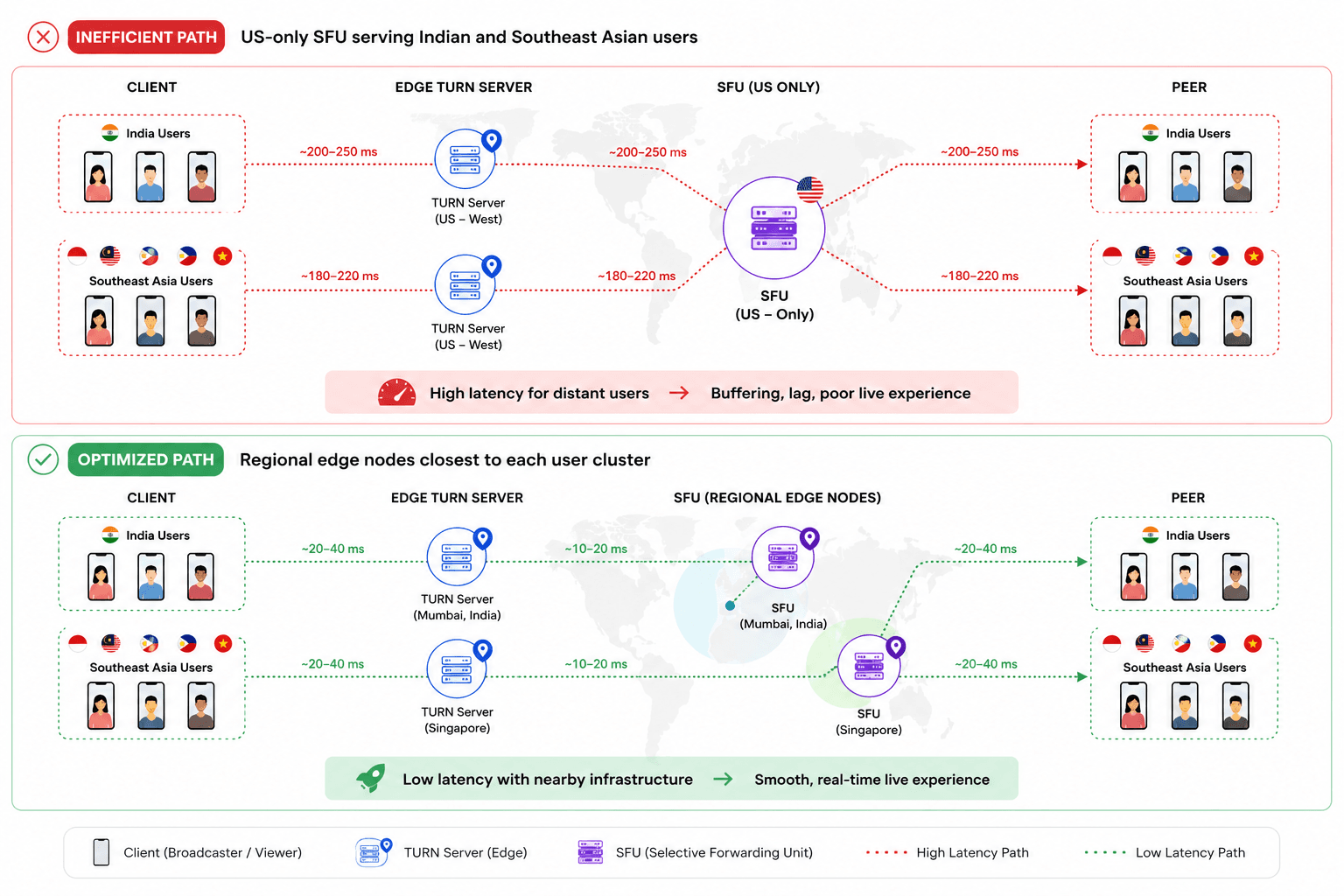
How WebRTC routing actually works, and where it breaks down
SFU (Selective Forwarding Unit, a media server that receives streams from publishers and selectively forwards them to subscribers) is the architectural center of most modern social video apps. Unlike peer-to-peer WebRTC, an SFU topology scales to many viewers, but it introduces a critical dependency: the physical location of the SFU relative to every connected client.
The hub-and-spoke problem
Most early-stage social apps deploy a single SFU cluster, typically in a US East or EU West data center. This works fine for local audiences. For global audiences, it creates a hub-and-spoke latency penalty.
Consider a user in Mumbai streaming to viewers in Jakarta, Riyadh, and São Paulo. With a single US East SFU:
- Mumbai → US East: ~200 ms one-way
- US East → Jakarta: ~230 ms one-way
- Total round-trip visible latency: 800 ms+ before any other overhead
With a regional SFU in Singapore or Mumbai and another in São Paulo, the same stream can be delivered in under 150 ms round-trip to most of those destinations.
WebRTC routing latency is compounded by the fact that WebRTC itself does not control routing at the IP layer, it accepts whatever path the network selects, which is often not the shortest.
TURN, STUN, and NAT traversal: the overlooked latency multipliers
STUN (Session Traversal Utilities for NAT, a protocol that allows a client to discover its public IP address and the type of NAT it sits behind) and TURN (Traversal Using Relays around NAT, a fallback protocol that relays all media through a server when direct connection fails) are foundational to WebRTC connectivity.
In a controlled test environment, developer machines on open networks, NAT traversal succeeds without relays. In production, across mobile networks, carrier-grade NAT, corporate firewalls, and symmetric NAT configurations, a significant percentage of connections fall back to TURN. Estimates from large-scale WebRTC deployments suggest TURN fallback rates between 15% and 40% depending on the user population and geography (Philipp Hancke, testRTC research, 2022).
Why TURN server geography matters more than TURN server count
A TURN server in Virginia does not help a user in Bangalore connect to a peer in Singapore. The relay adds latency equal to the round-trip from each client to the TURN server. If that server is on the wrong continent, your TURN infrastructure is actively degrading the experience for a large share of your users.
TURN/STUN servers in WebRTC need to be deployed with the same geographic intentionality as your CDN edge nodes.
TURN placement checklist
- Deploy TURN servers in every region where you have more than 5% of your user base
- Use latency-based DNS routing (e.g., AWS Route 53 or Cloudflare) to direct clients to the nearest TURN server
- Monitor TURN fallback rate per region, spikes indicate NAT traversal failures
- Set TURN credential TTLs below 24 hours to reduce replay attack surface
- Test TURN reachability from mobile networks in target markets, not just fixed broadband
Infrastructure placement strategy for global social apps
Real-time communication infrastructure must be designed around user geography, not engineering convenience. The following framework applies regardless of whether you are building on a managed WebRTC platform or operating your own media servers.
The three-tier infrastructure model
Tier 1 Core SFU cluster: One or two primary regions handling the heaviest load and acting as the origination point for stream distribution. Typically US East and EU West.
Tier 2 Regional SFU nodes: Secondary clusters placed in high-density user regions Southeast Asia (Singapore), South Asia (Mumbai), Middle East (Bahrain/Dubai), Latin America (São Paulo), East Asia (Tokyo or Seoul). These receive ingest from Tier 1 and serve local subscribers.
Tier 3 Edge relay and TURN: Lightweight servers close to end users, responsible only for ICE candidate gathering and TURN relay. Does not handle SFU workloads.
Regional SFU placement decision matrix
| Region | Minimum user threshold for dedicated SFU | Recommended cloud zone |
|---|---|---|
| North America | Baseline | US East (Virginia) |
| Europe | 8% of DAU | EU West (Frankfurt or Amsterdam) |
| South Asia | 5% of DAU | ap-south-1 (Mumbai) |
| Southeast Asia | 5% of DAU | ap-southeast-1 (Singapore) |
| Middle East | 3% of DAU | me-south-1 (Bahrain) |
| Latin America | 4% of DAU | sa-east-1 (São Paulo) |
| East Asia | 4% of DAU | ap-northeast-1 (Tokyo) |
The thresholds above are indicative. The correct threshold for your product depends on the latency sensitivity of your use case. A social karaoke app has different tolerance than a casual watch-party feature.
Protocol and bitrate adaptation strategies
Infrastructure placement reduces the structural latency floor. Implementing adaptive bitrate streaming algorithms reduces latency spikes caused by network variability, and on mobile networks globally, variability is the norm.
Congestion control and why most apps ignore it until it hurts
WebRTC uses GCC (Google Congestion Control, an algorithm built into the WebRTC stack that estimates available bandwidth and signals the encoder to adjust bitrate) by default. GCC operates well on stable broadband but can be slow to react on cellular networks with rapid congestion transitions.
Several production deployments have moved to SCReAM (Self-Clocked Rate Adaptation for Multimedia) or NADA (Network-Assisted Dynamic Adaptation) for more aggressive and accurate adaptation, particularly in high-packet-loss environments such as 4G in dense urban areas.
For most social live video app teams, the practical recommendation is:
- Enable simulcast, publish at three quality levels simultaneously (high, medium, low)
- Let the SFU select the appropriate layer per subscriber based on their downlink estimate
- Set aggressive keyframe intervals (every 1–2 seconds) to reduce recovery time after packet loss
- Configure max bitrate caps per layer that are conservative enough to stay within mobile data constraints
Adaptive bitrate decision framework
| Network condition | Recommended action | Mechanism |
|---|---|---|
| RTT < 80 ms, 0% packet loss | Serve highest simulcast layer | SFU layer selection |
| RTT 80–200 ms, <2% loss | Serve mid simulcast layer | SFU layer selection |
| RTT > 200 ms, >2% loss | Downgrade to low layer + reduce FPS | SFU + encoder feedback |
| Sustained >5% loss | Switch to audio-only fallback mode | Application logic |
| Network disconnection | Reconnect with exponential backoff | Client ICE restart |
Low latency video streaming depends as much on this adaptation logic as on infrastructure. Without it, a viewer on a degraded mobile connection will see frozen frames and audio artifacts rather than a graceful quality reduction.
Using VideoSDK as an implementation reference
For teams building on managed infrastructure, VideoSDK provides a reference implementation worth examining. According to the VideoSDK documentation, the platform exposes simulcast configuration, TURN server credential management, and SFU region selection as configurable parameters within its SDK, which maps directly to the framework described above.
Specifically, VideoSDK's architecture documentation describes support for multi-region deployments and adaptive media routing, which aligns with Tier 2 and Tier 3 placement strategies. For teams evaluating build vs. buy decisions on media infrastructure, examining how managed platforms expose these controls is a useful calibration exercise, independent of vendor selection.
CTO decision checklist: diagnosing your latency problem
Before investing in new infrastructure, complete this diagnostic sequence.
Phase 1 Measurement (week 1)
- Instrument client-side RTT measurement and log per session, per region
- Track TURN fallback rate separately from direct connection rate
- Measure time-to-first-frame (TTFF) per region
- Log packet loss rate and jitter by network type (WiFi, 4G, 5G)
- Identify the 90th percentile latency, not just the median, outliers drive churn
Phase 2 Diagnosis (week 2)
- Map your user geography against your SFU and TURN server locations
- Identify any region where average RTT to your nearest SFU exceeds 150 ms
- Review whether your TURN server TTL and credential rotation is correctly configured
- Check whether simulcast is enabled and whether SFU layer selection is functioning
Phase 3 Remediation (weeks 3–8)
- Deploy regional TURN servers in your highest-latency user regions
- Add SFU capacity in regions where RTT to the existing cluster exceeds 150 ms
- Enable and test simulcast with conservative layer bitrate caps
- Implement ICE restart logic on the client for network transitions
- Add an audio-only fallback mode for extreme network degradation
Common mistakes and misconceptions
Mistake 1: treating latency as a server-side problem only
Client-side decisions, ICE candidate gathering order, encoder configuration, keyframe policy, contribute meaningfully to perceived latency. Both ends of the pipeline require attention.
Mistake 2: assuming CDN coverage equals SFU coverage
A CDN edge node serves cached content. An SFU processes live bidirectional media in real time. These are fundamentally different workloads. CDN presence in a region does not reduce SFU latency for that region unless you have also co-located media processing infrastructure there.
Mistake 3: using a single global STUN server
Public STUN servers (including Google's) are valuable for testing but are not optimized for your user geography, not monitored for your SLA, and not geographically distributed for your specific traffic patterns. Operate your own STUN/TURN infrastructure before scaling.
Mistake 4: not testing on representative devices and networks
Benchmarking WebRTC latency on a MacBook Pro on a 1 Gbps fiber connection tells you nothing about your median user experience in Southeast Asia or the Middle East. Use device labs, network emulation, and synthetic monitoring from target geographies.
Mistake 5: optimizing encode bitrate without considering the SFU selection logic
Lowering bitrate at the encoder helps only if the SFU is correctly routing the lower-quality layer to impacted subscribers. Check that your SFU's bandwidth estimation and layer selection logic is calibrated before tuning encoder parameters.
Key takeaways
- Perceived latency in a social live video app is the sum of five compounding layers; the largest controllable variable is geographic media routing.
- TURN server placement has an outsized impact on the 15–40% of connections that fall back to relay, deploy TURN regionally, not centrally.
- A single SFU cluster is sufficient for local audiences and harmful for global ones; adopt a three-tier infrastructure model as you scale internationally.
- Simulcast with SFU-side layer selection is the most reliable mechanism for handling the network variability that characterizes global mobile audiences.
- Measure 90th percentile latency by region before investing in remediation, the data will tell you where to spend infrastructure budget first.
FAQ
Q1. What is considered an acceptable latency target for a social live video app?
For interactive social features, reactions, co-streaming, live Q&A, sub-500 ms glass-to-glass latency is the practical target. Latency above 2 seconds breaks the social feedback loop and is consistently associated with lower engagement. WebRTC, when correctly implemented, achieves 100–300 ms in well-served regions.
Q2. Why does my app perform well in the US but poorly in Southeast Asia or the Middle East?
The most common cause is that your SFU and TURN infrastructure is located in the US or EU, creating long round-trips for users in those regions. A user in Jakarta connecting to a US East SFU faces 200+ ms of structural latency before any other factors. Deploy regional SFU nodes and TURN servers in those geographies to address this.
Q3. What is the difference between STUN and TURN, and do I need both?
STUN helps a client discover its public IP and NAT type, it is used during ICE negotiation but does not relay media. TURN relays all media through a server when a direct or STUN-assisted connection fails. You need both: STUN for the majority of connections that succeed without relay, and TURN as a fallback for the 15–40% that require it. Omitting TURN causes connection failures in restrictive network environments.
Q4. Does WebRTC latency optimization differ for mobile apps vs. web?
The infrastructure-level concerns are identical. At the client level, mobile apps have more control over hardware encode/decode paths, which can reduce processing latency compared to browser-based WebRTC. Mobile also faces more aggressive NAT configurations from cellular carriers, increasing the TURN fallback rate relative to fixed broadband.
Q5. What is simulcast and why does it matter for global latency performance?
Simulcast is a technique where the publisher's client encodes the same stream at multiple quality levels simultaneously (typically three) and sends all layers to the SFU. The SFU then forwards only the appropriate layer to each subscriber based on their estimated downlink bandwidth. This allows the SFU to immediately serve a lower-quality stream to a degraded subscriber without waiting for the encoder to change, reducing the visible impact of network variability from seconds to milliseconds.
Q6. How do I measure the actual latency my users are experiencing?
Instrument your WebRTC client to expose the RTCStatsReport API, which provides round-trip time estimates, packet loss, and jitter per peer connection. Log these per session with region metadata. For glass-to-glass latency measurement in testing environments, use NTP-synchronized timestamp watermarking in the video stream. Commercial WebRTC monitoring services such as testRTC and Callstats also provide production telemetry at scale.
Q7. Can I fix latency issues without replacing my media server infrastructure?
Partially. Enabling simulcast, tuning encoder parameters, improving ICE restart logic, and adding TURN servers in underserved regions can all be done without replacing the core SFU. However, if your SFU is physically distant from a large portion of your user base, those improvements have a ceiling. Geographic SFU placement is eventually necessary for global social apps at scale.
Q8. At what scale should a startup begin investing in regional infrastructure?
The trigger point is not user count, it is geographic distribution. As soon as a meaningful percentage of your active users are in regions more than 100 ms from your nearest SFU, you will observe latency-driven churn. A practical rule: when any region exceeds 5% of your daily active users and averages more than 150 ms RTT to your SFU, begin planning regional expansion for that geography.