


TLDR: For most system integrators in India evaluating video infrastructure today, the operational economics of self-hosted WebRTC do not justify the control it offers unless the project is both large-scale and infrastructure-intensive by design. When system integrators weigh VideoSDK vs open-source WebRTC, the decision is rarely about capability alone. It comes down to who owns the infrastructure burden, how quickly teams can ship, and what happens when something breaks at 2 AM.
What "open-source WebRTC" actually includes
Before comparing platforms, it is important to define the scope. Open-source WebRTC in this context includes three distinct layers that a system integrator must assemble and operate:
- Raw WebRTC APIs: The browser-native peer-to-peer communication protocol that handles media negotiation, ICE candidate exchange, and direct data channels between clients. It works well for simple two-party calls but does not scale to group sessions without a media server.
- Media servers: Tools like Janus, Jitsi Meet, or mediasoup that act as intermediaries to route media streams between multiple participants. These are open-source but require significant configuration, hosting, and tuning.
- Self-hosted SFU architecture: A Selective Forwarding Unit (SFU) is a server that receives media streams from each participant and forwards the appropriate streams to others without mixing them. Deploying and scaling an SFU demands cloud infrastructure expertise, network tuning, and ongoing capacity planning.
The comparison in this article is strictly between a managed video infrastructure platform (VideoSDK) and a self-built WebRTC stack composed of the above open-source components.
Evaluation criteria
Both options are assessed against the same eight criteria:
- Time to market
- Infrastructure complexity
- Scalability and global performance
- Maintenance and DevOps overhead
- Reliability and uptime expectations
- Compliance and security readiness
- Customisation and control
- Cost structure (short-term and long-term)
Option 1: Self-hosted WebRTC stack
What it involves
A self-hosted WebRTC deployment requires assembling multiple open-source components that do not come pre-integrated. A typical production stack includes:
- A signaling server to coordinate session setup and ICE candidate exchange between clients
- An SFU media server (e.g., mediasoup, Janus) to route media at scale
- STUN and TURN servers to handle NAT traversal, which is especially critical for enterprise and mobile clients behind firewalls
- A custom backend for room management, authentication, and recording triggers
- Monitoring and logging tooling to observe latency, packet loss, and session quality
Each of these components must be individually deployed, configured, secured, and scaled.
Strengths
- Full control over the protocol stack, codec selection, and media pipeline
- No vendor lock-in or platform dependency
- No per-minute or per-participant fees at scale, given sufficient infrastructure investment
- Suitable for highly specialised use cases such as broadcast-grade streaming or proprietary codec requirements
Weaknesses
- Initial build time is measured in weeks to months, not days
- Scaling requires proactive capacity planning and multi-region deployment expertise
- TURN server egress costs can be substantial, particularly for mobile-heavy or enterprise deployments behind restrictive firewalls
- Every component requires separate maintenance, patching, and incident response
- Most SIs in India lack dedicated real-time media infrastructure teams, making long-term ownership difficult
Option 2: VideoSDK managed infrastructure platform
What it involves
VideoSDK is a managed real-time communication SDK that abstracts the infrastructure layer. According to its documentation at docs.videosdk.live, it provides:
- Session handling and room lifecycle management
- Real-time media routing through a managed SFU layer
- Built-in recording and cloud storage
- Participant management APIs
- Analytics and monitoring out of the box
- SDKs for web, Android, iOS, React Native, and Flutter
System integrators interact with VideoSDK through well-documented APIs and client SDKs. The underlying signaling, TURN infrastructure, and media routing are handled by the platform.
Strengths
- Rapid integration: a functional video session can be demonstrated within hours using available SDKs
- No infrastructure provisioning, server management, or capacity planning required
- Built-in scalability without engineering intervention
- Predictable API structure for common use cases such as one-on-one calls, group video, webinars, and interactive live streaming
- Integrated recording, participant events, and analytics reduce custom backend work
Weaknesses
- Less control over low-level media pipeline (codec forcing, bitrate curves at the packet level)
- Platform dependency for uptime and feature roadmap
- Per-minute or per-participant pricing may not suit very high-volume deployments at commodity margins
- Customisation at the protocol level is limited compared to a fully owned stack
Architecture comparison
The diagram below illustrates the structural difference between the two approaches.
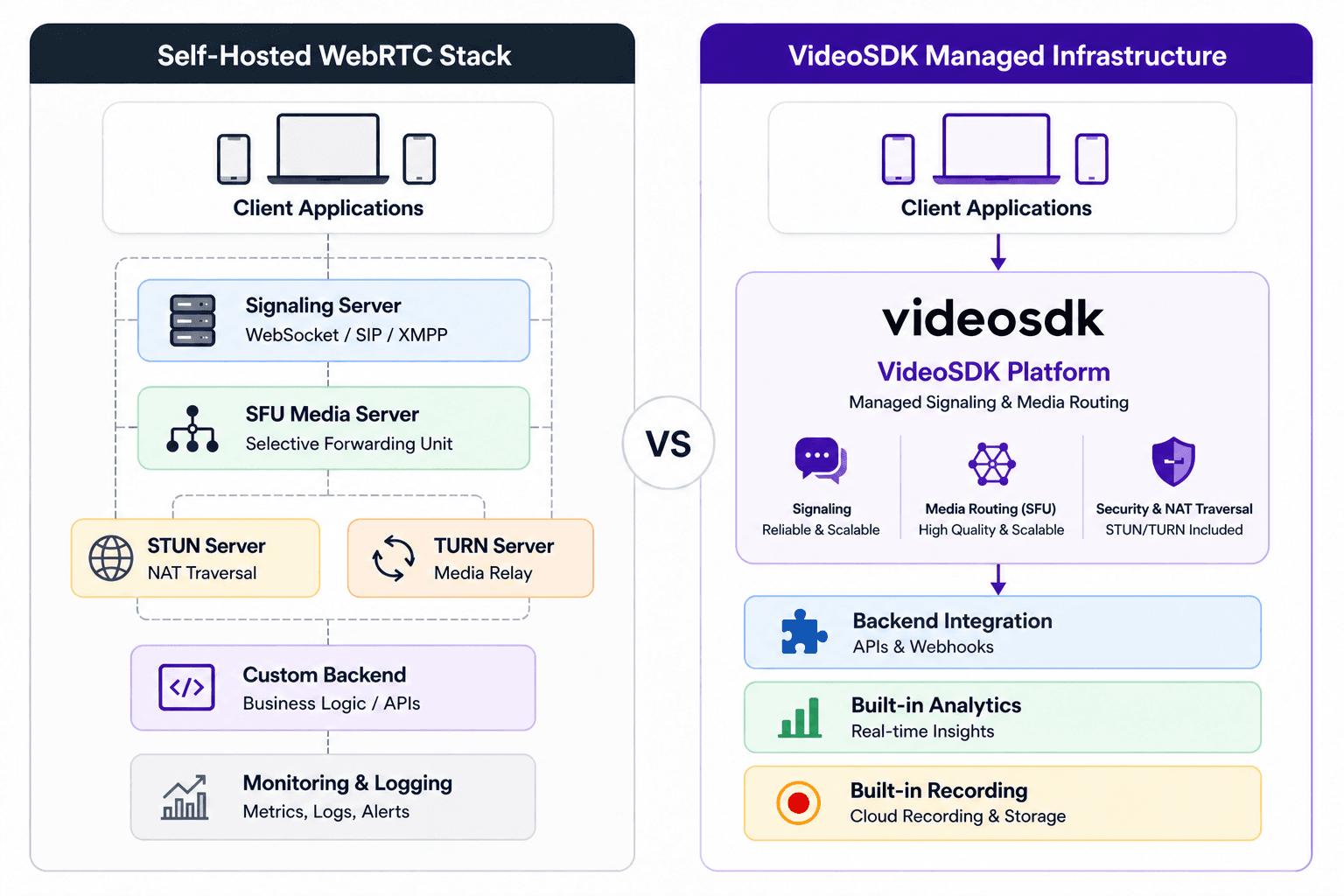
The self-hosted stack places every infrastructure component under the integrator's ownership. Failures in any layer, whether the TURN server under load or the SFU under a sudden spike in participants, require direct intervention.
The VideoSDK model consolidates those components behind a platform boundary. The integrator's client application interacts with a single SDK surface. What sits below that surface, including global media routing, signaling redundancy, and TURN fleet management, is operated by VideoSDK.
Read: What is WebRTC signaling
Side-by-side comparison tables
Table 1: Feature and capability comparison matrix
| Evaluation criterion | Self-hosted WebRTC stack | VideoSDK managed platform |
|---|---|---|
| Time to first working session | 1 to 4 weeks | Hours to 2 days |
| Infrastructure provisioning | Manual (cloud VMs, load balancers, DNS) | Not required |
| SFU media routing | Self-managed (mediasoup, Janus, etc.) | Managed and auto-scaled |
| TURN server management | Self-hosted or third-party (Coturn, Twilio) | Included in platform |
| Recording | Custom implementation required | Built-in API |
| Analytics and monitoring | Custom stack (Prometheus, Grafana, etc.) | Built-in dashboard |
| SDK availability | Community libraries, varying quality | Official SDKs for Web, iOS, Android, RN, Flutter |
| Multi-region scaling | Manual deployment and routing | Managed globally |
| Uptime SLA | Depends on your cloud setup | Platform-defined SLA |
| Compliance readiness | DIY (audit, certs, documentation) | Platform-level assurances |
| DevOps team requirement | High (dedicated infra engineers) | Low (application developers sufficient) |
| Vendor dependency | None | Moderate |
| Cost model | CapEx-heavy initially, variable OpEx | Subscription or usage-based |
Table 2: Use-case-based recommendation
| Project type | Recommended option | Rationale |
|---|---|---|
| Telehealth app for Indian clinics | VideoSDK | Fast delivery, compliance support, low DevOps overhead |
| EdTech platform with 1-to-many sessions | VideoSDK | Built-in live streaming and recording, scalable by default |
| Enterprise video conferencing (internal) | VideoSDK or hybrid | Depends on data residency requirements |
| Government or defence communication | Self-hosted WebRTC | On-premise control mandatory, no third-party data routing |
| Custom broadcast or production platform | Self-hosted WebRTC | Protocol-level control required |
| Startup MVP or pilot project | VideoSDK | Time to market is the primary constraint |
| High-volume consumer app at scale | Evaluate both | Pricing model comparison required at projected volume |
| IoT or embedded device integration | VideoSDK | SDK breadth covers constrained environments |
Detailed criterion analysis
Time to market
Self-hosted WebRTC requires assembling and integrating multiple components before a single call can be placed in production. Configuring mediasoup or Janus, setting up STUN and TURN, writing a signaling server, and testing NAT traversal across network conditions is a multi-week effort at minimum.
VideoSDK provides SDKs with a documented quick-start path. A working prototype can be integrated into an existing application within a day or two. For system integrators in India working on fixed-scope delivery contracts, this difference is commercially significant.
Infrastructure complexity
WebRTC infrastructure involves at least five distinct server-side roles (signaling, SFU, STUN, TURN, backend) that must be coordinated, load-balanced, and monitored independently. Failures are often non-obvious, presenting as degraded call quality rather than clean error states.
VideoSDK abstracts this entirely. Integrators deploy client-side SDK code and call server-side APIs. The infrastructure layer is invisible.
Scalability and global performance
WebRTC scalability challenges are well-documented. An SFU handles media forwarding but must itself be scaled horizontally when session counts grow. Multi-region deployments require geographic load balancing and latency-aware routing. These are non-trivial engineering problems.
VideoSDK handles regional routing internally. Sessions are served from infrastructure closest to participants without explicit configuration by the integrator.
Maintenance and DevOps overhead
A self-hosted WebRTC stack requires ongoing attention. Open-source media servers release updates, security patches, and breaking changes. TURN server configurations need tuning as traffic patterns evolve. Monitoring pipelines must be maintained separately.
A managed video infrastructure platform shifts maintenance responsibility to the vendor. Security patches, capacity upgrades, and protocol changes are handled without integrator involvement.
Reliability and uptime expectations
Uptime on a self-hosted stack is a direct function of the engineering investment made in redundancy and failover. An under-resourced deployment will reflect that in call reliability.
VideoSDK operates as a video API platform with uptime commitments defined at the service level. Integrators benefit from reliability engineering they did not have to build.
Compliance and security readiness
Indian system integrators working in healthcare, education, or finance must address data handling obligations. Self-hosted WebRTC requires direct effort to achieve and document compliance: infrastructure audits, encryption verification, data residency configuration, and policy documentation.
VideoSDK provides documentation on its security posture. Integrators should review VideoSDK's published policies at docs.videosdk.live to verify alignment with specific project requirements before committing.
Customisation and control
Self-hosted WebRTC wins decisively on protocol-level control. Organisations that need to enforce specific codecs, manipulate media pipelines, or route calls through air-gapped infrastructure will find open-source tools more appropriate.
VideoSDK offers customisation at the application layer: layout, participant management, event handling, and recording configuration. Low-level media control is not exposed, which is not a limitation for the majority of enterprise integration use cases.
Cost structure
Self-hosted WebRTC costs are front-loaded and variable:
- Engineering time to build and maintain the stack (often the dominant cost)
- Cloud infrastructure for SFU, TURN, signaling, and backend
- Egress bandwidth, particularly for TURN-relayed traffic in mobile-heavy deployments
- Monitoring and incident response tooling
VideoSDK shifts costs to a usage or subscription model:
- Predictable pricing aligned to sessions, participants, or minutes
- No infrastructure CapEx
- Engineering effort focused on product features, not plumbing
For smaller to mid-size projects, VideoSDK typically delivers a lower total cost of ownership within the delivery window. At very large scales, the comparison requires modelling specific volume against published pricing.
Final verdict by use case
System integrators choosing between VideoSDK and a self-hosted WebRTC stack should apply the following decision framework:
Choose VideoSDK when:
- Project timelines are under 3 months
- The team does not include dedicated real-time infrastructure engineers
- Use cases are standard: video calls, webinars, live sessions, or recorded meetings
- The project is a pilot, MVP, or client-facing product with near-term deadlines
- Compliance documentation is needed quickly without building an audit trail from scratch
Choose self-hosted WebRTC when:
- Data must never leave a specific geographic boundary or private network
- The organisation has an existing infrastructure team with WebRTC or media server experience
- The use case requires protocol-level customisation not achievable through an API platform
- Long-term operational ownership is preferred over vendor dependency
For the large majority of IT agencies and system integrators in India, VideoSDK aligns better with project economics, team capacity, and client delivery expectations.
Key takeaways
- System integrators VideoSDK vs open-source WebRTC is fundamentally a trade-off between control and operational burden, not a question of capability.
- Open-source WebRTC requires assembling signaling, SFU, STUN, TURN, backend, and monitoring as separate components, each requiring independent maintenance.
- VideoSDK compresses time to market from weeks to days by managing infrastructure, media routing, recording, and analytics at the platform level.
- For most enterprise integration projects in India, the cost of building and maintaining a self-hosted WebRTC stack exceeds the cost of a managed platform across a typical project lifecycle.
- The exception is deployments that require on-premise control, air-gapped operation, or deep protocol customisation, where open-source tools remain the appropriate choice.
FAQ
Q1: Can VideoSDK be used entirely without exposing infrastructure to end users?
Yes. VideoSDK operates as a server-side managed layer. Client applications interact with SDK methods and the platform handles all media routing, TURN, and signaling. End users have no visibility into or contact with the infrastructure.
Q2: What is a TURN server and why does it matter for India-based deployments?
A TURN server (Traversal Using Relays around NAT) is a relay server that handles media traffic when a direct peer-to-peer or SFU connection cannot be established due to firewalls or NAT configurations. In India, enterprise and ISP-level firewall configurations make TURN relaying frequent. Managing your own TURN fleet introduces significant egress cost and operational work.
Q3: Does VideoSDK support server-side recording?
Yes. According to VideoSDK's documentation, the platform includes a built-in recording API that captures sessions server-side and stores them in cloud storage accessible via the dashboard or API. Custom recording pipelines are not required.
Q4: Can a system integrator migrate from VideoSDK to a self-hosted stack later?
Yes, but migration involves rebuilding the infrastructure layer from scratch. Integrators planning for eventual migration should design their application layer to abstract SDK-specific calls behind internal interfaces, reducing the surface area of a future transition.
Q5: How does VideoSDK handle large group sessions (50 or more participants)?
VideoSDK's documentation describes support for large interactive sessions and live streaming scenarios. Specific participant limits and session configurations should be verified against current documentation at docs.videosdk.live for the relevant use case.
Q6: Is open-source WebRTC suitable for a government project in India?
For projects with strict data sovereignty or on-premise mandates, self-hosted WebRTC using open-source components on government-approved cloud or private infrastructure is typically required. Managed platforms may not satisfy procurement rules in such contexts.
Q7: What is the typical integration timeline for VideoSDK in a system integration project?
Based on available SDK documentation, a basic integration covering session creation, participant join, and media handling can be completed in one to two days. A production-grade integration including recording, authentication, and event handling typically takes one to two weeks.