



TLDR: Adding video calls to your product does not require deep engineering expertise. Most founders can ship a working video feature within days using a video calling API or SDK. The main decision is not how to build it but whether to build it or buy it.
What you actually need to know to get started
If you are a non-technical founder exploring how to add video calls to your product, you have two realistic paths: integrate a pre-built video calling API for startups, or build your own infrastructure using WebRTC. For most early-stage products, an API or SDK is the faster, cheaper, and safer path. Understanding the core components and trade-offs will help you make a confident decision without needing an engineering degree.
Introduction: Why video is now a product expectation, not a feature
Video communication has moved from a competitive differentiator to a baseline expectation. Telehealth platforms, edtech products, HR tools, legal services, and marketplace platforms all face user pressure to embed live video inside the product experience rather than redirecting users to a separate tool like Zoom or Google Meet.
For a non-technical founder, the challenge is not awareness. It is decision confidence. Should you buy or build video infrastructure? Which SDK do you pick? What does "scalable" even mean in this context? What does it cost at 1,000 concurrent users versus 10,000?
This guide answers those questions with plain frameworks and concrete checklists. No code required.
Understanding the technology landscape: WebRTC and what sits on top of it
WebRTC (Web Real-Time Communication): WebRTC is an open-source standard that enables real-time audio, video, and data transfer directly between browsers or devices without a plugin. It is the protocol layer underneath virtually every video calling product on the market.
WebRTC is powerful but low-level. Building on raw WebRTC requires managing network traversal, signalling, codec negotiation, and media routing. That complexity is why the ecosystem of SDKs and APIs exists.
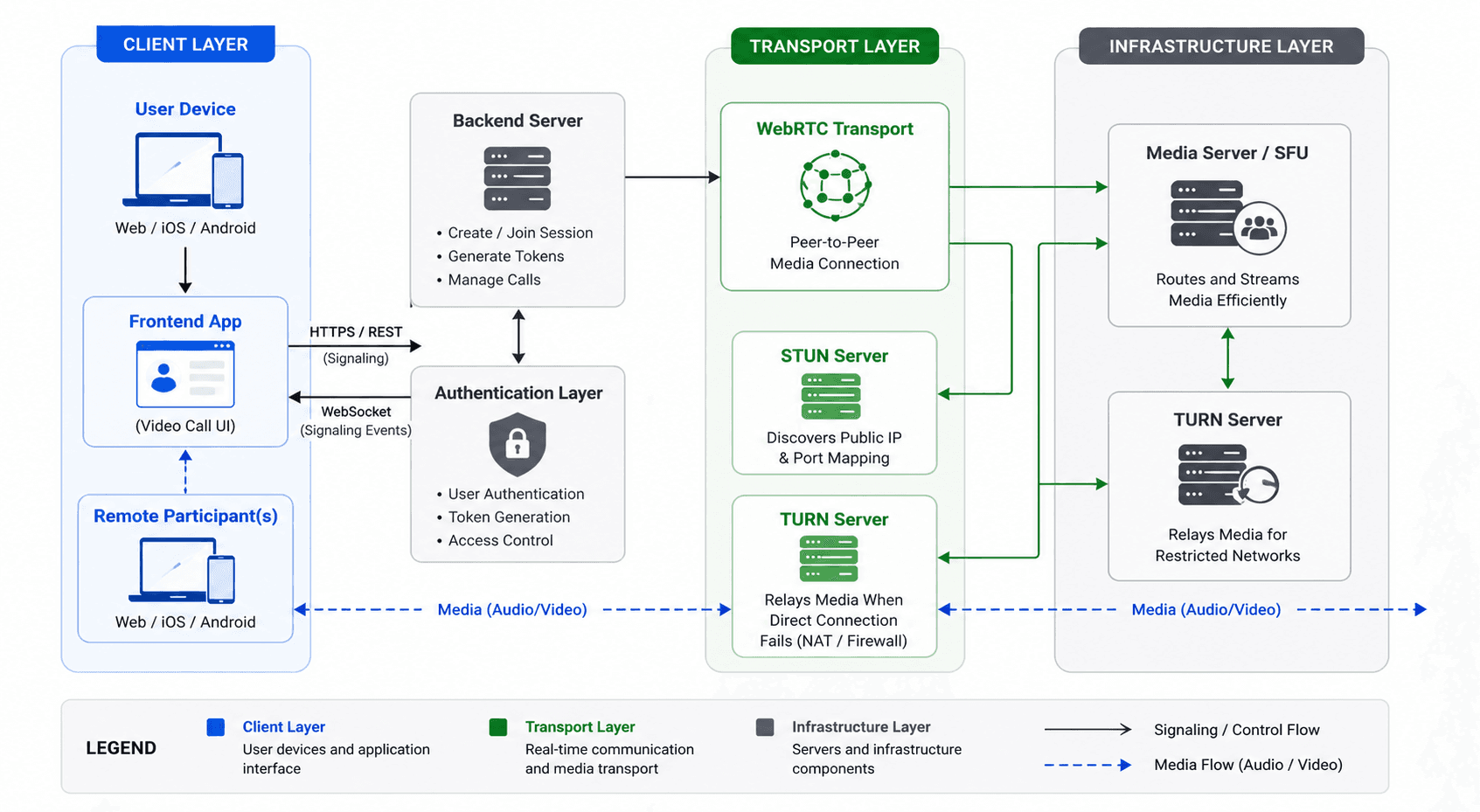
Key infrastructure components you need to know
STUN server (Session Traversal Utilities for NAT): A STUN server helps two devices discover their public IP addresses so they can connect to each other across firewalls and networks.
TURN server (Traversal Using Relays around NAT): A TURN server acts as a relay when a direct peer-to-peer connection is not possible, which happens in restrictive corporate or mobile networks.
SFU (Selective Forwarding Unit): An SFU is a media server that receives video streams from participants and selectively forwards them to others, enabling group calls without every participant uploading their video to everyone else.
Signalling server: A signalling server coordinates the initial connection handshake between devices, exchanging metadata so the WebRTC session can begin.
As a founder, you do not need to build any of these yourself. But you need to know they exist because any video calling API or SDK you evaluate will either manage these for you or require you to bring your own.
The core decision framework: Build vs buy video infrastructure
This is the most important decision you will make. Get it wrong and you lose months of engineering time, or you end up locked into a vendor that cannot scale with you.
Framework: Four-question build vs buy test
Answer each question honestly before moving forward.
1. Is video your core product differentiation?
If video is a peripheral feature (for example, adding a consultation call to a booking platform), buy. If your entire product value depends on unique video behavior (for example, a spatial video social platform), consider building.
2. How fast do you need to ship?
Building custom WebRTC infrastructure takes 3 to 6 months of dedicated engineering time for a production-grade solution. A video SDK can get you to a working prototype in days.
3. What is your engineering team's capacity?
Maintaining a WebRTC stack requires specialists in network engineering, media processing, and real-time systems. If your team does not have that expertise today, buying buys you time while you grow.
4. What are your compliance and data residency requirements?
Some regulated industries (healthcare, finance, government) require data to stay within specific geographic boundaries. Evaluate whether a vendor can meet those requirements before committing.
Must Read: Build or Buy Video Calling infrastructure
Decision output
| Your situation | Recommended path |
|---|---|
| Early-stage, pre-revenue, shipping fast | Buy (API or SDK) |
| Mid-stage, video is core, team has bandwidth | Hybrid (SDK with custom signalling) |
| Funded, video is the entire product, strong eng team | Build or managed infrastructure |
| Regulated industry with strict data requirements | Vendor with region-specific deployment or self-hosted option |
Infrastructure components and what you are actually paying for
When you evaluate a video calling API for startups, you are not just buying a button that says "Start Call." You are paying for a managed stack that includes:
- STUN and TURN server infrastructure across global regions
- SFU or media server capacity that scales with concurrent users
- Signalling and session management
- Codec support and adaptive bitrate streaming
- Recording storage and playback pipelines
- SDK maintenance across iOS, Android, web, and React Native
- Compliance certifications such as SOC 2 or HIPAA readiness
Understanding this list matters because it is what you would have to build and maintain yourself on the alternative path.
Cost considerations: What does video actually cost to run?
Cost in video infrastructure is driven by three variables: concurrent users, duration of calls, and feature complexity (recording, transcription, livestreaming).
Cost model comparison
| Cost driver | Self-build | API/SDK vendor |
|---|---|---|
| Engineering setup (one-time) | High (3-6 months of salaries) | Low (integration days to weeks) |
| Server/cloud infrastructure | Variable, directly managed | Included in usage pricing |
| Maintenance and updates | Ongoing engineering cost | Covered by vendor |
| Scaling cost at 1,000+ concurrent users | Requires active capacity planning | Auto-scales, billed by usage |
| Compliance certifications | You must obtain them | Often vendor-provided |
A typical rule of thumb: for products under 10,000 monthly active video users, a vendor API is almost always cheaper than self-building when you factor in total engineering cost.
At scale, the calculus shifts. At very high usage volumes, engineering a proprietary stack can reduce marginal cost per minute. But most early-stage founders are optimising for the wrong variable when they worry about per-minute pricing at 1 million users before they have 100.
Scalability planning: Thinking ahead without over-engineering
Scalability in real-time communication: Scalability is the ability of your video infrastructure to handle increasing numbers of concurrent sessions without degrading call quality or requiring manual intervention.
The biggest scalability mistake non-technical founders make is conflating user count with concurrent session count. If you have 10,000 registered users but only 200 are ever in a call at the same moment, your infrastructure load is based on 200 concurrent sessions, not 10,000 users.
Scalability checklist
- Estimate your peak concurrent call sessions, not total user count
- Ask vendors about their SFU architecture and how they handle geographic distribution
- Confirm whether the SDK supports adaptive bitrate (automatically reducing video quality on poor connections)
- Ask about fallback behaviour when TURN relay is needed
- Clarify SLA uptime guarantees and incident response times
Read: How to Scale Video KYC to 1 Million+ Monthly Verifications
Implementation roadmap: Step-by-step checklist for non-technical founders
Phase 1: Define requirements (1 to 2 weeks)
- Write a one-page video feature spec covering: one-to-one or group calls, mobile or web or both, recording needs, approximate MAU and concurrent session estimates
- List any compliance requirements: HIPAA, GDPR, RBI, PDPB
- Identify whether you need livestreaming or recording in addition to live calls
- Decide on your data residency preference (India, US, EU, or global)
Phase 2: Evaluate vendors or SDK options (1 to 2 weeks)
- Build a vendor shortlist based on platform coverage, pricing model, and compliance certifications
- Request a free trial or sandbox access from each shortlisted vendor
- Have your engineering lead (or a contractor) run a prototype integration during trial
- Test call quality on low-bandwidth connections relevant to your target market
Phase 3: Integration and QA (2 to 6 weeks depending on team)
- Integrate the chosen SDK into your staging environment
- Implement authentication so only your users can start or join sessions
- Test edge cases: dropped connections, browser permissions, mobile background behavior
- Confirm recording and playback work end-to-end if required
- Run load tests at 2x your expected peak concurrent session count
Phase 4: Launch and monitor (ongoing)
- Set up real-time monitoring for call quality metrics (packet loss, jitter, latency)
- Establish a feedback loop with early users to catch quality issues by geography or device
- Review vendor usage invoices monthly to validate cost projections
Comparison of approaches and representative platforms
Video SDK (Software Development Kit): A video SDK is a pre-packaged library that a developer integrates into an existing application to add real-time video calling capabilities without building transport or media logic from scratch.
| Approach | Examples | Best for | Limitations |
|---|---|---|---|
| Fully managed video API | VideoSDK, Daily, Agora, Twilio | Fast integration, broad platform support | Per-minute costs scale up at high volume |
| WebRTC SaaS platform | Whereby Embedded, Jitsi as a Service | Non-technical embed use cases | Limited customisation |
| Open source self-hosted | Jitsi Meet self-hosted, mediasoup | Cost control at scale, full ownership | High engineering and DevOps burden |
| Cloud media server | AWS Kinesis Video, GCP WebRTC | Teams already on a single cloud provider | Complex setup, not optimised for calls |
VideoSDK, for example, provides SDKs for React, React Native, Flutter, iOS, and Android, along with support for real-time audio and video, session recording, interactive livestreaming, and screen sharing. It exposes these capabilities through a unified API so a single integration covers multiple platforms and use cases.
Common mistakes and misconceptions
Mistake 1: Treating WebRTC as a product, not a protocol
WebRTC is the foundation, not the building. Founders who research WebRTC and then try to build directly on it often underestimate the operational complexity. The correct question is not "how do we use WebRTC" but "which layer above WebRTC fits our needs."
Mistake 2: Confusing concurrent users with registered users for cost planning
Video infrastructure costs are driven by concurrent sessions. Plan your cost model around peak simultaneous call usage, not total user base.
Mistake 3: Skipping low-bandwidth testing
Many Indian and global-south markets have variable mobile connectivity. A product that works perfectly on a Bangalore office Wi-Fi connection may break for users on 3G in a Tier 2 city. Always test on throttled connections before launch.
Mistake 4: Ignoring mobile platform requirements
If your users are primarily on mobile, your SDK choice must support native iOS and Android, not just a mobile web wrapper. Native SDKs offer better access to device hardware for camera and microphone management.
Mistake 5: Deferring compliance to post-launch
In regulated sectors like healthcare (HIPAA, ABDM in India), finance (RBI), or education (FERPA), compliance cannot be retrofitted. Evaluate vendor certifications before you write a line of integration code.
Mistake 6: Over-customising before validating demand
Many founders spend weeks building a custom video UI before confirming that users actually want or use the video feature. Integrate a working but minimal video experience first, validate usage, then invest in customisation.
Key takeaways
- For most non-technical founders, a video calling API or SDK is the right starting point; building from scratch on WebRTC is rarely justified before product-market fit.
- The four-question build vs buy test (differentiation, speed, team capacity, compliance) is a reliable framework for making this decision without technical depth.
- Cost planning for video infrastructure should be anchored to concurrent session counts, not registered user totals.
- Low-bandwidth testing is not optional if your product serves users in India or other markets with variable connectivity.
- Compliance requirements in regulated sectors must be validated before vendor selection, not after launch.
Frequently asked questions
Q1. What is the difference between a video calling API and a video SDK?
A video calling API is a set of HTTP or WebSocket endpoints that your backend calls to manage sessions, tokens, and recordings. A video SDK is a client-side library that your app integrates to render the video UI and connect to the media infrastructure. Most modern video platforms provide both: an API for server-side session management and an SDK for client-side rendering. In practice, you use both together.
Q2. Do I need a technical co-founder to add video calls to my product?
Not necessarily. Many video SDKs are designed for integration by developers with general web or mobile experience, not real-time communication specialists. A front-end developer or a capable freelancer can complete a basic integration. What requires more expertise is building custom media processing, recording pipelines, or on-premise infrastructure.
Q3. How much does it cost to add video calling to a startup product?
Costs depend on your usage model. Most vendor APIs charge per-minute of video processed, with rates typically ranging from USD 0.001 to USD 0.004 per participant minute depending on features enabled. A product with 1,000 monthly users averaging two 30-minute calls per month would generate roughly 60,000 participant minutes, which translates to USD 60 to USD 240 per month at those rates. Always model your own usage pattern against vendor pricing pages rather than relying on generic estimates.
Q4. What is real-time communication architecture for a startup?
Real-time communication (RTC) architecture for a startup typically includes a frontend SDK (for rendering audio/video in the app), a signalling layer (to coordinate session setup), STUN and TURN servers (for network traversal), and an SFU or media server (for routing video streams in group calls). A backend authentication layer issues session tokens so only authorised users can join calls. When you use a video API vendor, they manage all of this except the authentication layer, which integrates with your existing user system.
Q5. Is WebRTC secure for sensitive use cases like telehealth?
WebRTC encrypts media streams by default using DTLS-SRTP (Datagram Transport Layer Security - Secure Real-time Transport Protocol), which is a strong baseline. However, security in telehealth or other regulated sectors depends on the entire stack: vendor compliance certifications (HIPAA BAA, SOC 2), data residency controls, access logging, and session recording encryption. Evaluate vendors against your specific regulatory framework, not just the protocol layer.
Q6. Can I add video calling to a mobile app without rebuilding it?
Yes. Most major video SDKs provide native libraries for iOS (Swift/Objective-C) and Android (Kotlin/Java), as well as cross-platform SDKs for Flutter and React Native. If your app is already in production, you can integrate a video SDK as an additional module without restructuring the entire application. The integration scope depends on how deeply the video feature needs to connect to your app's authentication and data layers.
Q7. What happens if the video vendor I choose goes down?
Vendor downtime is a real risk. Mitigate it by: checking the vendor's historical uptime SLA and incident reports before signing, understanding their global CDN and server redundancy architecture, and ensuring your integration does not hard-depend on a single regional endpoint. Some vendors offer enterprise SLAs with financial penalties for downtime. For mission-critical use cases, consider multi-vendor fallback strategies at the session initiation layer.
Q8. How do I choose between building for web-first or mobile-first?
Let your user data decide. If more than 60% of your current users are on mobile devices, prioritise a native mobile SDK. If your product is browser-based, a web SDK covering Chrome, Firefox, and Safari is your starting point. Most vendors support both, but the quality of their mobile SDK, especially on Android with its fragmented device landscape, varies significantly. Always test the SDK on the specific device types your target users actually use.