


Cloudflare WebSocket support lets you proxy persistent, bidirectional connections through Cloudflare's global edge network without changing your application logic. The edge terminates the HTTP upgrade handshake and forwards the raw TCP stream to your origin, adding latency reduction, DDoS protection, and TLS termination. For serverless real-time architectures, Cloudflare Workers and Durable Objects extend this with event-driven WebSocket endpoints and hibernation for cost-efficient scaling. If you need production-grade real-time video or audio instead of raw sockets, VideoSDK provides managed WebRTC infrastructure that handles signaling, media routing, and participant management out of the box.
Real-time applications have moved from nice-to-have to expected. Users want chat messages delivered instantly, live dashboards that update without a page refresh, multiplayer game state synced across continents, and notifications that arrive the moment something happens. Behind nearly all of these experiences sits a WebSocket connection holding a persistent pipe open between client and server.
Developers increasingly route those connections through Cloudflare's edge network to gain global proximity, built-in DDoS mitigation, and automatic TLS. But Cloudflare's WebSocket support comes with specific behaviors, limits, and architectural patterns that catch people off guard. Connection idle timeouts, upgrade handshake requirements, billing quirks, and the interaction between Workers, Durable Objects, and your origin all matter when you ship to production.
This guide walks through everything you need to know about Cloudflare WebSocket in 2026, from basic proxying to advanced serverless patterns, with best practices for reliability, security, and cost control.
What Is a WebSocket?
A WebSocket is a communication protocol that provides full-duplex, persistent communication over a single TCP connection. Unlike HTTP, where the client requests and the server responds in a request-response cycle, WebSocket lets both sides send messages independently at any time once the connection is established.
The protocol starts life as an HTTP request. The client sends an HTTP GET with an Upgrade header asking the server to switch protocols. If the server agrees, it responds with a 101 Switching Protocols status, and from that point forward the TCP connection carries WebSocket frames instead of HTTP requests. This handshake mechanism means WebSockets work through existing HTTP infrastructure, including proxies and load balancers, as long as they understand the upgrade signal.
Typical use cases include chat applications, live sports tickers, collaborative editing tools, multiplayer game lobbies, financial trading dashboards, and IoT telemetry streams. Any scenario where the server needs to push data to the client without waiting for a poll benefits from WebSocket's low-latency, bidirectional channel.
For applications that need real-time video and audio rather than text or binary data, WebRTC is the standard protocol. VideoSDK builds on WebRTC to provide a complete video calling SDK that handles media streams, participant management, and network adaptation, which raw WebSockets alone cannot deliver.
Understanding Cloudflare WebSocket Support
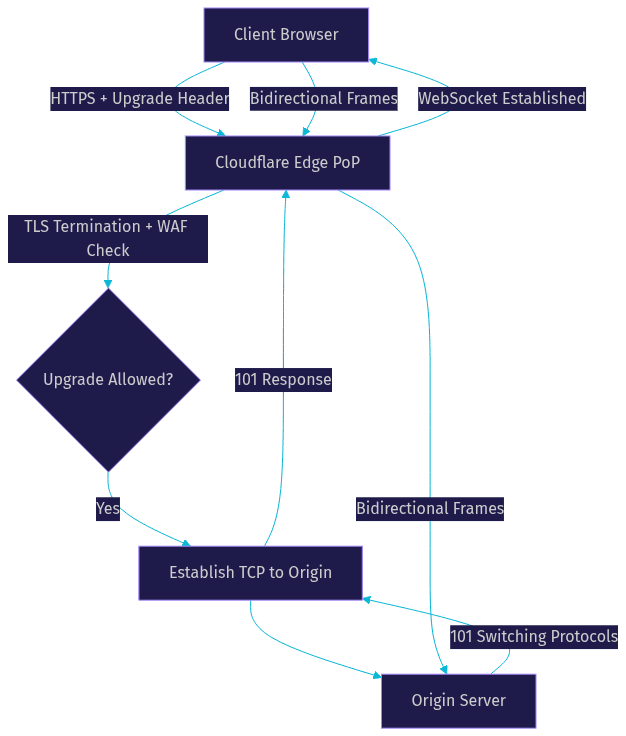
Cloudflare acts as a reverse proxy for WebSocket connections. When a client opens a WebSocket to your domain, the connection hits the nearest Cloudflare edge data center first. Cloudflare terminates the TLS, inspects the initial HTTP upgrade request, and then establishes its own TCP connection to your origin server. Once both sides complete their respective handshakes, Cloudflare pipes data bidirectionally between client and origin for the lifetime of the connection.
This architecture means your origin server never sees the client's real TCP connection. It sees a connection from Cloudflare's edge. The client's real IP address is passed through in the standard CF-Connecting-IP header. Your application logic does not need to change to support this proxying, but you should be aware that connection-level details like source port and TCP keepalive behavior differ from a direct connection.
Cloudflare's edge also applies its security stack to the initial upgrade request. The Web Application Firewall, rate limiting rules, and bot management features all inspect the HTTP request before the protocol switch happens. Once the upgrade completes and the connection becomes a WebSocket, most HTTP-layer security features no longer apply to individual frames, though the connection itself remains protected by Cloudflare's network-level DDoS mitigation.
The key advantage is latency. Because Cloudflare has over 300 edge locations worldwide, the client-to-edge leg of the WebSocket connection is typically very short. The edge-to-origin leg may be longer, but Cloudflare's backbone and Argo Smart Routing can optimize that path. For globally distributed users, this split connection model often produces lower round-trip times than connecting directly to a single origin region.
Enabling Cloudflare WebSocket Settings
Cloudflare enables WebSocket support by default on all plan tiers, including the free plan. For most origins, no configuration change is needed. The edge automatically detects the Upgrade header and proxies the connection.
If you need to verify or toggle the setting, navigate to the Network tab in your Cloudflare dashboard for the relevant domain. The WebSocket toggle appears in the network settings section. When enabled, Cloudflare processes upgrade requests normally. When disabled, upgrade requests are dropped and the client receives an error response.
You can also manage this setting programmatically through the Cloudflare API by updating the zone's settings endpoint. This is useful if you manage multiple zones or want to enforce configuration through infrastructure-as-code pipelines. The API accepts a boolean flag for WebSocket support and returns the updated zone configuration.
One important note: if your origin server itself does not support WebSockets or is behind a load balancer that strips Upgrade headers, enabling the Cloudflare toggle alone will not fix the problem. The origin must be configured to accept and handle WebSocket upgrade requests.
Best Practices for Reliable Cloudflare WebSocket Connections
Reliable WebSocket connections require attention to keep-alive signaling, timeout alignment, security posture, and scaling strategy. Each of these areas has specific considerations when Cloudflare sits in the middle.
Keep-Alive and Ping/Pong
WebSocket connections are persistent TCP connections, and TCP connections can silently die if a network device in the path drops them. Firewalls, NAT gateways, and load balancers all have idle timeout values that close connections after a period of inactivity. Cloudflare's edge is no exception.
To prevent idle-timeout closures, your application should send periodic WebSocket ping frames to the client and expect pong frames in return. The WebSocket protocol defines ping and pong as control frames that the receiving side must respond to automatically at the protocol level. A typical interval is every 30 to 60 seconds. If your application sends application-level heartbeat messages instead of protocol-level ping frames, make sure the client responds with an acknowledgment message so you can detect unresponsive connections.
Without keep-alive, connections that go quiet for a few minutes will be silently terminated by intermediate network devices. The client and server may not learn about the disconnection until one side tries to send data and fails. This leads to ghost connections that consume resources on both sides.
Origin Timeout Configuration
Cloudflare's edge maintains a timeout for idle WebSocket connections. If no data flows in either direction for the configured timeout period, Cloudflare closes the connection. The default idle timeout varies by plan tier, and enterprise customers can negotiate custom values.
Your origin server and client-side application should have timeout values that are shorter than or equal to Cloudflare's edge timeout. If your origin closes idle connections after 60 seconds but Cloudflare waits 100 seconds, clients will experience unexpected disconnections that appear to come from the server. Align all three layers: client keep-alive interval, origin idle timeout, and Cloudflare edge timeout.
For long-lived connections that may have natural quiet periods, such as a notification system that only sends data when an event occurs, rely on ping frames rather than application data to keep the connection alive.
Security Considerations
Cloudflare's WAF and rate limiting rules apply to the initial HTTP upgrade request but not to subsequent WebSocket frames. This means you should enforce authentication and authorization during the upgrade request, before the protocol switches. Include authentication tokens in the upgrade request headers or query parameters, and validate them server-side before accepting the connection.
For TLS, Cloudflare automatically provides HTTPS and WSS (WebSocket Secure) at the edge. Your client should always connect using the WSS scheme, never WS. Cloudflare's Universal SSL covers this by default. If you use Cloudflare's Full or Full Strict SSL mode for origin connections, the edge-to-origin leg is also encrypted.
Consider using Cloudflare's IP Access Rules and firewall rules to restrict WebSocket endpoints to known client IP ranges if your application is not public-facing. For public applications, rate limiting on the upgrade request helps prevent connection flooding attacks where a botnet opens thousands of WebSocket connections to exhaust server resources.
Scaling Tips
Cloudflare imposes connection limits that vary by plan. The free plan supports a generous number of concurrent WebSocket connections per domain, but high-traffic applications should evaluate the Pro, Business, or Enterprise tiers for higher limits and dedicated support.
For horizontal scaling, distribute WebSocket connections across multiple origin servers using Cloudflare's load balancing features. Session affinity, also called sticky sessions, ensures that a given client's connection routes to the same origin server for the connection's lifetime. Without session affinity, a reconnecting client might land on a different origin that does not have its session state.
If you use Cloudflare Workers as your WebSocket endpoint instead of a traditional origin, you eliminate the origin scaling problem entirely. Workers run at the edge, close to the client, and can handle WebSocket connections without a backend server. This is where Durable Objects become essential for coordinating state across multiple Worker instances.
Monitoring and Analytics for Cloudflare WebSockets
Monitoring WebSocket traffic through Cloudflare requires understanding how the platform counts and measures these connections, since they differ significantly from standard HTTP requests.
Request Counting
Cloudflare counts only the initial HTTP upgrade request as a billable request. Once the WebSocket connection is established, subsequent frames sent over that connection do not count as additional HTTP requests. This means a single WebSocket connection that stays open for hours and exchanges thousands of messages counts as exactly one request for billing purposes.
This counting model is favorable for high-frequency, low-volume messaging applications like chat or live dashboards. However, applications that open many short-lived WebSocket connections, such as a page that reconnects on every navigation, will generate more billable requests than a single long-lived connection.
Bandwidth Measurement
Data transferred over WebSocket connections counts toward your bandwidth usage. Cloudflare measures both inbound and outbound bytes. Outbound data, meaning data sent from the origin through Cloudflare to the client, is typically the larger portion for real-time applications like live dashboards or streaming notifications.
You can view bandwidth usage in the Cloudflare dashboard under the Analytics tab. The dashboard shows aggregate bandwidth broken down by protocol, including WebSocket traffic. For granular analysis, the Cloudflare GraphQL Analytics API lets you query WebSocket-specific metrics programmatically and build custom dashboards.
Traffic Analytics Dashboard
The Cloudflare analytics dashboard provides visibility into WebSocket connections alongside regular HTTP traffic. You can filter by time range, hostname, and data center to understand where your WebSocket traffic originates and how it distributes across Cloudflare's edge locations.
For deeper analysis, use the GraphQL Analytics API to query metrics like concurrent WebSocket connections, bytes transferred, and connection duration. This is particularly useful for capacity planning and identifying traffic patterns that may indicate abuse or misconfiguration.
Using Cloudflare Workers and Durable Objects with WebSockets
Cloudflare Workers can act as WebSocket endpoints directly, without a traditional origin server. This serverless approach to real-time communication runs your WebSocket handling logic at the edge, close to users, and scales automatically with demand. The combination of Workers and Durable Objects provides a powerful architecture for stateful real-time applications.
Workers as WebSocket Endpoints
A Worker accepts a WebSocket upgrade by responding to the client's HTTP request with a 101 Switching Protocols response and a WebSocket server-side object. The Worker then registers event listeners on that object for incoming messages, connection open, and connection close events. This event-driven model fits naturally into the Worker execution model.
When a client connects, the Worker receives the upgrade request, can inspect headers and query parameters for authentication, and then either accepts or rejects the upgrade. Once accepted, the Worker holds the server-side WebSocket object and can send messages to the client at any time, not just in response to incoming messages.
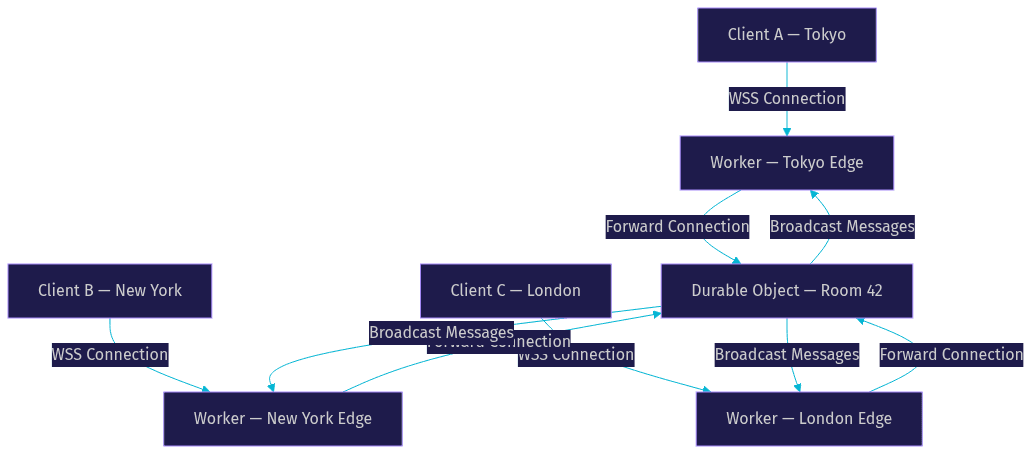
Workers run in Cloudflare's edge locations worldwide, so a client in Tokyo connects to a Worker in Tokyo, and a client in New York connects to a Worker in New York. This geographic distribution minimizes latency for the client-to-server leg of the connection.
Durable Objects for Coordination
The challenge with Workers as WebSocket endpoints is state coordination. Each Worker invocation is independent, and two clients connected to different edge locations are handled by different Worker instances. If those clients need to share state, such as being in the same chat room or game lobby, you need a coordination layer.
Durable Objects solve this problem. A Durable Object is a single-threaded, stateful object that lives in one Cloudflare data center. It acts as the single point of coordination for a specific entity, like a chat room or game session. Workers from any edge location can forward messages to the same Durable Object, which serializes access and maintains consistent state.
The pattern works like this: a client connects to a Worker at the nearest edge. The Worker determines which Durable Object represents the client's context, such as a room ID. The Worker forwards the client's WebSocket connection to that Durable Object. The Durable Object holds connections from all clients in that room, regardless of which edge location they connected through, and broadcasts messages among them.
This architecture gives you globally distributed connection endpoints with a single, consistent stateful coordinator per room or session.
Hibernation API for Cost Savings
Durable Objects incur charges based on the duration they are active and the number of requests they process. A Durable Object that stays active for hours holding idle WebSocket connections generates continuous duration charges even when no messages are flowing.
The Hibernation API addresses this. When a Durable Object has no active work to do, it can enter a hibernation state. The WebSocket connections it holds remain open at the platform level, but the Durable Object's execution context is suspended. When a new message arrives on any of those connections, Cloudflare wakes the Durable Object, delivers the message, and the object can process it and return to hibernation.
This dramatically reduces duration charges for applications with bursty traffic patterns. A chat room that is quiet for hours but occasionally has active conversation periods only incurs duration charges during the active periods. The connections stay alive, users experience no disconnection, and the billing reflects actual work rather than idle connection holding.
For developers building real-time applications that need video, audio, and data channels rather than just text messaging, VideoSDK's interactive live streaming provides a managed alternative where signaling, media routing, and participant state are handled by VideoSDK's infrastructure rather than custom Durable Object logic.
Common Issues and Troubleshooting
WebSocket connections through Cloudflare generally work reliably, but specific issues arise often enough that every developer should know how to diagnose them.
Upgrade Failures
The most common failure is a rejected upgrade request. This happens when the client's HTTP request does not include the required Upgrade and Connection headers, or when the origin server does not respond with a 101 status code. Cloudflare's WAF can also block upgrade requests if a security rule matches the request pattern, particularly if the request includes unusual headers or query parameters that look suspicious.
To diagnose, check the Cloudflare dashboard for blocked requests in the security events log. If the WAF is blocking legitimate upgrade requests, you may need to add a WAF exception rule for your WebSocket endpoint path. On the origin side, verify that your server framework is configured to accept WebSocket upgrades on the expected route.
Unexpected Disconnections
Connections that drop unexpectedly usually stem from one of three causes: origin server restarts, network interruptions, or keep-alive misconfiguration. If your origin server restarts or deploys new code, all existing WebSocket connections to that origin are terminated. Use rolling deployments or connection draining to minimize this impact.
Network interruptions between Cloudflare's edge and your origin can cause the edge-to-origin leg of the connection to fail while the client-to-edge leg remains open. Cloudflare will close the full connection in this case. The client should implement automatic reconnection with exponential backoff.
Keep-alive misconfiguration is the most insidious cause. If neither side sends ping frames and the connection goes idle, intermediate network devices will close it after their idle timeout expires. The disconnection appears random because the timeout period varies by network path. Implement consistent ping intervals on both client and server to prevent this.
Debugging Tools
Cloudflare provides several tools for debugging WebSocket issues. The dashboard analytics show connection counts and bandwidth, which can reveal patterns like mass disconnections. For detailed request-level debugging, Cloudflare Logs, available on enterprise plans, include WebSocket connection events with timestamps and edge data center locations.
The EdgeStartTimestamp field in Cloudflare Logs tells you exactly when the edge accepted the upgrade request, which helps correlate client-side errors with edge-side events. For client-side debugging, browser developer tools show WebSocket frames in real time under the Network tab, including the upgrade request and response headers.
Third-party WebSocket testing tools, such as browser-based WebSocket clients and command-line testers, help isolate whether a problem is client-side, Cloudflare-side, or origin-side by connecting directly to the origin and bypassing Cloudflare.
Cost Considerations and Limits
Cloudflare's free plan includes WebSocket support with no additional charge beyond standard request and bandwidth billing. The initial upgrade request counts as one HTTP request. Data transferred over the connection counts as bandwidth. For most applications, the bandwidth cost dominates because WebSocket connections stay open and transfer data continuously.
Enterprise plans measure WebSocket usage differently, with custom agreements on concurrent connections, bandwidth, and request volume. If your application expects tens of thousands of concurrent connections or high-bandwidth streaming over WebSockets, contact Cloudflare for enterprise pricing tailored to your traffic profile.
Durable Objects have their own pricing model based on request count and duration. The Hibernation API is the single most effective cost reduction tool for Durable Object-based WebSocket applications. Without hibernation, a Durable Object holding 100 idle chat rooms generates duration charges for all 100 objects continuously. With hibernation, only rooms with active message flow incur duration charges, and idle rooms cost nothing beyond the initial connection setup.
For applications that need real-time video and audio communication, raw WebSockets are not the right tool. VideoSDK handles the complexity of WebRTC media negotiation, adaptive bitrate streaming, and participant management through a comprehensive real-time communication API, letting you focus on application features rather than transport-layer engineering.
Definitions Glossary
WebSocket: A communication protocol providing full-duplex, persistent communication over a single TCP connection, initiated via an HTTP upgrade handshake.
Cloudflare Edge: Cloudflare's global network of data centers that terminates client connections close to the user and proxies traffic to the origin server.
WebSocket Upgrade Request: The initial HTTP GET request containing Upgrade and Connection headers that asks the server to switch from HTTP to the WebSocket protocol.
Durable Object: A single-threaded, stateful object in Cloudflare's Workers runtime that provides a coordination point for WebSocket connections across multiple edge locations.
Hibernation API: A Cloudflare Workers feature that suspends a Durable Object's execution while keeping its WebSocket connections alive, reducing duration-based charges during idle periods.
Ping/Pong Frames: WebSocket control frames used to keep connections alive and verify that the remote endpoint is responsive, sent periodically to prevent idle timeout closures.
Session Affinity: A load balancing configuration where connections from the same client are routed to the same origin server, preserving session state across reconnects.
Key Takeaways
- Cloudflare proxies WebSocket connections through its global edge network, terminating TLS and forwarding the TCP stream to your origin with no application code changes required.
- Implement periodic ping frames on both client and server to prevent idle timeout disconnections from intermediate network devices and Cloudflare's edge.
- Cloudflare Workers combined with Durable Objects provide a serverless architecture for stateful real-time applications, with the Hibernation API dramatically reducing costs for bursty traffic patterns.
- Only the initial HTTP upgrade request counts as a billable request, but all data transferred over the connection counts toward bandwidth usage.
- For real-time video and audio applications, consider VideoSDK instead of raw WebSockets, as it handles WebRTC media negotiation, participant management, and network adaptation through a managed SDK.
Conclusion
Cloudflare WebSocket support gives developers a straightforward way to add global edge proxying, TLS termination, and DDoS protection to persistent real-time connections. The basic proxying requires almost no configuration, while the advanced patterns using Workers and Durable Objects open up serverless real-time architectures that scale globally without managing origin infrastructure. The key to production reliability is aligning keep-alive intervals across client, edge, and origin, enforcing authentication during the upgrade handshake, and using the Hibernation API to control Durable Object costs. For applications that need real-time video, audio, or interactive live streaming rather than text and binary messaging, VideoSDK provides managed WebRTC infrastructure that handles the transport layer end to end. What are you building with Cloudflare WebSocket? Drop a comment, I'd love to hear what kind of real-time use case you're working on. You can also join the VideoSDK Discord community to discuss real-time architecture patterns with other developers.
Free $20 Balance for AI Voice Agents & Video Calls
FAQ