


A live transcription API converts spoken audio into text in real time, typically delivering transcript chunks over a WebSocket connection within a few hundred milliseconds of speech. VideoSDK provides built-in real-time transcription for its video and audio calling SDKs, so developers can add live captions and AI agent pipelines without wiring a separate speech-to-text service. This guide covers how streaming transcription works, what features to evaluate, and how to integrate a live transcription API into production applications.
Real-time speech-to-text has quietly become table stakes for modern applications. Call centers want live agent-assist prompts, virtual events need accessible captions, and AI voice agents cannot function without an instant text representation of what the user just said. Batch transcription, where you upload a finished recording and wait minutes for results, simply does not work for any of these scenarios.
That is where a live transcription API comes in. It streams audio to a speech recognition engine and returns text as the words are spoken. In this article, you will learn how streaming transcription works end to end, which features separate good providers from great ones, how to compare the leading services, and the integration practices that keep a production deployment stable. We will also look at how VideoSDK bundles real-time transcription directly into its communication SDKs, which removes an entire integration layer for teams already building video or voice apps.
Understanding the Live Transcription API
A live transcription API is a cloud service that accepts a continuous stream of audio and returns transcribed text incrementally, while the speaker is still talking. The core distinction from batch transcription is timing: batch services process a complete file after the fact, while live services process audio in small chunks, typically 100 milliseconds or less, and emit partial results that get refined as more context arrives.
Core Concepts
Four terms come up constantly in this space. A stream is the persistent connection, usually a WebSocket, that carries audio from your application to the provider. A token is a short-lived credential that authenticates that stream, generated server-side so your secret key never reaches the client. Voice activity detection (VAD) is the mechanism that distinguishes speech from silence or background noise, letting the engine skip processing when nobody is talking. Finally, partial versus final transcripts matter a lot: partial results appear mid-utterance and may change as the engine reconsiders context, while final results are committed once the utterance ends.
How It Works: Data Flow
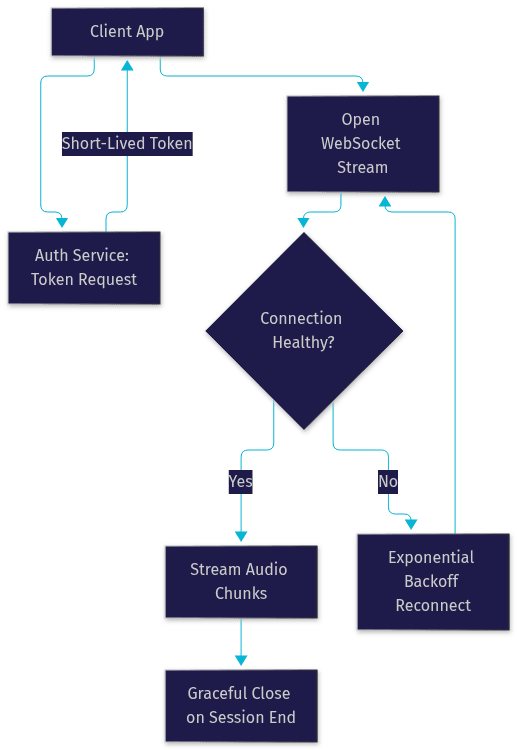
The end-to-end flow follows a consistent pattern across providers. First, your backend requests a session token using your API credentials. The client then opens a WebSocket connection to the provider's audio streaming endpoint, authenticating with that token. As the user speaks, your app captures raw audio from the microphone or call stream and sends it in small chunks over the open connection. The transcription engine processes each chunk, runs VAD, and returns JSON responses containing partial and finalized transcript segments. When the session ends, the client closes the connection and the token expires.
Here is what that architecture looks like:
The JSON responses typically include the transcribed text, confidence scores, word-level timestamps, and a flag indicating whether the segment is partial or final. Word-level timestamps are essential for use cases like real-time captioning, where text must sync with the speaker.
Key Features to Look for in a Live Transcription API
Not all streaming transcription services are built alike, and the differences show up in production, not in demos. These are the features that actually matter when you ship.
Low-Latency Streaming and Voice Activity Detection
Latency is the single most consequential metric for live transcription. For conversational AI and agent-assist use cases, you want end-to-end transcription latency under 250 milliseconds, because anything slower makes the experience feel laggy and breaks natural turn-taking. For captioning, sub-500 ms is generally acceptable. Voice activity detection plays a supporting role: by detecting silence and noise, VAD reduces the volume of audio the engine must process, which lowers both latency and cost. It also prevents the engine from hallucinating words out of background noise, a well-documented failure mode of streaming speech models. VideoSDK's real-time transcription runs inside its communication infrastructure, which means the audio never leaves the call pipeline, keeping latency minimal.
Language Support and Auto-Detection
If your users speak more than one language, look for a provider with broad multilingual coverage and automatic language detection, where the engine identifies the spoken language from the first few seconds of audio. This matters for global call centers and multilingual events, where asking users to pick a language upfront creates friction. Also check whether the provider supports code-switching, where a speaker alternates between languages mid-sentence, a common pattern in multilingual regions.
Authentication and Security
Every serious provider uses token-based authentication over HTTPS and WebSocket Secure connections. The best practice is scope-limited, short-lived tokens generated on your server, so a leaked client token grants access to one session rather than your entire account. For regulated industries, check whether the provider offers data residency options and whether audio is retained or discarded after transcription.
Rate Limits and Pricing
Providers typically enforce concurrent stream limits and requests-per-minute caps, which become relevant at call-center scale. Pricing models fall into two camps: pay-as-you-go, usually billed per minute of transcribed audio, and tiered subscriptions with committed volume discounts. For production workloads, model both carefully, because a high-volume deployment can see dramatically different bills under each model.
Choosing the Right Live Transcription Provider
The provider landscape is competitive, and the right choice depends heavily on your latency requirements, language coverage needs, and budget.
Comparison Criteria
Evaluate providers across six dimensions. Latency: measured end to end, from speech to delivered text. Accuracy: expressed as word error rate (WER), lower is better, and always benchmarked on audio that resembles your real traffic. Language coverage: both breadth and quality per language, since a provider supporting 50 languages poorly is worse than one supporting 10 well. SDKs and integration surface: WebSocket APIs, official SDKs for your stack, and webhook callbacks for post-processing. Pricing: per-minute cost at your expected volume. SLA and reliability: uptime guarantees and support responsiveness.
Top Providers Overview
Deepgram is known for fast, low-latency streaming transcription with strong accuracy on conversational audio, and its Nova model family consistently performs well in independent benchmarks. AssemblyAI offers a well-documented streaming API with excellent developer experience and strong speech understanding features built on top of transcription. Google Cloud Speech-to-Text provides broad language coverage and tight integration with the Google Cloud ecosystem, though its streaming latency is generally higher than the specialists. OpenAI Whisper excels at batch accuracy and multilingual support, but its real-time streaming variant is newer and less battle-tested for production streaming workloads.
For teams already building real-time communication, there is a fifth path: VideoSDK's real-time transcription runs natively inside its video and audio calling SDKs, so the transcript arrives as part of the same session without a second vendor, a second WebSocket, or a second bill for audio transport.
[LINKABLE ASSET: provider comparison table]
| Provider | Streaming Latency | Strength | Best For |
|---|---|---|---|
| Deepgram | Very low | Speed and conversational accuracy | Real-time agents, call centers |
| AssemblyAI | Low | Developer experience, speech intelligence | Product teams shipping fast |
| Google Cloud STT | Moderate | Language breadth, ecosystem | Google Cloud shops |
| OpenAI Whisper | Varies | Multilingual batch accuracy | Post-call processing |
| VideoSDK | Native to call | Built into RTC sessions | Apps with embedded video or voice |
The most important row depends on your architecture: if you are transcribing phone calls or meetings, an integrated option like VideoSDK removes an entire integration layer.
Integration Best Practices for a Live Transcription API
A live transcription API is easy to demo and easy to get wrong in production. These practices separate prototypes from production systems.
Setting Up Authentication
Store your API secret in a server-side environment configuration, never in client code, a mobile bundle, or a public repository. Your backend should exchange that secret for short-lived session tokens, scoped to a single transcription session, and hand them to clients on demand. Set token lifetimes to the expected session duration plus a small buffer, and rotate them per session. This way, even a fully compromised client only exposes one session's access.
Managing Streaming Connections
Treat the WebSocket stream as a long-lived, stateful resource that needs lifecycle management. Open the connection only after you have audio to send, because idle connections consume quota on most providers. While streaming, send audio in consistent small chunks rather than large bursts, which keeps the engine's internal buffers predictable. Implement heartbeat or keep-alive handling if the provider supports it, and always close the connection gracefully when the session ends so you are not billed for idle time.
Handling Errors and Reconnection
Common failure modes include authentication failures from expired tokens, connection drops from network instability, and rate-limit rejections when you exceed concurrent stream caps. For transient failures, reconnect with exponential backoff, starting at a short delay and doubling up to a ceiling, and request a fresh token on each reconnect attempt since the old one likely expired. For sustained outages, buffer audio locally and fall back to batch transcription once the stream recovers, so you lose latency but not the transcript. Always surface connection state to the user interface, because silent transcription failure looks like a broken product.
Post-Processing Transcripts
Raw streaming output is rarely the final product. Speaker diarization, which labels segments by speaker, is essential for multi-party calls and can run either inline or post-session. Automatic punctuation and capitalization make transcripts readable and are supported by most modern engines. For storage, decide between appending finalized segments to your database in real time or collecting the full transcript via webhook callback after the session ends. Post-call summaries, a feature VideoSDK offers alongside transcription, can turn a raw transcript into structured meeting notes automatically.
Real-World Use Cases for Live Transcription
Customer Support and Call Centers
Call centers were the first mass adopters of live transcription, and the use cases have matured. Live agent assist surfaces relevant knowledge base articles and suggested responses while the customer is still speaking. Compliance monitoring flags regulated language in real time, which matters in financial services and healthcare. Post-call quality scoring uses the transcript to evaluate agent performance automatically. In all three, sub-second latency is the difference between a tool agents actually use and one they ignore.
Live Captioning for Events
Webinars, conferences, and internal town halls increasingly require live captions for accessibility compliance, and in many jurisdictions accessibility standards effectively mandate them for public events. A live transcription API with word-level timestamps lets you render captions synchronized to the speaker, while multilingual support lets international audiences follow along. For platforms running events on interactive live streaming infrastructure, such as VideoSDK's live streaming SDK, transcription can run on the same session that delivers the stream.
Voice Assistants and AI Agents
This is the fastest-growing use case. An AI voice agent is, at its core, a pipeline: speech-to-text feeds a language model, whose response goes to text-to-speech. The live transcription API is the front door of that pipeline, and its latency directly determines how natural the agent feels. VideoSDK's AI voice agent architecture follows exactly this pattern, with the transcription stage running inside the agent worker alongside turn detection, so the agent knows both what was said and when the user stopped speaking.
Evaluating Performance of Your Live Transcription API
Accuracy Metrics
Word error rate (WER) is the standard accuracy metric: the percentage of words the engine gets wrong, combining substitutions, deletions, and insertions against a human-labeled ground truth. Character error rate (CER) is preferred for languages without clear word boundaries, such as Mandarin. The critical practice is benchmarking on your own audio: a provider's published WER on clean studio recordings tells you little about performance on noisy call-center audio with accents and crosstalk. Record a representative sample, label it, and measure.
Latency Benchmarks
End-to-end latency includes audio capture, network transport, engine processing, and result delivery, and each stage adds overhead. Specialist streaming providers typically deliver transcription results in the 150 to 300 millisecond range on good connections. Measure latency yourself by timestamping when audio is captured and when the corresponding final transcript arrives, then track the distribution, not just the average, because tail latency is what users notice.
Cost Considerations
Cost scales with audio minutes, but the hidden variables are concurrency and channel count. A 24/7 call-center deployment transcribing every line costs far more than occasional meeting transcription, and diarization or advanced features often carry surcharges. Balance accuracy, latency, and price against your use case: captioning can tolerate a cheaper, slightly less accurate model, while a voice agent pipeline cannot.
Definitions Glossary
Live Transcription API: A cloud service that converts streaming audio into text in real time, returning partial and final transcript segments over a persistent connection while the speaker is still talking.
Voice Activity Detection (VAD): The mechanism that distinguishes speech from silence or background noise, reducing processing load and preventing the engine from transcribing noise as words.
Word Error Rate (WER): The standard accuracy metric for speech recognition, measuring the percentage of substituted, deleted, and inserted words against a human-labeled reference transcript.
Partial Transcript: An interim transcription result delivered mid-utterance that may be revised as the engine receives more audio context, before being finalized when the utterance ends.
Speaker Diarization: The process of labeling transcript segments by who spoke them, essential for multi-party calls and meetings where attribution matters.
Key Takeaways
- A live transcription API streams audio over a persistent connection and returns text within hundreds of milliseconds, which is fundamentally different from batch transcription and required for any interactive use case.
- Evaluate providers on latency, word error rate, language coverage, SDK quality, pricing, and SLA, and always benchmark accuracy on audio that resembles your real traffic.
- Secure integrations generate short-lived, scope-limited tokens server-side and never expose API secrets to clients.
- Production reliability comes from exponential backoff reconnection, fresh tokens on reconnect, and a batch transcription fallback for sustained outages.
- VideoSDK includes real-time transcription natively in its video and audio calling SDKs, removing the need for a separate speech-to-text vendor when your app already has embedded communication.
Conclusion
Choosing a performant live transcription API is an architecture decision, not a vendor checkbox. Latency determines whether your AI agent feels natural, accuracy determines whether your captions are trustworthy, and integration discipline determines whether the system survives production traffic. Start by prototyping with a free tier, benchmark on your own audio, and scale from there. If your application already includes video or voice calling, explore VideoSDK's real-time transcription first, since it collapses two integrations into one. You can sign up and try it with free credits at app.videosdk.live/login, and browse the code samples to see transcription running inside a live session. What are you building with a live transcription API? Drop a comment, I'd love to hear about your use case.
Free $20 Balance for AI Voice Agents & Video Calls
FAQ