


Real-time transcription is the process of converting live spoken audio into text with sub-second latency, enabling instant captions, voice assistant responses, and searchable meeting records. VideoSDK provides built-in real-time transcription capabilities through its Rooms architecture, letting developers add live captioning to video and audio calling apps without managing separate speech-to-text infrastructure. This guide walks through the full pipeline from audio capture to production deployment.
Picture a live webinar with 500 attendees where the speaker switches between English and Spanish mid-sentence. Without captions, accessibility breaks and engagement drops. Now picture the same webinar with instant, accurate text appearing on screen within 300 milliseconds of each spoken word. That gap between broken and seamless is what a well-engineered real-time transcription pipeline closes.
This guide is for developers building production apps that need live transcription. Whether you are adding captions to a telehealth platform, powering a voice assistant, or making virtual events accessible, you will learn the architecture, provider landscape, integration steps, and production considerations needed to ship real-time transcription that holds up under real load. We will use VideoSDK's real-time communication infrastructure as the integration surface throughout.
What Is Real-Time Transcription?
Real-time transcription is defined as the continuous conversion of live audio streams into text as the speech happens, with latency low enough that the text appears nearly simultaneously with the spoken words. Unlike batch transcription, where a complete audio file is processed after recording, real-time transcription processes audio incrementally and returns partial results that get refined as more context arrives.
The distinction matters because batch transcription can afford to wait for the full audio context before producing a final result. Real-time transcription cannot. It must make predictions on incomplete audio segments and correct them as new data flows in. This creates a fundamental latency versus accuracy trade-off that every implementation must manage.
Sub-second latency is the practical threshold for real-time transcription. Anything above one second feels disconnected from the speaker, breaking the illusion of live captioning. According to benchmarks from Artificial Analysis's Speech Arena , leading speech-to-text providers achieve median latencies between 200 and 500 milliseconds on conversational audio, which is well within the real-time window for most interactive use cases.
VideoSDK provides real-time transcription through its Rooms architecture, where participant audio streams can be routed to transcription services and results rendered as in-call captions or post-call summaries.
Core Components of a Real-Time Transcription Pipeline
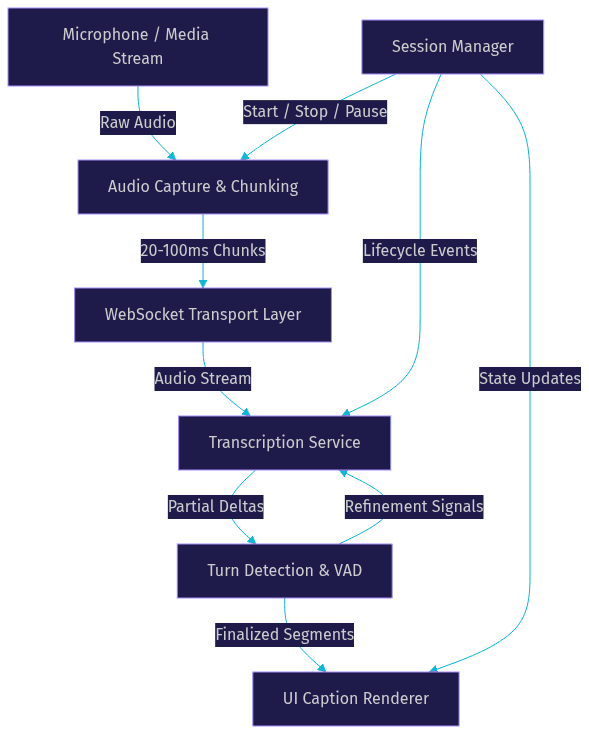
A production-grade real-time transcription pipeline consists of six interconnected components that must work together without introducing bottlenecks. Each component handles a specific stage of the audio-to-text journey, and a weakness in any one degrades the entire system.
The pipeline begins with audio capture from the device microphone or an existing media stream. Captured audio is split into small chunks and sent over a persistent transport connection to a transcription service. The service processes each chunk, applies acoustic and language models, and returns partial transcript deltas. A turn detection layer determines when speech segments begin and end, helping the system decide when to finalize a transcript segment versus continuing to refine it. Finally, the rendered text appears in the user interface as live captions or is stored for later use.
Here is how the end-to-end data flow looks:
Audio Capture and Chunking
Audio capture is the first and most overlooked component. You need access to the device microphone through the browser's media APIs or the platform's native audio framework. The sample rate you choose directly affects transcription quality and bandwidth consumption. Most transcription services expect 16 kHz mono audio for speech, which is sufficient for human voice frequencies and keeps payload sizes manageable.
Chunk size is the critical tuning parameter. Chunks that are too small (under 20 milliseconds) create excessive network overhead and API calls. Chunks that are too large (over 100 milliseconds) introduce latency because the transcription service must wait for a full chunk before processing. The sweet spot is 20 to 100 milliseconds, with 50 milliseconds being a common starting point that balances latency and efficiency.
Transport Layer: WebSocket Streaming
The transport layer carries audio chunks from the client to the transcription service. WebSocket is the dominant choice because it provides a persistent, bidirectional connection that avoids the overhead of repeated HTTP handshakes. Once established, a WebSocket connection streams audio chunks in one direction and receives transcript deltas in the other with minimal framing overhead.
Reliability is the main concern. WebSocket connections can drop on unstable networks, and your implementation must handle reconnection gracefully. A practical approach is to buffer the last few seconds of audio on the client side, reconnect automatically with exponential backoff, and resend the buffered audio upon reconnection. Some providers also offer fallback to HTTP-based streaming endpoints when WebSocket is blocked by corporate firewalls.
Transcription Service Selection
Choosing a transcription provider is a decision driven by four factors: latency, accuracy, pricing, and SDK support. The provider landscape shifts frequently, so verify current offerings before committing.
Deepgram is known for fast inference and competitive word-error-rates on conversational audio, making it a strong choice for real-time voice applications. AssemblyAI offers a Universal speech model with good accuracy across accents and supports streaming through WebSocket endpoints. OpenAI's Realtime API integrates speech-to-text directly into a multimodal pipeline, which is useful when you need transcription as part of a larger AI agent workflow. Google Cloud Speech-to-Text and Azure Speech provide enterprise-grade options with strong language coverage.
Pricing models vary significantly. Some providers charge per minute of audio processed, others charge per character of transcript returned, and some offer tiered pricing based on model quality. For high-volume applications, the cost difference between providers can be substantial.
Turn Detection and Partial Results
Turn detection determines when a speaker has finished a phrase or sentence, allowing the transcription system to finalize a segment. Voice Activity Detection (VAD) is the underlying mechanism, identifying speech versus silence in the audio stream. When VAD detects a silence threshold, the system can mark the current partial transcript as final and begin a new segment.
Partial results are incremental transcript deltas that arrive before a segment is finalized. They represent the transcription service's best guess given the audio processed so far, and they get refined as more audio arrives. Your UI layer must handle these updates smoothly, replacing the previous partial text with the refined version without causing visual jitter. A common pattern is to render partial results in a lighter style and switch to a solid style when the segment is finalized.
Integrating Real-Time Transcription with VideoSDK
VideoSDK's Rooms architecture makes real-time transcription integration straightforward because participant audio streams are already managed within the room. Instead of building a separate audio capture pipeline from scratch, you can leverage the audio tracks that VideoSDK already handles for every participant in a VideoSDK room.
The integration follows four steps. First, create a VideoSDK room using the REST API or SDK, which generates a unique room ID and meeting token. Second, capture participant audio through the SDK's participant stream access, which gives you the raw audio track for each speaker. Third, forward that audio to your chosen transcription service through a WebSocket connection managed by your backend or directly from the client. Fourth, display the returned transcript as captions within your call interface.
VideoSDK also offers built-in real-time transcription as a native feature, which eliminates the need to wire up a third-party service for basic captioning use cases. For more advanced needs like custom vocabulary, multi-language support, or specialized AI agent pipelines, the Python SDK can connect custom transcription pipelines directly to VideoSDK media streams.
The Prebuilt UI Kit includes a caption overlay option that renders transcripts on top of the video call interface without any custom UI work. This is the fastest path from zero to working captions in a VideoSDK-powered application.
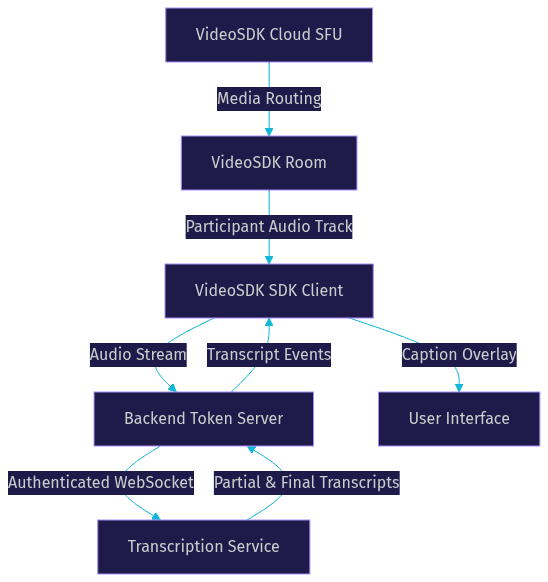
Here is the architecture for VideoSDK with an external transcription service:
Architecture Overview
The diagram above shows how VideoSDK's cloud infrastructure handles media routing while a separate transcription path runs alongside it. The backend token server plays a dual role: it generates VideoSDK meeting tokens for room access and manages authentication with the transcription service. This separation keeps API secrets server-side and allows you to swap transcription providers without touching the client application.
Step-by-Step Implementation Guide
This walkthrough explains the complete implementation path in natural language. Each step describes what to do, why it matters, and what the expected outcome looks like.
Step 1: Provision API Keys
Start by creating accounts on VideoSDK and your chosen transcription service. Both platforms provide API keys through their developer dashboards. Store these keys in environment variables or a secrets manager, never in your source code repository. The VideoSDK dashboard provides an API key and secret pair that you will use to generate meeting tokens. The transcription service provides an API key that authenticates your WebSocket connection.
The expected outcome here is having two sets of credentials stored securely, ready for your backend server to use.
Step 2: Set Up the Backend Token Server
Your backend server needs two responsibilities: generating VideoSDK meeting tokens and creating transcription service authentication tokens. For VideoSDK, the server uses your API key and secret to sign a JWT that authenticates a participant's access to a specific room. This token is passed to the SDK on the frontend when a participant joins. You can follow the VideoSDK authentication guide for the exact token generation process.
For the transcription service, the backend either generates a short-lived auth token or proxies the WebSocket connection entirely. Proxying through your backend gives you more control over rate limiting, logging, and error handling, but adds a network hop. Direct client-to-service connections reduce latency but expose your API key management to the client.
The expected outcome is a backend endpoint that returns both a VideoSDK meeting token and a transcription auth token to the frontend in a single response.
Step 3: Configure Audio Routing
Once the participant joins the VideoSDK room, the SDK provides access to each participant's audio track. You need to extract the raw audio from this track and format it for the transcription service. This means accessing the media stream associated with the participant, setting the correct sample rate (typically 16 kHz), and chunking the audio into 20 to 100 millisecond segments.
If you are using VideoSDK's built-in transcription feature, this routing happens automatically within the SDK. If you are using a third-party service, you handle the audio extraction and WebSocket streaming yourself or through the Python SDK for server-side processing.
The expected outcome is a continuous stream of audio chunks flowing from the VideoSDK participant track to your transcription service over a WebSocket connection.
Step 4: Handle Transcription Events
The transcription service sends two types of events: partial transcript deltas and final transcript segments. Partial deltas arrive frequently and represent the service's current best prediction. Final segments arrive when the service determines a phrase or sentence is complete, typically triggered by a silence gap detected by VAD.
Your event handler must update the UI for each partial delta by replacing the current partial text, and commit the text to its final form when a final segment arrives. If you are using the Prebuilt UI Kit, this rendering is handled for you through the caption overlay. For custom UIs, you manage a transcript state object that holds the current partial text and a list of finalized segments.
The expected outcome is live captions that update smoothly as participants speak, with partial text refining in real time and finalizing when speech pauses.
Step 5: Manage Session Lifecycle
Transcription sessions must be tied to the VideoSDK room lifecycle. When a participant joins the room, start the transcription session. When a participant leaves or the room ends, stop the transcription session and release the WebSocket connection. If a participant temporarily mutes their microphone, pause audio chunking to avoid sending silence and incurring unnecessary transcription costs.
Error handling at this layer is critical. If the WebSocket connection drops, buffer audio on the client and reconnect. If the transcription service returns an error, log it and retry with backoff. If the VideoSDK room disconnects, clean up the transcription session to avoid orphaned connections.
The expected outcome is a transcription session that starts and stops cleanly with the call, handles network interruptions gracefully, and does not leak resources.
Production-Ready Considerations
Moving from a working prototype to a production transcription system requires attention to latency tuning, scaling, security, and cost management. These are the areas where most implementations break under real load.
Latency tuning involves finding the right balance between chunk size, network round-trip time, and transcription service processing time. Smaller chunks reduce latency but increase overhead. Monitor end-to-end latency from microphone to rendered caption and adjust chunk size based on measured performance, not theoretical estimates. A target of 300 to 500 milliseconds end-to-end is achievable with most leading providers.
Bandwidth adaptation matters when participants join from varying network conditions. VideoSDK's network-adaptive streaming handles video quality adjustments automatically, but your transcription pipeline needs its own adaptation layer. If the network degrades, consider increasing chunk size to reduce request frequency, or switching to a lower-bitrate audio encoding.
Scaling concurrent streams is where architecture decisions pay off. Each transcription session holds open a WebSocket connection and consumes processing resources on the provider side. Most providers charge per concurrent stream or per minute of audio. Plan your capacity based on peak concurrent participants, not average. Use a connection pool on your backend if you are proxying WebSocket connections, and implement circuit breakers to prevent cascading failures when the transcription service is overloaded.
Security requires TLS for all transport connections, token scoping for both VideoSDK and transcription service access, and proper handling of sensitive audio data. VideoSDK tokens should be scoped to specific rooms and roles. Transcription service tokens should be short-lived and generated on demand. If your application handles healthcare or legal audio, ensure your transcription provider is HIPAA-compliant or meets the relevant regulatory requirements.
Cost monitoring is essential because transcription costs scale linearly with audio minutes. Set up dashboards that track audio minutes processed, concurrent stream counts, and cost per participant. Alert on unexpected spikes. Some providers offer committed-use pricing that reduces per-minute costs for high-volume applications.
Common Pitfalls and Troubleshooting
Even well-architected transcription pipelines hit issues in production. Here are the most common problems and their fixes.
Audio clipping happens when chunk boundaries cut through phonemes, causing the transcription service to misinterpret words. Fix this by ensuring chunks are aligned to frame boundaries and that your audio capture does not drop samples between chunks. A circular buffer on the capture side prevents gaps.
Token expiry occurs when VideoSDK meeting tokens or transcription auth tokens expire mid-session. VideoSDK tokens have a configurable TTL, so set it long enough to cover your longest expected session. For transcription tokens, implement a refresh mechanism that obtains a new token before the current one expires, without interrupting the active WebSocket connection.
VAD misfires cause the system to finalize segments too early (cutting off speech) or too late (merging separate sentences). Tune the silence threshold and minimum silence duration based on your speaker patterns. Some providers expose VAD configuration parameters, while others handle it internally. If you are using VideoSDK's built-in transcription, VAD tuning is handled automatically.
WebSocket connection drops on mobile networks are common when devices switch between WiFi and cellular. Implement automatic reconnection with audio buffering, and test on real mobile networks, not just desktop browsers.
Real-World Case Study: Live Captioning for Virtual Events
A mid-sized event platform company added real-time captions to their VideoSDK-powered webinars in early 2026. Their use case was straightforward: 200 to 500 attendees joining virtual events where speakers presented in English, with a portion of the audience relying on captions for accessibility.
They chose VideoSDK's built-in real-time transcription for the caption overlay, avoiding the complexity of managing a separate transcription service. The implementation took their frontend team roughly two days, primarily spent wiring the transcription start and stop events to their existing room join and leave handlers.
The results were measurable. End-to-end caption latency averaged 350 milliseconds, well within the sub-second target. Post-event surveys showed a 23% increase in attendee satisfaction scores for accessibility, and the platform saw a 15% increase in average watch time for sessions with captions enabled. The company attributed the retention improvement to captions helping non-native English speakers follow along more easily.
The team noted one limitation: built-in transcription did not support their need for custom vocabulary around industry-specific terms. For their next iteration, they planned to route audio through Deepgram with a custom language model while keeping VideoSDK for the video calling infrastructure.
Definitions Glossary
Real-Time Transcription: The continuous conversion of live audio into text with sub-second latency, producing partial results that refine as more audio arrives. VideoSDK supports this natively through its Rooms architecture.
Partial Transcript Delta: An incremental transcription result that represents the service's current best prediction for an in-progress speech segment. Deltas are replaced by refined versions until the segment is finalized.
Voice Activity Detection (VAD): The mechanism that distinguishes speech from silence in an audio stream, used to determine when a speaker has finished a phrase and a transcript segment can be finalized.
Audio Chunk Size: The duration of each audio segment sent to the transcription service, typically 20 to 100 milliseconds. Smaller chunks reduce latency but increase network overhead.
VideoSDK Room: A real-time communication session that participants join to share audio and video streams, identified by a unique room ID and authenticated via meeting tokens.
Key Takeaways
- Real-time transcription requires a pipeline with six components: audio capture, chunking, transport, transcription service, turn detection, and result rendering, each tuned for sub-second latency.
- The optimal audio chunk size for streaming transcription is 20 to 100 milliseconds, with 50 milliseconds being a practical starting point that balances latency and overhead.
- VideoSDK provides built-in real-time transcription through its Rooms architecture, eliminating the need for a separate speech-to-text service for basic captioning use cases.
- The Prebuilt UI Kit's caption overlay offers the fastest path from zero to working live captions in a VideoSDK-powered application, requiring no custom UI development.
- Production transcription systems must handle token lifecycle, WebSocket reconnection, bandwidth adaptation, and cost monitoring to remain reliable under real load.
Conclusion
Building a production-grade real-time transcription pipeline means getting six components right and tuning the latency versus accuracy trade-off for your specific use case. This implementing real time transcription guide covered the full path from audio capture through provider selection, VideoSDK integration, and production deployment considerations. The biggest leverage point for most developers is starting with VideoSDK's built-in transcription and the Prebuilt UI Kit caption overlay, then graduating to a custom provider like Deepgram or AssemblyAI when you need specialized vocabulary or multi-language support. You can explore the full VideoSDK documentation or grab a free tier account at app.videosdk.live/login to start building. What are you building with VideoSDK? Drop a comment below, I would love to hear what kind of real-time transcription use case you are working on.
Free $20 Balance for AI Voice Agents & Video Calls
FAQ