


A video chat API is defined as a hosted service, such as VideoSDK, that creates video rooms, authenticates users with short-lived tokens, and routes audio and video over WebRTC. Your backend calls the API; a client SDK renders media.
Adding a camera button to an app takes an afternoon. Keeping that call connected for a user on hotel Wi-Fi, behind a firewall that blocks direct connections, is the part that takes a team.
A hosted API is how most products skip that second part. You get the servers, relays, and signaling as a service, and you write the interface.
This guide covers what a video chat API is, how it differs from a video chat SDK, and what happens on the network during a call. It then lists the features worth checking and what four providers charge, and ends with the integration steps on VideoSDK.
What is a video chat API?
A video chat API is the server side of live video, delivered as a service you call instead of infrastructure you run.
A video chat API is defined as a set of REST endpoints and client libraries that create rooms, admit authenticated participants, and move real-time audio and video between their devices. It works by placing a media server between participants, so each device uploads its stream once and the server forwards it to everyone else.
The category goes by several names. Video chat API, video chatting API, video calling API, and video conferencing API all describe the same product. That is why a search for video chat APIs returns calling and conferencing pages side by side.
What you are buying is the part of a call nobody sees. That includes a signaling service that reconnects dropped users and media servers close to your users. It also includes TURN relays for networks that block direct traffic, plus recording and streaming your server can trigger.
VideoSDK's video conferencing API is built around the Room. Your backend creates a room over REST and signs a token for each participant. The participant then joins from a client SDK for React, JavaScript, React Native, Android, iOS, Flutter, Unity, C++, IoT, or Python.
Video Chat API vs Video Chat SDK
The API and the SDK are two halves of one product, and you need both. The API runs on your server; the SDK runs in your user's app.
| Video chat API | Video chat SDK | |
|---|---|---|
| Where it runs | Your backend, called with your secret | Inside the browser or mobile app |
| What it does | Creates rooms, issues tokens, starts and stops recording, sends webhooks | Captures camera and microphone, sends media, renders other participants |
| What it holds | Your API key and secret | A short-lived token only |
| Typical actions | Create a room, start recording, fetch recordings | Join, mute and unmute, turn the camera on and off, leave |
| When you touch it | Before and after the call, and for server-side control | Everything the user sees and hears during the call |
The token is the handoff between the two. Your server signs it with the secret, the app passes it to the SDK, and the secret never reaches the client.
In practice, teams integrate video chat API calls on the server and integrate video chat SDK components in the client, in that order. The confusion comes from marketing, where vendors headline whichever half their buyer searched for.
A useful test when comparing vendors is to ask where the media server runs. If the vendor runs it, you are buying an API and the SDK comes with it. If you run it, you are adopting a library, and the servers and relays are yours to build.
How a video chat API works
Every video chat call passes through the same six components, and the first one runs on your server before the user sees a camera preview.
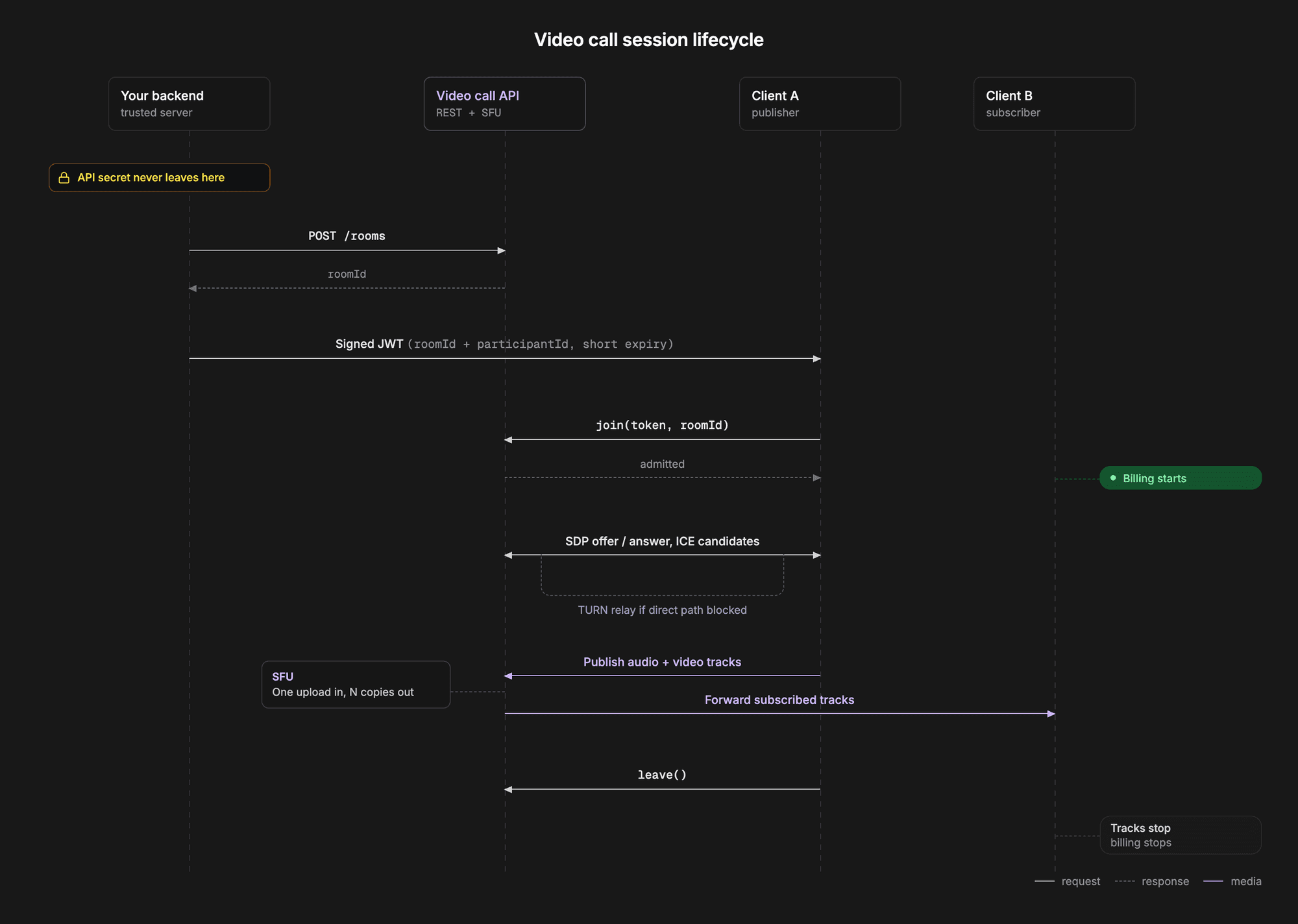
- Your backend. Your server creates a room through the REST API and signs a JSON Web Token (JWT) for the participant. The token carries your API key, a join permission, and an expiry.
- Signaling. The client SDK connects to the provider's signaling service and exchanges session descriptions with the media server. These list the codecs and media each side can send, in the offer and answer format that WebRTC standardises.
- STUN. Each device asks a STUN server for its public address, since most devices sit behind a router that hides it. That address becomes one of several ICE candidates, and ICE picks the path that works.
- TURN. When no direct path works, the connection falls back to a TURN server that relays the media. Relayed calls cost real bandwidth, which is why TURN is among the first things to break in a self-built stack.
- SFU. The selective forwarding unit is the media server. It receives one upload from each participant and forwards copies to everyone who subscribes, without re-encoding them.
- Media tracks. Each participant publishes an audio track and a video track. Your interface subscribes to tracks, not people, so a participant can appear a moment before their video does.
WebRTC encrypts media in transit using DTLS-SRTP, as its security architecture requires. In a standard SFU deployment the server terminates that encryption to forward packets, so encryption in transit is not the same as end-to-end encryption. Ask any provider which one they mean before it goes into a security review. For a privacy-sensitive worked example, see VideoSDK's guide to secure video chat in a React Native dating app.
The SFU is also why a group video chat API scales. In a peer-to-peer mesh, a five-person call means four uploads from every device. Through an SFU, each device uploads once however large the room gets. VideoSDK's WebRTC explainer covers the protocol layer underneath in more depth.
Video chat API features to look for
Every provider handles a 1:1 call. The features below are where providers actually differ, and each one is cheaper to check now than to discover missing after launch.
| Feature | Why it matters | VideoSDK documentation |
|---|---|---|
| Group calls | Depends on the SFU and on account-wide concurrency. VideoSDK's quota page lists 50 concurrent hosts on the free plan and 500 on pay-as-you-go. | Usage quotas |
| Screen share | Support, tutoring, and sales calls need it, and it publishes as a separate track. | Screen share |
| In-call chat | Text alongside video, for links and for users whose microphone fails. VideoSDK builds it on its PubSub messaging. | Chat using PubSub |
| Recording | Check composite versus per-participant files, and whether they can land in your own storage bucket. | Recording overview |
| Noise suppression | Background noise is a common complaint on mobile calls. VideoSDK's plugin is labelled beta in its docs. | Noise suppression |
| HLS for large audiences | When a call becomes a broadcast, HLS carries far more viewers than an interactive room, with more delay. | HLS overview |
| SIP dial-in | Lets someone join from a phone number when their data connection is poor. | Telephony and SIP |
| Transcription | Captions during the call, or a transcript and summary after it. | Real-time transcription |
Two more items rarely appear on feature pages. The first is platform coverage: list every client you will ship in the next two years and confirm an SDK exists for each. The second is the token model, because tokens with a short expiry stop a leaked room link from becoming an open door.
Read these video chat API features as a filter, not a scorecard. Most products need four or five on day one, and the rest decide which provider you can grow into.
How to add video chat to your app
Adding video chat takes two pieces of work: a server route that issues tokens and creates rooms, and a client screen that joins a room and shows participants.
The steps below follow VideoSDK's React quickstart and its authentication and token guide. The same order applies on every platform VideoSDK supports. Only the client library changes.
- Get your API key and secret. Create a VideoSDK account and copy both from the dashboard. The secret belongs in your server's environment variables, never in an app bundle.
- Issue a token on your server. Your backend signs a JWT with the secret, carrying your API key, a join permission, and an expiry. VideoSDK's token guide uses 120 minutes in its example. The quickstart keeps a token in client code to shorten the demo, so move it server-side before you ship.
- Create a room. Your server calls the REST API's create-room endpoint with that token and gets back a room ID. Store the ID against your own record, such as the appointment, class, or support ticket, then send it to the client with a token.
- Join from the client SDK. In React, the call sits inside VideoSDK's meeting provider, configured with the room ID and token. A meeting hook exposes join, leave, and the microphone and camera toggles, and a participant hook gives you each person's streams.
- Render video and audio separately. VideoSDK's React video player renders video only. Each participant's audio needs its own audio element fed from their microphone stream, muted for the local user. Miss this and the call looks right, but nobody can hear anyone.
- Test on HTTPS. Browsers grant camera and microphone access only in a secure context, meaning HTTPS or localhost. A staging server on plain HTTP fails at the permission prompt, not in the SDK.
Open the page in two browser tabs and join the same room from both, and you should see two participants. VideoSDK's code samples hold complete, runnable versions of this flow for each platform.
Embed video chat without building the UI
To embed video chat API features without designing an interface, use VideoSDK's Prebuilt UI kit. It drops a complete call screen into a page and uses the same room and token model, so you can move to a custom interface later.
Pick the quickstart for your platform
Steps 1 to 3 stay identical on every platform, because they run on your server. For the client, start from the React quickstart or the JavaScript quickstart, or go to Flutter, Android, or iOS.
Try it on your own account: sign up for VideoSDK and use the $20 free credit to run a quickstart end to end.
Prefer to see it running? This 4-minute walkthrough builds the React group video call above, from an empty folder to two browser windows in the same room. It takes its token from the dashboard to keep the demo short, so switch to a server-issued token before you ship, as step 2 explains.
What a video chat API costs
Video chat API pricing is per participant minute: one person connected for one minute. A three-person, 20-minute call is 60 participant minutes, and an empty room costs nothing.
Rates below were read from each vendor's pricing page on September 11, 2026. Watch the units, because Agora quotes per 1,000 minutes.
| Provider | Video, per participant minute | Audio only, per participant minute | Free allowance |
|---|---|---|---|
| VideoSDK | $0.004 (HD 720p), $0.008 (Full HD) | $0.001 | $20 free credit on signup, one time |
| Twilio Video | $0.004 (Group Rooms) | Not listed separately | No free minutes listed; first 10 GB of recording storage free |
| Agora | $0.00399 HD ($3.99 per 1,000 minutes), $0.00899 Full HD | $0.00099 ($0.99 per 1,000 minutes) | 10,000 minutes per month |
| Daily | $0.004 from 10,001 to 100,000 minutes a month, falling in tiers to $0.0015 above 50 million | $0.00099, falling to $0.00036 | 10,000 minutes per month |
Three things stand out, and not all of them favour VideoSDK.
The entry rate is effectively identical. All four charge about $0.004 per participant minute for HD video at low volume, so the headline rate does not separate them.
The free allowances differ. Agora and Daily include 10,000 minutes every month. VideoSDK gives a one-time $20 credit, which covers 5,000 participant minutes of HD video. For a product that stays small, the recurring allowance is worth more.
Daily is the only one of the four that publishes volume discounts on its pricing page. Agora bills video by aggregate subscribed resolution, the combined pixels of every stream a user receives. A user watching several small tiles can therefore land in a higher tier than any single stream suggests. For a comparison beyond price, VideoSDK's video calling API roundup covers ten providers.
Why teams switch video chat providers
When entry rates sit within a fraction of a cent of each other, teams rarely switch providers over price. They switch over support and product quality, or because their current provider is ending the service.
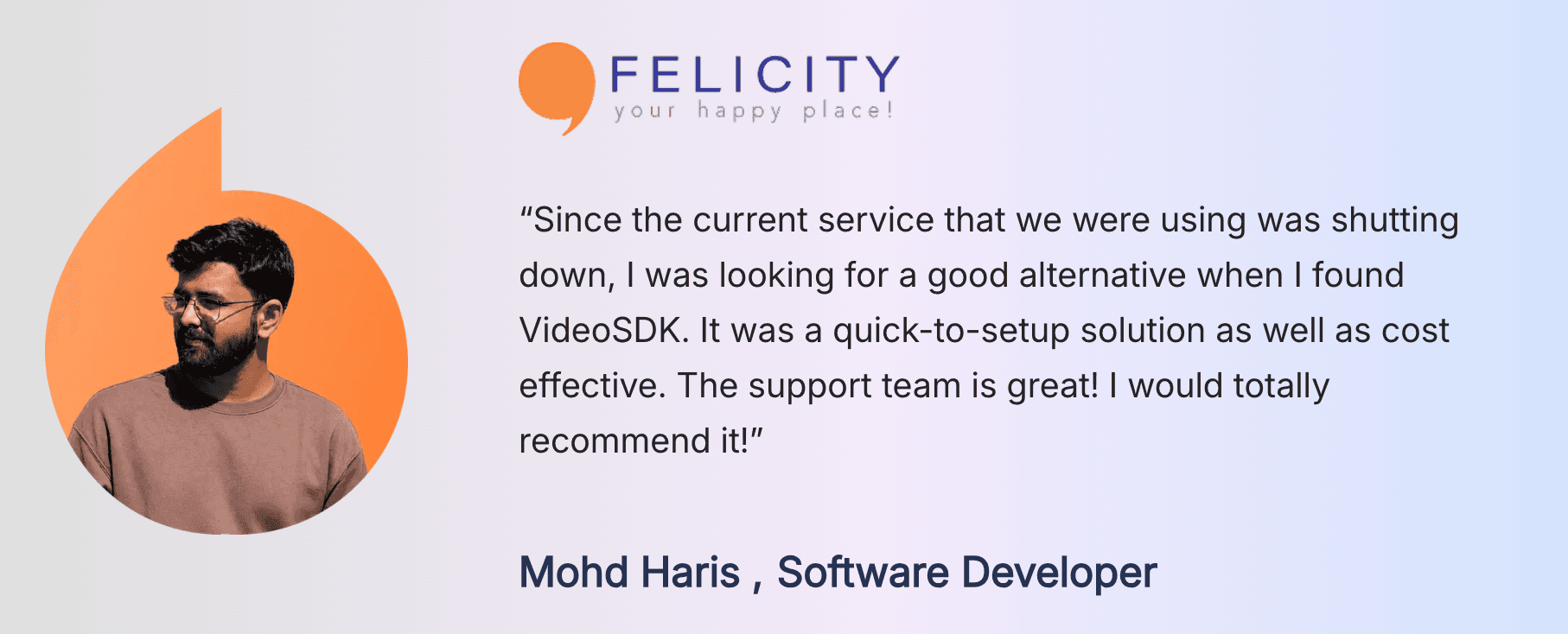
Felicity, an India-based teletherapy platform that runs counselling over video, audio, and chat. Its case study says the team had to move because its previous video provider was shutting down. Felicity completed the migration in 48 hours and reports 70% fewer technical issues in counselling sessions.
Glossary
Room: The container a video chat happens in, identified by a room ID. Participants join a room, and server-side operations such as recording target that room ID.
Meeting token: A JWT your server signs with your API secret that lets a participant join. VideoSDK tokens carry a join permission and an expiry.
SFU (selective forwarding unit): The media server that receives one stream from each participant and forwards copies to the others without re-encoding them.
Participant minute: The billing unit for almost every provider in this category. One person connected for one minute is one participant minute.
Key takeaways
- A video chat API is the hosted server side of live video: rooms, tokens, signaling, TURN relays, and an SFU that forwards each participant's stream.
- The API and the video chat SDK are two halves of one integration, joined by a token your server signs, so the API secret never reaches the client.
- VideoSDK, Twilio Video, Agora, and Daily all charge about $0.004 per participant minute for HD video at entry volume, so features and free allowances decide the choice.
- VideoSDK uses one room and token model across React, JavaScript, React Native, Android, iOS, Flutter, and more, so one backend serves every client you ship.
Conclusion
A hosted API trades a media engineering project for a per-minute bill. Signaling, STUN, TURN, and the SFU become the provider's problem, and your work shrinks to a token route and a call screen.
Choose on features and free allowance rather than the headline rate, and price the recording and transcription you will use. To try VideoSDK's video chat API, start with the React quickstart, check live rates on the pricing page, and sign up for $20 free credit.
What kind of video chat are you adding to your app? Drop a comment, or ask in the VideoSDK Discord.
Frequently asked questions
How to create a video chat app?
To create a video chat app, choose a provider and add a server route that signs a token and creates a room. Then add a client component that joins the room and renders each participant. With VideoSDK, the server side stays the same on every platform, and the React, Flutter, Android, and iOS quickstarts cover the client.
What is the difference between a video chat API and a video chat SDK?
The API is the server-side surface your backend calls with its secret to create rooms, issue tokens, and control recording. The video chat SDK is the client library inside your app that captures, sends, and renders media. A working integration uses both, with the token as the handoff.
How much does a video chat API cost?
A video chat API typically costs about $0.004 per participant minute for HD video. As of September 11, 2026, VideoSDK, Twilio Video, and Daily list $0.004 at entry volume, and Agora lists $3.99 per 1,000 minutes. Recording and transcription are billed separately and often cost more than the call.
Is there a free video chat API?
There is no fully free hosted option for production, but each major provider has a free entry point. Agora and Daily include 10,000 minutes every month, and VideoSDK gives a one-time $20 free credit, enough for 5,000 participant minutes of HD video. Open-source media servers are free to license but move the server cost to you.
Can I embed a video chat SDK without building the UI?
Yes. To embed video chat SDK features without writing an interface, use a prebuilt UI kit. VideoSDK's Prebuilt option drops a complete call screen into a page. It shares the room and token model with the custom SDK, so you can switch to a custom interface later.
Can a live video chat API handle group calls?
Yes, a live video chat API handles group calls through an SFU, which takes one upload from each participant and forwards it to the others. The limit that usually matters is account-wide concurrency rather than room size. VideoSDK's quota documentation lists 50 concurrent hosts on the free plan and 500 on pay-as-you-go.
Is WebRTC a video chat API?
No. WebRTC is the open standard for capturing and sending real-time media in browsers and apps, and it has no servers of its own. An online video chat API is a hosted service built on WebRTC that adds signaling, TURN relays, an SFU, room management, and recording.