



A WebRTC video call enables real-time, peer-to-peer audio and video communication directly between browsers without plugins or proprietary software. WebRTC uses built-in browser APIs to capture media, negotiate connections through SDP and ICE protocols, and stream encrypted media over UDP. VideoSDK wraps this entire WebRTC stack into a multi-platform SDK, letting developers ship production-grade video calls without managing signaling servers or TURN infrastructure.
WebRTC is natively supported in over 95% of modern browsers, including Chrome, Firefox, Safari, and Edge, making it the de facto standard for browser-based real-time video communication. Developers choose WebRTC for video calls because it is open, royalty-free, and eliminates the need for third-party plugins. The protocol handles everything from media capture to network traversal, but the implementation details can be daunting if you are building from scratch.
This guide walks through the fundamentals of how a WebRTC video call works, the role of signaling, practical setup steps, quality optimization techniques, security considerations, and strategies for scaling from one-to-one calls to group conversations. Whether you are building a telehealth platform or a social app, understanding these layers will help you make informed architecture decisions.
Understanding WebRTC Video Call Basics
A WebRTC video call is a real-time communication session where two or more participants exchange audio and video media directly through their browsers using the WebRTC protocol suite. According to the W3C WebRTC specification, WebRTC defines a set of ECMAScript APIs that allow applications to send and receive media between browsers without requiring users to install plugins. VideoSDK provides a complete video calling SDK that abstracts these APIs into a simpler developer interface across ten platforms.
How Does a WebRTC Video Call Work?
WebRTC relies on three core browser APIs working together. The media capture API, commonly known as getUserMedia, requests access to the user's camera and microphone and returns a media stream object containing audio and video tracks. The peer connection API, known as RTCPeerConnection, establishes the direct connection between two browsers, handling encryption, bandwidth management, and media encoding. The data channel API enables arbitrary text or binary data exchange between peers, though it is not used for video call media itself.
Several supporting protocols make the connection possible. Session Description Protocol (SDP) describes the media formats, codecs, and transport parameters each peer supports. Interactive Connectivity Establishment (ICE) discovers the best network path between peers by gathering candidate addresses. STUN servers help peers discover their public IP addresses, while TURN servers relay media when direct peer-to-peer connectivity fails due to restrictive firewalls or NAT configurations.
Here is the high-level flow of a WebRTC video call handshake:
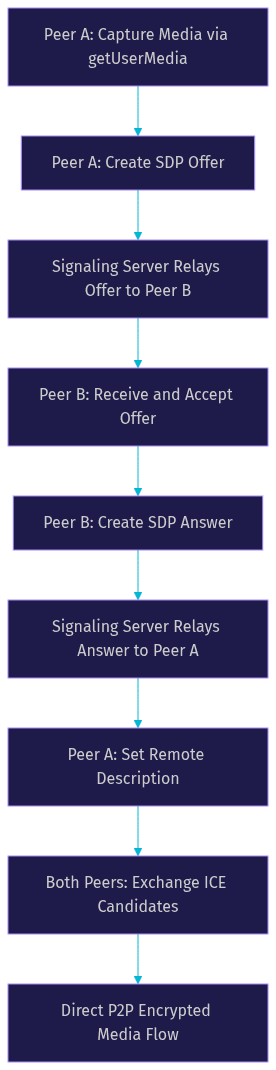
The handshake begins when one peer creates an SDP offer describing its media capabilities. The signaling server relays this offer to the remote peer, which responds with an SDP answer. Both peers then exchange ICE candidates to find the optimal network path. Once ICE negotiation completes, encrypted media flows directly between the two browsers.
The Role of Signaling in a WebRTC Video Call
Signaling is the process that enables two peers to find each other and exchange connection metadata before a direct WebRTC link is established. The WebRTC specification deliberately omits signaling from its protocol, leaving developers free to choose any transport mechanism for exchanging SDP offers, SDP answers, and ICE candidates between peers.
Common signaling approaches include WebSocket connections to a custom server, Firebase Realtime Database for serverless exchanges, and HTTP-based polling for simpler setups. WebSocket-based signaling is the most widely used pattern because it provides bidirectional, low-latency communication that fits naturally with the real-time nature of WebRTC. Firebase Realtime Database works well for prototypes and small-scale applications where you want to avoid managing a server.
Best-practice signaling patterns revolve around room-based discovery. Each call is assigned a unique room identifier. When a participant joins a room, the signaling server registers their presence and notifies other participants in the same room. Peers then exchange SDP and ICE messages through the signaling channel until the direct WebRTC connection is established. Message formats should be lightweight and structured, typically using JSON objects that clearly distinguish between offer, answer, and candidate message types.
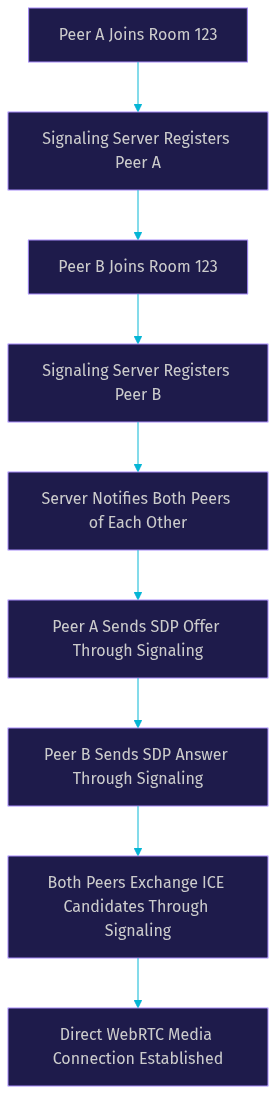
Once the direct peer connection is open, the signaling server steps back. Media flows directly between browsers, and the signaling channel is only needed again if the connection drops or new participants join.
Setting Up a Simple WebRTC Video Call
Building a WebRTC video call from scratch involves a logical sequence of steps that connect two browsers through a peer-to-peer media session. The process starts with media capture, moves through connection negotiation, and ends with rendering the remote participant's video stream.
Step 1: Capture Local Media
The first step is requesting access to the user's camera and microphone through the browser's media capture API. The browser prompts the user for permission, and once granted, returns a media stream containing audio and video tracks. This stream is attached to a video element in the DOM so the user can see their own camera preview. Common pitfalls at this stage include running on HTTP instead of HTTPS, since browsers block media access on non-secure origins, and failing to handle the permission denial case gracefully.
Step 2: Create the Peer Connection
Next, you create a peer connection object that will manage the WebRTC session. This object handles codec negotiation, encryption setup, and bandwidth management. You add the local media tracks from step one to this peer connection so they are ready to be sent once the connection is established.
Step 3: Exchange SDP Offer and Answer
One peer creates an SDP offer describing its media capabilities and sends it through the signaling server. The remote peer receives the offer, creates an SDP answer accepting the offered media formats, and sends the answer back. Both peers set their local and remote descriptions based on this exchange.
Step 4: Exchange ICE Candidates
As each peer gathers ICE candidates, which are potential network paths, they send these candidates to the remote peer through the signaling server. The remote peer adds each candidate to its peer connection. Once a viable path is found, the connection opens and media begins flowing.
Step 5: Display the Remote Stream
When the remote peer's media tracks arrive, you attach them to another video element in the DOM. The user can now see and hear the remote participant.
For STUN and TURN servers, developers typically start with Google's public STUN server for basic NAT traversal. For production deployments behind restrictive corporate firewalls, a commercial TURN provider is recommended. A minimal production-ready checklist includes HTTPS hosting, a WebSocket signaling server, a STUN server, a TURN server with adequate bandwidth allocation, and proper camera permission handling.
If you want to skip the signaling and infrastructure setup entirely, VideoSDK's Prebuilt UI Kit lets you embed a fully functional video call interface with a single component, handling authentication, room management, and media routing automatically.
Optimizing Quality and Reducing Latency
WebRTC includes built-in mechanisms for adapting to network conditions, but understanding how to tune them separates a smooth call from a frustrating one. The protocol's congestion control algorithm automatically adjusts bitrate based on available bandwidth, but developers can influence this behavior through codec selection, resolution constraints, and frame-rate limits.
Bandwidth Adaptation and Resolution Scaling
WebRTC's built-in bandwidth estimation continuously monitors packet loss, round-trip time, and available bandwidth. When congestion is detected, the encoder reduces bitrate, which may lower resolution or frame rate depending on the codec in use. Developers can set maximum bitrate constraints on individual video tracks to prevent the encoder from exceeding a threshold, which is useful for applications where multiple video streams compete for limited bandwidth.
According to webrtcstats.com, monitoring real-time connection statistics through the getStats API is essential for understanding call quality in production. The API exposes metrics like outbound bitrate, packet loss percentage, round-trip time, and jitter buffer depth. By polling these statistics at regular intervals, applications can detect degradation early and take corrective action, such as disabling video when audio quality is at risk.
Practical Quality Tips
Camera selection matters more than most developers expect. Built-in laptop cameras often produce noisy, low-resolution video that compresses poorly. Encouraging users to select external webcams or higher-quality cameras can dramatically improve perceived call quality. Lighting conditions also affect encoder efficiency: well-lit scenes produce less noise, which means the encoder can achieve the same visual quality at a lower bitrate.
TURN server fallback introduces latency because media must travel through an intermediary rather than directly between peers. To mitigate this, choose TURN servers geographically close to your users and ensure the TURN provider has sufficient bandwidth capacity. Some applications proactively measure TURN relay latency and warn users when their connection quality is degraded.
Security and Privacy Considerations for WebRTC Video Calls
Security is not optional in a WebRTC video call. The protocol includes mandatory encryption, but developers must also secure the signaling layer and respect user privacy requirements. Browsers enforce several security constraints that affect how WebRTC applications can operate.
HTTPS Is Mandatory
Browsers require HTTPS for WebRTC media capture. The getUserMedia API and related interfaces are only available on secure origins, which means localhost during development and any domain served over HTTPS. If you attempt to access camera or microphone APIs over HTTP, the browser silently blocks the request. This enforcement protects users from man-in-the-middle attacks that could intercept media streams on unencrypted connections.
Built-in Encryption
WebRTC encrypts all media using DTLS-SRTP, which combines Datagram Transport Layer Security for key exchange with Secure Real-time Transport Protocol for media delivery. This encryption is mandatory and cannot be disabled. Every audio and video packet sent over a WebRTC connection is encrypted at the transport layer, meaning even if an attacker intercepts packets between peers, they cannot decode the media without the session keys.
Signaling and Room Access Control
While WebRTC media is encrypted end-to-end between peers, the signaling channel is only as secure as you make it. Token-based authentication for signaling endpoints is essential. VideoSDK handles this through server-side token generation, where each participant receives a signed JWT that validates their identity and room permissions. Never expose API secrets on the client side.
For applications handling personal or health-related video content, GDPR and CCPA compliance requires explicit user consent before media capture, clear data retention policies for any recordings, and the ability to delete stored media on request. WebRTC itself does not store media, but if your application records calls, those recordings fall under data protection regulations.
Scaling from One-to-One to Group Video Calls
A one-to-one WebRTC video call uses a direct peer-to-peer mesh where each browser sends media directly to the other. This works well for two participants, but the mesh architecture does not scale. In a mesh network with five participants, each browser must encode and send its media to four other peers simultaneously, consuming enormous bandwidth and CPU resources.
SFU Architecture for Group Calls
A Selective Forwarding Unit (SFU) solves this scaling problem by acting as a media router. Each participant sends one stream to the SFU, and the SFU forwards each stream to all other participants. This reduces the upload burden on each participant to a single stream while the SFU handles the distribution. The tradeoff is that you now need a server with sufficient bandwidth and processing capacity to handle all media forwarding.
You should choose an SFU when your call has more than four participants, when participants have limited upload bandwidth, or when you need server-side features like recording, transcription, or custom layouts. For two to three participants, a direct peer-to-peer mesh may still be acceptable.
Popular open-source SFU options include mediasoup and Janus, both of which provide WebRTC-compatible media routing. However, deploying and maintaining an SFU requires significant infrastructure expertise. Cloud-hosted services like VideoSDK abstract away the SFU entirely, providing a REST API for room creation and participant management while handling media routing, recording, and adaptive streaming automatically.
The decision is straightforward: for prototypes and small calls, peer-to-peer mesh works. For production group calls, use an SFU or a managed service that provides one.
Common Troubleshooting Scenarios
Even with a well-architected WebRTC video call, issues will surface in production. Here are the most frequent problems and how to address them.
Camera or Microphone Permission Denied
Browsers prompt users for camera and microphone access, and users often deny the prompt by accident or because they did not expect it. Always handle the permission denial case with a clear UI message explaining why access is needed and providing a button to retry. On Chrome, users can reset permissions through the site settings panel. On Safari, permissions are more restrictive and may require the user to explicitly allow access in browser settings.
ICE Negotiation Failure
When ICE negotiation fails, peers cannot establish a direct connection. This typically happens behind symmetric NAT configurations or restrictive corporate firewalls that block UDP traffic. The solution is ensuring your TURN server is properly configured and reachable. Check that your TURN server credentials are valid and that the server has adequate bandwidth. Monitor ICE connection state changes in your application to detect failures early and fall back to TURN relay automatically.
Audio and Video Sync Drift
Audio and video can drift out of sync over long calls, especially on mobile devices with aggressive power management. WebRTC includes built-in synchronization mechanisms, but they can fail under poor network conditions. If sync drift becomes noticeable, check for packet loss on the audio track, as lost audio packets can cause the jitter buffer to desync from the video timeline.
Browser Compatibility Quirks
Safari remains the most challenging browser for WebRTC. It has stricter autoplay policies that require user interaction before video can play, different codec preferences where Safari historically favored H.264 over VP8, and occasional differences in ICE candidate gathering behavior. Always test on Safari, Chrome, and Firefox during development. For mobile, test on both iOS Safari and Android Chrome, as their WebRTC implementations differ significantly.
Definitions Glossary
WebRTC: An open-source project and W3C specification that enables real-time peer-to-peer audio, video, and data communication between browsers without plugins.
SDP (Session Description Protocol): A text-based format used to describe media sessions, including codecs, resolutions, and transport parameters, exchanged between peers during WebRTC connection setup.
ICE (Interactive Connectivity Establishment): A framework that allows WebRTC peers to discover and negotiate the best network path between them by gathering and testing candidate addresses.
STUN Server: A server that helps a WebRTC peer discover its public IP address and the type of NAT it is behind, enabling direct peer-to-peer connections in many network scenarios.
TURN Server: A relay server that forwards WebRTC media between peers when direct peer-to-peer connectivity fails due to restrictive firewalls or symmetric NAT configurations.
SFU (Selective Forwarding Unit): A media server architecture that receives one stream per participant and selectively forwards streams to other participants, enabling scalable group video calls without overloading individual peers.
Signaling Server: An application server that facilitates the exchange of SDP offers, SDP answers, and ICE candidates between WebRTC peers before the direct media connection is established.
Key Takeaways
- A WebRTC video call uses three core browser APIs (media capture, peer connection, and data channel) to establish direct, encrypted peer-to-peer media sessions without plugins.
- Signaling is not part of the WebRTC specification, so developers must implement their own signaling transport using WebSockets, Firebase, or similar technologies to exchange SDP and ICE data.
- HTTPS is mandatory for WebRTC media capture, and all media is encrypted using DTLS-SRTP at the transport layer, but signaling endpoints require separate token-based authentication.
- Peer-to-peer mesh architecture works for one-to-one calls but does not scale beyond four participants, at which point an SFU or managed service becomes necessary.
- VideoSDK abstracts the entire WebRTC stack, including signaling, TURN infrastructure, and SFU media routing, into a multi-platform SDK with a Prebuilt UI Kit for zero-code embedding.
Conclusion
Building a WebRTC video call from scratch teaches you the fundamentals of real-time communication, from SDP negotiation to ICE traversal and encrypted media transport. The protocol is powerful and well-supported, but the implementation surface is wide. Signaling servers, TURN infrastructure, SFU scaling, and cross-browser compatibility all demand attention before you reach production quality.
If you want to skip the infrastructure work and ship video calls in minutes instead of weeks, VideoSDK gives you a complete video calling SDK across ten platforms including React, Flutter, iOS, Android, and JavaScript. The Prebuilt UI Kit handles authentication, room management, adaptive streaming, and recording out of the box. Explore the code samples to see working implementations, or sign up at app.videosdk.live/login to start building for free.
What are you building with WebRTC? Drop a comment below, I would love to hear what kind of video calling use case you are working on.
Free $20 Balance for AI Voice Agents & Video Calls
FAQ