


Text to speech characters are AI-generated voices paired with a visual persona, such as a game NPC, animated mascot, or e-learning tutor, that speak written dialogue with controllable pitch, speed, and emotion. Modern TTS engines like ElevenLabs, Amazon Polly, and Google Cloud TTS let developers create these voices through voice model selection, SSML markup, and optional voice cloning. The result is a repeatable pipeline that turns a character script into natural, expressive speech ready for games, animation, and interactive apps. Read the full workflow below to build your own character voice system.
A decade ago, giving a game character a voice meant booking a studio, a microphone, and a voice actor for every line of dialogue. Today, a solo developer can generate a fully voiced cast in an afternoon. The rise of AI-driven voice synthesis has collapsed the cost of character speech from thousands of dollars per session to fractions of a cent per sentence.
That shift matters far beyond gaming. E-learning platforms use voiced tutors to hold student attention. Marketing teams deploy brand mascots that speak in ads and product tours. Animation studios prototype entire episodes with synthetic voices before committing to final audio. And interactive apps increasingly expect characters to talk back in real time, not just play pre-recorded clips.
This guide walks through what text to speech characters actually are, how a character voice pipeline fits together, how to choose the right TTS service, and the exact workflow for going from a character concept to deployed, lip-synced speech.
What Are Text-to-Speech Characters?
Text-to-speech characters are defined as synthetic voices designed to represent a specific persona, paired with a visual or narrative identity such as a game NPC, an animated figure, or a virtual assistant avatar. The TTS engine converts written dialogue into spoken audio, while the character design gives that audio a personality the audience can recognize.
Generic TTS and character-specific voice work differ in one crucial way: intent. A generic TTS voice reads a weather update. A character voice performs. It carries an accent, an age, an emotional register, and a consistent identity across hundreds or thousands of lines. A gruff dwarf blacksmith and a cheerful teenage sidekick need to sound unmistakably different, even when reading the same sentence.
Character-specific voice models achieve this through two approaches. Pre-built voices are curated personas offered by TTS providers, each with distinct timbre and delivery style. Custom voice cloning goes further, training a model on recorded samples of a target voice to reproduce its unique qualities. Either way, the goal is the same: a voice the audience associates with one character and one character only.
For developers building interactive applications, character voices can also be delivered live rather than pre-rendered. Real-time voice pipelines, like those used in VideoSDK's AI voice agents, stream synthesized speech into a session as the conversation unfolds, which opens the door to characters that genuinely respond to users.
Core Components of a TTS Character Pipeline
Every character voice system, whether for a mobile game or a corporate training video, is built from the same fundamental stages. Understanding each stage helps you debug quality problems and plan your architecture before writing a single line of dialogue.
Text Input and SSML
Speech Synthesis Markup Language, or SSML, is the control layer that sits between your dialogue script and the TTS engine. It tells the engine how to pronounce words, where to pause, and how to shape emotional delivery. With SSML you can insert a beat of silence before a dramatic reveal, slow a sentence to convey exhaustion, or emphasize a single word in a punchline. Without it, even the best voice model delivers dialogue in a flat, metronomic cadence that no amount of voice selection can fix.
Voice Model Selection
The voice model is the personality engine of your character. Pre-built voices are fast to adopt, well-tested across languages, and usually cheaper. Custom cloning produces a voice that is uniquely yours, which matters for brand mascots or when you need consistency with an existing actor's performance. Cloning typically requires a clean sample set of recorded speech and comes with stricter licensing terms, so evaluate whether your character truly needs a bespoke voice before committing to the cloning path.
Pitch, Speed, and Prosody Tuning
Prosody is the musicality of speech: pitch, rhythm, and stress. A hero character benefits from a steady, mid-range delivery with confident pacing. A villain often works with a slightly lowered pitch and deliberate, slower speed. A comic sidekick thrives on higher pitch and quick tempo. Most TTS services expose these parameters directly, letting you shape one pre-built voice into several distinct-feeling characters with careful tuning.
Lip-Sync and Animation Integration
Once audio is generated, it must be matched to mouth movement. Game engines and animation tools analyze the audio to derive visemes, the visual mouth shapes corresponding to phonemes, and drive the character's facial animation from them. Most modern engines handle this automatically once you feed them the audio track.
The full pipeline flows from script to screen in a straight line:
Choosing the Right TTS Service for Characters
The TTS market in 2026 is crowded, and the right choice depends on your budget, latency requirements, and licensing needs. The comparison below covers the services developers most commonly evaluate for character voice work.
Feature Comparison Matrix
| Service | Languages | Voice Cloning | Latency | Pricing Model | Commercial Use |
|---|---|---|---|---|---|
| Google Cloud TTS | 50+ | Limited (custom voice program) | Moderate | Per-character, free tier | Broad, check terms |
| Amazon Polly | 40+ | No (neural voices only) | Low | Per-character, free tier | Broad |
| Microsoft Azure Speech | 80+ | Yes (Custom Neural Voice) | Low | Per-character, free tier | Requires application approval |
| ElevenLabs | 30+ | Yes (high-quality cloning) | Low to moderate | Subscription + credits | Tier-dependent, verify plan |
| Kokoro / VITS (open source) | Growing | Train your own | Varies by hardware | Free, self-hosted | Model-license dependent |
ElevenLabs leads on cloning quality and expressive delivery, which is why it dominates indie game and content-creation circles. Azure offers the broadest language coverage and a mature custom voice program, though commercial use of cloned voices requires approval. Amazon Polly remains the pragmatic choice for high-volume, low-cost character speech with predictable latency. Open-source options like Kokoro and VITS eliminate per-character costs entirely but shift the burden of hosting, scaling, and quality control onto your team.
Cost Considerations
TTS pricing splits into two models: pay-per-character and subscription. Pay-per-character suits projects with predictable, moderate volume, since you only pay for what you synthesize. Subscriptions fit teams generating large volumes continuously, as flat monthly fees often beat per-character rates at scale. Free tiers are generous enough for prototyping on most platforms, typically covering a few million characters per month, but production games with thousands of dialogue lines can burn through them quickly. Cache aggressively: a character line spoken ten thousand times should only be synthesized once.
Licensing and Commercial Use
Licensing is where character voice projects most often go wrong. A voice that is fine in a free app may be prohibited in a paid game or a national ad campaign. Cloned voices carry extra weight: cloning a voice you do not own or have rights to can create legal exposure for your entire project. Before shipping, confirm three things: whether your plan tier permits commercial distribution, whether the voice license covers your distribution channels, and whether cloned-voice usage requires the original speaker's consent. When in doubt, read the provider's terms directly rather than relying on forum summaries.
Step-by-Step Workflow to Create a Character Voice
The workflow below takes you from a blank page to a deployed, speaking character. It works equally well for a single mascot and a cast of dozens.
1. Define the Character Persona
Start with a written persona before touching any TTS tool. Decide the character's age, background, accent, emotional baseline, and speech quirks. A 70-year-old wizard speaks differently from a 12-year-old inventor: vocabulary, pacing, and confidence all differ. Write a one-paragraph persona document and a few sample lines of dialogue in the character's voice. This document becomes your reference for every downstream decision, from voice selection to prosody tuning, and it keeps the character consistent as your project grows.
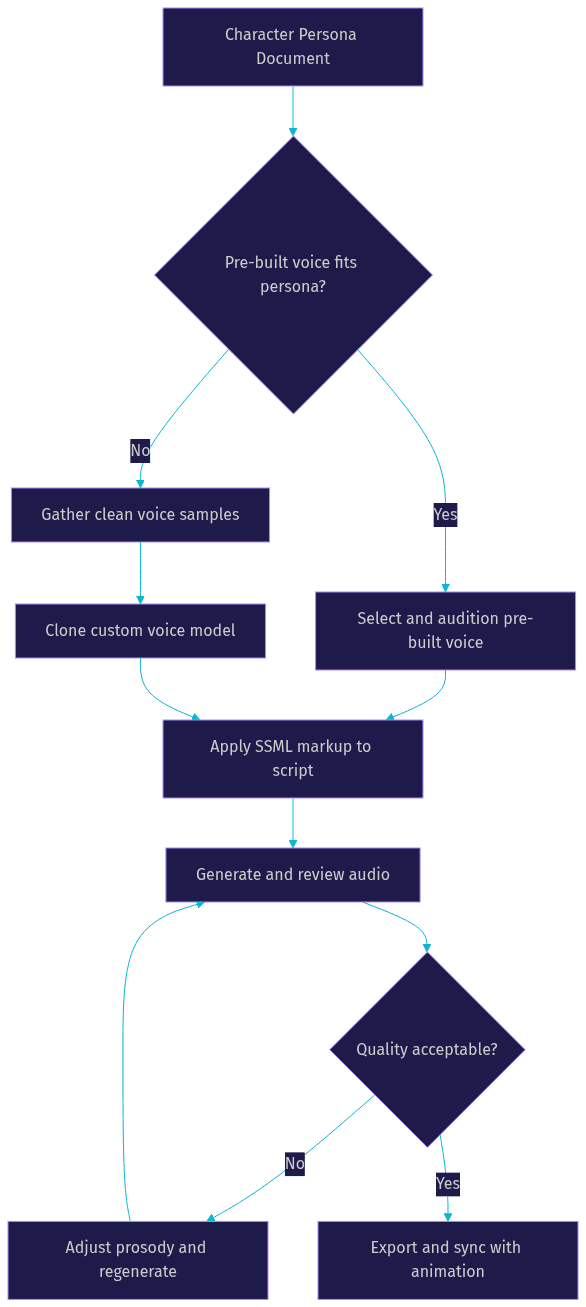
2. Select or Clone a Voice
With the persona in hand, audition voices. Most services let you type a sample line and hear it in every candidate voice, which is far more informative than listening to generic demo sentences. Match the voice's natural timbre to your persona's age and energy rather than hoping tuning will fix a mismatch. If no pre-built voice fits, move to cloning: record or gather clean samples of the target voice, submit them through the provider's cloning interface, and evaluate the resulting model against your sample dialogue. Cloning quality depends heavily on sample quality, so prioritize clean, quiet recordings.
3. Craft the SSML Script
Now markup your dialogue. Insert pauses where a human would breathe, mark emphasis on the words that carry meaning, and adjust rate and pitch around emotional beats. A whispered confession needs slower delivery and softer volume. A battle shout needs speed and force. Think of SSML as stage directions for your voice actor. The difference between a line that lands and one that falls flat is usually a handful of well-placed pauses and emphasis marks, not a different voice.
4. Generate Audio and Review
Generate the audio and listen critically. Check naturalness: does the delivery sound human, or does it drift robotic on longer sentences? Check consistency: does the character sound the same across lines recorded in different sessions? Check pronunciation: are names and invented words spoken correctly? Iterate on prosody settings rather than accepting the first output. Small rate and pitch adjustments often fix issues that seem like voice-model problems.
5. Sync Audio with Animation
Export the approved audio in a format your pipeline supports, typically WAV for quality or MP3 for size, and feed it into your engine or editor. Unity and Unreal both analyze imported audio to generate lip-sync data automatically. For video workflows, most editors can auto-generate viseme tracks from the audio timeline. Verify sync on the final render, since compression and frame-rate conversions occasionally shift alignment.
The decision flow for the voice stage looks like this:
Best Practices for High-Quality Character Speech
Quality character speech is engineered, not stumbled upon. Teams that consistently produce great character voices follow a shared set of practices.
Write for the ear, not the page. Short, expressive sentences synthesize better than long compound ones. TTS engines handle a ten-word punchy line far more naturally than a forty-word paragraph with nested clauses. Break long dialogue into speakable chunks.
Use emotion markup deliberately. Slowing the rate on a somber line or raising pitch on an excited one transforms delivery. Apply these adjustments at the sentence level, not globally, so the character's emotional range stays dynamic rather than uniformly "emotional."
Test across devices. A voice that sounds rich on studio headphones can turn tinny on a phone speaker. Test on the devices your audience actually uses, especially mobile, where most game and e-learning audio is consumed.
Keep latency under 300 ms for interactive use. For real-time character dialogue in games or live agents, end-to-end latency from input to audible speech should stay under roughly 300 milliseconds to feel conversational. Beyond that, players perceive the character as laggy. Pre-generate static dialogue; reserve real-time synthesis for dynamic responses. For live interactive characters, VideoSDK's agent pipeline is engineered around exactly this constraint.
Cache and serve from a CDN. Store generated clips on a content delivery network so playback starts instantly regardless of player location. Never re-synthesize a line you have already generated.
Common Pitfalls and How to Avoid Them
Even experienced teams hit predictable problems with character TTS. Here are the five that cause the most rework.
Over-cloning. Pushing a cloned voice beyond its training data, into extreme emotions or unfamiliar phrasing, produces robotic artifacts. Keep cloned voices within the emotional and stylistic range of the source samples, and use prosody tuning rather than script extremes to reach difficult deliveries.
Ignoring licensing restrictions. Discovering after launch that your voice plan prohibits commercial game distribution is a costly mistake. Verify licensing before production begins, not after, and document the license terms alongside the persona document.
Neglecting SSML. Raw text fed straight into a TTS engine produces flat, mechanical delivery. Teams that skip markup spend weeks wondering why their "great voice" sounds lifeless. Even minimal markup, pauses and emphasis alone, lifts quality noticeably.
Forgetting audio normalization. Lines generated in different sessions or with different settings end up at different volumes, and players notice when a character suddenly shouts or whispers relative to the previous line. Normalize all clips to a consistent loudness standard before integration.
One voice for every character. A single voice reading all roles, even a good one, flattens your cast into monotony. Even on a tight budget, differentiate characters through pitch, rate, and accent settings on two or three base voices rather than using one voice for everyone.
Future Trends in Text-to-Speech Characters
Character voice technology is moving quickly, and four trends will shape the next few years.
Real-time emotional modulation is the biggest shift on the horizon. Rather than pre-selecting an emotional style per line, engines are beginning to infer and shift emotion dynamically from context, letting a character sound genuinely startled or amused in response to what a user just said. This pairs naturally with live agent pipelines where dialogue is not scripted in advance.
Multimodal avatars are merging voice with facial expression. Providers like Anam AI and others are building systems where the synthesized voice and the avatar's facial movement are generated together, producing more coherent performance than stitching separate voice and animation systems.
Low-resource language expansion is accelerating. Character voices were once an English-first luxury; multilingual TTS characters are now viable in dozens of languages, letting games and e-learning products ship localized voiced experiences without recording separate casts per market.
Open-source voice models are reaching parity. The gap between commercial and open-source synthesis quality has narrowed dramatically. For teams with the infrastructure to self-host, open-source models now deliver character-quality speech without per-character costs, and the gap continues to close.
Definitions Glossary
Text-to-Speech Character: A synthetic voice designed to represent a specific persona, paired with a visual or narrative identity such as a game NPC or animated mascot, delivering written dialogue as expressive spoken audio.
SSML (Speech Synthesis Markup Language): A markup language that controls how a TTS engine delivers text, specifying pronunciation, pauses, emphasis, pitch, and speaking rate. It functions as stage directions for synthetic character voices.
Voice Cloning: The process of training a TTS model on recorded samples of a specific voice so it reproduces that voice's unique timbre and delivery, typically used for brand mascots or matching existing performances.
Prosody: The musical dimension of speech, including pitch, rhythm, speed, and stress, which developers tune to distinguish a hero's steady confidence from a villain's slow menace.
Viseme: The visual mouth shape corresponding to a spoken sound, derived from generated audio to drive lip-sync animation in game engines and video editors.
Agent Worker: In real-time voice AI systems like VideoSDK's agent framework, the process that manages a live character's session, routing user speech through recognition, generation, and synthesis in real time.
Key Takeaways
- Text to speech characters pair a TTS voice model with a defined persona, and consistency of that persona across all dialogue is what separates a character from a generic narrator.
- SSML markup is the highest-leverage, most-skipped step in character voice work; pauses, emphasis, and rate control transform flat delivery into performance.
- Choose your TTS service by cloning needs, latency budget, and licensing terms, not just price, and verify commercial-use rights before production begins.
- Keep end-to-end latency under roughly 300 ms for interactive character dialogue, and cache all generated audio on a CDN for instant playback.
- Real-time pipelines, such as VideoSDK's AI voice agents, extend character voices from pre-recorded clips to characters that respond live to users.
Conclusion
Building text to speech characters is no longer a studio-scale undertaking. Define a persona, select or clone a voice, markup your script with SSML, review and iterate on prosody, then sync the result with your animation. The workflow is repeatable, the tooling is mature, and the cost per line keeps falling. Start with one character, audition voices against a written persona, and expand your cast once the pipeline is proven. For live, interactive characters that speak in real time, explore the VideoSDK AI agents documentation and grab a free API key at app.videosdk.live to start building. What are you building with character voices? Drop a comment, I'd love to hear what kind of text to speech characters use case you're working on.
Free $20 Balance for AI Voice Agents & Video Calls
FAQ