


JavaScript speech recognition lets a web app convert spoken audio into text directly in the browser, most commonly through the native Web Speech API's SpeechRecognition interface. It supports continuous listening, interim results, and dozens of languages without any server-side processing. For offline or higher-accuracy needs, libraries like Vosk-browser and Whisper-based WebGPU builds run models fully on-device, and you can pair any of these with VideoSDK's real-time transcription for live calls.
Voice is quietly becoming a first-class input method on the web. Between virtual assistants, in-car interfaces, and accessibility mandates, users increasingly expect to talk to their software instead of typing into it. For web developers, that expectation lands squarely on JavaScript speech recognition, the set of browser capabilities that turn microphone audio into actionable text.
The good news is that the barrier to entry has never been lower. The Web Speech API gives most modern browsers a native speech-to-text engine that requires no downloads, no API keys, and no server round-trips. The catch is that native recognition has real limits: it needs a network connection in most browsers, it stops listening at awkward moments, and its accuracy varies by locale. That is where libraries like Vosk and Whisper enter the picture.
This guide walks through the native API first, then explores practical use cases you can ship today, and finishes with library options and performance practices for production apps.
Understanding the Web Speech API
The Web Speech API is the browser's built-in interface for converting spoken audio into text, and it is the default starting point for JavaScript speech recognition. It is split into two halves: speech recognition (audio in, text out) and speech synthesis (text in, audio out). This article focuses on the recognition half, which is exposed through the SpeechRecognition interface.
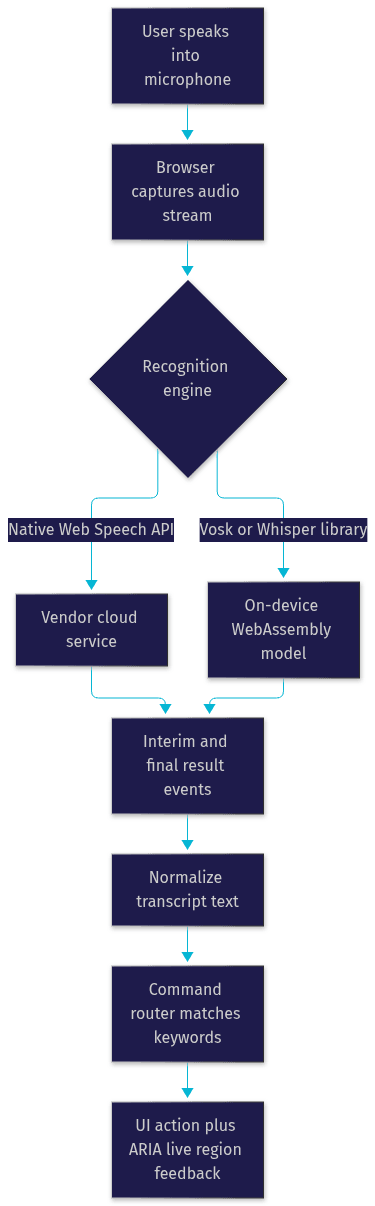
The SpeechRecognition interface works by capturing microphone audio, streaming it to a recognition engine (in Chrome and Safari this is typically a cloud-backed service operated by the browser vendor), and returning transcribed text as events. Your JavaScript code never touches raw audio buffers with the native API. Instead, you configure the recognizer, start it, and respond to the events it emits.
Three properties control most of the behavior. The language property tells the engine which locale to expect, such as United States English or Indian-accented Hindi, and setting it correctly is the single biggest accuracy lever you have. The continuous property determines whether recognition stops automatically after a single phrase or keeps transcribing until you explicitly end the session. The interimResults property controls whether you receive provisional, best-guess text while the user is still speaking, which is essential for responsive voice interfaces.
Four events carry the actual work. The result event fires whenever a final or interim transcript is available, delivering both the transcribed text and a confidence score. The error event reports problems such as a denied microphone permission, a no-speech timeout, or a network failure in cloud-backed engines. The end event signals that recognition has stopped, whether naturally or after an error, and it is your hook for restarting continuous listening. The start event confirms the recognizer is actively listening.
Browser support is the main caveat. Chrome and Edge offer the most complete implementation, Safari supports the API on both desktop and iOS with some behavioral quirks, and Firefox has historically lagged behind. Because vendor implementations differ, production apps should detect availability at runtime and provide a graceful fallback, either a plain text input or a library-based recognizer. The MDN Web Docs compatibility tables are the authoritative reference for current support status.
Quick Setup: Getting Started with JavaScript Speech Recognition
Getting a basic recognizer running follows a consistent pattern across browsers. You create an instance of the recognition interface, accounting for the vendor-prefixed variant that some browsers still expose. You then set the language to match your users' locale, enable interim results if you want live feedback, and decide whether recognition should run continuously or stop after each phrase.
Once configured, you request the microphone by starting recognition. The browser prompts the user for permission the first time, and that prompt is a hard gate: if the user denies it, the error event fires with a permission-denied code and there is no programmatic workaround. Good UX practice is to explain why you need the microphone before triggering the prompt, because a denied permission is sticky and hard to recover from.
After listening starts, your event handlers do the real work. The result handler receives transcript segments, each flagged as either interim or final. Final results are stable and safe to act on; interim results are provisional and should drive UI feedback rather than business logic. A common pattern is to display interim text in a lighter style while the user speaks, then commit the final transcript once the result event marks it complete.
One structural detail matters for continuous interfaces: the recognizer can end on its own after silence, and browsers impose their own timeouts. Robust apps restart recognition inside the end handler, guarded by a flag that lets the user deliberately stop listening. Without that guard, you get the classic bug where the app keeps re-requesting the microphone after the user clicked stop.
Core Use Cases
Voice-Powered Dark Mode Toggle
A theme toggle is the ideal first voice feature because it is stateless, instantly visible, and forgiving of recognition errors. The pattern is simple: listen continuously, inspect each final transcript for a keyword such as "dark" or "light," and apply the matching theme when a hit is found.
Keyword matching deserves care. Raw transcript matching fails on plural forms, filler words, and recognition noise, so normalize the transcript by lowercasing and trimming it before comparison. A user saying "switch to dark mode please" should still trigger the dark theme, which means matching on contained keywords rather than exact phrases.
Feedback is the difference between a demo and a feature. Because voice is invisible, users need confirmation that their command registered. A brief visual pulse on the toggle, an ARIA live region announcement, or a short toast message all work. Without feedback, users repeat themselves, and repeated commands on a toggle produce the frustrating on-off-on effect.
Voice Search and Form Filling
Speech input shines in search boxes and forms because it removes typing friction entirely. The pattern is to route final transcripts directly into the input's value, then trigger your existing search or validation logic as if the user had typed and pressed enter.
Interim results change the experience here. Displaying provisional text as the user speaks makes the interface feel instant, but you should only commit the value and fire the search on a final result. Committing on interim text causes premature searches that fire while the user is mid-sentence.
Accuracy improves dramatically when you constrain the vocabulary. If your form expects city names, product codes, or a fixed set of commands, validate the transcript against your known list and offer corrections for near matches. For free-text fields, consider a confirmation step for high-stakes submissions, showing the transcribed text and letting the user edit before saving. Speech recognition is probabilistic, and treating it as such prevents embarrassing data-entry errors.
Hands-Free Dashboard Controls
Dashboards and monitoring tools are a natural fit for voice because they are often glanced at rather than interacted with. A voice layer can trigger navigation between views, apply data filters, or start and stop timers without touching a mouse.
The architecture is a command router. Each final transcript is normalized and matched against a registry of commands, where each command maps to a handler function. A phrase like "show sales for last week" can be decomposed into an intent (navigate to sales view) and parameters (a date range), letting one recognizer drive many actions.
Timers and alerts deserve special handling. A voice command that starts a countdown should announce its state both visually and through a live region, because a hands-free user may not be looking at the screen. Pairing voice commands with the Web Speech API's synthesis half, so the dashboard speaks its confirmation back, creates a genuinely hands-free loop for kitchen timers, lab equipment, or accessibility scenarios.
Accessibility Enhancements
For users with motor impairments, repetitive strain injuries, or temporary limitations, speech recognition is not a novelty, it is access. A voice-driven interface can replace pointer-heavy navigation with spoken commands, and the Web Speech API makes that achievable without external assistive software.
The critical integration point is ARIA live regions. Recognition results and command confirmations should be announced through polite or assertive live regions so screen readers convey what the voice layer is doing. A user who cannot see the visual feedback needs the spoken or read-aloud equivalent.
WCAG compliance frames the whole feature. Voice input should always be an alternative, never the only path, because recognition fails for users with speech differences, accents the engine handles poorly, or noisy environments. Provide keyboard and pointer equivalents for every voice command, document the voice feature in your accessibility statement, and test with real assistive technology users. The W3C's Web Accessibility Initiative publishes the authoritative WCAG guidance that governs this work.
Extending Native Capabilities with Libraries
The native API has three structural weaknesses: it usually depends on a network connection, it sends audio to vendor cloud services, and its accuracy on domain vocabulary can disappoint. Libraries solve these by running recognition models entirely in the browser.
Vosk-browser compiles the Vosk offline recognizer to WebAssembly, downloading a compact model (typically tens of megabytes) once and then recognizing speech with zero network traffic. It supports over twenty languages, handles continuous streaming, and returns partial results. Vosk is the strongest choice when privacy or offline operation is the requirement, such as internal tools, kiosks, or regions with unreliable connectivity. The tradeoff is the initial model download and modest accuracy compared to large cloud models.
JuliusJS takes a different approach, running the Julius recognizer inside a web worker so recognition never blocks the main thread. Its models are small and its footprint is light, which suits simple command vocabularies on constrained devices. It is an older project, so verify its maintenance status before committing to it in 2026.
Whisper-based browser builds, such as those using ONNX Runtime Web with WebGPU acceleration, bring OpenAI's Whisper model into the browser at impressive accuracy. These are heavier: model files run into the hundreds of megabytes and WebGPU support is required for acceptable speed. They excel at transcribing recorded audio or supporting languages and accents that native engines handle poorly. For a comparison of Whisper's accuracy against other engines, the Artificial Analysis speech benchmarks provide independent, current measurements.
Choose the native API when you need zero setup, online operation is acceptable, and your vocabulary is general. Choose Vosk for offline and privacy-first scenarios. Choose a Whisper build when accuracy on difficult audio outweighs download size. And when your use case is live calls rather than page-level commands, a real-time communication platform like VideoSDK offers built-in real-time transcription alongside its video calling SDK, which handles the audio pipeline for you.
Best Practices and Performance Tips
Robust JavaScript speech recognition is mostly about handling failure gracefully. Implement explicit handling for every error category: permission denials, no-speech timeouts, network failures in cloud-backed engines, and audio-capture problems. Each deserves a distinct user-facing message, because "microphone blocked, check your browser settings" is actionable while a generic failure is not.
Continuous listening needs lifecycle discipline. Restart recognition in the end handler but gate it behind a user-intent flag, and add a small delay between restarts to avoid tight loops when something is systematically broken. On mobile, stop listening when the page is hidden to save battery and avoid background permission issues.
Throttle your result handling. Interim results can arrive many times per second, and running keyword matching or state updates on every one of them wastes cycles. Debounce interim-driven UI updates and reserve heavy logic for final results only.
Privacy is a genuine obligation. Cloud-backed native recognition sends audio off-device, so disclose that in your privacy policy, request the microphone only in response to a user action, and stop listening the moment the task completes. For sensitive contexts, prefer an on-device library like Vosk where no audio ever leaves the browser.
Finally, cache model assets for library-based recognizers. Serving Vosk or Whisper models with long-lived cache headers, ideally from a CDN, means users download the model once and subsequent visits load from cache. The flow below shows how audio moves from capture to actionable commands:
Future Trends: AI-Enhanced Speech in the Browser
Browser speech recognition is shifting from cloud-dependent to fully on-device. WebGPU, now shipping in major browsers, gives the web access to GPU compute that makes running large neural models like Whisper practical without a server. Combined with ONNX Runtime Web and frameworks like TensorFlow.js, this points toward a future where high-accuracy recognition is a download rather than an API dependency.
On-device models also change the privacy equation. When recognition runs locally, no audio leaves the device, which removes the main compliance concern for voice features in healthcare, legal, and enterprise contexts. Expect W3C specification work to continue formalizing both recognition and synthesis interfaces, gradually reducing the vendor-prefix and behavioral-divergence problems that plague cross-browser support today.
For teams building live voice experiences, the convergence is already visible: real-time communication platforms are adding server-side and client-side transcription, speaker diarization, and AI agent pipelines. VideoSDK, for example, pairs its real-time transcription capabilities with an AI voice agent SDK for fully conversational interfaces, a signal of where browser speech is heading.
Definitions Glossary
Web Speech API: The browser-native interface for speech recognition and speech synthesis, exposed through the SpeechRecognition interface for converting audio into text.
SpeechRecognition: The core interface of the Web Speech API that captures microphone audio, sends it to a recognition engine, and emits result events containing transcribed text.
Interim results: Provisional, best-guess transcripts delivered while the user is still speaking, used for live UI feedback before a final result arrives.
Continuous recognition: A recognizer mode where transcription keeps running across multiple phrases until explicitly stopped, requiring careful restart handling in the end event.
Vosk-browser: A WebAssembly build of the Vosk offline speech recognizer that runs entirely on-device, enabling private, network-free JavaScript speech recognition.
WebGPU: A modern browser graphics and compute API that enables GPU-accelerated machine learning in the browser, used by Whisper-based recognition builds.
Key Takeaways
- The Web Speech API provides native JavaScript speech recognition in most modern browsers, with language, continuous, and interim-results settings controlling its behavior.
- Interim results drive responsive UI, but only final results should trigger business logic to avoid acting on incomplete transcriptions.
- Permission handling is a hard gate: explain why you need the microphone before prompting, because a denial is difficult to reverse.
- Offline and privacy-first scenarios call for library-based recognition with Vosk-browser, while maximum accuracy on difficult audio favors WebGPU-accelerated Whisper builds.
- For live calls and meetings, VideoSDK's real-time transcription and AI voice agent capabilities handle the audio pipeline end to end, alongside its video calling SDK.
- Every voice command needs a keyboard and pointer equivalent to stay WCAG compliant, since recognition fails for accents, speech differences, and noisy environments.
Conclusion
JavaScript speech recognition has matured from a novelty demo into a practical input layer, whether through the native Web Speech API, offline Vosk models, or GPU-accelerated Whisper builds. Start with the native API for a quick win, add a command router for anything beyond a single toggle, and reach for a library when offline operation or accuracy demands it. If your project involves live conversations rather than page commands, explore VideoSDK's JavaScript SDK and its real-time transcription features, or grab a free API key at app.videosdk.live to prototype a voice-enabled call in an afternoon. What are you building with speech recognition? Drop a comment, I'd love to hear which use case you are tackling first.
Free $20 Balance for AI Voice Agents & Video Calls
FAQ