


IBM Watson Speech Recognition, officially called IBM Watson Speech to Text, is a cloud-based speech transcription service that converts spoken audio into written text in real time or in batch. It supports dozens of languages, offers customizable language and acoustic models, and runs on IBM Cloud with enterprise-grade compliance. Developers typically integrate it through WebSocket streaming or REST-based file transcription using official SDKs for Java, Swift, Python, and Node.js.
Speech is quickly becoming the default interface for customer service, virtual assistants, and enterprise analytics. Every phone call, voice note, and meeting recording represents data that most organizations never convert into searchable, actionable text. IBM Watson Speech Recognition exists to close that gap, and it has been doing so at enterprise scale for years.
For developers, Watson Speech to Text offers two distinct modes of operation: real-time streaming transcription over WebSockets, and asynchronous batch transcription of recorded audio files. Both support multi-language recognition, custom vocabulary tuning, and speaker labels. For enterprises, the service inherits IBM Cloud's security posture, including HIPAA and GDPR alignment, which matters enormously in healthcare and regulated contact-center deployments.
This guide walks through what the service is, how its core features work, how to provision and authenticate it, which SDKs to use, and how to integrate it into production applications. By the end, you'll understand the full path from an IBM Cloud account to a working transcription pipeline, along with pricing realities and best practices that most quickstarts skip.
What is IBM Watson Speech Recognition?
IBM Watson Speech Recognition is defined as the speech-to-text capability within the IBM Watson portfolio on IBM Cloud, delivered as the Watson Speech to Text service. It works by accepting an audio stream or file, applying acoustic and language models to decode the speech, and returning recognized text with confidence scores, word timings, and optional speaker labels.
What differentiates Watson Speech to Text from many competitors is its combination of transcription accuracy across a broad language set, deep customization options, and enterprise compliance. Where most consumer-grade services offer a fixed model, Watson lets you train custom language models with domain vocabulary, such as product names or medical terminology, so recognition adapts to your field. That flexibility, plus IBM's long history in regulated industries, makes it a common choice for call centers, healthcare, and financial services.
Core Features and Capabilities
Watson Speech to Text is built around three pillars: real-time streaming recognition, batch file transcription, and model customization. Understanding how each works helps you pick the right mode for your use case before you write any integration code.
Real-time streaming with WebSockets
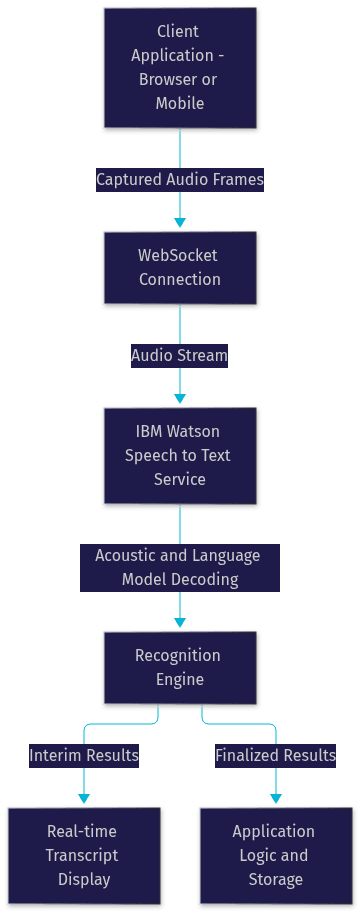
Real-time streaming is the service's flagship capability, and it works by maintaining a persistent WebSocket connection between your application and the Watson service. Audio frames flow continuously over that connection, and the service returns interim transcription results as speech happens, followed by finalized results once an utterance completes.
The latency benefit is significant. Instead of waiting for a recording to finish, a live agent-assist application can display what a caller is saying within a second or two of them saying it. This enables live captioning, real-time voice commands, and on-call compliance monitoring. The streaming interface also supports interim results, meaning your UI can show a best-guess transcription that refines itself as more audio context arrives, which feels dramatically more responsive to users.
The following diagram illustrates the streaming architecture:
Batch transcription and file formats
Batch mode handles recorded audio asynchronously. You submit an audio file, the service processes it in the background, and you retrieve the completed transcript when the job finishes. Watson Speech to Text accepts common formats including WAV, FLAC, MP3, MPEG, Ogg, Opus, and WebM, with per-file size limits that vary by plan and method, so very large recordings typically need chunking or the asynchronous interface. Batch mode is ideal for transcribing call archives, voicemail backlogs, and meeting recordings where latency doesn't matter but throughput does.
Custom language models and acoustic customization
Customization is where Watson earns its enterprise keep. Custom language models let you feed domain-specific corpora and word lists so the recognizer learns your vocabulary, whether that's pharmaceutical drug names or internal product codes. Acoustic model customization adapts to your audio environment, such as a noisy call center floor, improving accuracy where off-the-shelf models struggle.
Getting Started: Setting Up the Service
Provisioning Watson Speech to Text follows the standard IBM Cloud pattern, and getting it right the first time saves debugging headaches later.
Creating an IBM Cloud instance
Start by creating an IBM Cloud account if you don't have one, then search the catalog for the Speech to Text service. Select a pricing plan (the Lite tier is free and sufficient for evaluation), choose a region close to your users to minimize latency, and provision the instance. Once provisioned, the service appears in your resource list, and its service credentials page is where you'll find the API key and URL needed for authentication. Give the instance a descriptive name if you plan to run separate development and production instances, because managing multiple identically named services becomes painful quickly.
Authentication methods: IAM API key vs token
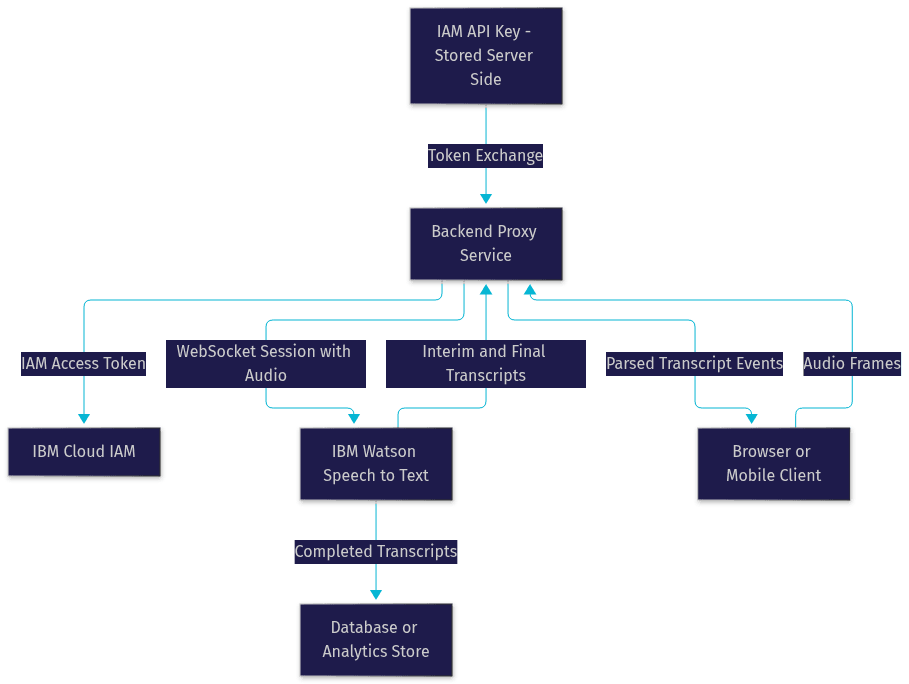
Watson Speech to Text authenticates through IBM Cloud IAM. The practical pattern is this: your application holds an IAM API key, and before calling the speech service, it exchanges that key for a short-lived IAM access token. The token is what actually authenticates requests to the service endpoint.
The security best practice is to keep the API key server-side only. A common production architecture places a thin backend service between your clients and Watson: the backend holds the API key, mints tokens, and proxies or manages WebSocket connections. Never embed an API key in a browser bundle or mobile binary, since anything shipped to a client can be extracted. Rotate keys periodically and scope access with IBM Cloud resource groups where possible.
Testing the service without writing an application
Before building a full integration, you can validate your credentials and instance using any HTTP client capable of sending an audio file with a request. The intent is simple: authenticate with your token, point the request at your service URL, attach a short audio file, and confirm you get back a recognizable transcript. This smoke test confirms provisioning, authentication, and audio format compatibility in one step, and it's the fastest way to isolate setup problems from application bugs.
SDKs and Language Support
IBM provides official SDKs for the major platforms, and each wraps the REST and WebSocket interfaces with native idioms so you spend time on your application rather than protocol handling.
Java SDK overview
The Java SDK integrates through standard dependency management, meaning you add the Watson SDK artifact to your Maven or Gradle project like any other library. The basic flow is straightforward: construct a service client configured with your IAM credentials, point it at your provisioned instance URL, then either open a streaming recognition session or submit an audio file for transcription. The SDK handles token refresh, connection management, and response parsing, returning recognized text along with confidence scores and word alternatives. Java remains a strong fit for enterprise backend transcription pipelines, especially in organizations already running Java middleware.
Swift SDK overview
The Swift SDK targets iOS and macOS applications. After adding the SDK to your Xcode project, the typical pattern involves capturing audio from the device microphone, packaging those audio frames, and streaming them to the Watson service over a WebSocket session. The SDK manages the recognition session lifecycle, so your view layer receives transcription callbacks as speech arrives. This makes Swift a natural choice for on-device voice interfaces, live captioning apps, and accessibility features where the microphone is already in your application's hands.
Other SDKs: Python and Node.js
The Python SDK is the workhorse for data science and backend teams, fitting naturally into batch transcription scripts, analytics pipelines, and machine learning workflows that post-process transcripts. The Node.js SDK suits JavaScript-heavy stacks, powering server-side transcription endpoints and browser applications that stream audio through a Node backend. Both follow the same conceptual model: authenticate with IAM, connect to your instance, stream or submit audio, and handle the returned results. IBM's official documentation on IBM Cloud Speech to Text covers installation and usage for every supported language.
Integrating Watson Speech Recognition into Applications
Integration architecture matters more than most developers expect. How you route audio between clients, your backend, and Watson determines your latency, security, and cost profile.
Using WebSockets for live transcription
Live transcription works by opening a WebSocket session to the Watson service, sending audio as it is captured, and processing the interim and final results that stream back. The critical design decision is where the WebSocket originates. In a browser application, connecting directly from the client requires exposing a token to that client, which is acceptable if the token is short-lived and scoped. In more controlled deployments, your backend opens the WebSocket and relays audio, keeping credentials fully server-side.
The diagram below shows the full production flow, including the token exchange:
Handle interim results gracefully in your UI, showing them as provisional text that updates in place, and treat final results as the authoritative transcript for storage.
Transcribing audio files
File transcription follows a submit-and-retrieve pattern. Your application uploads the audio with metadata indicating its format and the recognition model to use, the service processes it, and the transcript comes back either synchronously for short files or through an asynchronous job interface for longer recordings. For archives of recorded calls, the asynchronous pattern is essential: submit jobs in bulk, track their status, and collect results as they complete. Always specify the correct audio format explicitly rather than relying on auto-detection, because mismatched format declarations are a leading cause of garbled transcripts.
Call-center integration patterns
Call centers are the most common enterprise deployment for Watson speech recognition, and two integration patterns dominate. The first uses Apache Camel's Watson Speech to Text component, which lets integration teams wire transcription into existing Camel routes that already move telephony events between systems. Audio from the telephony platform flows through the route into Watson, and transcripts flow onward to CRM or analytics systems without custom middleware code.
The second pattern connects Watson to contact-center platforms directly. Bright Pattern, for example, offers documented integration where call audio is streamed to Watson for real-time transcription, and the resulting text feeds agent-assist tooling, quality monitoring, and post-call analytics. Both patterns share the same principle: tap the audio stream at the telephony layer, transcribe it with Watson, and route the text wherever it creates business value.
Pricing, Plans, and Cost Management
Watson Speech to Text pricing is usage-based, measured by audio duration processed. The Lite tier provides a free monthly allowance suitable for development and evaluation, though with lower concurrent-request limits. Paid plans scale with per-minute rates that vary by recognition tier, with higher-accuracy next-generation models typically priced above standard broadband models. Enterprise agreements cover volume commitments, dedicated capacity, and compliance requirements. [UPDATE guidance: verify current rates on the IBM Cloud pricing page before budgeting.]
Cost management comes down to three habits. First, monitor usage in IBM Cloud's cost dashboard and set billing alerts so a runaway transcription loop can't silently consume budget. Second, choose the cheapest model that meets your accuracy needs, since not every workload needs the most advanced model. Third, avoid re-transcribing the same audio, which happens surprisingly often when batch jobs are retried without idempotency checks. Streaming sessions left open after a caller disconnects are another classic silent cost leak, so always close sessions on call end.
Best Practices and Common Pitfalls
Most Watson Speech to Text problems trace back to a handful of causes, and each has a straightforward fix.
Audio quality is the first. Recognition accuracy degrades sharply with low sample rates, heavy compression, and background noise. Use 16 kHz or better audio for speech, prefer lossless formats where bandwidth allows, and consider acoustic customization for consistently noisy environments.
Content-type declarations are the second. Always tell the service exactly what format and sample rate your audio is in. Auto-detection exists, but explicit declarations eliminate an entire class of garbled-output bugs.
Interim result handling is the third. Applications that treat interim streaming results as final transcripts end up with duplicated and contradictory text. Design your data model so interim results update a provisional display and only final results are persisted.
Finally, build real error handling. WebSocket sessions drop, tokens expire, and rate limits trigger. Reconnect with backoff, refresh tokens before expiry, and queue audio during brief outages rather than dropping it. Production transcription systems fail far more often on these edges than on the recognition itself.
Future Roadmap and Emerging Features
IBM's speech roadmap is converging on watsonx, its AI platform brand. watx Speech to Text offerings bring next-generation models with improved accuracy, and the broader watsonx ecosystem positions speech recognition alongside LLM-powered summarization and conversational AI, which opens natural pipelines from transcript to insight. Edge deployment is also on the roadmap direction, with on-device recognition options relevant for latency-sensitive and offline scenarios. Developers building today should watch the watsonx announcements, since model naming and migration paths are actively evolving. [UPDATE guidance: check IBM's watsonx documentation for the current model lineup.]
Definitions Glossary
Watson Speech to Text: The official IBM Cloud service that converts spoken audio into text, supporting real-time streaming and batch transcription across dozens of languages.
IAM (Identity and Access Management): IBM Cloud's authentication framework, where an API key is exchanged for a short-lived access token that authorizes calls to Watson services.
WebSocket streaming: A persistent bidirectional connection used to send live audio frames to Watson and receive interim and final transcription results in real time.
Custom language model: A Watson-trained vocabulary model that improves recognition of domain-specific terms, such as product names or medical terminology.
Batch transcription: Asynchronous processing of recorded audio files, where jobs are submitted, processed in the background, and results retrieved on completion.
Key Takeaways
- IBM Watson Speech Recognition, delivered as Watson Speech to Text, supports both real-time WebSocket streaming and asynchronous batch transcription, covering live and archival use cases.
- Authentication follows the IAM pattern: keep your API key server-side, exchange it for short-lived tokens, and never ship credentials to clients.
- Official SDKs for Java, Swift, Python, and Node.js wrap the REST and WebSocket interfaces, letting you integrate transcription without handling raw protocols.
- Custom language and acoustic models are Watson's key differentiator, boosting accuracy for domain vocabulary and noisy environments.
- Cost control depends on explicit audio format declarations, choosing the right model tier, closing idle streaming sessions, and monitoring usage with billing alerts.
Conclusion
IBM Watson Speech Recognition remains one of the most enterprise-ready speech-to-text services available in 2026, combining real-time streaming, batch processing, deep customization, and IBM Cloud's compliance posture. Whether you're building agent-assist tooling for a call center, transcribing healthcare consultations, or adding voice interfaces to a mobile app, the path is the same: provision the service, authenticate through IAM, pick the right SDK, and design your integration around the streaming and batch patterns covered here. Start with the free Lite tier to validate accuracy on your own audio, then explore the IBM Cloud Speech to Text documentation and the official SDKs for your stack. What are you building with speech recognition? Drop a comment, I'd love to hear what kind of transcription use case you're working on.
Free $20 Balance for AI Voice Agents & Video Calls
FAQ