


Introduction to Google Cloud Speech to Text
Google Cloud Speech to Text is a powerful speech recognition solution that harnesses cutting-edge AI to transcribe spoken words into written text. This technology is pivotal in modern applications, powering everything from real-time captioning to automated voice commands and call analytics. As speech interfaces become standard across platforms, the demand for reliable, accurate speech-to-text APIs has surged. Google Cloud Speech to Text stands out for its robust set of features, including support for over 125 languages, real-time and batch transcription, streaming recognition, and highly secure enterprise-grade compliance. Whether you're building accessibility tools, voice-driven apps, or automated transcription services, Google Cloud Speech to Text provides the flexibility and scalability developers need in 2025.
How Google Cloud Speech to Text Works
Advanced Speech AI and the Chirp Model
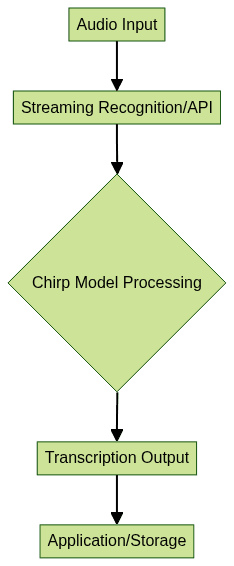
At the heart of Google Cloud Speech to Text lies Google’s advanced AI stack and the state-of-the-art Chirp model. Chirp leverages deep neural networks to deliver superior accuracy and resilience to noise compared to traditional speech recognition models. This translates to higher transcription fidelity, especially in diverse real-world environments. The Chirp model is continuously improved using vast datasets, enabling it to handle a wide range of accents, dialects, and industry-specific jargon. The result: highly accurate audio transcription for both short commands and lengthy, complex conversations.
Supported Languages and Variants
Google Cloud Speech to Text offers unparalleled multilingual support, with recognition capabilities spanning over 125 languages and variants. This extensive coverage makes it the go-to speech-to-text API for global applications. From creating multilingual captions to supporting localized voice commands, developers can build inclusive, worldwide solutions. Additionally, automatic language detection and switching empower applications to cater to diverse user bases without extensive manual configuration.
Key Features of Google Cloud Speech to Text
Real-time and Batch Transcription
Google Cloud Speech to Text offers both real-time (streaming) and batch (asynchronous) transcription. Real-time transcription is ideal for live captioning, voice assistants, and interactive voice commands, providing instant feedback as users speak. Batch transcription, on the other hand, is perfect for processing large, pre-recorded audio files, such as podcasts or customer support recordings, with high throughput and reliability. For developers looking to add real-time voice features to their own apps, integrating a Voice SDK can further enhance interactive experiences.
Pretrained and Custom Models
Developers can leverage Google’s pretrained models for general-purpose speech recognition or create custom speech models tailored to specific domains. Custom models allow for domain adaptation, enabling improved accuracy for industry-specific vocabulary—such as medical or legal terms. Through Vertex AI Studio, you can fine-tune and manage custom models, ensuring that Google Cloud Speech to Text adapts to your unique use cases. If your application requires seamless integration with video communication, consider using a Video Calling API to combine speech recognition with real-time video and audio streams.
Security, Compliance, and Data Residency
Security and compliance are at the forefront of Google Cloud Speech to Text. The service employs enterprise-grade encryption for data in transit and at rest, ensuring that sensitive audio data is protected. Compliance with global standards such as GDPR, HIPAA, and SOC 2 is supported, and customers can configure data residency to meet jurisdictional requirements. This makes Google Cloud Speech to Text a trusted choice for enterprise and regulated industries.
Getting Started with Google Cloud Speech to Text
Setting Up Your Google Cloud Project
To begin using Google Cloud Speech to Text, create or select a Google Cloud Project. Enable the Speech-to-Text API in the Cloud Console, set up billing, and assign the necessary permissions using Identity and Access Management (IAM). Proper IAM configuration ensures that only authorized users and services can access your transcription resources.
Pricing and Free Tier
Google offers a $300 free credit for new users and an always-free tier for Google Cloud Speech to Text. This allows developers to experiment and prototype without upfront costs, making it accessible for startups and individual developers.
Authentication and Access Control
Authentication is managed via service accounts, API keys, or OAuth 2.0, depending on the use case. Implement IAM roles to grant granular access to resources, ensuring secure and auditable usage. For production workloads, service accounts with minimal permissions are recommended to enhance security.
Implementation Methods for Google Cloud Speech to Text
Using Google Cloud Console
The Google Cloud Console offers an intuitive UI for quick transcription jobs. Upload your audio file, select language and recognition options, and trigger the transcription process. Results can be viewed and exported directly from the console, making it ideal for ad-hoc or low-volume needs. If you want to add live audio interaction to your app, integrating a Voice SDK can help you build scalable audio rooms alongside your transcription workflows.
Using gcloud CLI
The
gcloud CLI enables programmatic access to Google Cloud Speech to Text. After installing and configuring the CLI, use the following command to transcribe audio stored in Cloud Storage:1gcloud ml speech recognize gs://YOUR_BUCKET/audio.flac \
2 --language-code="en-US" \
3 --formatting="true"This command sends the audio file to the Speech-to-Text API, specifying the language and enabling automatic formatting. The output is returned as a structured JSON object with the transcription results. For developers working with live broadcasts or events, leveraging a Live Streaming API SDK can enable interactive streaming features alongside speech-to-text capabilities.
Using Client Libraries (Python Example)
Google provides client libraries for multiple languages. Below is an example using Python:
1from google.cloud import speech_v1p1beta1 as speech
2
3client = speech.SpeechClient()
4
5audio = speech.RecognitionAudio(uri="gs://YOUR_BUCKET/audio.flac")
6config = speech.RecognitionConfig(
7    encoding=speech.RecognitionConfig.AudioEncoding.FLAC,
8    sample_rate_hertz=16000,
9    language_code="en-US"
10)
11
12response = client.recognize(config=config, audio=audio)
13
14for result in response.results:
15    print("Transcript: {}".format(result.alternatives[0].transcript))
This script authenticates using your service account, submits an audio file for recognition, and prints the transcribed text. If you’re building with Python and want to add real-time video and audio features, check out the python video and audio calling sdk for a quick integration guide.
Using REST API
You can call the Speech-to-Text API directly using REST with
curl. Here’s an example using a JSON payload:1curl -s -X POST \
2 -H "Content-Type: application/json" \
3 -H "Authorization: Bearer $(gcloud auth application-default print-access-token)" \
4 --data '{
5 "config": {
6 "encoding": "FLAC",
7 "sampleRateHertz": 16000,
8 "languageCode": "en-US"
9 },
10 "audio": {
11 "uri": "gs://YOUR_BUCKET/audio.flac"
12 }
13 }' \
14 "https://speech.googleapis.com/v1/speech:recognize"The API returns a JSON object containing the transcript and confidence scores, which you can process in your application pipeline. For JavaScript developers, integrating a javascript video and audio calling sdk can help you build browser-based communication features that complement your speech-to-text workflows.
Best Practices and Optimization Tips
- Audio Quality: Use high-quality microphones and reduce background noise for higher transcription accuracy. Prefer lossless formats like FLAC or WAV.
- Language Hints: Provide language hints or phrase hints to guide the model, especially for uncommon words or names.
- Model Selection: Choose between enhanced, video, or phone call api models based on your audio source for optimal results.
- Error Handling: Implement robust error handling and retry logic for network or quota errors. Log API responses for troubleshooting.
- Security: Always use IAM roles and service accounts with the least privilege principle.
Common Use Cases for Google Cloud Speech to Text
Google Cloud Speech to Text powers a wide range of applications:
- Live Captions: Automatically generate captions for video streams and online meetings.
- Voice Commands: Enable hands-free control in mobile apps, smart devices, and web platforms. For developers building voice-driven interfaces, a Voice SDK can simplify the process of adding real-time audio features.
- Call Analytics: Transcribe customer support calls for sentiment analysis and quality assurance.
- Accessibility: Make content accessible to users with hearing impairments through real-time transcription.
- Integration: Seamlessly connect with other Google Cloud services (e.g., Cloud Storage, Pub/Sub) for end-to-end workflows. If you need to build scalable live audio rooms, consider integrating a Voice SDK for robust audio infrastructure.
Conclusion: Is Google Cloud Speech to Text Right for You?
Google Cloud Speech to Text offers industry-leading accuracy, scalability, and security, making it ideal for developers building global, voice-enabled applications in 2025. Whether you need real-time voice commands, transcriptions at scale, or multilingual support, Google’s platform provides comprehensive tools and support for modern software projects.
Free $20 Balance for AI Voice Agents & Video Calls
FAQ