


Introduction to Google Cloud Speech Recognition
Google Cloud Speech Recognition is a powerful cloud-based speech-to-text solution that transforms spoken language into written text using advanced artificial intelligence and machine learning. Offered as part of the Google Cloud Platform, it enables developers to build applications that understand and transcribe human speech in real time or from recorded audio files. This technology is widely used for audio transcription, real-time communication tools, video captioning, accessibility services, and analytics.
The benefits of Google Cloud Speech Recognition include industry-leading transcription accuracy, support for multiple languages and dialects, robust security compliance, and easy integration via APIs and tools. Organizations leverage it to automate workflows, enhance accessibility, and deliver smarter user experiences across web, mobile, and enterprise applications.
How Google Cloud Speech Recognition Works
At the core of Google Cloud Speech Recognition is the Chirp model, a state-of-the-art neural network designed for speech-to-text tasks. Powered by Google’s deep learning and AI/ML infrastructure, the service processes audio inputs, decodes them, and generates highly accurate transcriptions. The model supports a wide array of languages and adapts to diverse accents and audio environments.
For developers building real-time communication tools, integrating a Voice SDK can further enhance the capabilities of speech recognition by enabling seamless live audio interactions within your applications.
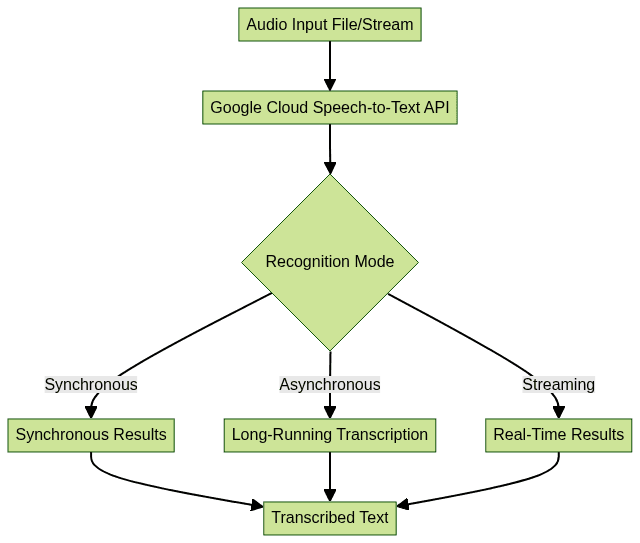
The high-level workflow involves sending audio data to the Speech-to-Text API, which processes the input using the selected model (standard or enhanced, possibly custom), and returns the recognized text. Both synchronous and asynchronous modes are supported, as well as streaming for real-time applications.
Key Features of Google Cloud Speech Recognition
Extensive Language and Accent Support
Google Cloud Speech Recognition supports over 125 languages and variants as of 2025, enabling global applications. The service also offers automatic language detection, recognition of regional accents, and the ability to select specific language models for improved accuracy. This breadth makes it ideal for international products and diverse user bases.
If you're building multilingual communication platforms, consider leveraging a Video Calling API to support both voice and video interactions alongside speech recognition features.
Real-Time and Batch Transcription
With flexible modes, developers can choose between real-time streaming transcription for applications like voice assistants and batch (synchronous or asynchronous) processing for pre-recorded audio files. This versatility supports a wide range of use cases, from live captions to automated meeting notes and large-scale audio analytics.
For those looking to add robust audio capabilities, integrating a Voice SDK can simplify the process of enabling real-time voice features in your applications.
Security and Compliance
Google Cloud Speech Recognition is built with enterprise-grade security in mind. It supports encryption in transit and at rest, detailed audit logs, granular IAM permissions, and compliance with major standards such as GDPR, HIPAA, and ISO/IEC 27001. This ensures that sensitive audio data is protected throughout the transcription workflow.
Google Cloud Speech Recognition API Methods
Synchronous Recognition
Synchronous recognition is used for short audio files (typically under 1 minute). The API responds quickly with the transcribed text after processing the uploaded audio.
1POST https://speech.googleapis.com/v1/speech:recognize
2Authorization: Bearer [YOUR_ACCESS_TOKEN]
3Content-Type: application/json
4
5{
6  "config": {
7    "encoding": "LINEAR16",
8    "sampleRateHertz": 16000,
9    "languageCode": "en-US"
10  },
11  "audio": {
12    "uri": "gs://your-bucket/audio.wav"
13  }
14}
Asynchronous Recognition
For longer audio files (up to 8 hours), asynchronous recognition allows you to submit audio for processing and retrieve results later.
1POST https://speech.googleapis.com/v1/speech:longrunningrecognize
2Authorization: Bearer [YOUR_ACCESS_TOKEN]
3Content-Type: application/json
4
5{
6  "config": {
7    "encoding": "LINEAR16",
8    "sampleRateHertz": 16000,
9    "languageCode": "en-US"
10  },
11  "audio": {
12    "uri": "gs://your-bucket/long_audio.wav"
13  }
14}
You can poll the operation endpoint to check for completion and retrieve results.
If your application requires handling phone-based audio, you may want to explore a phone call api to facilitate seamless integration of telephony features with speech recognition.
Streaming Recognition
For applications needing real-time transcription, streaming recognition uses a persistent gRPC connection to send and receive data.
1import grpc
2from google.cloud import speech_v1p1beta1 as speech
3
4client = speech.SpeechClient()
5
6config = speech.RecognitionConfig(
7    encoding=speech.RecognitionConfig.AudioEncoding.LINEAR16,
8    sample_rate_hertz=16000,
9    language_code="en-US"
10)
11streaming_config = speech.StreamingRecognitionConfig(config=config)
12
13def generator():
14    with open("audio.wav", "rb") as audio_file:
15        while chunk := audio_file.read(4096):
16            yield speech.StreamingRecognizeRequest(audio_content=chunk)
17
18requests = generator()
19responses = client.streaming_recognize(streaming_config, requests)
20for response in responses:
21    for result in response.results:
22        print("Transcript:", result.alternatives[0].transcript)
For developers working with Python, integrating a python video and audio calling sdk can streamline the process of adding both video and audio communication features to your projects.
Using the gcloud CLI
The
gcloud CLI offers a simple way to transcribe audio without writing code. For example:1gcloud ml speech recognize gs://your-bucket/audio.wav \
2 --language-code='en-US' \
3 --format='value(results[0].alternatives[0].transcript)'If you prefer working with JavaScript, you can leverage a javascript video and audio calling sdk to quickly add real-time communication and transcription capabilities to your web applications.
Using Vertex AI Studio for Speech Recognition
Vertex AI Studio integrates Google’s speech recognition, allowing developers to test and prototype transcription workflows in a no-code environment. This is especially helpful for rapid experimentation before full-scale API integration.
For a comprehensive solution, combining Google Cloud Speech Recognition with a Voice SDK can help you build scalable, interactive audio experiences.
Step-by-Step Guide: Implementing Google Cloud Speech Recognition
Prerequisites and Setup
- Enable the Speech-to-Text API in your Google Cloud project.
- Set up billing to cover usage beyond the free tier.
- Install the Google Cloud CLI (
gcloud) and authenticate with your account. - Set up authentication via service account keys for programmatic access.
1gcloud services enable speech.googleapis.com
2gcloud auth application-default login
If you want to add live audio rooms or group conversations to your application, integrating a Voice SDK can provide a seamless experience for users.
Transcribing Audio Files
Using the REST API (Python example with
google-cloud-speech library):1from google.cloud import speech
2client = speech.SpeechClient()
3
4with open("audio.wav", "rb") as f:
5 audio = speech.RecognitionAudio(content=f.read())
6
7config = speech.RecognitionConfig(
8 encoding=speech.RecognitionConfig.AudioEncoding.LINEAR16,
9 sample_rate_hertz=16000,
10 language_code="en-US"
11)
12response = client.recognize(config=config, audio=audio)
13for result in response.results:
14 print("Transcript:", result.alternatives[0].transcript)Or via CLI:
1gcloud ml speech recognize audio.wav \
2  --language-code='en-US'
For developers seeking to build comprehensive communication platforms, integrating a Video Calling API can enhance your application by adding video and audio conferencing features alongside transcription.
Handling Long Audio and Streaming
For long files, use asynchronous recognition:
1operation = client.long_running_recognize(config=config, audio=audio)
2response = operation.result(timeout=600)
3for result in response.results:
4    print("Transcript:", result.alternatives[0].transcript)
For streaming (real-time) audio, use the streaming API as shown earlier. Best practices include splitting audio into manageable chunks and handling reconnections.
If your project requires advanced voice features, a Voice SDK can help you implement real-time audio streaming and interactive voice functionalities efficiently.
Customization and Model Selection
Google Cloud Speech Recognition allows customization via:
- Enhanced models for improved accuracy in noisy environments
- Domain-specific models (e.g., for telephony or video)
- Custom classes and phrase hints to improve recognition of specific words or jargon
Example of phrase hints:
1config = speech.RecognitionConfig(
2    encoding=speech.RecognitionConfig.AudioEncoding.LINEAR16,
3    sample_rate_hertz=16000,
4    language_code="en-US",
5    speech_contexts=[speech.SpeechContext(phrases=["API", "gRPC", "Vertex AI"])]
6)
Best Practices for Google Cloud Speech Recognition
- Maximize accuracy by selecting the correct language, providing sample phrases, and using enhanced models for noisy audio.
- Handle varying audio qualities by normalizing input, reducing background noise, and using lossless formats (like WAV/FLAC).
- Manage quotas and limits by monitoring usage via the Google Cloud console and optimizing API calls (e.g., batching requests, using async recognition for large files).
Pricing, Quotas, and Security Considerations for Google Cloud Speech Recognition
Google Cloud Speech Recognition offers a generous free tier and transparent pay-as-you-go pricing. Pricing varies based on audio length, recognition model (standard/enhanced), and features such as data logging. Quotas are set to prevent abuse but can be increased for enterprise needs.
Security is a core focus, with encrypted data at rest and in transit, compliance with industry standards (GDPR, HIPAA, ISO/IEC 27001), and detailed audit logs. Role-based access controls ensure only authorized users access transcription resources.
Common Use Cases for Google Cloud Speech Recognition
- Application integration: power chatbots, virtual assistants, and mobile apps with voice input. For advanced voice features, try integrating a Voice SDK to enable high-quality real-time audio.
- Video captioning: automate closed captions for media platforms
- Call center analytics: transcribe and analyze customer interactions for quality and insights
- Accessibility: provide real-time captions for the hearing impaired in educational and workplace settings
Conclusion
Google Cloud Speech Recognition offers a robust, scalable, and secure solution for speech-to-text needs in 2025. Start integrating its powerful APIs today to deliver smarter, more accessible, and innovative applications. Try it for free and explore the possibilities for your next project.
Free $20 Balance for AI Voice Agents & Video Calls
FAQ