


Azure Speech to Text is Microsoft's cloud-based speech recognition service, part of Azure Cognitive Services, that converts spoken audio into text using streaming recognition, fast synchronous processing, or large-scale batch jobs. It supports over 100 languages and locales, speaker diarization, and custom speech models trained on your domain vocabulary. Developers typically pair it with a real-time communication layer, such as VideoSDK, to caption live calls or analyze recorded conversations end to end.
Every app that touches voice eventually hits the same wall: audio is rich with information, but it is useless until it becomes text. A support call contains the exact reason a customer is frustrated. A lecture recording holds the entire curriculum. A town hall stream carries decisions that nobody wrote down. Azure Speech to Text exists to convert that unstructured audio into searchable, analyzable, actionable text, and it does so at a scale and accuracy level that would have seemed unrealistic a decade ago.
The catch is that the service is not one thing. It is a family of transcription modes, model options, and integration patterns, and picking the wrong combination leads to latency problems, surprise bills, or transcripts full of mangled product names. This guide walks through how Azure Speech to Text works, which mode fits which workload, and the practical decisions around audio quality, security, scaling, and cost that determine whether your transcription pipeline actually works in production.
What is Azure Speech to Text?
Azure Speech to Text is defined as the speech recognition component of Azure Cognitive Services that converts spoken audio into machine-readable text. It works by streaming or submitting audio to a regional Azure endpoint, where an acoustic model decomposes the signal into phonetic candidates and a language model converts those candidates into the most probable word sequence. The result comes back as recognized text with confidence scores, timestamps, and optional metadata such as speaker identity and detected language.
The service sits inside the broader Azure AI services family, alongside text-to-speech, translation, and language understanding offerings. You interact with it through the Speech SDK for real-time scenarios, a REST API for batch and fast transcription jobs, and a set of management APIs for training custom speech models and retrieving results from Azure storage containers.
At a high level, every Azure Speech to Text interaction follows the same pipeline: audio enters from a microphone, file, or storage blob, gets authenticated against a regional endpoint, flows through acoustic and language model processing, and returns text to your application. The diagram below shows that flow for a typical real-time integration:

The key architectural insight is that the heavy lifting happens in Azure's cloud, not on your device. Your application only needs to capture audio, authenticate, and handle results. That is also why the same service can power a phone captioning feature and a nightly job transcribing ten thousand call-center recordings: the ingestion path differs, but the recognition core is shared.
Key Features of Azure Speech to Text
Azure Speech to Text's feature set spans three transcription modes plus a layer of accuracy-enhancing tools. Understanding each one is the first step toward matching the service to your workload.
Azure Speech to Text Real-time Transcription
Real-time transcription streams audio to Azure as it is captured and returns partial results while the speaker is still talking. The Speech SDK maintains a persistent connection to a regional endpoint, sends audio in small chunks, and emits intermediate hypotheses that refine as more context arrives. Final results typically land within a few hundred milliseconds of the spoken word, which is fast enough for live captioning and voice commands. The intermediate-result behavior matters for UX: users see text appear almost instantly, then watch it correct itself as the language model gains context. For live video or audio calls built on platforms like VideoSDK, real-time transcription is the mode that powers in-meeting captions and live translation overlays.
Azure Speech to Text Fast Transcription
Fast transcription is a synchronous, short-file mode designed for audio under a couple of minutes, such as voicemails, voice notes, or short meeting clips. You submit the complete audio, the request blocks until processing finishes, and the full transcript returns in a single response, typically within seconds. Because there is no job lifecycle to manage, no polling, and no webhook wiring, fast transcription is the simplest integration path in the service. It also supports optional output formatting, including readable text with punctuation and display formatting rather than raw recognition output.
Azure Speech to Text Batch Transcription
Batch transcription handles large volumes of long audio, from hour-long meetings to entire archives of recorded calls. You submit audio files stored in an Azure Blob Storage container, and Azure processes them as asynchronous jobs, writing transcripts back to a destination container and optionally notifying your system through webhook callbacks when each job completes. Batch mode supports diarization, profanity filtering, and word-level timestamps, and it is the right choice whenever audio is already recorded rather than live. A common production pattern is a media platform that ingests uploaded videos, queues a batch job per file, and indexes the resulting transcripts for full-text search.
Azure Speech to Text Custom Speech Models
Base models are trained on broad, general speech, which means they routinely stumble on domain vocabulary: drug names in telehealth, part numbers in manufacturing, regional slang in social apps. Custom speech models let you fine-tune recognition using your own audio and text data. You upload human-labeled transcripts and related text, train an adaptation of the base model, evaluate it against a held-out test set, and deploy it as a named endpoint your applications reference instead of the default. The evaluation step is where the value shows up: comparing word error rate between the base model and your custom model on the same test audio tells you whether the training effort actually paid off.
Azure Speech to Text Speaker Diarization and Language Detection
Speaker diarization labels segments of a transcript by who spoke them, distinguishing "speaker 1" from "speaker 2" without knowing their identities. It is essential for call analytics, interview analysis, and any two-party conversation where attribution matters. Language detection, meanwhile, lets the service identify the spoken language automatically when your audio may arrive in any of several supported locales, removing the need to prompt users or maintain per-language pipelines. Both features are available in batch transcription and, with some configuration, in real-time scenarios.
Azure Speech to Text Phrase Lists and Language Support
Phrase lists are a lighter-weight accuracy tool than full custom models. You provide a list of domain-specific terms, product names, or acronyms, and the recognizer biases its decoding toward those phrases at recognition time. Phrase lists are ideal when the vocabulary gap is small and the audio domain is otherwise normal speech. Combined with support for over 100 languages and locales, phrase lists make Azure Speech to Text practical for global products without per-market model engineering.
Choosing the Right Transcription Mode
The single most consequential decision in any Azure Speech to Text integration is picking the right mode, because latency, cost, and architecture all follow from it. Real-time transcription is measured in milliseconds and built on persistent streaming connections. Fast transcription is measured in seconds and built on synchronous requests. Batch transcription is measured in minutes to hours and built on storage containers and job queues.
The decision tree below maps the most common conditions to a mode:
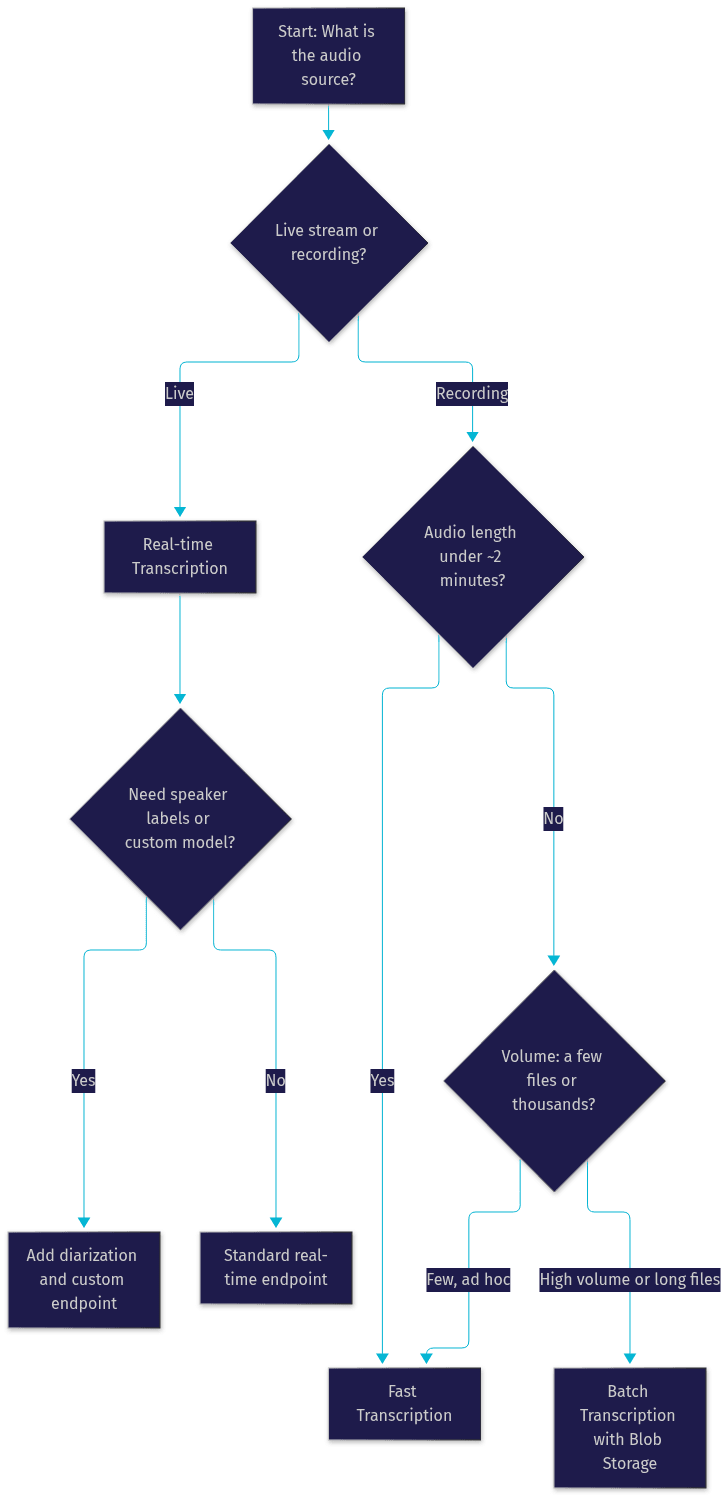
A few practical rules sharpen the choice. Use real-time when a human is watching the text appear, because anything slower than roughly a second feels broken in live captions. Use fast transcription when you need a complete, formatted transcript for short audio and want to avoid job management entirely. Use batch when audio exceeds a couple of minutes, when you need diarization or word-level timestamps at scale, or when throughput matters more than immediacy, such as overnight processing of a day's call recordings.
Cost also differs by mode. Real-time and fast transcription are billed per audio duration processed, while batch pricing depends on the model tier and whether you read results through the standard API or an associated read feature. Mixing modes is normal: many products use real-time for live captions and batch for post-call analytics on the same recorded audio.
Implementation Considerations for Azure Speech to Text
Getting a prototype working is easy. Getting a production pipeline that is secure, reliable, and cost-predictable takes planning in four areas.
Authentication and Secure Endpoints
Azure Speech to Text authenticates requests using either a subscription key or a short-lived authorization token exchanged for that key. The token approach is the recommended pattern for client-facing applications because tokens expire, limiting the blast radius of a leaked credential. Never embed a subscription key in a mobile app or browser bundle. Instead, run a small backend service that holds the key, issues tokens to authenticated clients, and scopes access to a specific region endpoint. On the network side, restrict your Azure resource to expected regions, use managed identities for server-to-server calls where possible, and treat transcription output as sensitive data subject to the same compliance controls, including GDPR and HIPAA considerations, as the audio itself.
Selecting Audio Formats and Sample Rates
The service accepts a range of formats, with WAV PCM and OGG Opus being the most common, and MP3 supported for batch scenarios. Sample rate matters more than format: recognition quality degrades noticeably below 16 kHz, and 16 kHz mono is the practical baseline for speech workloads. Higher rates are accepted but rarely improve accuracy for speech, while increasing payload size and streaming bandwidth. For real-time streaming, consistent chunking and a stable sample rate prevent the recognizer from misinterpreting the audio stream. If your source audio is telephony, which is often 8 kHz, expect lower accuracy and consider whether your pipeline can upsample or whether a custom model trained on telephony audio is warranted.
Managing Webhooks and Event Notifications
Batch transcription is asynchronous, which means your system needs to know when jobs finish. Azure supports webhook notifications: you register a callback URL when submitting a job, and Azure posts a status message to that endpoint when the job completes or fails. Build your webhook receiver to be idempotent, since notifications can be retried, and to validate that the notification corresponds to a job you actually submitted. A common pattern is a queue-based worker: the webhook enqueues a job-completion event, and a separate process fetches the transcript from storage, post-processes it, and updates your search index or database. This decoupling keeps a burst of completed jobs from overwhelming your API layer.
Monitoring and Scaling
Azure Monitor exposes metrics for request volume, latency, and errors on your Speech resource, and those metrics are your early warning system for throttling. Every subscription has concurrency limits per region, and exceeding them returns errors rather than queuing gracefully. For high-volume workloads, spread load across time with batch scheduling, request quota increases through Azure support when you have a justified baseline, and design retry logic with exponential backoff for transient failures. For real-time workloads, track connection-level health, because a dropped stream mid-utterance produces a partial transcript that your application must handle gracefully, either by reconnecting and resuming or by flagging the gap.
Performance and Accuracy Tips
Transcription quality is not fixed. It is a function of audio input, vocabulary coverage, and model choice, and you can influence all three.
Optimizing Audio Quality
The cheapest accuracy improvement is almost always better input audio. Position microphones close to speakers, avoid compressing audio multiple times before submission, and prefer higher bitrates when you control encoding. If your application captures live speech, apply noise suppression before streaming, either client-side or through the SDK's built-in processing. For calls built on real-time platforms, features like VideoSDK's built-in noise suppression clean up the audio before it ever reaches a transcription endpoint, which directly improves recognition quality downstream.
Using Phrase Lists Effectively
Curate phrase lists from real recognition errors, not from guesses. Review transcripts, find the terms the base model gets wrong, and add those terms. Keep lists focused, because an oversized phrase list biases recognition in unhelpful ways and adds per-request overhead. Revisit the list as your product vocabulary evolves, retiring stale terms and adding new ones after each release.
Leveraging Custom Models
Train a custom speech model when phrase lists stop closing the gap, typically when domain audio itself is unusual, such as accented speech in a specific industry, telephony-band audio, or heavy jargon. Always evaluate before deploying: hold out a labeled test set, compare word error rate between base and custom models, and only deploy the custom endpoint if the improvement is meaningful. A custom endpoint also carries hosting cost, so retire custom models when base model updates make them redundant.
Handling Speaker Diarization Limits
Diarization accuracy degrades as speaker count grows, and overlapping speech remains genuinely hard. For recordings with many speakers, structure the conversation where possible, such as turn-taking moderation in virtual events, and treat diarization labels as probabilistic rather than ground truth in downstream analytics. For two-party calls, diarization is reliable enough to drive analytics like talk-time ratio and interruption counts.
Cost and Pricing Overview
Azure Speech to Text pricing is based on audio duration processed, with rates varying by tier and features. The standard tier covers base-model transcription, while premium pricing applies to features like custom model hosting and certain batch read capabilities. Real-time and fast transcription are billed per hour of audio, and batch transcription pricing depends on the model and retrieval method. Rates also vary by region, so a workload pinned to one region can cost measurably more or less than the same workload elsewhere. Check the current Azure Speech Services pricing page before estimating, since rates change.
The main cost drivers beyond per-hour rates are custom model endpoint hosting, which bills hourly while the endpoint exists whether or not it is serving traffic, and volume, since committed-use pricing offers lower rates for predictable monthly hours. A quick estimation habit: multiply expected monthly audio hours by your mode's rate, add custom endpoint hosting if applicable, and add a buffer for retries and re-processing, which commonly adds 5 to 10 percent to real-world volume.
The free tier includes a monthly allowance of audio hours, which is enough to build and validate a prototype before any spend. Use it to benchmark accuracy on your actual audio before committing to a tier.
Real-World Use Cases
Accessibility Captioning for Live Events
A virtual event platform streams a conference to thousands of viewers. Real-time transcription feeds a caption overlay with sub-second latency, so deaf and hard-of-hearing attendees follow sessions live. Because the same captions are persisted, the platform also gets searchable session transcripts for free, turning an accessibility feature into a content asset.
Call-Center Conversation Analytics
A support operation records every call. Batch transcription with diarization processes recordings nightly, and the resulting transcripts drive analytics: talk-time ratios, frequent complaint topics, compliance keyword detection, and sentiment trends. What was previously unmeasured audio becomes a queryable dataset, and supervisors surface coaching opportunities from real conversation patterns rather than call notes.
Media Asset Indexing for Video Platforms
A video platform ingests hours of user uploads daily. Batch jobs transcribe each upload, word-level timestamps align transcript text to video timecodes, and the transcripts feed a search index. Users search for spoken phrases and jump directly to the moment they were said, transforming a passive video library into a navigable knowledge base.
Multilingual Customer Support
A global helpdesk accepts voice messages in dozens of languages. Language detection routes each message to the correct recognizer without asking users to self-identify, and transcripts flow into the same downstream ticketing workflow regardless of locale. Support agents read instead of listen, cutting handling time and making multilingual coverage practical without per-language staffing.
Definitions Glossary
Real-time transcription: Streaming recognition that returns partial and final results while audio is still being captured, typically within a few hundred milliseconds, used for live captions and voice interfaces.
Batch transcription: Asynchronous processing of recorded audio at scale, where files are submitted from storage containers and results are written back with optional webhook notification on completion.
Fast transcription: A synchronous mode for short audio files that returns a complete, formatted transcript in a single response within seconds, with no job lifecycle to manage.
Custom speech model: An adaptation of a base recognition model trained on your own audio and text data, deployed as a named endpoint to improve accuracy on domain-specific vocabulary and audio conditions.
Speaker diarization: The process of labeling transcript segments by speaker identity, distinguishing who said what in multi-speaker audio without knowing actual names.
Phrase list: A set of domain-specific terms supplied at recognition time that biases the language model toward those phrases, improving accuracy without full model training.
Word error rate (WER): The standard accuracy metric for speech recognition, calculated from substitutions, deletions, and insertions relative to a reference transcript, used to compare base and custom models.
Key Takeaways
- Azure Speech to Text offers three distinct modes, real-time, fast, and batch transcription, and choosing the correct one based on audio length, latency needs, and volume is the most important architectural decision.
- Custom speech models and phrase lists close the vocabulary gap that base models leave open, but always validate improvements with word error rate evaluation before deploying a custom endpoint.
- Authentication should use short-lived tokens issued by a backend service, never subscription keys embedded in client applications.
- Audio quality is the cheapest accuracy lever: 16 kHz or better, noise suppression, and minimal re-encoding beat any model tuning on bad input.
- Cost is driven by audio hours, region, custom endpoint hosting, and retry overhead, so estimate monthly spend from real volume plus a buffer, and validate accuracy on the free tier first.
Conclusion
Azure Speech to Text is a capable, flexible transcription platform, but its value depends on matching the right mode to the right workload and then investing in the accuracy levers that matter for your domain. Real-time for live captions, fast for short files, batch for scale. Phrase lists for small vocabulary gaps, custom models for big ones. Tokens for security, monitoring for scale, and word error rate evaluation for every model decision.
If you are building live voice or video experiences, transcription pairs naturally with a real-time communication layer. VideoSDK provides video and audio calling SDKs across React, Flutter, React Native, Android, and iOS, with built-in noise suppression that cleans audio before it reaches a transcription endpoint, plus real-time and post-call transcription features of its own. Start on the Azure free tier to benchmark accuracy on your actual audio, then explore the VideoSDK quickstart to see the full pipeline end to end. What are you building with speech transcription? Drop a comment, I'd love to hear what kind of voice use case you are working on.
Free $20 Balance for AI Voice Agents & Video Calls
FAQ