


The Socket.IO client is a browser and mobile library that manages a real-time, event-driven connection to a Socket.IO server, handling the WebSocket handshake, automatic reconnection, and message delivery for you. It abstracts raw WebSocket details, falls back to HTTP long-polling when WebSockets are blocked, and works across JavaScript, React Native, Android, and iOS. If you need low-latency two-way messaging, start with the official Socket.IO documentation, then consider a managed real-time platform like VideoSDK for audio and video features.
Modern applications no longer poll a server every few seconds hoping something changed. Users expect chat messages to appear instantly, cursors to move in real time during collaborative editing, and live dashboards to update the moment new data lands. That expectation has pushed real-time communication from a nice-to-have into a core requirement for web and mobile products.
The socketio client is one of the most widely adopted tools for meeting it. It gives developers a simple, event-driven messaging layer that works in the browser, in React Native, and on native Android and iOS platforms. This guide walks through what the client does, how connections and events work, how to keep them reliable and secure, and how to diagnose problems when they appear.
What is Socket.IO Client?
The Socket.IO client is a library that opens and manages a persistent, bidirectional connection between your application and a Socket.IO server. It is defined as the client half of the Socket.IO real-time communication stack, responsible for initiating connections, negotiating transport, sending events, and receiving broadcasts.
The client works by first attempting a WebSocket connection and, if that fails due to proxies, firewalls, or older browser WebSocket support issues, automatically falling back to HTTP long-polling. This connection fallback is the feature that made Socket.IO popular in the first place: it works in network conditions where a raw WebSocket client would simply fail. Once connected, the library maintains a heartbeat mechanism, exchanging periodic ping and pong frames so both sides know the connection is alive.
Crucially, the socketio client is cross-platform. The official JavaScript client runs in browsers and Node.js, and community-maintained clients exist for Java (Android), Swift (iOS), C++, and other runtimes. The same conceptual model, connect, emit, listen, disconnect, applies everywhere.
Core Concepts
Four concepts govern how you use the client. Events are named messages: the client emits events to the server and registers listeners for events the server sends back, following a publish-subscribe model. Namespaces let one connection multiplex several logical channels, such as separating admin traffic from user traffic. Rooms are server-side groupings that let you broadcast to a subset of connected clients, and the client participates through room subscription. Finally, the client-side API exposes the connection lifecycle through connection state events, so your UI can react to connects, disconnects, and reconnection attempts without manual polling.
Setting Up the Environment
Before writing any client logic, confirm your environment is ready. You need a JavaScript runtime such as Node.js installed if you are building for the web, along with a package manager to install the client library from the npm registry. Mobile developers working with React Native get the same JavaScript client through their existing dependency workflow, while native iOS and Android teams use the Swift and Java client libraries distributed through their standard package ecosystems.
You also need a running Socket.IO server to connect to. In development that is usually a local Node.js process; in production it is typically behind HTTPS with a valid certificate. The client and server major versions must match, because the protocol between them has changed across major releases, and a version mismatch is one of the most common causes of failed handshakes.
Choosing the Right Platform
Browser projects should use the official JavaScript client, which handles browser WebSocket support detection and fallback automatically. React Native projects can use the same JavaScript client, though teams sometimes swap in a native WebSocket implementation for performance. Native Android apps use the Java client, and iOS apps use the Swift client. The trade-off is simple: the JavaScript client offers the fastest development loop and the widest documentation, while native clients give finer control over background behavior, battery usage, and platform-specific networking.
Connecting to a Socket.IO Server
Connecting is a multi-step negotiation, not a single request. The client first fetches the server's configuration over HTTP, learning which transports are available and receiving a session identifier. It then attempts to upgrade to a WebSocket connection using the secure WebSocket (wss) protocol when the page is served over HTTPS. Once the server accepts the upgrade, the connection is established and the heartbeat mechanism begins.
This server-client handshake matters because it is where authentication tokens are typically passed, where connection options such as the namespace and query parameters are set, and where failures surface first. Understanding the sequence helps you diagnose problems quickly.
Establishing the Connection
The logical sequence runs as follows. You provide the server URL plus any connection options, including the namespace, authentication credentials, and transport preferences. The client performs the initial HTTP exchange, upgrades to WebSocket if possible, and fires its connection success event once the handshake completes. At that point your application can treat the channel as open: presence can be announced, room subscriptions requested, and queued messages flushed.
Handling Connection Events
The client exposes lifecycle events that your UI should always handle. The connect event confirms the channel is open and is the right place to announce presence or rejoin rooms. The disconnect event tells you the channel closed, whether deliberately or because of a network drop. The error event signals something the client could not recover from on its own, such as an authentication failure. The reconnecting event fires during recovery attempts and is essential for showing honest connection status to users. Skipping these handlers is the most common cause of apps that silently stop receiving updates.
Emitting and Listening to Events
Event-driven messaging is the heart of the socketio client. Instead of making requests and waiting for responses, the client emits named events carrying JSON payloads, and the server pushes named events back whenever something happens. Client-side event handling means registering listeners for each event name you care about, and the library invokes the matching listener whenever a message arrives.
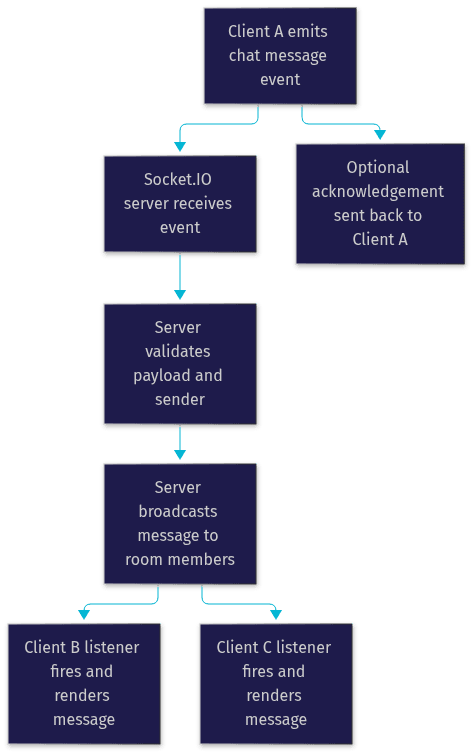
This publish-subscribe model decouples senders from receivers. A client emitting a chat message does not know or care which other clients receive it; the server decides, often using rooms to target a broadcast at a specific group. The client can also request acknowledgements, where the server confirms receipt of a specific emitted event, which is useful for critical messages like payment actions.
Common Event Patterns
Three patterns cover most real-world needs. Chat applications emit a message event carrying the text and metadata, and the server broadcasts it back to everyone in the room. Presence updates let the server tell clients when users join, leave, or change status, so rosters stay current without polling. Typing indicators use short-lived events, emitted when a user starts typing and cleared after a timeout, and because they are high-frequency and low-value, they are the first candidates for throttling.
Managing Reconnection and Reliability
Networks are unreliable, and a real-time client that gives up after the first dropped connection is useless in production. The socketio client treats reconnection as a first-class feature. When the connection drops, it automatically begins retrying, and by default it uses exponential back-off, waiting progressively longer between attempts so a struggling server or network is not hammered with retries.
You control this behavior through connection options: the maximum number of reconnection attempts, the delay before the first attempt, and the upper bound on back-off. Custom retry logic is also possible, for example pausing reconnection entirely when the application detects the user is offline, or forcing an immediate attempt when connectivity returns.
Automatic Reconnection Strategies
Exponential back-off is the default because it balances recovery speed against server load. The first retry happens quickly, and each subsequent retry roughly doubles the wait, capped at a maximum delay. Setting a max attempts limit prevents infinite retry loops in situations where recovery is impossible, such as an expired authentication token. On successful reconnection, the client fires its reconnection success event, and well-designed apps use that moment to rejoin rooms, re-announce presence, and resynchronize any state missed while offline.
Detecting Network Changes
On mobile especially, the socket layer can be slow to notice that Wi-Fi was lost or airplane mode was toggled. Listening for the browser or platform's online and offline events lets your application proactively close the dead socket and trigger an immediate reconnection attempt when connectivity returns, rather than waiting for the heartbeat to time out.
Security Considerations for Socket.IO Clients
A persistent socket is an open door into your server, so client-side security is not optional. Three areas matter: transport security, authentication, and data validation.
For transport, always use the secure WebSocket (wss) protocol in production. TLS encryption for sockets protects message contents and credentials from interception, and the client will use wss automatically when the page itself is served over HTTPS. For authentication, pass a token during the handshake rather than in messages. Token-based authentication, typically with a JWT issued by your backend, lets the server verify identity before the connection is fully accepted, and the client can refresh tokens on reconnection when old ones expire. For validation, never trust incoming event payloads on the server, and on the client, treat all received data as untrusted until rendered safely.
Transport Security (TLS)
The wss protocol wraps the WebSocket stream in TLS, the same encryption that protects HTTPS. The client enforces it by matching the page protocol: an HTTPS page connects over wss, and most clients can be configured to refuse insecure ws connections outright. Serving sockets over plain ws in production exposes every message, including authentication tokens, to network-level eavesdropping.
Authentication and Token Management
The standard pattern is to obtain a short-lived token from your authentication server, attach it to the connection options so it is sent during the handshake, and have the Socket.IO server reject unauthenticated connections before any events flow. Because tokens expire, the client should handle authentication failures by fetching a fresh token and reconnecting, rather than retrying forever with a dead credential.
Performance Optimization Tips
A socket connection is fast by default, but careless usage can still produce laggy apps. Latency optimization and bandwidth management are where most gains come from.
Reducing Latency
Three habits keep round-trips short. Prefer the WebSocket transport over long-polling, since polling adds artificial delay on every message. Minimize payload size by sending only the fields each event needs rather than whole objects. And for binary data such as images, audio chunks, or drawing strokes, send it as binary instead of base64-encoded text, which inflates size by roughly a third and adds encoding overhead.
Bandwidth Management
High-frequency events are the main bandwidth drain. Throttle typing indicators and cursor-position updates so they fire at most a few times per second. Batch rapid updates, sending one aggregated event per short window instead of dozens of individual ones. And use selective event subscription through namespaces and rooms so each client only receives the traffic relevant to it, rather than every broadcast on the server.
Real-World Use Cases
The socketio client powers a huge range of production applications. Multiplayer games use it for position updates and game state. Trading and analytics dashboards stream live price ticks. Ride-sharing apps track vehicle locations. Notification systems push alerts the instant they are generated. Two patterns are worth examining in detail because they appear in almost every product.
Chat Applications
A typical group chat flow runs like this: each client connects, authenticates, and joins a room representing the conversation. When a user sends a message, the client emits a chat event, the server validates and persists it, then broadcasts it to every other client in the room, whose listeners render it instantly. Presence events keep the participant list accurate, and typing indicators add the human touch that makes chat feel live.
Live Collaboration Tools
Collaborative editors and shared whiteboards push the same pattern harder. Every keystroke or stroke becomes an event, and the server merges concurrent edits and broadcasts the resolved state. Because these events are extremely high-frequency, throttling, batching, and binary payloads for drawing data are essential. When your collaboration needs to go beyond data, adding live audio and video, platforms like VideoSDK provide the calling layer alongside your socket-based data channel.
Troubleshooting Common Issues
Even a well-built client hits problems. Two categories account for most support tickets.
Connection Failures
When a client cannot connect at all, check four things in order. First, CORS: the server must explicitly allow the client's origin, and a silent CORS rejection looks exactly like a dead server from the client's perspective. Second, firewalls and corporate proxies that block WebSocket upgrades, which is exactly the scenario the long-polling fallback exists for. Third, version mismatches between client and server, which break the handshake protocol. Fourth, authentication failures, which often surface as a connection that opens and immediately closes.
Event Mismatch
When the connection works but listeners never fire, the cause is almost always naming. Event names are case-sensitive strings, and a client listening for one casing while the server emits another will silently receive nothing. Verify the exact event names on both sides, confirm the client registered its listeners before the events could arrive, and check that the client actually joined the room or namespace the server is broadcasting to.
When to Use Socket.IO Versus a Managed Real-Time Platform
Socket.IO is an excellent choice when you control the server, need custom event-driven messaging, and are willing to run and scale the infrastructure yourself. Scaling socket.io across multiple server nodes requires a Redis adapter or similar pub/sub backbone, plus sticky sessions at the load balancer, and that operational burden grows with your user base.
Use a managed real-time communication platform when you need features beyond messaging: audio and video calling, interactive live streaming, or recording. VideoSDK provides these through SDKs for React, React Native, Flutter, Android, and iOS, with token-based authentication, automatic network adaptation, and REST APIs for server-side orchestration handled for you. Many production apps use both: Socket.IO for lightweight custom events, and a managed platform for the media-heavy parts.
Definitions Glossary
Socket.IO client: The library that initiates and manages a real-time, event-driven connection to a Socket.IO server, handling transport negotiation, heartbeats, and automatic reconnection.
Namespace: A logical channel multiplexed over a single connection, used to separate concerns such as admin and user traffic.
Room: A server-side grouping of connected clients that enables targeted broadcasting, with clients participating through room subscription.
Heartbeat mechanism: Periodic ping and pong frames exchanged between client and server to confirm the connection is still alive.
Connection fallback: The client's automatic switch to HTTP long-polling when a WebSocket connection cannot be established.
Exponential back-off: A reconnection strategy where the wait between retry attempts grows progressively, reducing load on a struggling server.
Key Takeaways
- The socketio client abstracts WebSocket complexity, negotiating transport automatically and falling back to HTTP long-polling when WebSockets are blocked.
- Handling connection lifecycle events (connect, disconnect, reconnecting, error) is mandatory for apps that stay honest about connection state.
- Automatic reconnection with exponential back-off, combined with online/offline detection, keeps sessions alive across network interruptions.
- Security rests on three pillars: wss transport, token-based authentication during the handshake, and validation of every payload on the server.
- Throttling, batching, binary payloads, and selective room subscription keep latency low and bandwidth efficient.
- For audio, video, and interactive live streaming beyond custom messaging, a managed platform like VideoSDK handles the infrastructure, scaling, and media optimization for you.
Conclusion
The socketio client remains one of the fastest paths to real-time, event-driven messaging in web and mobile applications. It hides transport negotiation, keeps connections alive through automatic reconnection, and gives you a clean publish-subscribe model for everything from chat to live dashboards. The concepts in this socketio client guide, connection lifecycle, event patterns, reliability, and security, apply whether you build for the browser, React Native, Android, or iOS.
Start by connecting to a local server, wire up your connection event handlers, and iterate from there. When your project grows to include live audio and video, explore VideoSDK's quickstart guides and the code samples library, or grab a free account at app.videosdk.live. What are you building with real-time messaging? Drop a comment, I'd love to hear what kind of socket-powered use case you're working on.
Free $20 Balance for AI Voice Agents & Video Calls
FAQ