


Live call transcription is the process of converting spoken audio from an ongoing call into text instantly. VideoSDK provides native real-time transcription within its video and audio calling SDKs, allowing developers to access transcription events directly without managing separate streaming pipelines. To implement it, you need to capture audio, stream it to a speech-to-text engine, and handle the resulting text events in your application UI.
Live call transcription is rapidly becoming a baseline expectation rather than a premium feature. In support centers, remote meetings, and media production, manual note-taking introduces delays, errors, and missed opportunities. When agents are focused on typing, they are not fully engaged in the conversation. When insights are delayed until after a call ends, the window for immediate action has closed. Developers are now tasked with embedding real-time speech-to-text capabilities directly into their applications.
This shift eliminates the gap between conversation and insight, allowing systems to react instantly to spoken words. By integrating live call transcription, teams can automate summaries, trigger contextual alerts, and ensure compliance without burdening human agents. Historically, adding this capability meant managing a fragile pipeline of audio capture, third-party streaming, and separate UI rendering. Today, platforms like VideoSDK provide built-in real-time transcription capabilities for their video and audio calling SDKs, allowing developers to add this functionality seamlessly without stitching together multiple disjointed services.
What Is Live Call Transcription?
Live call transcription is defined as the process of converting spoken audio from an ongoing call into text instantly. It works by capturing continuous audio streams from a microphone, web browser, or telephony line, sending them to a speech-to-text engine, and delivering the recognized text back to the application in real time. Unlike batch transcription, which processes a recorded file after a call ends, live transcription provides immediate visibility into the conversation. This architectural difference is significant. Batch processing can leverage heavier, more accurate models because latency is not a concern. Live transcription requires models optimized for speed, capable of processing streaming audio and returning partial results in milliseconds. VideoSDK provides live call transcription through its real-time communication APIs, enabling developers to access transcription events directly within their video or audio calling applications. This native integration means the transcription engine operates on the same media streams the application is already routing, ensuring synchronization and low latency without duplicating audio pipelines.
How Live Call Transcription Works
Audio Capture and Streaming
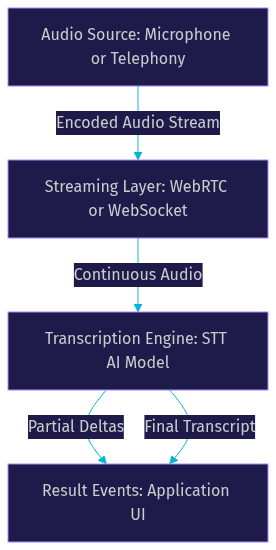
The transcription pipeline begins with audio capture. Whether the source is a mobile microphone, a web browser, or a SIP telephony line, the system must capture raw audio and encode it efficiently. Developers typically use standard formats like 24 kHz PCM to ensure compatibility with modern AI models. The encoded audio is then streamed continuously to the transcription engine. For web and mobile applications, WebRTC handles this natively, managing the complex network traversal and media routing. In a typical architecture, the audio is sent to a media server, often an SFU (Selective Forwarding Unit), which then routes it to other participants and to the transcription service. Telephony integrations might use SIP gateways to bridge traditional phone lines into the streaming layer. VideoSDK simplifies this step by automatically handling audio capture and routing within its SDK, exposing clean media tracks that can be directed to the transcription service. Developers do not need to manually manage WebRTC peer connections or media server configurations to get the audio to the STT engine.
Real-Time Speech-to-Text Models
Once the audio reaches the transcription engine, AI models process the incoming stream. Providers like OpenAI, Deepgram, and Amazon Transcribe use specialized models that emit incremental deltas. Instead of waiting for a speaker to finish a long sentence, these models output partial transcripts that update as the person speaks. This streaming approach is what makes live call transcription feel instantaneous. The models are trained on vast datasets to understand various accents, dialects, and acoustic conditions. They use complex neural networks to map audio frames to phonetic probabilities and then to words. VideoSDK integrates with these provider models through its Python SDK and AI Agent framework, allowing developers to route the real-time audio to their preferred STT engine and receive text back without managing the underlying WebSocket connections. This abstraction layer means developers can switch between providers like Deepgram and OpenAI by changing a few configuration parameters rather than rewriting the integration logic.
Turn Detection and Speaker Diarization
In a multi-party call, knowing who said what is critical for accurate records and analytics. Turn detection uses voice activity detection, or VAD, to identify when a user starts and stops speaking, creating boundaries between conversational turns. VAD algorithms analyze the energy and frequency of the audio signal to distinguish speech from silence or background noise. Speaker diarization takes this further by labeling segments of audio with specific speaker identities. This is especially important in scenarios like customer support, where distinguishing between the agent and the customer is necessary for sentiment analysis and compliance. Diarization models extract voice characteristics and cluster them to assign labels like "Speaker 1" and "Speaker 2." VideoSDK handles participant-level audio tracks natively, making it significantly easier to attribute transcribed text to specific participants in a room rather than trying to separate a mixed audio stream after the fact.
Delivering Results
Transcription engines deliver results through event-driven mechanisms. Applications receive partial transcripts as users speak and final transcripts when a sentence or phrase is complete. These events typically include word-level timestamps and confidence scores, allowing developers to build precise UI updates or trigger downstream automations. Partial transcripts are useful for live captioning, where the text updates rapidly on screen. Final transcripts are used for logging and analysis. VideoSDK exposes these transcription events through its SDK hooks and callbacks, meaning the frontend can update the chat interface or display live captions the moment the event fires. This event-driven architecture ensures the UI remains responsive and the transcript is perfectly synchronized with the audio.
Key Features to Look For
When evaluating a live call transcription solution, developers should prioritize sub-second latency. If the transcript lags too far behind the speaker, it loses its value for live interactions and creates a disjointed user experience. Multilingual support is also essential, with top providers offering recognition for 99 or more languages. This is crucial for applications serving global user bases. Keyword spotting allows applications to trigger alerts when specific terms are mentioned, which is vital for sales enablement and compliance monitoring. Speaker identification, word-level timestamps, and custom vocabularies for industry-specific jargon further enhance accuracy. Custom vocabularies are particularly important in technical fields where product names or acronyms might be misinterpreted by general models. Finally, privacy controls are non-negotiable for many enterprises. Developers need options for cloud-based processing or on-premises deployment to meet strict compliance requirements. VideoSDK addresses these needs by offering secure token-based authentication and the ability to integrate private or on-prem AI models via its Python SDK. Developer experience is another critical feature. A provider with comprehensive SDKs, clear documentation, and robust community support will significantly reduce integration time.
Common Use Cases
Customer Support & Call Centers
In call centers, live call transcription enables agents to focus entirely on the conversation rather than typing notes. The system captures the interaction automatically and can suggest actions based on detected keywords or sentiment. This reduces after-call work, improves agent productivity, and ensures a complete record of the customer interaction. Supervisors can also monitor live transcripts to provide real-time coaching and identify escalations before they become critical.
Remote Meetings & Webinars
Remote meetings benefit from live captions, making sessions accessible to participants with hearing impairments or non-native speakers. After the meeting, the transcript can be used to generate an automated summary and identify action items. VideoSDK's real-time transcription feature integrates directly into its meeting SDKs, making this easy to deploy across web and mobile platforms. This ensures every participant can follow along regardless of their audio environment.
Podcast & Media Production
Media producers use live transcription to generate immediate text versions of audio recordings. This speeds up the editing process, allows for rapid publishing of searchable content, and improves SEO for audio and video assets. Having a live transcript means editors can search for specific quotes without listening to the entire recording, saving hours of post-production time.
Compliance & Legal
Regulated industries, such as finance and healthcare, require accurate records of communications. Live call transcription creates searchable, timestamped archives of calls, ensuring organizations meet legal and compliance standards without manual transcription overhead. The ability to securely store these transcripts with end-to-end encryption is a critical requirement in these sectors. VideoSDK provides the necessary security infrastructure, including E2E encryption, to support these use cases.
Choosing a Live Call Transcription Provider
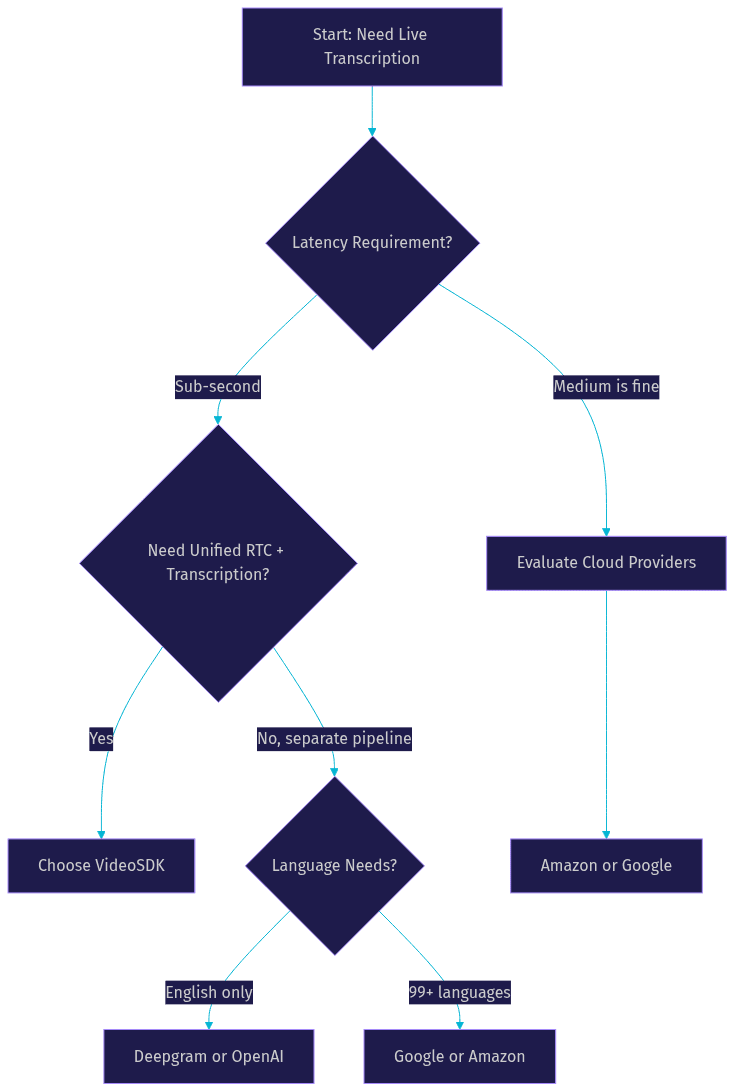
Selecting the right provider depends on your specific latency requirements, language needs, and deployment model. VideoSDK offers a distinct advantage by integrating transcription directly into its real-time communication platform. This eliminates the need to manage a separate streaming pipeline to a third-party service, reducing both latency and infrastructure complexity. Other major players include OpenAI, Amazon Transcribe, Google Cloud Speech, Deepgram, and AssemblyAI. Each has its own strengths in terms of model accuracy, language coverage, and pricing structure.
[LINKABLE ASSET — comparison table]
| Provider | Latency | Language Coverage | Best For | VideoSDK Integration |
|---|---|---|---|---|
| VideoSDK | Sub-second | Multi-language | Unified RTC and transcription | Native built-in |
| OpenAI | Low | Multi-language | General purpose AI models | Via Python SDK |
| Amazon Transcribe | Medium | Extensive | AWS ecosystem users | Via custom pipeline |
| Google Cloud Speech | Medium | Extensive | Google Cloud users | Via custom pipeline |
| Deepgram | Ultra-low | Good | High-volume, fast transcription | Via Python SDK |
| AssemblyAI | Low | Good | Post-call analytics | Via REST API |
The table above highlights the trade-offs. If your application is already using WebRTC for audio or video calls, using VideoSDK for transcription is the most efficient path. The transcription data is available directly within the same SDK events, meaning you do not need to build a separate backend service to handle STT webhooks. If you are processing pre-recorded files or building a custom telephony backend from scratch, a standalone provider like Deepgram or AssemblyAI might be more appropriate. The decision ultimately comes down to whether you want a unified platform or a best-of-breed stack.
Implementation Considerations
Integrating live call transcription requires careful attention to audio formats and sample rates to ensure the STT engine receives clean input. Mismatched sample rates can lead to garbled text or processing delays. Managing authentication tokens securely is critical, especially when tokens are passed between frontend clients and backend servers. Never expose API keys in the client. Developers must also handle network interruptions gracefully, implementing reconnection logic so a brief drop in connectivity does not lose the entire transcript. Scaling for concurrent calls requires a provider that can handle high throughput without degradation in latency. Data privacy must be enforced through encryption in transit and at rest, with on-premises options available for sensitive workloads. Monitoring and observability are also essential. Developers need visibility into transcription latency, error rates, and audio quality to diagnose issues in real time. Finally, consider post-call processing. A live transcript is valuable, but pairing it with automated summaries, sentiment analysis, and searchable archives maximizes long-term utility. VideoSDK handles much of this complexity by managing the media streams and transcription events within the same SDK, and provides REST APIs for fetching post-call analytics.
Best Practices for High-Quality Transcription
Achieving high transcription accuracy starts with high-quality audio capture. Encourage users to use good microphones and reduce background noise in their environment. Configure custom vocabularies with industry-specific terms, product names, and acronyms to prevent the model from guessing or hallucinating words. Calibrate turn detection thresholds to avoid cutting off speakers prematurely or merging separate sentences into a single block. If using VideoSDK, leverage the built-in noise suppression features to clean the audio before it reaches the transcription engine. This ensures the AI model receives the clearest possible signal. Testing and evaluation are also critical. Before deploying to production, run a pilot with a diverse set of accents and audio conditions to establish a baseline for accuracy and latency.
Future Trends in Live Call Transcription
The future of live call transcription points toward edge AI processing, where models run directly on devices to reduce latency and improve privacy. Multimodal models that combine video and audio context will provide richer understanding, allowing systems to interpret gestures or facial expressions alongside speech. Real-time translation will become standard, breaking down language barriers in global meetings by instantly converting spoken text into the listener's preferred language. Tighter integration with conversational AI agents will allow systems to not only transcribe but actively participate in calls, using VideoSDK's AI Voice Agents to handle complex workflows autonomously. As these models become more efficient, we will see transcription move from a passive recording tool to an active participant in the conversation. The convergence of real-time communication and artificial intelligence will blur the lines between human and machine interactions, creating new possibilities for automated support and collaboration.
Definitions Glossary
Live Call Transcription: The process of converting spoken audio from an ongoing call into text instantly.
Speaker Diarization: The process of labeling segments of audio with specific speaker identities in a multi-party conversation.
Turn Detection: The mechanism that uses voice activity detection to identify when a user starts and stops speaking.
Incremental Deltas: Partial transcripts emitted by AI models as a person speaks, updated continuously until the final transcript is produced.
VideoSDK Room: A virtual meeting space where participants join to share real-time audio and video streams, with built-in transcription capabilities.
Key Takeaways
- Live call transcription converts spoken audio into text instantly, enabling real-time insights and automation.
- Key features to evaluate include sub-second latency, multilingual support, speaker diarization, and privacy controls.
- VideoSDK provides native real-time transcription within its video and audio calling SDKs, simplifying implementation.
- Implementation requires careful handling of audio formats, authentication, network interruptions, and scaling.
- Future trends include edge AI processing, multimodal models, and tighter integration with conversational AI agents.
Conclusion
Live call transcription is no longer a luxury but a core feature for modern communication applications. By converting speech to text in real time, developers can build systems that are more accessible, compliant, and intelligent. When choosing a solution, prioritize latency, language coverage, and ease of integration. VideoSDK stands out by offering native transcription within its real-time communication platform, allowing you to focus on building features rather than managing audio pipelines. Explore the VideoSDK real-time transcription documentation to get started.
What are you building with VideoSDK? Drop a comment below to share your live call transcription use case.
Free $20 Balance for AI Voice Agents & Video Calls
FAQ