


AV1 compression is the process of encoding video using the AOMedia Video 1 codec, a royalty-free format developed by the Alliance for Open Media. AV1 delivers roughly 30% better compression efficiency than HEVC and VP9 while remaining free from licensing fees. For developers building video delivery pipelines or real-time communication apps with platforms like VideoSDK, AV1 offers a path to lower bandwidth costs without quality degradation.
What Is AV1 Compression?
AV1 compression is defined as the encoding and decoding of digital video using the AV1 codec specification, an open and royalty-free standard created by the Alliance for Open Media (AOMedia) in 2018. The format was designed to replace older royalty-bearing codecs like HEVC (H.265) by delivering superior compression efficiency without the licensing entanglements that have slowed adoption of previous generation codecs.
AV1 compression works by applying a suite of prediction, transform, and entropy coding techniques to reduce the amount of data needed to represent a video sequence. The codec targets a roughly 30% bitrate reduction over VP9 and HEVC at equivalent visual quality, making it attractive for streaming platforms, video calling applications, and web-based video delivery.
VideoSDK, which provides video calling SDKs built on WebRTC, benefits from the broader industry shift toward AV1. As browser and hardware support for AV1 matures, real-time communication platforms can leverage the codec's efficiency to deliver higher quality video at lower bitrates, especially on constrained networks where VideoSDK's network-adaptive streaming already adjusts resolution and bitrate dynamically.
The codec is maintained by AOMedia, a consortium that includes Google, Amazon, Netflix, Microsoft, Cisco, Mozilla, and other major technology companies. This backing has driven rapid adoption across browsers, mobile platforms, and dedicated hardware decoders since the specification was finalized.
How AV1 Compression Works
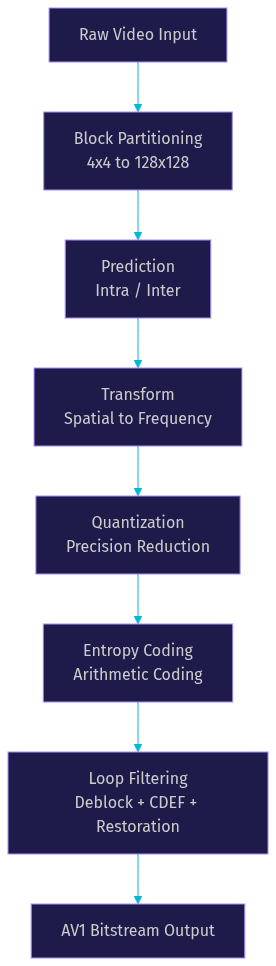
AV1 compression processes video through a multi-stage pipeline. First, each frame is divided into coding blocks of varying sizes, from 4x4 up to 128x128 pixels, using a flexible block partitioning scheme. The encoder then applies intra prediction for frames that reference only themselves or inter prediction for frames that reference other frames, using advanced motion vectors and reference frame management.
After prediction, the residual data (the difference between the predicted and actual frame) passes through a transform stage that converts spatial data into frequency coefficients. These coefficients are quantized to reduce precision and discard less visually important information. An entropy coding stage then compresses the quantized data using arithmetic coding. Finally, in-loop filtering (including deblocking, constrained directional enhancement, and loop restoration) cleans up compression artifacts before the output bitstream is written.
Here is a visual representation of the AV1 compression pipeline:
The AV1 bitstream syntax defines how all of these stages are represented in the compressed output, allowing any conformant decoder to reconstruct the video. The syntax supports advanced features like film grain synthesis, which separates grain patterns from the underlying image and encodes them as parameters, reducing bitrate for noisy source material.
Why Choose AV1 Compression Over Other Codecs?
AV1 compression stands out from competing codecs primarily because it combines modern compression efficiency with a royalty-free licensing model. This matters for developers and companies building video infrastructure because codec licensing costs can scale dramatically with user growth.
HEVC (H.265), while offering good compression efficiency, has been plagued by a fragmented patent pool structure. Multiple licensing entities each demand royalties, creating uncertainty and cost that has slowed adoption, particularly in web browsers. VP9, Google's earlier royalty-free codec, avoided the licensing problem but has been surpassed by AV1 in compression efficiency.
H.264 (AVC) remains the most widely deployed codec, but its compression efficiency is significantly lower than AV1. For developers building interactive live streaming or video calling applications, the bandwidth savings from AV1 can translate directly to lower infrastructure costs and better user experiences on mobile networks.
According to testing published by the Netflix Technology Blog, AV1 achieves approximately 30% lower bitrate than VP9 at equivalent quality on standard test sequences. The W3C WebRTC specification has also added AV1 as a supported codec, meaning real-time communication platforms like VideoSDK can benefit from AV1's efficiency as browser support expands.
Compression Efficiency Compared to HEVC and VP9
Published studies consistently show AV1 outperforming both HEVC and VP9 on compression efficiency. According to benchmarks from the Moscow State University Video Codecs Comparison and Netflix's internal testing, AV1 achieves an average bitrate reduction of roughly 30% compared to VP9 and 20 to 30% compared to HEVC, depending on content type and quality target.
The trade-off is encoding complexity. AV1 encoding is significantly more computationally intensive than HEVC or VP9 encoding. A single-pass AV1 encode can take 5 to 10 times longer than an equivalent HEVC encode using hardware acceleration. This gap narrows with newer encoders like SVT-AV1, but real-time AV1 encoding at production quality remains challenging without dedicated hardware.
Here is a comparison of approximate bitrates needed to achieve equivalent visual quality across codecs:

For video-on-demand workflows where encoding time is less critical, the bandwidth savings easily justify the computational cost. For live and real-time use cases, the decision depends on available hardware encoding support and latency requirements.
Hardware Decoding and Compatibility
Hardware decoding support for AV1 has expanded rapidly since 2020. Major GPU manufacturers including NVIDIA, AMD, and Intel now ship consumer and data center GPUs with dedicated AV1 decode hardware. On mobile, Qualcomm Snapdragon 8 Gen 2 and later SoCs include AV1 hardware decoders, as do recent MediaTek Dimensity and Google Tensor chips.
Browser support is broad as of 2026. Google Chrome, Mozilla Firefox, Microsoft Edge, and Brave all support AV1 playback on desktop. On mobile, Chrome on Android supports AV1 when hardware decoders are present, and Safari added AV1 support in iOS 17 and macOS Sonoma. This means the majority of web users can now play AV1-encoded video without software decoding fallbacks.
Hardware decoding matters because it dramatically reduces power consumption during playback. Software AV1 decoding on a laptop can consume 2 to 3 times more CPU than hardware-decoded H.264. For mobile devices, hardware AV1 decoding can extend battery life during video playback by 30 to 40% compared to software decoding, according to measurements published by Qualcomm and Google.
For developers building video applications with the VideoSDK Prebuilt UI Kit, the expanding hardware support means that AV1 can eventually become a default codec choice without requiring users to upgrade their devices.
Key Tools and Encoders for AV1 Compression
Several software encoders are available for AV1 compression, each targeting different points on the speed-quality spectrum. Choosing the right encoder depends on your use case: archival and VOD encoding prioritize quality, while live streaming and real-time communication prioritize speed.
Open-Source Encoders
Three primary open-source AV1 encoders are widely used in production workflows.
libaom is the reference AV1 encoder maintained by AOMedia. It produces the highest quality output but is extremely slow, making it suitable for archival encoding and quality benchmarking rather than production workflows. libaom supports all AV1 features and serves as the gold standard for conformance testing.
rav1e is a Rust-based encoder developed by the Xiph.Org Foundation. It focuses on safety and reasonable encoding speeds while maintaining good quality. rav1e is suitable for developers who need a memory-safe encoder and are willing to accept slightly lower compression efficiency than libaom.
SVT-AV1 (Scalable Video Technology for AV1), originally developed by Intel and Netflix, is the fastest production-quality AV1 encoder. It offers a wide range of speed presets (0 through 13) that let developers trade encoding time for compression efficiency. SVT-AV1 is the recommended encoder for most VOD and live encoding workflows because it achieves near-libaom quality at a fraction of the encoding time.
Commercial and Cloud Solutions
Cloud transcoding services have integrated AV1 support to varying degrees. AWS Elemental MediaConvert offers AV1 encoding for VOD workflows, allowing developers to generate AV1 renditions alongside H.264 and HEVC without managing encoding infrastructure. Bitmovin's encoding service similarly supports AV1 output with adaptive bitrate streaming packaging.
Google Cloud Transcoder API and Azure Media Services also provide AV1 encoding options. For developers building video platforms, these services eliminate the need to provision and scale encoding servers, though per-minute encoding costs for AV1 are typically higher than for H.264 due to the additional compute required.
Proprietary tools like MainConcept's AV1 encoder and Beamr's encoding optimization platform target professional broadcast and studio workflows where encoding quality and throughput are critical. These tools often include hardware-accelerated AV1 encoding using Intel Quick Sync or NVIDIA NVENC AV1 support.
For real-time communication use cases, VideoSDK's REST APIs handle room and participant management, while the underlying WebRTC layer negotiates codec selection based on browser and device capabilities. As AV1 hardware encoding becomes more prevalent on client devices, real-time AV1 encoding for video calls becomes feasible.
Practical Steps to Implement AV1 Compression
Implementing AV1 compression in a video delivery pipeline involves several stages, from source preparation to encoder configuration to delivery optimization. Here is a practical walkthrough.
Preparing Source Material
Before encoding, ensure your source video is in the best possible condition. Use the highest resolution and bitrate source available, as compression artifacts from a low-quality source will be amplified by any lossy codec. Convert source material to a standard color space (typically BT.709 for SDR content or BT.2020 for HDR) before encoding.
For HDR content, AV1 supports both HDR10 and HDR10+ through static and dynamic metadata. Ensure your source has correct HDR metadata embedded, as AV1's HDR support relies on this metadata for proper tone mapping on compatible displays. If your source uses Dolby Vision, note that AV1 does not currently support Dolby Vision profiles, so you may need to convert to HDR10 or HDR10+ first.
Selecting an Encoder and Settings
For most production workflows, SVT-AV1 is the recommended encoder due to its speed-quality balance. When configuring SVT-AV1, the key decisions are the speed preset and the rate control method.
Speed presets range from 0 (slowest, highest quality) to 13 (fastest, lowest quality). For VOD encoding where quality is paramount, presets 2 through 4 offer an excellent balance. For live encoding where latency matters, presets 6 through 8 are more appropriate. Presets above 8 sacrifice significant quality for speed and should only be used for preview or low-priority content.
For rate control, Constant Rate Factor (CRF) mode is recommended for VOD encoding because it maintains consistent visual quality across varying scene complexity. A CRF value of 30 to 35 typically produces good quality for 1080p content, while 25 to 30 is better for 4K content. For live streaming, use a target bitrate with Variable Bitrate (VBR) rate control to cap bandwidth usage while allowing quality to fluctuate within bounds.
Optimizing for Bandwidth and Quality
Two-pass encoding produces better quality at a target bitrate than single-pass encoding because the first pass analyzes the entire video to distribute bits more intelligently. For VOD workflows, always use two-pass encoding when target bitrate matters. For CRF mode, two-pass is unnecessary since the encoder already adapts to content complexity.
When building adaptive bitrate ladders for streaming, AV1's efficiency means you can use fewer rungs or lower bitrates per rung compared to H.264 ladders. A typical AV1 ABR ladder for 1080p content might include 360p at 150 kbps, 480p at 300 kbps, 720p at 600 kbps, and 1080p at 1200 kbps, compared to H.264 ladders that might require 2000+ kbps for 1080p.
AV1-specific features can further improve quality. Film grain synthesis is particularly valuable for content with natural or artificial grain (film stock, animated content with textured backgrounds). Instead of encoding the grain pattern directly, the encoder analyzes the grain and encodes it as a set of parameters. The decoder then synthesizes the grain during playback, saving significant bitrate on noisy content.
For real-time applications, VideoSDK's video calling SDK already handles bitrate and resolution adjustments based on available bandwidth. As AV1 encoding support arrives in WebRTC stacks, these adaptive mechanisms will benefit from AV1's superior compression efficiency.
Real-World Use Cases of AV1 Compression
Streaming Platforms
Major streaming platforms have adopted AV1 compression to reduce bandwidth costs at scale. YouTube transcodes selected content to AV1 for playback on supported devices, reporting significant bandwidth savings. Netflix uses AV1 for streaming on Android devices with hardware AV1 decoders, citing a 30% reduction in data usage compared to VP9.
Twitch has begun rolling out AV1 encoding for select streamers, targeting lower bitrate requirements for high-quality live streams. The platform's scale means even modest per-stream bandwidth reductions translate to substantial infrastructure savings. According to Twitch's engineering blog, AV1 encoding at equivalent quality requires roughly 25 to 30% less bitrate than the H.264 encodes that dominate live streaming.
Web Delivery and Browser Support
Delivering AV1 video on the web requires a fallback strategy for older browsers and devices. The standard approach uses HTML5 video with multiple source elements, listing AV1 first and falling back to H.264 or VP9 for unsupported clients. Modern browsers that support AV1 will select it automatically, while others fall through to the next supported codec.
As of 2026, browser support for AV1 covers the majority of web users. Chrome, Firefox, Edge, Safari (iOS 17+ and macOS Sonoma+), and Brave all support AV1 playback. The remaining gap is primarily older mobile devices and enterprise environments running legacy browser versions.
For developers building web-based video applications, combining AV1 delivery with a real-time communication platform like VideoSDK allows you to serve both VOD content and live video calling from a unified stack. VideoSDK's video calling SDK handles the real-time layer while your CDN handles AV1-encoded VOD delivery.
Future Trends and Roadmap for AV1 Compression
Emerging Hardware Support
Hardware support for AV1 continues to expand. NVIDIA's RTX 40 series and later GPUs include both AV1 encode and decode hardware. AMD's RDNA 3 architecture adds AV1 encoding support. Intel's Arc GPUs and integrated graphics from Meteor Lake onward include full AV1 encode and decode.
On mobile, the Snapdragon 8 Gen 3 and 8 Elite SoCs include improved AV1 hardware decoders with lower power consumption. Apple's A17 Pro and later chips include AV1 hardware decoding, bringing efficient AV1 playback to iPhones and iPads. This expanding hardware base means that by late 2026, the majority of new consumer devices will support hardware AV1 decode.
For encoding, hardware AV1 encoders are becoming viable for live and real-time use cases. NVIDIA's NVENC AV1 encoder on the RTX 40 series can encode 1080p video in real time at quality levels approaching SVT-AV1 preset 6. Intel's Quick Sync AV1 encoder on Meteor Lake offers similar real-time encoding capability for laptops and compact devices.
Ongoing Standard Updates
AOMedia is actively working on AV1-2, a next-generation codec that builds on AV1's foundation with further compression efficiency improvements. The work item is in early stages as of 2026, with initial drafts focusing on improved prediction modes and more efficient entropy coding. Additionally, the AV1 specification continues to receive errata and clarification updates to improve interoperability between encoders and decoders.
The AV1 Image File Format (AVIF), which uses AV1's intra-frame compression for still images, is gaining adoption as a replacement for JPEG and WebP. AVIF achieves significantly better quality at smaller file sizes, and browser support now includes Chrome, Firefox, and Safari.
Definitions Glossary
AV1: An open, royalty-free video codec developed by the Alliance for Open Media, designed to succeed VP9 and HEVC with approximately 30% better compression efficiency.
Codec: A software or hardware component that compresses (encodes) and decompresses (decodes) digital video or audio data.
CRF (Constant Rate Factor): A rate control mode that maintains consistent visual quality across varying scene complexity by adjusting bitrate dynamically.
Block Partitioning: The process of dividing a video frame into coding blocks of varying sizes for independent prediction and transform processing.
Film Grain Synthesis: An AV1 feature that encodes film grain as parameters rather than pixel data, allowing the decoder to reconstruct grain patterns and save bitrate on noisy content.
AVIF (AV1 Image File Format): An image format that uses AV1's intra-frame compression to achieve significantly smaller file sizes than JPEG at equivalent quality.
Network-Adaptive Streaming: A VideoSDK feature that automatically adjusts video bitrate and resolution based on real-time bandwidth detection, ensuring smooth playback on varying network conditions.
Key Takeaways
- AV1 compression delivers roughly 30% better compression efficiency than HEVC and VP9 while remaining completely royalty-free, making it the most cost-effective modern codec for video delivery.
- Hardware decoding support is now broadly available across desktop GPUs, mobile SoCs, and major browsers, covering the majority of users as of 2026.
- SVT-AV1 is the recommended open-source encoder for most production workflows, offering a wide range of speed presets that balance encoding time and quality.
- Cloud transcoding services from AWS, Bitmovin, and others provide managed AV1 encoding without infrastructure overhead, though at higher per-minute costs than H.264.
- For real-time communication platforms like VideoSDK, AV1's expanding hardware encoding support will eventually enable higher quality video calls at lower bitrates, complementing existing network-adaptive streaming capabilities.
Conclusion
AV1 compression has moved from experimental to production-ready. With broad browser support, expanding hardware decode coverage, and mature open-source encoders like SVT-AV1, the barriers to adoption are lower than ever. The royalty-free licensing model eliminates the cost uncertainty that plagued HEVC, while the compression efficiency gains translate directly to bandwidth savings at scale.
For developers building video applications, now is the right time to start experimenting with AV1. Begin by encoding a portion of your content library with SVT-AV1 and measuring the bandwidth savings on supported devices. If you are building real-time video features, explore how VideoSDK's video calling SDK handles codec negotiation and network adaptation, and consider how AV1 will fit into your delivery strategy as hardware encoding becomes ubiquitous.
You can sign up for a free VideoSDK account at app.videosdk.live/login and start building video calling or interactive live streaming features today. The free tier includes credits to test the platform without commitment.
What are you building with VideoSDK? Drop a comment below and let me know what kind of video delivery or real-time communication use case you are working on.
Free $20 Balance for AI Voice Agents & Video Calls
FAQ