



A SIP email address is a URI that routes voice, video, and instant-messaging sessions over IP, functioning like an email address for real-time communication. It follows the format sip:user@domain and is used by VoIP, video-conferencing, and unified-communications platforms. VideoSDK can connect SIP addresses to its WebRTC rooms for seamless calling.
If you have ever dialed someone from a softphone or joined a VoIP call without touching a traditional phone number, you have used a SIP address. These addresses are the backbone of modern IP-based communication, yet many developers encounter them without fully understanding how they work under the hood.
The question "what is a sip email address" comes up frequently when developers start integrating telephony features into web or mobile applications. Whether you are building a telehealth platform, a customer support tool, or an AI voice agent that needs to accept inbound phone calls, understanding SIP addressing is essential.
Why SIP matters today
SIP (Session Initiation Protocol) remains the dominant signaling protocol for real-time communication over IP networks. According to the IETF RFC 3261 specification, SIP establishes, modifies, and terminates multimedia sessions between two or more participants. In 2026, SIP is more relevant than ever because it bridges legacy telephony infrastructure with modern WebRTC-based applications.
Developers building communication features increasingly need to connect traditional phone networks to browser-based or mobile calling experiences. That bridge is where SIP addresses and SIP URIs become critical. They provide a standardized way to route calls between disparate systems without relying on proprietary protocols.
Who should read this guide
This guide is written for software developers, solution architects, and technical founders who are building applications with embedded real-time communication. If you are evaluating VoIP providers, integrating telephony into a web app, or exploring how to connect SIP trunk providers like Twilio or Telnyx to a WebRTC-based platform like VideoSDK, this article will give you the foundational knowledge you need.
What Is a SIP Email Address?
A SIP email address, more accurately called a SIP URI, is a Uniform Resource Identifier used to locate and reach a user or device on an IP network for the purpose of establishing a real-time communication session. While it looks similar to an email address, it serves a fundamentally different purpose: it initiates live sessions rather than delivering stored messages.
Definition and official terminology
A SIP address is defined as a URI that identifies a communication resource reachable through the Session Initiation Protocol. The IETF defines SIP URIs in RFC 3261 as part of the broader SIP signaling framework. The address tells the SIP infrastructure which user to contact and which domain or server is responsible for routing the session request to that user.
In practice, a SIP address functions as the "phone number" of the IP world. Instead of dialing digits, a SIP client sends a session invitation to a SIP URI, and the SIP infrastructure routes that invitation to the registered device or user agent associated with that address. VideoSDK provides SIP integration that bridges these addresses into its WebRTC rooms, allowing developers to connect traditional telephony participants with browser-based callers.
RFC 3261 reference
RFC 3261, published by the IETF in June 2002, is the foundational specification for the Session Initiation Protocol. It defines the SIP URI scheme, the message format for SIP requests and responses, and the call setup flow that SIP addresses participate in. The RFC describes SIP as an application-layer control protocol for creating, modifying, and terminating sessions with one or more participants.
The specification also defines the secure SIP URI scheme, which uses the "sips:" prefix instead of "sip:" and mandates that each hop in the signaling path must be secured using TLS encryption. This distinction matters for developers building production systems where call signaling must be encrypted end to end. You can read the full specification at the IETF RFC 3261 document.
SIP Email Address Format
The SIP URI format follows a structure defined by RFC 3261 and shares visual similarities with email addresses, but the components carry signaling-specific meaning. Understanding each part of the format is essential for debugging routing issues and configuring SIP integrations correctly.
Basic syntax
A standard SIP address follows the format sip:user@domain:port. The "sip:" prefix identifies the URI scheme as a SIP address. The user portion identifies the specific person, extension, or device being contacted. The domain portion identifies the SIP server or registrar responsible for that user. The port is optional and defaults to 5060 for unencrypted SIP or 5061 for secure SIP over TLS.
For example, a SIP address might look like sip:alice@example.com. In this case, "alice" is the user identifier and "example.com" is the domain whose SIP registrar manages Alice's device registrations. When someone sends a call invitation to this address, the SIP infrastructure queries the domain's DNS records to find the appropriate server, then forwards the invitation to whatever device Alice has currently registered.
The user portion does not have to be a person's name. It can be an extension number, a conference room identifier, or a service address. For instance, sip:1001@pbx.company.com might route to extension 1001 on a company PBX, while sip:support@company.com might route to a call queue handled by multiple agents.
Optional parameters
SIP URIs can include additional parameters that control transport behavior, routing, and session characteristics. These parameters appear after the host portion and are separated by semicolons. Common parameters include the transport method (UDP, TCP, TLS), the user type (phone or IP), and a method tag indicating the intended SIP method.
A SIP address with parameters might include a transport directive appended after the domain, such as a user named bob at the example dot com domain with a TLS transport requirement, which explicitly requests encrypted TLS transport for the signaling path. Another example is a conference address at the example dot com domain with a user type parameter set to phone, which tells the receiving server to treat the user portion as a phone number rather than a username.
Developers configuring SIP integrations should pay close attention to transport parameters. If a SIP trunk provider requires TLS but your client sends UDP, the call will fail at the transport layer before signaling even begins. VideoSDK's SIP gateway handles these transport negotiations automatically, abstracting away the complexity for developers who just want to connect a phone call to a WebRTC room.
How Does a SIP Email Address Work?
When a SIP client initiates a call to a SIP address, a multi-step process unfolds involving DNS resolution, signaling message exchange, and media negotiation. Each step follows rules defined in RFC 3261 and related RFCs, and understanding this flow is key to troubleshooting failed calls.
DNS lookup
The first step in reaching a SIP address is resolving the domain portion to an actual SIP server. SIP uses two DNS record types for this purpose: NAPTR (Naming Authority Pointer) records and SRV (Service) records. NAPTR records tell the client which transport protocols and services the domain supports, while SRV records provide the actual hostname and port of the SIP server.
When a SIP client dials sip:alice@example.com, it first queries DNS for NAPTR records on example.com. The NAPTR response indicates whether the domain supports SIP over UDP, TCP, or TLS. Based on that response, the client queries SRV records, such as sip.tcp.example.com or sips.tcp.example.com, to find the server hostname and port. This layered lookup allows domains to run multiple SIP servers on different ports and protocols while presenting a single clean address to callers.
If no NAPTR or SRV records exist, the client falls back to a direct A or AAAA record lookup on the domain using the default SIP port (5060 for UDP/TCP, 5061 for TLS). This fallback behavior is important for developers running self-hosted SIP servers without full DNS configuration.
Call setup flow
Once the SIP server is resolved, the calling client sends an INVITE message to the server. The INVITE contains the SIP address being called, the caller's address, and a Session Description Protocol (SDP) payload describing the media codecs and transport the caller wants to use.
The receiving server locates the called user's registered device and forwards the INVITE. The called device responds with a 180 Ringing message to indicate the call is alerting the user, followed by a 200 OK message when the user answers. The caller then sends an ACK message to confirm the session is established.
At this point, media flows directly between the two endpoints using RTP (Real-time Transport Protocol) or SRTP (Secure RTP) over UDP. The SIP signaling path and the media path are separate, which is a fundamental architectural difference from protocols that multiplex signaling and media on the same connection. When the call ends, either party sends a BYE message and the other responds with 200 OK to terminate the session.
SIP call flow diagram
The following diagram illustrates the complete SIP call flow from DNS resolution through signaling exchange to media establishment:

Differences Between SIP Email Addresses and Traditional Email
SIP addresses and email addresses share a visual format (user@domain) but serve entirely different purposes and operate over different protocols. Confusing the two can lead to integration mistakes, especially when building systems that handle both asynchronous messaging and real-time calling.
Protocol purpose
A SIP address initiates real-time, bidirectional communication sessions. When you send a message to a SIP address, you are asking the recipient to participate in a live conversation right now. The recipient must be available and must answer, or the session fails.
An email address, by contrast, delivers an asynchronous message to a mailbox. The recipient can read and respond at any time. There is no concept of "ringing" or "answering" in email. The protocols reflect this difference: SIP uses INVITE, ACK, and BYE messages for session lifecycle management, while email uses SMTP for delivery and IMAP or POP3 for retrieval.
Routing mechanisms
SIP routing relies on DNS NAPTR and SRV records to discover SIP servers, then uses SIP-specific proxy and redirect servers to forward invitations toward the called party. The routing path can involve multiple SIP proxies, each making forwarding decisions based on the SIP address and registered location of the user.
Email routing uses DNS MX (Mail Exchange) records to find the destination mail server, then uses SMTP to transfer the message hop by hop. The routing logic is simpler because email does not need to locate a currently registered device. It just needs to find a mailbox server.
Security considerations
SIP and email face different security threats. SIP is vulnerable to call interception, registration hijacking, and toll fraud, where attackers compromise SIP credentials to place expensive international calls. Email is vulnerable to spam, phishing, and spoofing.
SIP security typically involves TLS for signaling encryption, SRTP for media encryption, and strong digest authentication for registration. Email security uses STARTTLS, SPF, DKIM, and DMARC. The tooling and threat models are distinct, and developers building SIP integrations must understand SIP-specific security practices rather than assuming email security patterns transfer over.
Obtaining and Managing a SIP Email Address
Getting a SIP address involves choosing a provider, optionally configuring a custom domain, and managing device registrations. The process varies depending on whether you are an individual developer testing SIP or an enterprise deploying a full unified communications system.
Getting a SIP address from a provider
The simplest path to obtaining a SIP address is signing up with a VoIP or SIP trunking provider. Providers like Twilio, Telnyx, Vonage, and Plivo assign SIP addresses when you create an account and provision a SIP trunk or endpoint. The provider acts as your SIP registrar, handling DNS configuration, NAT traversal, and PSTN gateway connectivity.
When you register with a provider, you typically receive a SIP address in the format sip:yourusername@provider.sip.com along with authentication credentials. You configure your SIP client (a softphone, a PBX, or a programmatic SIP stack) with these credentials, and the client registers with the provider's SIP server. Once registered, the address is reachable from other SIP clients and, if the provider offers PSTN connectivity, from traditional phone numbers.
For developers building applications with VideoSDK, you do not need to manage individual SIP addresses for your end users. VideoSDK's SIP and telephony integration handles the SIP layer, letting you connect SIP trunk providers directly to VideoSDK rooms.
Setting up a custom domain
Organizations that want SIP addresses on their own domain (sip:alice@company.com instead of sip:alice@provider.com) need to configure DNS records and either run their own SIP registrar or use a provider that supports custom domain hosting.
The DNS configuration involves setting NAPTR records on the custom domain to advertise SIP service availability, SRV records to point to the SIP server hostname and port, and A or AAAA records for the server itself. If you are using a hosted SIP provider with custom domain support, the provider typically gives you the DNS record values to add to your domain's DNS zone.
Running your own SIP registrar gives you full control but requires managing server security, NAT traversal (STUN/TURN), TLS certificate provisioning, and high availability. Most development teams opt for a hosted SIP provider unless they have specific compliance or infrastructure requirements.
Managing multiple device registrations
SIP supports forking, which means a single SIP address can ring multiple devices simultaneously. This is how a user might have their desk phone, softphone, and mobile SIP client all ring when someone calls their SIP address.
The SIP registrar maintains a registration database mapping each SIP address to one or more contact URIs (device addresses). When an INVITE arrives for that address, the SIP proxy can fork the invitation to all registered contacts. The first device to answer wins, and the other branches are cancelled.
Developers should be aware that registration expires periodically. SIP clients must re-register before the registration timer expires, typically every 3600 seconds (one hour) but configurable. If a device loses connectivity and fails to re-register, the SIP server will stop routing calls to it until registration is restored.
Common Security and Spam Issues
SIP addresses are exposed to the public internet and face several security threats that developers must address when building production communication systems. Understanding these threats is critical for anyone integrating SIP into a customer-facing application.
VoIP spam (SPIT)
Spam over Internet Telephony, known as SPIT, is the VoIP equivalent of email spam. Attackers use automated SIP clients to dial thousands of SIP addresses, playing pre-recorded messages or attempting to scam recipients. Because SIP calls over the internet cost essentially nothing, SPIT can reach volumes that make email spam look modest by comparison.
Unlike email spam, SPIT is immediately disruptive. A ringing phone demands attention in a way that a spam email in a inbox does not. For applications that accept inbound SIP calls, developers should implement call screening, whitelisting, or CAPTCHA-based verification for unknown callers. VideoSDK's SIP gateway supports routing rules that can filter or challenge incoming calls before they reach a WebRTC room.
Caller ID spoofing
SIP allows the caller to set the From header in the INVITE message, which means a malicious actor can spoof any caller ID they want. This is the same vulnerability that exists in the PSTN, but SIP makes it trivially easy because there is no centralized authority validating caller identity by default.
To combat spoofing, the SIP ecosystem has adopted STIR/SHAKEN, a framework that uses cryptographic signatures to validate that the caller is authorized to use the phone number in the From header. Developers building SIP integrations should verify whether their SIP trunk provider supports STIR/SHAKEN and enable verification on inbound calls where available.
Best practices for SIP security
Production SIP deployments should enforce TLS for all signaling traffic, SRTP for all media traffic, and strong digest authentication for device registration. Never expose a SIP registrar directly to the public internet without authentication, as unauthenticated registrars are a primary vector for toll fraud.
Additional best practices include implementing IP whitelisting on your SIP server to only accept traffic from known SIP trunk providers, using geo-fencing to block traffic from regions where you do not expect calls, and monitoring call logs for unusual patterns such as a sudden spike in outbound calls to premium-rate numbers. VideoSDK's telephony integration supports secure SIP, IP whitelisting, and geo-fencing as built-in features.
VideoSDK and SIP Integration
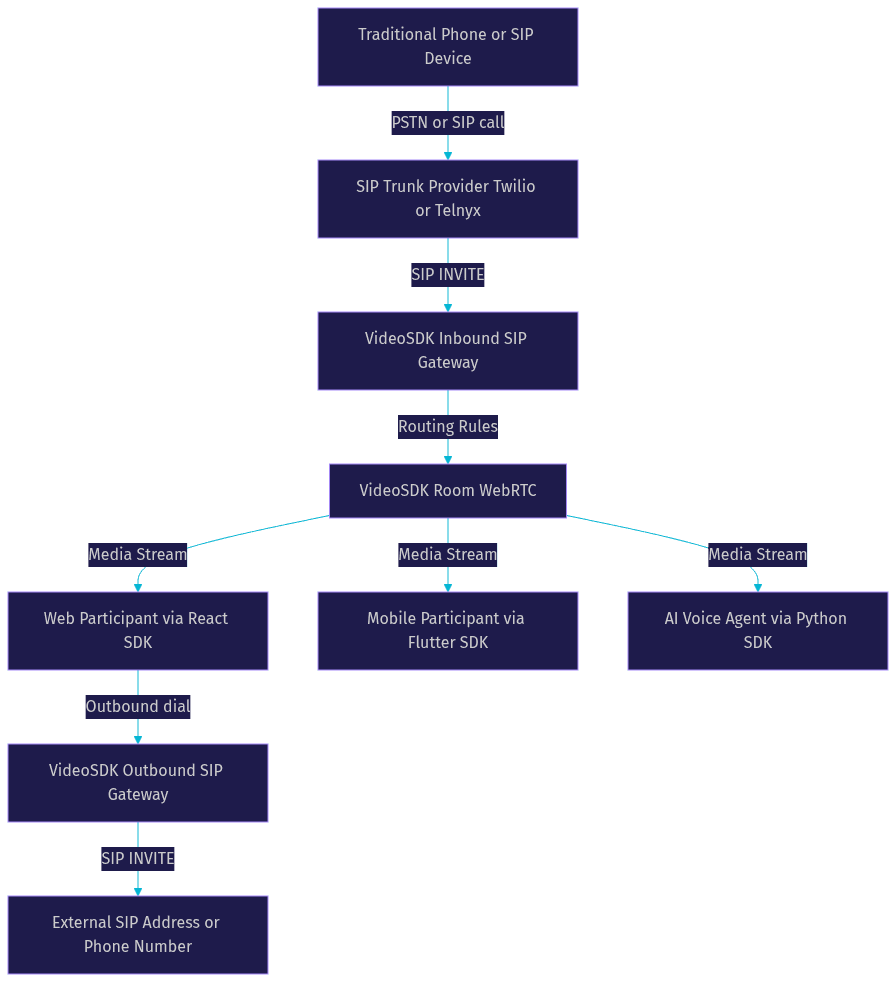
VideoSDK provides a SIP gateway that bridges traditional SIP telephony with its WebRTC-based real-time communication rooms. This integration allows developers to connect desk phones, PBX systems, SIP trunk providers, and AI voice agents into the same VideoSDK rooms where browser and mobile participants communicate.
Overview of VideoSDK's SIP gateway
VideoSDK's SIP gateway consists of an inbound gateway, an outbound gateway, and a routing rules engine. The inbound gateway accepts incoming SIP calls from SIP trunk providers and bridges them into VideoSDK rooms as participants. The outbound gateway allows VideoSDK room participants to dial out to SIP addresses or PSTN phone numbers through a configured SIP trunk.
The routing rules engine lets developers define how incoming SIP calls are handled: which room they join, what participant role they receive, and whether they should be filtered or challenged. This makes it possible to build sophisticated call flows, such as routing support calls to a waiting room before connecting to an agent, or directing AI agent calls to a specific room configured with a voice agent pipeline.
VideoSDK supports integration with major SIP trunk providers including Twilio, Vonage, Telnyx, and Plivo. The gateway handles DTMF events, call transfers, HD voice, and secure SIP transport. Developers can manage all SIP configuration through VideoSDK's REST API and dashboard.
Use case: embedding a SIP-based call in a web app
Consider a telehealth application where patients call in from traditional phones and doctors join from a web browser. The patient's call arrives at the SIP trunk provider as a standard phone call. The provider routes it to VideoSDK's inbound SIP gateway using the SIP address configured for the telehealth service.
VideoSDK's gateway bridges the SIP call into a WebRTC room. The doctor, who has joined the same room using the VideoSDK React SDK, can now see and hear the patient in real time. The patient hears the doctor's audio through their phone, and the doctor sees the patient's caller ID and can use VideoSDK's participant management features to control the session.
This architecture eliminates the need for the patient to install an app or use a browser. They just dial a phone number, and the SIP infrastructure handles the rest. For the developer, the integration involves configuring the SIP trunk in the VideoSDK dashboard, setting up routing rules, and using the VideoSDK SDK on the frontend to render the doctor's video call interface.
VideoSDK SIP architecture diagram
The following diagram shows how VideoSDK's SIP gateway connects traditional telephony to WebRTC rooms:
Practical Use Cases
SIP addresses power a wide range of real-world applications, from enterprise phone systems to AI-driven voice agents. Understanding these use cases helps developers identify where SIP integration adds value to their own products.
Enterprise unified communications
Large organizations use SIP addresses as the foundation of their unified communications infrastructure. Each employee receives a SIP address that rings their desk phone, softphone, and mobile client simultaneously. Internal calls route directly between SIP addresses over the corporate network, while external calls pass through a SIP trunk to the PSTN.
This architecture allows organizations to replace expensive legacy PBX hardware with software-based SIP servers while maintaining compatibility with traditional phone systems. VideoSDK can extend these systems by adding WebRTC-based video calling and screen sharing to existing SIP voice infrastructure, giving employees a browser-based video option without abandoning their SIP phones.
Remote support and telehealth
Remote support platforms and telehealth applications use SIP addresses to accept inbound calls from patients or customers who only have access to a traditional phone. The SIP call is bridged into a VideoSDK room where a support agent or healthcare provider joins via web or mobile SDK, enabling video, screen sharing, and real-time transcription.
This pattern is particularly valuable in healthcare, where patients may not have smartphones or may be unable to install apps. The SIP address acts as the entry point, and VideoSDK's room architecture handles the rest, including recording, transcription, and post-call summaries.
Live streaming with audience interaction
VideoSDK's interactive live streaming capabilities can be combined with SIP integration to create live events where audience members call in from traditional phones. The SIP gateway bridges phone callers into the live streaming room as participants, where they can ask questions or interact with the host in real time.
This use case is popular for radio-style broadcasts, live Q&A sessions, and community town halls where some audience members prefer phone access over web participation. The host manages the event from a web interface using VideoSDK's SDK, while phone participants join through the SIP gateway with their audio bridged into the room.
Definitions Glossary
SIP URI: A Uniform Resource Identifier that identifies a communication resource reachable through the Session Initiation Protocol, formatted as sip:user@domain.
SIP Registrar: A SIP server component that maintains a database mapping SIP addresses to currently registered device contact URIs, enabling call routing to the correct device.
NAPTR Record: A DNS record type that tells SIP clients which transport protocols and services a domain supports, used in the first step of SIP address resolution.
SRV Record: A DNS service record that provides the hostname and port of a specific service, such as a SIP server, within a domain.
STIR/SHAKEN: A cryptographic framework for validating caller identity in SIP calls, designed to combat caller ID spoofing by signing and verifying the From header.
VideoSDK SIP Gateway: A VideoSDK telephony component that bridges traditional SIP calls into VideoSDK WebRTC rooms, supporting inbound and outbound call flows with routing rules.
Key Takeaways
- A SIP email address (SIP URI) is a standardized identifier for reaching users and devices on IP networks for real-time communication, formatted as sip:user@domain.
- SIP address resolution involves DNS NAPTR and SRV record lookups, followed by SIP signaling messages (INVITE, Ringing, OK, ACK) that establish the session before media flows over RTP.
- SIP addresses differ from email addresses in protocol purpose, routing mechanisms, and security threat models, despite sharing a similar visual format.
- Production SIP deployments require TLS for signaling, SRTP for media, strong authentication, and protections against SPIT (VoIP spam) and caller ID spoofing.
- VideoSDK's SIP gateway bridges traditional telephony into WebRTC rooms, enabling developers to connect phone callers, SIP trunk providers, and AI voice agents into browser-based calling experiences.
Conclusion
Understanding what a SIP email address is and how SIP URI routing works gives you the foundation to build communication features that bridge traditional telephony with modern web and mobile applications. SIP addresses are the addressing layer that makes this bridge possible, and the protocol's DNS-based resolution and signaling flow are concepts every developer building RTC features should understand.
If you are ready to connect SIP calls into your application, VideoSDK's telephony integration provides the gateway, routing rules, and provider compatibility you need. You can start with a free account at app.videosdk.live/login and explore the code samples for SIP integration examples. What are you building with SIP and VideoSDK? Drop a comment, I would love to hear what kind of telephony use case you are working on.
Free $20 Balance for AI Voice Agents & Video Calls
FAQ