


SIPp is an open-source command-line tool for load testing and traffic generation against SIP (Session Initiation Protocol) servers. It lets engineers simulate thousands of concurrent calls using XML-defined scenarios, supports UDP, TCP, TLS, and SCTP transports, and reports real-time statistics on call rates, response times, and failures. If you deploy VoIP infrastructure, SIPp is the standard first tool for validating signaling performance before real users depend on it.
Every VoIP deployment eventually faces the same uncomfortable question: will the SIP server hold up under real call volume? A platform that handles ten test calls flawlessly can collapse at a thousand, and discovering that in production is expensive. Signaling failures cascade quickly, and customers do not forgive dropped calls.
That is where the sipp protocol testing tool earns its place. SIPp is a free, open-source traffic generator that has been the de facto standard for SIP load testing for nearly two decades. It simulates calls, measures responses, and surfaces bottlenecks before they reach production.
In this guide, you will learn what SIPp is, how to install it, how to build XML call scenarios, configure transports and media, run high-volume load tests, automate testing, and troubleshoot the failures that matter. We will also compare SIPp with other SIP testing tools and share production-tested best practices.
What Is the sipp Protocol?
SIP is defined as a text-based signaling protocol used to establish, modify, and terminate real-time communication sessions such as voice and video calls. SIP itself does not carry media; it negotiates the session while RTP handles the actual audio and video streams. A SIP testing tool exists to verify that servers, proxies, and gateways process this signaling correctly and at scale.
SIPp works by executing XML scenario files that describe a message-by-message call flow. Each scenario defines which SIP messages to send, what to expect in response, how to react to unexpected replies, and when to inject variables such as user numbers or authentication credentials. The tool then runs thousands of these scenarios in parallel, at a controlled call rate, and aggregates the results.
SIPp's architecture is deliberately minimal. It is a single command-line executable with no GUI, which makes it easy to run on headless servers, inside Docker containers, or across a fleet of load-generation machines. It supports both client and server modes, meaning one SIPp instance can act as the caller while another acts as the callee, letting you test a complete call path through your infrastructure.
The project is open source, hosted on GitHub, and maintained by an active community of telecom engineers. That matters in practice: bugs get reported, patches get merged, and the tool keeps pace with modern SIP deployments. For teams building real-time communication applications, SIPp pairs naturally with platforms like VideoSDK, which bridges SIP telephony into WebRTC-based rooms.
Installing the sipp Protocol
SIPp runs on Linux and macOS natively, and on Windows through the Windows Subsystem for Linux environment. Because SIPp is a command-line tool with no graphical dependencies, it installs cleanly on minimal server images, which is exactly where you want to run load tests.
There are three common installation paths. First, most Linux distributions ship SIPp through their standard package repositories, which is the fastest route for a quick evaluation. Second, building from source gives you the latest features, particularly for TLS and PCAP media support, which some distribution packages compile out. Third, an official Docker image is available, which is the recommended approach for reproducible test environments since the container pins the exact SIPp version and its compiled feature set.
To verify a successful install, run the tool with its version-reporting flag and confirm the output lists the transports and features you need. Specifically, check that TLS support is compiled in if you plan to test secure signaling, and that PCAP playback is available if you need realistic media. A missing feature discovered mid-test is a frustrating way to lose an afternoon.
One practical tip: install the same SIPp version on every load-generation machine. Mixed versions can produce subtly different statistics, which makes cross-machine result comparison unreliable.
Building XML Scenarios for sipp Protocol
XML scenario files are the heart of SIPp testing. A scenario is a declarative description of one call: the sequence of SIP messages exchanged, the pauses between them, the variables substituted into headers, and the branching logic for unexpected responses. SIPp executes this scenario thousands of times concurrently, and every instance follows the same script.
A scenario file is built from a few key element types. Message elements define outgoing SIP requests and responses, including full header sets and message bodies. Receive elements define what the scenario expects back, with matching rules so a response can be accepted or rejected based on status codes or header content. Variable elements, called reference variables in SIPp terminology, inject dynamic values such as sequential user numbers, random digits, or per-call media parameters. Timer and pause elements control pacing within a single call, such as how long to wait after a 200 OK before sending a BYE.
The classic starting scenario is the INVITE, 200 OK, ACK, BYE flow. Structurally, you describe sending an INVITE with a generated caller number, receiving a 200 OK with a media description, acknowledging it, holding the call for a configured duration, then sending a BYE and expecting the final confirmation. This single flow, run at high concurrency, is enough to baseline most SIP servers.
The most common pitfall is variable handling. SIPp distinguishes between variables it generates locally and values it extracts from received messages, such as the tags and branch parameters a server assigns. If you reference an extracted value before the message that populates it has been received, the scenario fails in ways that look like server errors rather than script errors. Always trace variable population order before blaming the server under test. The second pitfall is forgetting to handle optional messages, such as provisional 100 Trying responses, which causes false failures on servers that send them.
Transport Options and Media Handling
SIPp supports all four SIP transports: UDP, TCP, TLS, and SCTP. UDP is the default and the most common in real deployments, but testing over TCP matters because some servers behave differently when signaling runs over a connection-oriented transport, particularly around retransmission handling. TLS testing is essential for production validation, since many carriers and enterprises now require encrypted signaling.
When running TLS, SIPp can act as a client with a certificate, which lets you test mutual authentication deployments. Keep in mind that TLS handshakes add CPU overhead per call, so a server that comfortably handles a thousand UDP calls per second may saturate earlier under TLS. That difference is itself a valuable test finding.
For media, SIPp can send and receive RTP streams, including RTP echo mode where it reflects received audio back to the sender. This is enough to verify that media paths and port allocations work end to end. For more realistic media, SIPp supports PCAP playback: you supply a captured RTP packet file, and SIPp replays it as the audio stream for each call. This lets you test with real codec traffic, including the timing characteristics of actual speech, rather than synthetic tones.
Media configuration lives inside the scenario's INVITE and 200 OK message bodies, where you describe the session parameters the same way a real SIP endpoint would. Mismatched media descriptions between caller and callee scenarios are a frequent source of one-way audio in tests, and they mirror a genuinely common production bug, which makes them worth catching deliberately.
Running Load Tests with sipp Protocol
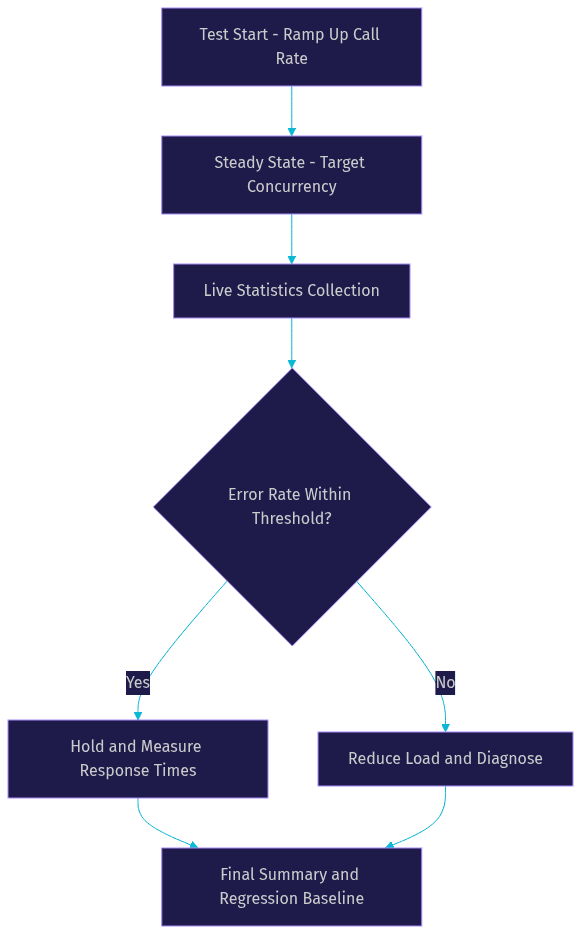
A SIPp load test is controlled by a handful of runtime parameters: the call rate, the maximum concurrent calls, the total call count or test duration, and the scenario file. The call rate defines how many new calls start per second, while concurrency is a consequence of call rate multiplied by call duration. If each call lasts 30 seconds and you start 20 calls per second, you will settle at roughly 600 concurrent calls.
SIPp reports real-time statistics while running: calls started, succeeded, failed, and retransmitted, plus response time distributions for each message in the scenario. These counters update continuously, so you can watch a server degrade live rather than discovering it afterward. The response time graph is the most diagnostic output: a gradual rise in INVITE response times as concurrency climbs tells you the server is queuing work, while a sudden jump suggests you crossed a resource cliff such as a thread pool or file descriptor limit.
For high-volume testing, a few practices make results trustworthy. First, run SIPp on a machine separate from the server under test, otherwise the load generator competes with the server for CPU and your measurements become meaningless. Second, watch SIPp's own retransmission counter: if SIPp itself is retransmitting, the generator may be the bottleneck, not the server. Third, ramp call rates gradually rather than jumping straight to the target, because some servers handle steady load well but fail on sudden bursts, and both behaviors are worth knowing.
Finally, run each test at least three times. Single-run results on shared networks are noisy, and variance between runs is itself a signal worth investigating.
Remote Control and Automation
SIPp includes a built-in remote control interface that lets an external process manage a running test: adjusting the call rate up or down, pausing traffic, or querying statistics without restarting the tool. This is invaluable for adaptive testing, where you increase load until a specific error rate threshold is reached, then hold that point to characterize behavior at the edge.
For automation, SIPp's command-line interface makes it straightforward to embed in CI pipelines. Because scenarios are files and all runtime parameters are flags, a test run is fully declarative: the pipeline checks out the scenario files, launches SIPp against a staging SIP server, waits for completion, and then parses the statistics output. Most teams convert the statistics into a machine-readable summary and fail the pipeline if the error rate or response time exceeds defined thresholds.
A typical pattern is a nightly performance regression test: the pipeline spins up the SIP server in a container, runs a standard INVITE-BYE scenario at a fixed rate for a fixed duration, and compares results against the previous night's baseline. Any regression in call success rate or response time surfaces immediately, before it reaches production. This turns performance from a one-time validation exercise into a continuously enforced property of your system.
Analyzing Results and Troubleshooting
SIPp's output falls into three layers: the live screen statistics, the final summary, and optional detailed trace files. The live statistics answer "is it working right now," the summary answers "what happened overall," and the trace files answer "why did this specific call fail." For serious debugging, enable message traces so every SIP message sent and received is logged with timestamps.
Retransmissions deserve special attention. A retransmission means SIPp sent a request and received no timely response, then repeated it. Occasional retransmissions under heavy load are normal for UDP. A rising retransmission rate is the earliest visible symptom of server saturation, appearing before calls actually fail.
Common issues cluster into recognizable patterns. Network timeouts, where calls fail with no response at all, usually indicate a routing, firewall, or port-range problem rather than a server defect. Authentication failures, visible as repeated 401 or 407 challenges followed by errors, typically mean the scenario's credential variables are wrong or the authentication response computation is misconfigured. Media mismatches, where signaling succeeds but audio fails, point to inconsistent session descriptions between caller and callee scenarios, or to a media relay that is not forwarding RTP.
To pinpoint bottlenecks, correlate SIPp's response time data with server-side resource metrics collected during the same window. If INVITE response times climb while server CPU stays flat, the bottleneck may be network or a downstream dependency. If CPU saturates first, the server itself is the limit. This correlation, not either metric alone, is what turns a load test into a diagnosis.
Comparing sipp Protocol with Other SIP Testers
The SIP testing tool landscape includes SIPp itself, lighter-weight scriptable tools, GUI-based testers, and commercial load-testing platforms. The right choice depends on what you are testing and who is doing the testing.
SIPp's unique strengths are scriptability, open-source licensing, and extensive transport support. Because scenarios are XML files, they live in version control, get code-reviewed, and run identically on every machine. No commercial license limits concurrency or test duration, which matters when you need to run sustained multi-hour soak tests. And its support for UDP, TCP, TLS, and SCTP covers essentially every signaling deployment.
GUI-based testers are better for interactive exploration, where an engineer manually places calls and inspects messages one at a time. Commercial platforms add polished reporting and distributed test coordination out of the box, which large organizations may find worth paying for. Lightweight alternatives are fine for simple call checks but typically lack the concurrency and scenario complexity needed for genuine load testing.
The honest trade-off: SIPp has a learning curve, its XML scenarios take effort to write well, and its reporting is functional rather than beautiful. Teams that invest in that curve get a testing capability that scales to any load, runs anywhere, and costs nothing. Teams that need one-off manual verification may be better served elsewhere. In practice, many organizations run both: a GUI tool for debugging and SIPp for load and regression testing.
Best Practices and Production Tips
Use Docker for reproducible test environments. A container image that pins the SIPp version, its compiled features, and your scenario files guarantees that a test run today produces the same conditions as a run next quarter. This is especially important for TLS testing, where certificate and key configuration differences between machines cause maddening inconsistencies.
Secure TLS keys and credentials properly. Test scenarios often contain real credentials or private keys, and these files frequently end up in repositories. Treat scenario credentials like production secrets: use injected variables for sensitive values, keep keys out of version control, and rotate anything that has leaked into a shared repository.
Scale tests across multiple machines when a single generator saturates. SIPp's own CPU and network limits can cap achievable load before the server under test does. Running coordinated instances on several machines, each generating a share of the target call rate, pushes the ceiling higher and more accurately models distributed real-world traffic. Keep per-machine statistics so you can confirm each generator contributed its expected share.
Finally, keep scenarios in version control alongside the server configuration they test. A scenario file is a specification of expected behavior, and it deserves the same review and history as the code it validates.
Definitions Glossary
SIP (Session Initiation Protocol): A text-based signaling protocol that establishes, modifies, and terminates real-time communication sessions. SIP handles call setup while RTP carries the actual media.
SIPp: An open-source command-line SIP traffic generator and testing tool that executes XML-defined call scenarios at controlled rates and reports real-time statistics.
XML Scenario: A declarative file describing a SIP call flow, including messages to send, responses to expect, variables to inject, and pacing timers. SIPp executes the scenario thousands of times concurrently.
RTP (Real-time Transport Protocol): The protocol that carries audio and video media streams after SIP signaling has negotiated the session parameters.
Retransmission: The repetition of a SIP request when no timely response arrives. A rising retransmission rate is an early indicator of server saturation or network problems.
PCAP Playback: A SIPp feature that replays a captured packet file as the media stream for each call, producing realistic codec traffic instead of synthetic tones.
Key Takeaways
- SIPp is the de facto open-source standard for SIP load testing, executing XML scenarios across UDP, TCP, TLS, and SCTP at any concurrency level without licensing limits.
- Scenario quality determines test quality: trace variable population order, handle provisional responses, and keep caller and callee media descriptions consistent.
- Watch retransmission counters and response time graphs during tests, since rising retransmissions and climbing INVITE response times are the earliest signs of server saturation.
- Run SIPp on machines separate from the server under test, ramp load gradually, and repeat each test at least three times for trustworthy results.
- Docker-pinned SIPp versions, secured TLS credentials, and multi-machine load distribution make tests reproducible and scalable to production-realistic volumes.
Conclusion
The sipp protocol testing tool remains the most reliable way to answer the question every VoIP deployment must face: does the SIP infrastructure hold up under real load? Its XML scenarios, full transport coverage, real-time statistics, and zero licensing cost make it the workhorse of SIP performance validation, from quick baseline tests to nightly regression pipelines.
Start simple: install SIPp, write a basic INVITE-200-BYE scenario, and run it against a staging server at a modest call rate. Then scale up, watch the retransmission counter, and let the response time graph tell you where your limits are. The official SIPp documentation and GitHub repository contain ready-made scenarios for common flows, and the VideoSDK telephony documentation covers how SIP infrastructure bridges into modern WebRTC-based communication platforms. What are you testing with SIPp? Drop a comment, I would love to hear what kind of SIP deployment you are validating.
Free $20 Balance for AI Voice Agents & Video Calls
FAQ