


An RTMP server with Nginx is a self-hosted live-streaming ingest point built on the Nginx web server plus the nginx-rtmp module, which accepts RTMP publisher streams and repackages them for delivery as HLS or DASH over HTTP. It is the most popular low-cost alternative to managed streaming platforms, running comfortably on a single modest VPS. This guide walks through the full architecture, setup logic, scaling, security, and monitoring, and tells you honestly when a managed service is the better call.
Introduction
Imagine you are launching a live-streaming channel for a community event, an online course, or a gaming tournament. You fire up OBS, point it at a managed streaming platform, and immediately hit the limits: per-hour pricing, forced branding, and no control over how your stream is packaged or delivered. Within an hour, you could instead have your own RTMP ingest server running on a five-dollar VPS, accepting your encoder's stream and serving viewers over standard HTTP.
That is the promise of an RTMP server with Nginx. This article covers what the nginx-rtmp module actually does, how data flows from your encoder to your viewers, how to reason about configuration without drowning in syntax, how to scale beyond one box, and how to secure and monitor the whole thing. By the end, you will understand the complete architecture well enough to run it in production, and you will know exactly when to hand the job to a managed service instead.
What is an RTMP Server in Nginx?
RTMP, or Real-Time Messaging Protocol, is a TCP-based protocol originally designed by Macromedia for Flash-era media delivery. In modern streaming, its surviving role is ingest: it is the language that encoders like OBS, FFmpeg, hardware encoders, and mobile broadcasting apps speak when they push a live stream toward a server. RTMP remains the universal ingest standard because it is simple, firewall-friendly, and supported by virtually every broadcasting tool made in the last fifteen years.
Nginx is a popular host for an RTMP server because it is lightweight, battle-tested, and already present in most deployment stacks. The piece that makes it a streaming server is the nginx-rtmp module, an open-source extension originally written by Roman Arutyunyan. The module adds an RTMP listener to Nginx and gives it the ability to accept incoming streams, record them to disk, relay them to other servers, and repackage them into HTTP-based formats like HLS and DASH. In practice, teams running self-hosted streaming consistently choose this combination because one process handles ingest, packaging, and HTTP delivery, which keeps resource usage and operational complexity low.
Core Components of an Nginx RTMP Server
Every nginx-rtmp configuration is organized as a hierarchy of three nested blocks, and understanding that hierarchy is the key to reasoning about any rtmp server nginx setup.
The outermost block is the RTMP block itself. It is the top-level container that tells Nginx to activate the streaming subsystem, and it holds global settings such as which port to listen on, how large stream buffers should be, and how logging should behave.
Inside the RTMP block sit one or more server blocks. A server block binds to a specific listening port, such as the conventional 1935 for RTMP. You can run multiple server blocks on different ports if you want to separate, say, public ingest from internal relay traffic.
Inside each server block live application blocks. An application is the logical endpoint of a stream URL: when an encoder publishes to a path like your-domain-dot-com-slash-live, the segment after the slash names the application. The application is where the interesting directives live.
The most important application directives map directly to what your server does. The live directive turns the application into a live-streaming endpoint where one publisher and many subscribers can connect. The record directive controls writing the stream to disk, with options for all sessions, audio-only, or keyframe-aligned chunks. The push directive forwards the incoming stream to another RTMP server, which is how you build relay chains. The pull directive does the opposite, fetching a stream from a remote server and making it available locally. Together, these four directives cover the vast majority of real-world streaming topologies.
Data Flow Diagram
The full journey of a stream through an Nginx RTMP server is easiest to understand visually before diving into setup decisions.
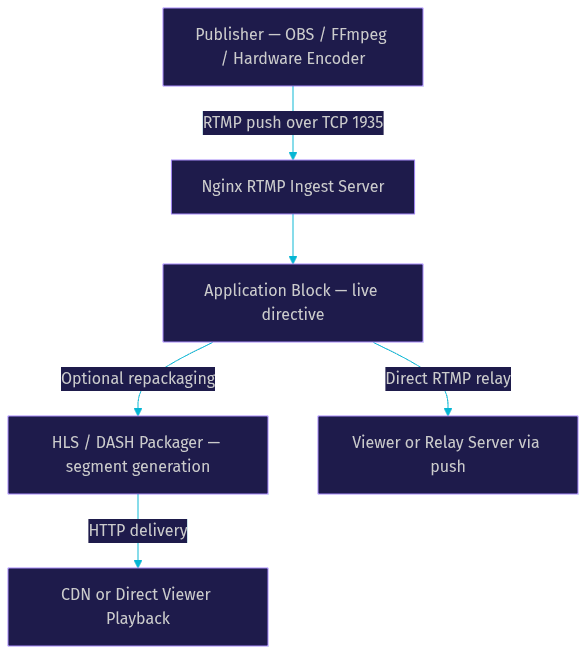
Reading top to bottom: the publisher encodes audio and video locally and pushes a single RTMP stream over TCP, typically to port 1935. Nginx accepts the connection and routes it into the application block named in the URL. From there, the stream can take two paths. If you enable HTTP packaging, the module slices the stream into short media segments and writes playlist files that any browser or player can fetch over standard HTTP. If you enable relay instead, the raw RTMP stream is pushed onward to another server or pulled by downstream players. Both paths can run simultaneously, which is exactly why a single Nginx instance can serve a low-latency RTMP audience and a broad HLS audience at the same time.
Setting Up a Basic RTMP Ingest
The setup process for a working ingest server is short, and each step has a clear purpose worth understanding before you touch anything.
Install Nginx with the RTMP Module
Start with a Linux server, ideally a small VPS with at least one gigabyte of memory. The critical detail is that the RTMP module is a compiled extension, so you either install a prebuilt Nginx package that bundles it, or you compile Nginx from source with the module included. Most cloud-marketplace images and popular Docker images already bundle the module, which saves you a build step. Verify the module is loaded before proceeding, because a stock Nginx install will silently ignore your streaming configuration otherwise.
Create a Minimal Configuration
A minimal working configuration contains exactly three things: an RTMP block, one server listening on port 1935, and one application with the live directive enabled. Conceptually, you are telling Nginx three facts: activate streaming, listen on the standard RTMP port, and accept live broadcasts at a named application path. Resist the urge to add recording, relay, or packaging directives at this stage. A minimal config that works is worth more than a maximal config that fails silently.
Start the Service and Open the Port
Start or reload Nginx and confirm the process is listening on port 1935. Then check your cloud firewall and operating-system firewall, because a blocked port 1935 is the single most common reason a first ingest attempt fails. The symptom is an encoder that hangs on connect while the server logs show nothing at all.
Test with an RTMP Client
Point OBS or FFmpeg at your server using the standard URL form: the scheme, your host, the port, and the application name. Start a broadcast and watch the Nginx error log. A successful publish produces a log entry naming the application and the publishing client. You can then verify playback by pulling the same stream URL with a player such as VLC. If publish succeeds but playback fails, the problem is almost always downstream of ingest, not the ingest itself.
Common First-Run Errors
Three failures account for most first-run frustration. A connection timeout means a firewall or security group is blocking port 1935. An authentication or handshake rejection usually means the application name in your URL does not match the one in your configuration. And a stream that connects but shows no video typically means the encoder is sending a format the path downstream cannot handle, most often a missing keyframe at the start of the broadcast.
Enabling HLS and DASH Output
RTMP playback requires a player that speaks RTMP, which modern browsers do not. That is why HTTP-based delivery formats exist, and why the same Nginx instance that ingests your stream should usually package it.
HLS, or HTTP Live Streaming, works by slicing the incoming stream into short media segments, typically a few seconds each, and writing a playlist file that lists them. Viewers fetch the playlist over plain HTTP, then fetch the segments in order. DASH works on the same principle with different container conventions. Because delivery is plain HTTP, you get browser compatibility, CDN compatibility, and standard caching for free.
Enabling this in the nginx-rtmp module is a matter of turning on the HLS directive inside your application and specifying where segment files should be written. The module then handles segmentation automatically as the stream arrives, cutting at keyframe boundaries so every segment starts with a decodable frame. You also expose that output directory through Nginx's regular HTTP server block, so the same process that accepts your encoder's TCP stream also serves viewers over port 443.
One decision worth making deliberately is segment length. Shorter segments reduce viewer-side latency but increase request overhead and playlist churn. Longer segments do the opposite. For a typical broadcast, segments in the two-to-six-second range are the practical sweet spot, and most teams settle there after one round of testing.
Scaling the RTMP Server
A single Nginx instance comfortably handles hundreds of concurrent HLS viewers on modest hardware, but real scaling questions appear at two specific points: multi-core utilization on one box, and fan-out across many boxes.
Multi-Worker Streaming on One Instance
Nginx normally runs multiple worker processes to use every CPU core, but RTMP streams are stateful: a publisher connects to one specific worker, and by default other workers know nothing about it. The module solves this with the inter-process push mechanism, often configured through the auto-push directive, which propagates each published stream to all worker processes so any worker can serve any subscriber. If you observe that playback only works intermittently on a multi-core server, a missing or misconfigured auto-push setting is the usual culprit.
Load-Balancing Across Multiple Instances
Beyond one box, the standard pattern is a load balancer in front of several Nginx ingest nodes, with each node pushing its streams to the others or to shared relay targets so every node can serve every stream. The push directive is the building block here: each ingest node forwards what it receives to its peers, creating a mesh where any node has the full catalog.
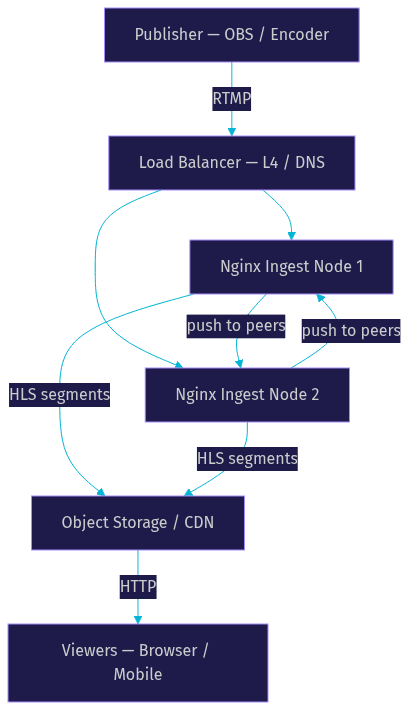
The diagram shows the topology that works in practice: the load balancer spreads publishers across ingest nodes, nodes relay streams to each other so the catalog stays consistent, and HLS output is written to object storage or a CDN so viewer traffic never touches the ingest tier at all. Separating ingest from delivery this way is the single highest-leverage scaling decision, because viewer bandwidth, not publisher count, is what usually exhausts a self-hosted server first.
Security and Access Control
An unauthenticated RTMP endpoint on the public internet will be found and abused, usually within days. Security for an rtmp server nginx deployment rests on four layers.
First, token-based authentication. The module supports publish and play callbacks, which are HTTP requests your server sends to your own application whenever someone attempts to publish or watch. Your application checks a token embedded in the stream URL and returns a verdict. This is the standard pattern for restricting who can broadcast and who can watch, and it integrates naturally with your existing user database.
Second, IP whitelisting. If your publishers are known machines, such as studio encoders or a fixed office IP, restricting port 1935 to those addresses removes the entire public attack surface on ingest.
Third, TLS termination. RTMP over TLS, often called RTMPS, encrypts the publisher connection so stream credentials and content cannot be intercepted in transit. Many encoders support it directly, and terminating TLS at Nginx or at a fronting proxy keeps the rest of your pipeline unchanged.
Fourth, protect the HTTP delivery side with the same discipline you apply to any web endpoint: HTTPS everywhere, signed or expiring URLs for premium content, and rate limiting on playlist requests. A stream that is secure at ingest but wide open at playback is not secure.
Monitoring and Troubleshooting
The nginx-rtmp module ships with a built-in statistics page, exposed through a special HTTP location, that shows live publishers, subscribers, bandwidth, and per-stream details in XML. Feeding that XML into a dashboard or an alerting tool gives you real-time visibility without any external agent. Complement it with standard Nginx access and error logs, which record every connection, publish, and play event with timestamps.
Interpreting the data is mostly about pattern recognition. Latency spikes that grow steadily over a broadcast usually indicate the encoder's bitrate exceeding the server's uplink, and the fix is lowering the encoder bitrate, not touching Nginx. Frequent viewer disconnects clustered at the same moment often trace to segment generation stalling, which points back to disk I/O on the segment output directory. A publisher that drops and reconnects in a loop is typically a network issue between encoder and server, visible as repeated handshake entries in the error log. In practice, teams that monitor the statistics page and the error log together resolve the large majority of streaming incidents without deeper tooling.
When to Choose Nginx RTMP vs. Managed Services
Self-hosting an RTMP server with Nginx is not always the right answer, and the honest comparison depends on three factors: cost, control, and how much operations you want to own.
On cost, Nginx wins at small and medium scale. A single VPS handling a few hundred concurrent HLS viewers costs a handful of dollars per month, while per-hour managed pricing compounds quickly for always-on channels. At large scale, the math flips, because egress bandwidth dominates and managed providers with CDN economics often beat raw cloud bandwidth pricing.
On control, Nginx wins outright. You choose codecs, segment lengths, relay topology, authentication logic, and retention. Managed services like Amazon IVS, Wowza, and Cloudflare Stream abstract those decisions away, which is a feature when you want speed-to-market and a limitation when you have specific requirements.
On maintenance, managed services win. Self-hosting means you own security patches, capacity planning, monitoring, and the two-a.m. incident when a stream drops mid-event. Use Nginx RTMP when you have the engineering capacity to operate it and the requirements that justify it. Use a managed service when time-to-launch and hands-off operations matter more than control. And if you are building interactive, sub-second-latency experiences rather than one-to-many broadcasts, evaluate purpose-built interactive streaming platforms such as VideoSDK's interactive live streaming alongside raw RTMP infrastructure, because audience interaction changes the architecture entirely.
Definitions Glossary
RTMP: Real-Time Messaging Protocol, a TCP-based protocol used in modern streaming almost exclusively as the ingest language between encoders and servers, carried over port 1935.
nginx-rtmp module: An open-source Nginx extension that adds RTMP ingest, recording, relay, and HLS/DASH packaging capabilities to the standard Nginx web server.
HLS: HTTP Live Streaming, a delivery method that slices a live stream into short media segments described by a playlist file, playable by any browser over plain HTTP.
Application block: The logical endpoint inside an Nginx RTMP server configuration, named by the path segment of the stream URL, where directives like live, record, push, and pull take effect.
Auto-push: The nginx-rtmp mechanism that propagates each published stream to all Nginx worker processes so any worker can serve any subscriber on a multi-core server.
Key Takeaways
- An RTMP server with Nginx combines the nginx-rtmp module with the standard web server to accept encoder streams and repackage them as HLS or DASH over HTTP, all in one lightweight process.
- Configuration is a three-level hierarchy: the RTMP block, server blocks bound to ports, and application blocks where the live, record, push, and pull directives define behavior.
- Scaling has two layers: auto-push for multi-core utilization on one box, and a load-balanced ingest mesh with CDN-backed HLS delivery for many boxes.
- Security requires publish and play callbacks for token authentication, IP whitelisting, RTMPS for encrypted ingest, and HTTPS on the delivery side.
- Choose Nginx RTMP for cost and control at small-to-medium scale; choose managed services like Amazon IVS or Wowza when hands-off operations and fast launch matter more.
Conclusion
Running your own RTMP server with Nginx gives you a complete streaming pipeline, ingest, packaging, and HTTP delivery, on hardware that costs less than a coffee subscription, with a level of control no managed platform offers. The trade is operational ownership: you monitor it, secure it, and scale it yourself. For many teams building live streaming products in 2026, that trade is well worth it. Start with the minimal ingest setup, add HLS packaging, then layer in authentication and scaling as your audience grows. The official nginx-rtmp module documentation on GitHub is the definitive reference for every directive covered here. What are you building with your own streaming server? Drop a comment, I'd love to hear what kind of live streaming use case you're working on.
Free $20 Balance for AI Voice Agents & Video Calls
FAQ