


A media server is a specialized server that stores, processes, and delivers audio and video content to client devices over a network. Unlike a generic web server, it handles media-specific tasks such as transcoding, adaptive bitrate streaming, and protocol negotiation. Whether you are streaming a movie to your living room TV or broadcasting a live event to thousands of viewers, a media server sits at the center of the delivery pipeline, and platforms like VideoSDK build on the same real-time principles to power live video applications.
Every time you press play on a movie stored on your home network, or join a live webinar with ten thousand other attendees, a media server is doing the heavy lifting behind the scenes. It is one of those pieces of infrastructure most people never think about, yet it determines whether your video plays instantly, buffers endlessly, or fails entirely.
A media server is a dedicated system, either software running on your own hardware or a managed cloud service, that stores media files, converts them into streamable formats, and delivers them to playback devices. This guide breaks down what a media server actually does, how content travels from storage to your screen, which protocols matter in 2026, and how to choose between self-hosted and cloud deployments.
What Is a Media Server?
A media server is defined as a server system whose primary responsibility is to store, process, and deliver digital audio and video content to client devices over a network. It works by receiving media from a source (a stored file, a live camera feed, or an uploaded stream), converting that media into formats and bitrates suitable for delivery, and then streaming it to players using standardized protocols.
This is where a media server differs sharply from a generic web server. A web server primarily serves documents, images, and static files over HTTP, one request at a time. A media server, by contrast, must handle continuous, time-sensitive data streams, negotiate playback compatibility across wildly different devices, and adapt quality in real time as network conditions change. Serving a two-hour 4K movie is a fundamentally different problem from serving a blog page.
Media servers rely on a family of protocols to move content around. DLNA and UPnP enable discovery and playback inside home networks. HLS (HTTP Live Streaming) and MPEG-DASH segment media into small chunks delivered over standard HTTP, which is what most modern streaming uses. RTMP and RTSP handle lower-latency live feeds, typically for ingestion from cameras or contribution into a streaming platform.
Here is what the high-level architecture of a typical streaming media server looks like:

Core Components of a Media Server
Every media server, from a home Plex install to an enterprise video platform, is built from four core components.
Ingestion and transcoding. The server accepts the original media, whether a stored file or a live feed, and converts it into delivery-ready formats. Transcoding is CPU-intensive because it decodes and re-encodes video in real time.
Segmentation and manifest generation. For HLS and DASH delivery, the server slices media into short segments (typically two to ten seconds each) and writes manifest files that tell players which segments exist and at which bitrates.
Streaming protocols. The delivery layer speaks the protocol each client expects, from plain HTTP for segmented streaming to RTSP for camera-style control.
Library and catalog management. The server maintains metadata, artwork, watch states, and user permissions, turning a folder of files into a browsable media library.
How Media Servers Deliver Content
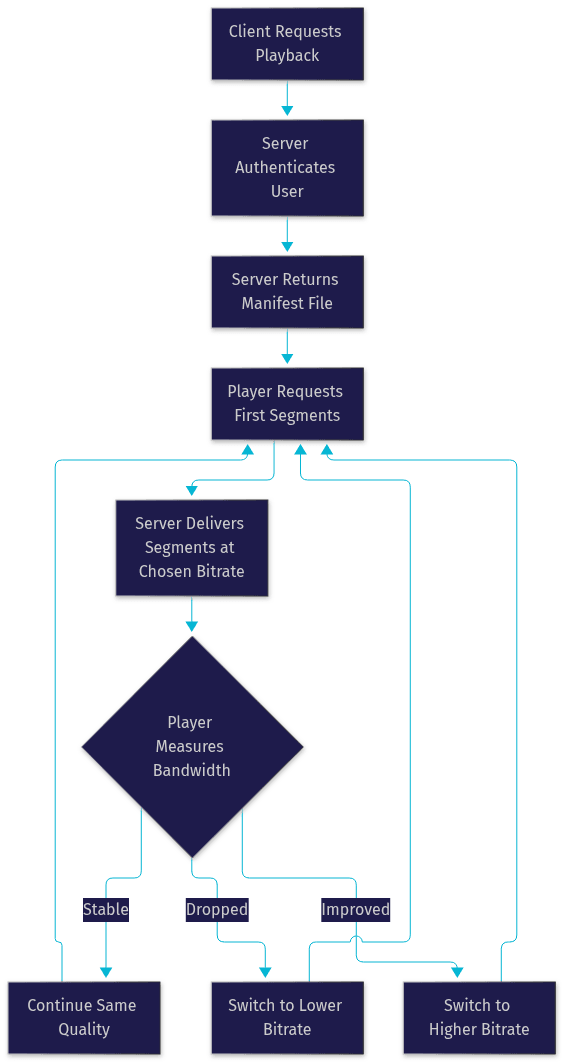
Media delivery follows a predictable end-to-end flow, and understanding it explains most of the behavior you experience as a viewer. The journey starts in storage, where the original media file or live feed resides. When a client requests playback, the server first authenticates the request, then selects an appropriate rendition of the content based on the device and available bandwidth.
For segmented streaming, the server responds with a manifest file rather than the video itself. The player reads the manifest, requests the first few segments, and begins buffering. As playback proceeds, the player keeps fetching segments ahead of the playhead, maintaining a buffer that absorbs network jitter.
Adaptive Bitrate Streaming
Adaptive bitrate streaming is the mechanism that keeps video playing when your connection fluctuates. The server encodes each piece of content at multiple bitrates and resolutions, for example a 1080p rendition at 5 Mbps and a 480p rendition at 1 Mbps. The player continuously measures how fast segments are arriving and switches between renditions on the fly. If your Wi-Fi degrades, quality drops momentarily instead of freezing. This is why Netflix occasionally looks blurry on a crowded train and sharp again seconds later.
Live Versus On-Demand Workflows
On-demand video (VOD) workflows start with a complete file. The server can transcode it ahead of time, store every rendition, and serve segments from disk, which makes delivery fast and predictable.
Live workflows are more demanding. The server transcodes and segments in real time as the event happens, and latency depends heavily on segment length and protocol. Traditional HLS introduces 10 to 30 seconds of delay. For genuinely interactive experiences, such as live shopping or audience participation, developers increasingly turn to low-latency interactive streaming, where sub-second delay lets viewers react in real time. VideoSDK's interactive live streaming, for example, is built exactly for these scenarios, letting viewers be promoted to active speakers with sub-second latency.
Protocol Deep Dive: HLS, DASH, RTMP, and RTSP
Protocol choice shapes latency, compatibility, and scalability more than any other single decision in media server design.
HLS (HTTP Live Streaming) segments media into chunks delivered over standard HTTP. It is natively supported on Apple devices and broadly across browsers, making it the safest default for general delivery. Its weakness is latency, typically 10 to 30 seconds in classic implementations.
MPEG-DASH works the same way as HLS but is codec-agnostic and vendor-neutral. It dominates on Android devices and in browser-based players that support it. Most modern servers generate both HLS and DASH manifests from the same segments.
RTMP was designed for Flash-era streaming but survives in 2026 primarily as an ingestion protocol, carrying camera or encoder output into platforms like YouTube and Twitch. It offers lower latency than segmented HTTP streaming but requires a persistent connection.
RTSP acts more like a remote control than a delivery protocol, managing play, pause, and seek commands, often paired with RTP for the actual media transport. It remains common in IP cameras and surveillance systems.
Choose HLS or DASH for broad on-demand and live delivery, RTMP for pushing live feeds into platforms, and RTSP for camera control scenarios. For interactive, real-time communication rather than one-way broadcast, WebRTC-based approaches such as VideoSDK's video calling SDKs deliver sub-300ms latency that segmented protocols cannot match.
Popular Media Server Use Cases
Media servers power four broad categories of deployment, each with different requirements.
Home Entertainment
Home media servers like Plex and Jellyfin organize personal movie, music, and photo collections and stream them to TVs, phones, and tablets around the house. DLNA and UPnP support lets smart TVs and game consoles discover the server automatically on the local network. Some routers, including FRITZ!Box models in Europe, even include basic media server functions for sharing USB-attached storage. Jellyfin has grown rapidly as a fully open-source alternative to Plex, appealing to users who want no subscription tiers or cloud accounts.
Small-Business Video on Demand
Businesses use media servers to host training videos, product demos, and recorded webinars. A self-hosted VOD server keeps sensitive internal content off public platforms while giving employees on-demand access from any device. Access control and usage analytics become important here in ways they rarely are at home.
Live Event Streaming
Sports, concerts, town halls, and product launches need servers that can ingest a live feed, transcode it into multiple renditions, and push it out to a CDN for mass distribution. RTMP ingestion feeding HLS delivery remains the standard pattern, with RTMP output simultaneously broadcasting to YouTube or Twitch.
Enterprise Video Collaboration
Larger organizations run internal video platforms for all-hands meetings, executive communications, and knowledge libraries. These blend live streaming with on-demand archives, and increasingly integrate real-time video calling for interactive sessions. VideoSDK's SDKs cover both sides of this pattern, from embedded video calling to interactive live streaming with recording and transcription built in.
Choosing Between Self-Hosted and Cloud Media Servers
The self-hosted versus cloud decision comes down to cost structure, control, and how much operational work you are willing to take on.
Cost. Self-hosting means upfront hardware spend plus electricity, but no per-viewer or per-bandwidth fees. Cloud media servers convert that into variable costs that scale with usage. A home user streaming to three TVs will almost always be cheaper self-hosting; a business streaming to thousands of concurrent viewers will almost always be cheaper in the cloud, where CDN egress is bundled and negotiated at scale.
Maintenance and scalability. A self-hosted server is your responsibility: updates, disk failures, backups, and capacity planning. When your audience doubles, you buy hardware. Cloud services scale elastically, absorbing traffic spikes without intervention, but you depend entirely on the provider's uptime.
Security and privacy. Self-hosting keeps media inside your own network, which matters for confidential corporate content or personal libraries you do not want tied to a vendor account. Cloud providers offer strong security, including encryption and access management, but the data lives on their infrastructure.
| Factor | Self-Hosted | Cloud Media Server |
|---|---|---|
| Upfront cost | Higher (hardware) | Low or none |
| Ongoing cost | Electricity, maintenance | Usage-based fees |
| Scalability | Limited by hardware | Elastic |
| Privacy | Full control | Provider-dependent |
| Maintenance burden | Yours | Provider's |
| Best for | Home labs, sensitive content | Large audiences, live events |
[LINKABLE ASSET — comparison table]
The most important row is scalability. If your audience is small and predictable, self-hosting wins on cost and control. The moment concurrent viewers grow into the hundreds, cloud delivery with CDN distribution becomes the practical choice.
Key Decision Factors
Three factors should anchor your decision.
Hardware requirements. Transcoding is the bottleneck. Real-time transcoding of a single 1080p stream can saturate a modest CPU, while hardware-accelerated encoders in modern Intel, NVIDIA, and AMD chips handle multiple streams efficiently. Storage needs depend on library size and whether you keep multiple renditions.
Bandwidth and CDN needs. Your outbound bandwidth caps concurrent viewers on a self-hosted setup. Three remote viewers watching 10 Mbps streams need 30 Mbps of sustained upload, which exceeds many home connections. Cloud CDNs remove this ceiling entirely.
Software ecosystem. Open-source options like Jellyfin and Nginx-RTMP offer full control at zero license cost but require more configuration. Commercial platforms like Wowza and Plex offer polish, support, and features at a price. For developers building custom streaming products, API-first services like VideoSDK provide SDKs across ten-plus platforms, avoiding both raw infrastructure work and rigid off-the-shelf limitations.
Setting Up a Basic Home Media Server
Building a home media server is one of the most satisfying weekend projects in self-hosting, and the process is straightforward when approached in order.
Step 1: Choose your hardware. An old desktop, a small-form-factor PC, or a dedicated network-attached storage unit all work. Prioritize a CPU with hardware transcoding support, enough storage for your library, and a wired network connection.
Step 2: Install server software. Install a media server package such as Plex, Jellyfin, or Emby. These handle library management, transcoding, and client delivery out of the box. Installation is a standard guided process on all major operating systems.
Step 3: Configure your library. Point the server at your media folders and let it scan, identify, and catalog your collection. Clean, consistently named files make metadata matching far more reliable.
Step 4: Enable DLNA and UPnP. Turn on local network discovery so smart TVs, consoles, and other players can find the server without manual configuration. If devices cannot see the server, check that both are on the same subnet and that the router is not isolating wireless clients from wired ones.
Step 5: Connect your clients. Install the matching app on each playback device, sign in or pair with the server, and verify playback quality. Test both direct play (where the client natively supports the file format) and transcoded playback.
Common Pitfalls
Three problems account for most home media server frustration. Network isolation, where router settings block device discovery between wired and wireless segments, breaks DLNA entirely. File format incompatibility forces constant transcoding, spiking CPU usage and degrading quality; standardizing your library on widely supported formats reduces this. Permission issues, where the server software cannot read certain folders, cause files to vanish from the library mysteriously.
Performance Tips
Use SSD storage for the operating system and server software, keeping large media files on cheaper spinning disks. Wire the server to your network over gigabit Ethernet; Wi-Fi is acceptable for clients but a poor choice for the server itself. If you must use Wi-Fi for playback devices, prefer 5 GHz or Wi-Fi 6 connections, and expect 4K streams to struggle on older wireless hardware.
Security and Access Control
A media server is a doorway into your media collection, and like any doorway it needs a lock.
Authentication comes first. Use strong user accounts rather than open access, and give each household member or employee their own credentials so watch states and permissions stay separate. Most servers support per-user libraries and remote access through authenticated tunnels rather than exposed ports.
Network protection matters most for remote access. Avoid opening server ports directly to the internet. Instead, route remote access through a VPN connection back into your home network, or use the server software's built-in relay feature. A firewall rule limiting access to known IP ranges adds another layer for business deployments.
Encrypt streams whenever content leaves your local network. Modern servers support HTTPS delivery and encrypted remotes sessions by default; verify these are enabled rather than assuming. For enterprise deployments handling sensitive content, end-to-end encryption and token-based access control, the same patterns VideoSDK applies to its rooms and meeting tokens, should be the baseline.
Future Trends for Media Servers
Media server technology is evolving quickly, and three trends will define the next few years.
Edge computing and CDN integration are pushing delivery closer to viewers. By running segmentation and caching at edge locations, providers cut latency and reduce backbone traffic. This is already standard for major platforms and is filtering down to smaller deployments through managed services.
AI-driven transcoding is optimizing encoding itself. Machine learning models now analyze content scene by scene, spending bits where viewers notice them and saving them where they do not. Per-title and per-scene encoding can cut bandwidth for equivalent visual quality by 20 to 40 percent according to published codec research. AI is also powering content recommendation inside media libraries.
8K and HDR streaming raise the stakes on every layer. An 8K stream can demand 80 to 100 Mbps per viewer, stressing transcoding hardware, storage throughput, and delivery networks alike. HDR adds color-format negotiation complexity across devices. Servers that combine hardware-accelerated encoding with adaptive delivery will be the ones that handle this transition gracefully.
Definitions Glossary
Media Server: A server system that stores, processes, and delivers audio and video content to client devices over a network, handling transcoding, streaming protocols, and library management.
Transcoding: The process of converting media from one format, codec, or bitrate into another so that it can be played on a target device or delivered over a constrained connection.
Adaptive Bitrate Streaming: A delivery technique where content is encoded at multiple quality levels and the player switches between them in real time based on measured bandwidth.
HLS (HTTP Live Streaming): A segmented streaming protocol that splits media into short chunks delivered over standard HTTP, widely supported across Apple devices and modern browsers.
RTMP (Real-Time Messaging Protocol): A persistent-connection protocol now used mainly to push live feeds from encoders and cameras into streaming platforms.
DLNA/UPnP: Home-network standards that let devices like smart TVs automatically discover and play media from a server on the same local network.
Key Takeaways
- A media server is a specialized system for storing, transcoding, and streaming audio and video, fundamentally different from a generic web server because it handles continuous, adaptive, time-sensitive media delivery.
- Segmented protocols like HLS and MPEG-DASH power most modern streaming, while RTMP and RTSP persist for live ingestion and camera control.
- Adaptive bitrate streaming is the core mechanism that keeps playback smooth on fluctuating networks by switching quality in real time.
- Self-hosting wins for small, privacy-sensitive deployments; cloud media servers with CDN distribution win for large audiences and live events.
- For interactive, low-latency experiences beyond one-way broadcast, real-time SDKs like VideoSDK's video calling and interactive live streaming products deliver sub-second latency that traditional media servers cannot.
Conclusion
A media server is the engine behind every stream you watch, whether it is a personal movie library in your living room or a live event reaching a global audience. Understanding what a media server is, how protocols like HLS and RTMP shape the experience, and where self-hosting ends and cloud delivery begins gives you the framework to pick the right solution for your needs. If you are building streaming into a product rather than just consuming it, explore VideoSDK's documentation and try the video calling quickstart with a free account at app.videosdk.live/login. What are you building with media streaming? Drop a comment, I'd love to hear what kind of media server use case you're working on.
Free $20 Balance for AI Voice Agents & Video Calls
FAQ