


Membrane WebRTC technology is an Elixir-based plugin framework that enables developers to build real-time media streaming applications using WebRTC protocols within the Membrane media processing ecosystem. It provides Source and Sink components for handling inbound and outbound media tracks, along with signaling options including Phoenix channels, WHIP, and WebSocket servers. For developers seeking a managed, multi-platform alternative, VideoSDK offers prebuilt WebRTC infrastructure with SDKs across ten or more platforms.
Elixir developers building real-time media applications have historically faced a tough choice: leave the BEAM ecosystem for WebRTC, or cobble together fragile bridges to external media servers. Membrane WebRTC technology changes that equation by bringing WebRTC directly into the Elixir runtime as a first-class Membrane Framework plugin.
The rise of real-time media in Elixir is driven by the language's natural fit for concurrent, fault-tolerant systems. WebRTC, with its peer connection architecture and low-latency media flows, pairs well with Elixir's process-based concurrency model. Membrane makes this pairing practical by providing a modular pipeline where media elements can be composed, reordered, and extended without rewriting core logic.
By the end of this guide, you'll understand how Membrane WebRTC technology works, how to set it up in an Elixir project, which signaling option fits your use case, and how to handle media tracks, LiveView integration, codec negotiation, and common debugging pitfalls. Whether you're building a video chat SaaS, an IoT camera dashboard, or a live streaming platform, this walkthrough covers the architecture and decisions you'll face.
What is Membrane WebRTC Technology?
Membrane WebRTC technology is defined as a set of plugins within the Membrane Framework that implement WebRTC peer connection functionality for Elixir applications. It works by wrapping the WebRTC protocol stack, including SDP offer/answer negotiation, ICE candidate exchange, and media track management, into composable pipeline elements that integrate with other Membrane components for encoding, decoding, filtering, and rendering media.
The plugin occupies a specific niche in the Membrane ecosystem: it serves as the bridge between browser-based WebRTC peers and server-side media processing pipelines. Instead of treating WebRTC as a black box, Membrane exposes individual media tracks as pads that can be connected to any other Membrane element, giving developers fine-grained control over how media flows through the system.
VideoSDK provides similar real-time communication capabilities through its video calling API and SDKs, but takes a different architectural approach by managing the entire WebRTC infrastructure as a hosted service rather than as a library you embed in your application runtime.
Core Components of the Membrane WebRTC Plugin
The plugin ships with four primary components that cover the full WebRTC lifecycle. The Source element receives inbound media streams from remote peers and exposes them as output pads for downstream processing. The Sink element accepts processed media from upstream pipeline elements and sends it to remote peers via WebRTC. The Signaling module handles SDP and ICE message exchange through one of three supported transport mechanisms. LiveView helpers provide Phoenix integration for browser media capture and remote stream playback within LiveView components.
Each component operates independently within a Membrane pipeline, meaning you can insert transcoding, recording, or analysis elements between Source and Sink without modifying the WebRTC layer itself.
How It Fits Into the Broader Membrane Framework
Membrane Framework follows a modular pipeline model where media processing is composed from discrete elements connected through pads. WebRTC is a natural extension because it deals with the same fundamental unit: media tracks flowing between endpoints. By implementing WebRTC as pipeline elements rather than a standalone server, Membrane lets developers mix WebRTC with file playback, RTP streaming, RTSP ingestion, and any other supported protocol within a single coherent pipeline graph.
Setting Up Membrane WebRTC in an Elixir Project
Setting up Membrane WebRTC in an Elixir project involves three main phases: adding the plugin dependency, configuring your signaling transport, and wiring the WebRTC elements into a Membrane pipeline. The plugin targets Elixir versions compatible with the current Membrane Framework release, so checking version compatibility before starting saves debugging time later.
Before installing, ensure your project already includes Membrane Core and any codec elements you plan to use, such as the Membrane H264 or Opus plugins. The WebRTC plugin depends on these for encoding and decoding media that flows through the peer connection.
Installing the Plugin
To install the plugin, add the Membrane WebRTC package to your project's dependency list in your mix configuration file. You should specify the latest stable version from the official Membrane GitHub repository or Hex package manager. After adding the dependency, run the standard Mix compilation task to fetch and compile the package along with its transitive dependencies.
If you encounter compilation errors related to native extensions, verify that your system has the required build tools installed. The WebRTC plugin relies on several native libraries for cryptographic operations and media processing. On macOS, installing the Xcode command line tools usually resolves these issues. On Linux, you may need development headers for OpenSSL and certain media libraries. Always verify the current Membrane WebRTC plugin version on the Membrane GitHub repository before installation, as releases happen frequently.
Configuring Signaling
Membrane WebRTC supports three signaling mechanisms, and choosing the right one depends on your application architecture. Phoenix Signaling uses Phoenix channels to exchange SDP offers, answers, and ICE candidates between the browser and the Elixir server. WHIP (WebRTC HTTP Ingestion Protocol) provides a standardized HTTP-based signaling path for ingesting WebRTC streams, useful when integrating with external broadcasting tools. A simple WebSocket server offers a lightweight alternative when you don't need Phoenix's full channel infrastructure.
The signaling flow follows a consistent pattern regardless of transport: the browser generates an SDP offer, sends it through the signaling channel, the Elixir server processes it through the Membrane WebRTC plugin, generates an SDP answer, and returns it along with ICE candidates for connectivity establishment.
For most Phoenix applications, Phoenix Signaling is the default choice because it integrates with your existing socket infrastructure and LiveView setup. WHIP is better suited for scenarios where a broadcasting client or external tool needs to push a stream into your Membrane pipeline without a custom signaling implementation. The WebSocket server option works well for minimal deployments or testing environments where Phoenix overhead is unnecessary.
Understanding Signaling Options
Each signaling method in Membrane WebRTC has distinct mechanics that affect how you structure your application. Understanding these differences helps you avoid architectural mismatches that become painful to refactor later.
Phoenix Signaling
Phoenix Signaling leverages Phoenix channels to transport WebRTC signaling messages between the browser and the Elixir server. When a browser peer initiates a connection, it sends an SDP offer through a Phoenix channel message. The server-side channel handler forwards this offer to the Membrane WebRTC plugin, which processes it and generates an SDP answer. ICE candidates flow through the same channel, enabling trickle ICE for faster connection establishment.
This approach works well when your application already uses Phoenix for real-time features like chat, presence, or live updates. The signaling messages share the same WebSocket connection as other channel traffic, reducing connection overhead. However, it ties your WebRTC signaling to your Phoenix socket implementation, which may not be ideal if you need to accept streams from non-Phoenix clients.
WHIP and Simple WebSocket Servers
WHIP (WebRTC HTTP Ingestion Protocol) is an emerging standard for ingesting WebRTC streams over HTTP. It defines a simple REST-like interface where a client posts an SDP offer to a WHIP endpoint and receives an SDP answer in the response body. This makes WHIP ideal for integrating with broadcasting software, hardware encoders, or any client that supports the protocol without requiring a custom signaling channel.
The built-in WebSocket server provides a minimal signaling path without Phoenix dependencies. It handles SDP and ICE message exchange over a raw WebSocket connection, making it suitable for lightweight applications or testing setups. The tradeoff is that you lose Phoenix's channel features like presence, pub/sub, and authentication unless you implement them separately.
Working with Media Tracks
Media track management is where Membrane WebRTC's pipeline architecture shines. Instead of dealing with abstract stream objects, you work with individual audio and video tracks exposed as pads on the Source and Sink elements. This granular control lets you route, transform, or discard tracks independently.
Receiving Streams with Membrane.WebRTC.Source
The Source element handles inbound media from remote WebRTC peers. When a new track arrives, the element creates a corresponding output pad and notifies the pipeline through a new_tracks callback. This notification includes metadata about the track, such as its type (audio or video), codec, and stream identifier.
Your pipeline can then link this pad to downstream elements for decoding, recording, or further processing. The key consideration is that pad creation is dynamic: tracks can arrive at any point during the session, and your pipeline must handle dynamic pad linking gracefully. Membrane's pad model supports this through dynamic pad callbacks that fire when new pads are added or removed.
For applications receiving multiple simultaneous tracks, such as a multi-party video call, each track gets its own pad. You can choose to process all tracks through a shared pipeline or fork into separate processing branches per track, depending on your transcoding and recording requirements.
Sending Streams via Membrane.WebRTC.Sink
The Sink element sends processed media from your Membrane pipeline to remote WebRTC peers. You configure it with output pads that correspond to the audio and video tracks you want to send. Codec selection happens during pad initialization, where you specify which codecs the Sink should advertise during SDP negotiation.
Keyframe control is an important consideration when sending video. The Sink element can request keyframes from upstream encoders at specific intervals or in response to network conditions. Frequent keyframes improve recovery from packet loss but increase bandwidth usage. Infrequent keyframes save bandwidth but can cause longer video freezes when packets are lost. Finding the right balance depends on your latency requirements and network conditions.
LiveView Integration for Capture and Playback
Phoenix LiveView integration is one of the most powerful features of the Membrane WebRTC plugin. It bridges the gap between server-side media processing and browser-based media capture and playback, all within a unified LiveView component model.
Capturing Browser Media
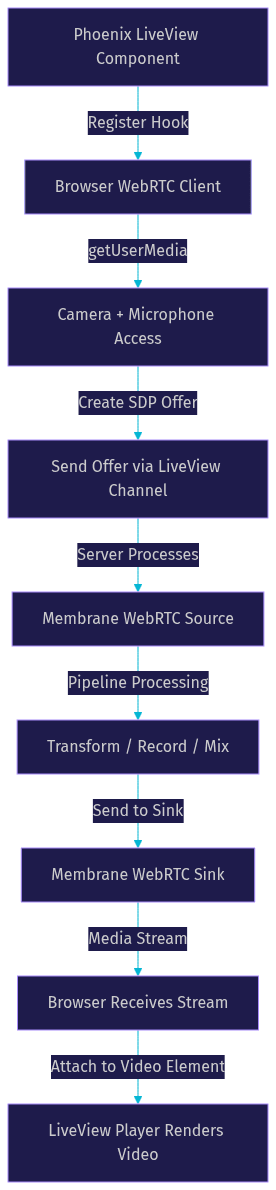
To capture browser media, you register a LiveView hook that manages the WebRTC peer connection lifecycle on the client side. The hook handles getUserMedia calls for camera and microphone access, creates the SDP offer, and sends it to the server through the LiveView channel. The server responds with the SDP answer and ICE server configuration, which the hook uses to complete the peer connection.
ICE server configuration is critical at this stage. You need to provide a list of STUN and TURN servers that the browser can use for NAT traversal. Without proper TURN servers, peers behind symmetric NATs or restrictive firewalls will fail to establish connectivity. The ICE server list is typically passed from the server to the browser as part of the signaling exchange, allowing you to configure it centrally.
Browser permission handling is another consideration. The first time a user grants camera or microphone access, the browser displays a permission prompt. Your LiveView should handle the case where permission is denied gracefully, providing feedback to the user and falling back to audio-only if video is unavailable.
Playing Remote Streams
For playback, the plugin provides a LiveView player component that renders a video element and attaches the remote media stream. When the server-side pipeline sends media through the WebRTC Sink, the browser receives it as a remote MediaStream that the player component attaches to the video element's srcObject.
Handling disconnections is essential for production reliability. The player component should detect when a peer connection drops and attempt reconnection or display an appropriate message. Network interruptions, browser tab switches, and device sleep can all cause temporary disconnections that your application should handle without requiring a full page reload.
Performance and Codec Considerations
Codec selection and performance tuning directly impact the quality and latency of your WebRTC streams. Membrane WebRTC supports several codecs and provides configuration options for balancing quality against bandwidth and computational overhead.
Supported Codecs and Negotiation
The plugin supports common WebRTC codecs including VP8, H.264, and Opus for audio. Support for newer codecs like AV1 and H.265 depends on the browser's capabilities and the Membrane codec plugins available in your project. During SDP negotiation, the plugin advertises available codecs based on your pipeline configuration, and the browser selects from the offered options.
Codec negotiation follows the standard WebRTC offer/answer model. The side creating the offer lists its preferred codecs in priority order, and the answerer selects from that list. If you need to prioritize a specific codec, such as H.264 for hardware acceleration compatibility, you can configure the codec preference order in your pipeline setup.
VP8 remains the safest default for browser compatibility, as it is universally supported across Chrome, Firefox, and Safari. H.264 offers better hardware encoding support on many platforms, which can reduce CPU usage during encoding. AV1 provides superior compression efficiency but requires more computational power and is not yet universally supported across all browsers as of 2026.
Keyframe Interval and Bandwidth Adaptation
Keyframe interval controls how frequently the encoder produces complete frame data versus incremental changes. Shorter intervals improve resilience to packet loss and speed up stream recovery but increase bandwidth consumption. Longer intervals reduce bandwidth but can cause visible artifacts or extended freezes when packets are lost.
Bandwidth adaptation adjusts the encoding bitrate in response to network conditions. Membrane WebRTC can leverage WebRTC's built-in congestion control feedback to signal upstream encoders to adjust their bitrate. This network-adaptive streaming approach is similar to what VideoSDK's network-adaptive streaming does automatically, adjusting resolution and bitrate based on real-time bandwidth detection without developer intervention.
For low-latency streaming applications, a keyframe interval of two to four seconds typically provides a good balance. For interactive video chat where latency is critical, shorter intervals around one second may be preferable despite the bandwidth cost.
Common Pitfalls and Debugging Tips
Even with a well-structured pipeline, WebRTC integration introduces specific failure modes that catch developers off guard. Understanding these common issues before deployment saves significant debugging time.
ICE Server Configuration
The most common WebRTC failure is unsuccessful ICE connectivity, which manifests as a peer connection that never establishes media flow. This typically stems from missing or misconfigured TURN servers. STUN servers alone are insufficient for peers behind symmetric NATs or corporate firewalls that block UDP traffic.
Always include at least one TURN server with TCP and UDP relay capabilities in your ICE configuration. Test your ICE setup with peers on different networks, including mobile networks and corporate VPNs, before assuming it works. The browser's WebRTC internals page, accessible through the chrome://webrtc-internals URL in Chrome, provides detailed ICE candidate gathering and connectivity check logs that are invaluable for diagnosing these issues.
SDP Mismatches and Track IDs
SDP offer/answer mismatches occur when the codecs, media types, or track configurations in the answer don't align with what the offer expected. This can happen when your pipeline advertises codecs that the browser doesn't support or when track IDs get mismatched during pad creation.
Ensure that your pipeline's codec configuration matches what you advertise in the SDP. If you configure the Sink for H.264 but the browser only supports VP8, the connection will fail during negotiation. Track ID mapping is equally important: each track's identifier in the SDP must correspond to the correct pad in your Membrane pipeline. Mismatches cause media to route to the wrong processing branch or fail to route at all.
Development vs Production Environment
WebRTC requires HTTPS in production. Browsers block getUserMedia on non-secure origins, meaning your local development environment with HTTP works fine but production deployment on HTTP will fail. Always test with HTTPS before deployment, even in staging environments.
TURN server configuration that works on localhost often fails in production because production traffic must traverse real NAT and firewall configurations. Plan for TURN server capacity and cost, as relayed traffic consumes bandwidth on your TURN infrastructure. For scaling considerations, evaluate whether a managed WebRTC solution like VideoSDK might reduce operational overhead for large deployments.
Real-World Use Cases
Membrane WebRTC technology powers several categories of real-time media applications, each leveraging different aspects of the plugin's architecture.
Live streaming platforms use the plugin to ingest browser-based broadcasts and process them through Membrane pipelines for transcoding, recording, and distribution. A concert streaming service, for example, can ingest a performer's camera feed via WebRTC, mix it with audio from a professional sound board through Membrane's audio mixer elements, and output the combined stream to viewers through HLS or additional WebRTC peer connections.
Video chat in SaaS applications benefits from the plugin's per-track pad model, which allows independent processing of each participant's audio and video. A remote collaboration tool can apply server-side noise suppression, record individual tracks for compliance, and mix audio for multi-party calls, all within a single Membrane pipeline.
IoT camera feeds use WHIP ingestion to stream from edge devices into Elixir-based monitoring dashboards. The standardized WHIP protocol means camera firmware doesn't need a custom signaling implementation, and the Membrane pipeline can handle motion detection, recording, and alerting as downstream elements.
Remote tutoring platforms combine LiveView integration with the Source and Sink elements to create interactive video sessions where the server can record lessons, apply real-time filters, or inject supplementary media like shared whiteboard content into the video stream.
For developers who need these capabilities without managing WebRTC infrastructure directly, VideoSDK offers a Prebuilt UI Kit and SDKs across React, React Native, Flutter, Android, iOS, and other platforms, handling signaling, TURN servers, and network adaptation as managed services.
Future Developments and Next Steps
The Membrane Framework is under active development, with the WebRTC plugin receiving regular updates for codec support, performance improvements, and bug fixes. Upcoming releases are expected to expand AV1 support, improve bandwidth estimation accuracy, and add more granular control over ICE candidate gathering.
The roadmap also includes better integration with Membrane's newer real-time streaming components, potentially simplifying the pipeline setup for common scenarios like one-to-many broadcasting. Developers following the Membrane GitHub repository can track progress and contribute through issues and pull requests.
For community support, the Membrane team maintains an active presence on their Discord server and GitHub discussions. The Elixir Forum also hosts discussions about Membrane and WebRTC integration, where practitioners share solutions to common challenges.
If you're evaluating whether to build with Membrane WebRTC or use a managed solution, consider your team's Elixir expertise, your need for custom media processing, and your operational capacity for maintaining TURN servers and WebRTC infrastructure. Both approaches have valid use cases, and the right choice depends on your specific requirements.
Definitions Glossary
Membrane Framework: An Elixir-based multimedia processing framework that uses a modular pipeline model where media elements are connected through pads to form processing graphs.
WebRTC Peer Connection: The browser API and protocol layer that establishes direct media and data connections between peers using SDP negotiation and ICE connectivity checks.
SDP Offer/Answer: The signaling exchange where one peer describes its media capabilities in an offer, and the other responds with a compatible answer, establishing the parameters for the media session.
ICE (Interactive Connectivity Establishment): The protocol WebRTC uses to find the best network path between peers, involving STUN servers for address discovery and TURN servers for relay when direct connectivity fails.
WHIP (WebRTC HTTP Ingestion Protocol): A standardized protocol for ingesting WebRTC streams over HTTP, enabling broadcasting clients to push media to a server without custom signaling channels.
Membrane Pad: The connection point on a Membrane element through which media flows, analogous to a port on a processing node, enabling dynamic linking of pipeline elements.
Network-Adaptive Streaming: The automatic adjustment of bitrate and resolution based on real-time network conditions, ensuring smooth playback when bandwidth fluctuates.
Key Takeaways
- Membrane WebRTC technology brings WebRTC peer connection functionality directly into Elixir applications through composable pipeline elements, eliminating the need for external media server bridges.
- The plugin supports three signaling options (Phoenix channels, WHIP, and WebSocket servers), each suited to different application architectures and client types.
- Media tracks are exposed as individual pads on Source and Sink elements, enabling fine-grained control over routing, transcoding, and recording within Membrane pipelines.
- Phoenix LiveView integration provides a unified model for browser media capture and remote stream playback, bridging server-side processing and client-side rendering.
- Codec selection, keyframe interval, and ICE server configuration are the primary levers for balancing latency, quality, and reliability in production WebRTC deployments.
- For developers who need managed WebRTC infrastructure without maintaining TURN servers and signaling logic, VideoSDK offers multi-platform SDKs and a Prebuilt UI Kit as an alternative approach.
Conclusion
Membrane WebRTC technology gives Elixir developers a native, composable way to handle real-time media without leaving the BEAM ecosystem. Its pipeline-based architecture treats WebRTC tracks as first-class media elements that can be mixed, transformed, recorded, and distributed alongside any other Membrane component. The signaling flexibility, LiveView integration, and growing codec support make it a strong foundation for custom media applications in 2026.
That said, building production WebRTC infrastructure involves more than plugin setup. TURN server capacity, network adaptation, cross-platform browser compatibility, and scaling considerations all require ongoing operational attention. If your team would rather focus on application logic than WebRTC infrastructure, VideoSDK's video calling SDKs handle signaling, media routing, network adaptation, and recording as managed services across ten or more platforms.
Ready to try Membrane WebRTC? Start with the official Membrane WebRTC demo on GitHub and the Membrane Framework documentation. Or explore VideoSDK's quickstart guide to see how a managed approach compares. What are you building with real-time media? Drop a comment below, I'd love to hear what kind of WebRTC use case you're working on.
Free $20 Balance for AI Voice Agents & Video Calls
FAQ