


Noise suppression is audio processing that removes background sound, such as fans, traffic and keyboard clicks, from a microphone signal while keeping the speech. Browsers offer a basic version through the WebRTC noiseSuppression constraint. VideoSDK adds an AI noise suppressor (BETA) for web and Flutter calling apps.
A fan or a busy street can make a speaker hard to follow on a call. The listener cannot fix it, because the noise arrives inside the audio.
This guide explains what noise suppression means, how it compares with echo cancellation and gain control, and how classic and AI denoisers work. It then shows how to add it in the browser, with VideoSDK's AI noise suppressor for React, and in mobile calling apps.
What is noise suppression?
Noise suppression is defined as the real-time removal of unwanted background sound from a speech signal, so the other people on a call hear mainly the voice.
Noise suppression works by splitting the microphone signal into short frames, estimating how much of each frequency is noise, and turning those parts down while leaving speech mostly intact.
So the plain noise suppression meaning is: keep the voice, lower everything else. What does noise suppression do on a call? It cleans the audio you send, so other participants hear less of your room. It does not change the audio you receive from them.
The W3C Media Capture and Streams specification treats audio noise suppression as a microphone setting that apps can switch on or off, since some cases need unaltered audio. Searchers also spell it "noise supression" or "noise suppresion".
Stationary and Non-stationary noise
Stationary noise sounds roughly the same over time, like an air conditioner or electrical hum. Non-stationary noise changes quickly, like keyboard clicks, a barking dog or other people talking.
Classic algorithms handle stationary noise well because they learn its profile during pauses. Non-stationary noise is where AI models help most, because it changes faster than a simple running estimate.
Noise suppression vs noise cancellation
Noise suppression cleans the audio a microphone sends, which helps your listeners. Active noise cancellation in headphones plays inverted sound into your ears, which helps you.
What does denoise mean?
To denoise audio is to run noise suppression on it. Research papers and audio libraries often call the component that does this a denoiser.
Noise suppression vs Noise reduction vs Echo cancellation vs Gain control
Noise suppression, noise reduction, echo cancellation and automatic gain control are separate jobs that often run together on one microphone signal.
| Process | What it removes or changes | Where it runs in a call | WebRTC constraint |
|---|---|---|---|
| Noise suppression | Background noise such as fans, hum, traffic and typing | On the sender's microphone signal, before encoding | noiseSuppression |
| Noise reduction | Any unwanted noise; the umbrella term for software, filter and hardware methods | Microphones, headsets, and sender or receiver software | None of its own; browsers expose noiseSuppression |
| Echo cancellation | Far-end voices that leak from your speaker back into your microphone | On the sender, using the audio being played out as a reference | echoCancellation |
| Automatic gain control | Volume swings; it brings speech to a steady level | On the sender, after echo cancellation and noise suppression | autoGainControl |
What does noise reduction do that noise suppression does not? It is the broader term, covering every way of lowering noise, from microphone design to software. Product copy also says noise filtering or noise removal.
In the open-source WebRTC engine, these steps live in one audio processing module. Its public header says the module takes audio in chunks of about 10 ms. It offers four suppression levels, from low to very high, with moderate as the default. Its adaptive digital gain controller runs after echo cancellation and noise suppression, so it does not boost the noise along with the voice.
How noise suppression works
Every noise suppressor runs the same loop on each short frame of audio: estimate the noise, decide how far to turn each frequency down, and rebuild the frame.
- Frame the signal. Audio is cut into short frames, about 10 ms each in WebRTC's audio module, and converted to the frequency domain.
- Estimate the noise. The suppressor judges which parts of the spectrum are noise, often by tracking the signal during pauses in speech.
- Compute gains. Each frequency bin or band gets a gain between zero and one. Bins dominated by noise get low gains.
- Apply and rebuild. The gains are applied, and the frame is converted back to a waveform for the encoder.
Classic and AI noise reduction techniques differ mainly in steps 2 and 3. The diagram below compares the two pipelines and shows where VideoSDK's web suppressor fits.
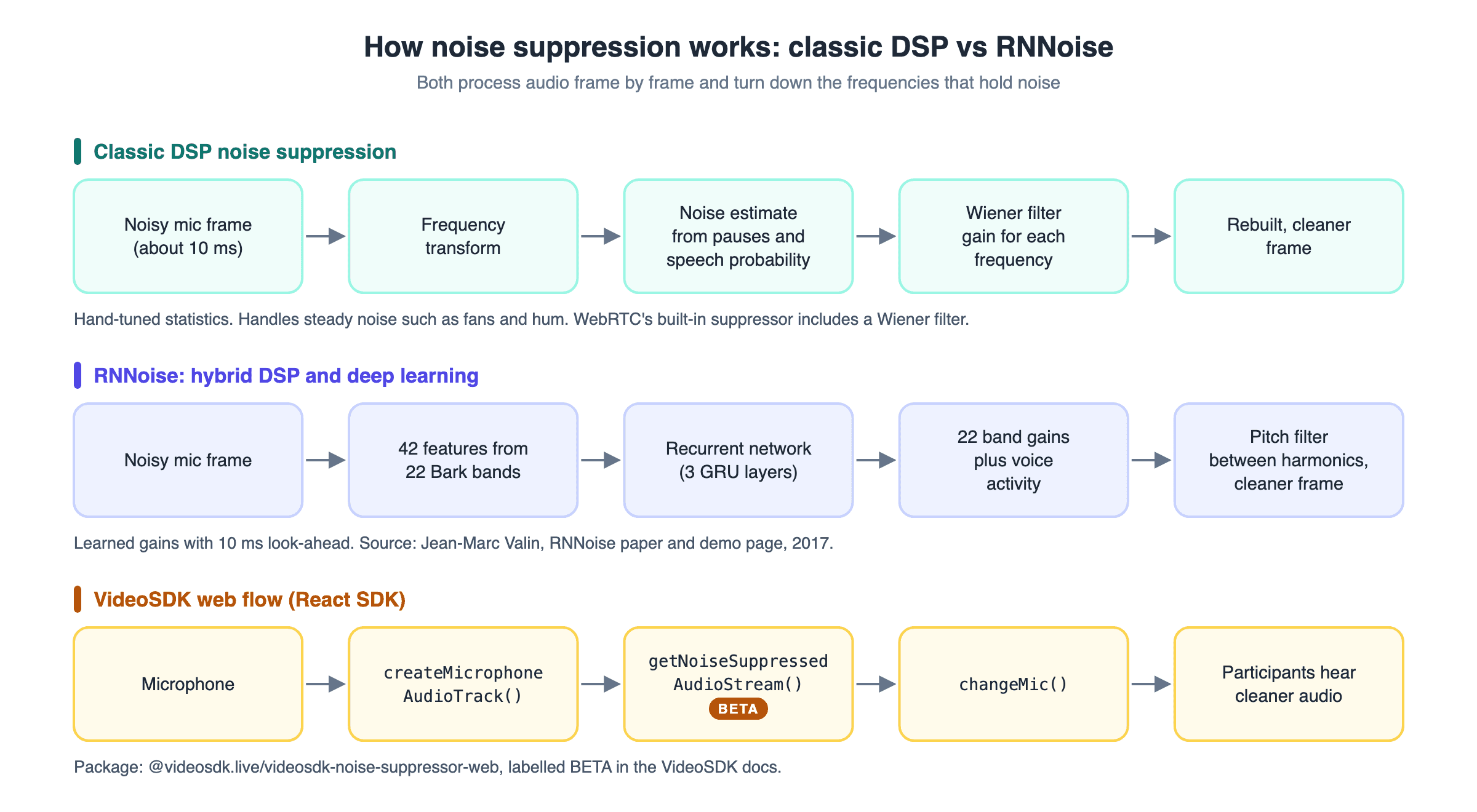
Classic noise suppression: Spectral subtraction and Wiener filtering
Classic noise suppression uses hand-designed statistics to estimate noise and compute gains, with no training data. These are the three noise reduction methods most later work builds on.
- Spectral subtraction. Steven Boll's 1979 paper estimates the noise spectrum during non-speech periods and subtracts it from the noisy spectrum. It is cheap, but aggressive subtraction leaves short tonal blips, often called musical noise.
- Wiener filtering. A Wiener filter scales each frequency by an estimate of how much of it is speech rather than noise. Lim and Oppenheim's 1979 review covers it among the main speech enhancement methods.
- MMSE amplitude estimation. Ephraim and Malah's 1984 estimator predicts the clean speech amplitude in each frequency. It remains a standard baseline for newer methods.
This family still ships today. WebRTC's open-source noise suppressor includes a Wiener filter, alongside a quantile-based noise estimator and a speech probability estimator.
The weakness is the assumption that noise changes slowly. Classic suppressors struggle with clicks, barks and background voices, and pushing them harder damages the speech.
AI noise suppression: RNNoise and Deep Learning
AI noise suppression replaces hand-tuned estimates with a neural network trained on pairs of noisy and clean speech.
RNNoise is an open-source example built for real-time calls. Jean-Marc Valin describes it in a 2017 paper, presented at MMSP 2018, as a hybrid of signal processing and deep learning. His RNNoise demo page explains the design:
- The network works on 22 bands on the Bark scale instead of 480 spectral values, much like a 22-band equaliser.
- It takes 42 input features, and most of the work happens in three GRU layers. A GRU is a recurrent layer that carries memory from frame to frame.
- It outputs a gain for each band plus a voice activity probability.
- A pitch filter removes noise between the harmonics of the voice, which the coarse bands cannot resolve.
- Look-ahead is limited to 10 ms to suit real-time communication.
The paper reports clearly higher quality than a traditional MMSE spectral estimator while running in real time at 48 kHz on a low-power processor.
To compare AI denoisers, Microsoft ran the Deep Noise Suppression (DNS) Challenge. The ICASSP 2023 edition, its fifth, used fullband 48 kHz audio, headset and speakerphone tracks, and listening tests. The organisers found that improving speech quality was hard when noise and interfering talkers appeared together. For automated scoring, Microsoft also published DNSMOS in 2020, a metric that predicts listener ratings without a clean reference.
For a longer look at neural models, read AI noise cancellation for real-time apps.
Trade-offs to test before shipping
Stronger noise suppression is not always better. Check these before you ship:
- Over-suppression. Aggressive settings can clip soft word endings or make voices sound thin.
- Music. A speech-tuned suppressor may treat instruments as noise.
- Overlapping talkers. A second voice is speech too, and DNS 2023 shows this case is still hard.
- Device load. Client-side models use CPU on every participant's device.
- Stacking. Browser and AI suppressors can both process one track, so compare the result with each on and off.
Adding noise suppression in the browser
Browsers that support it expose noise suppression as an audio constraint on getUserMedia(), so a web app can request it without extra libraries. This short snippet asks for all three voice processing steps and then logs whether noise suppression was applied.
const stream = await navigator.mediaDevices.getUserMedia({
  audio: {
    noiseSuppression: true,
    echoCancellation: true,
    autoGainControl: true,
  },
});

const [track] = stream.getAudioTracks();
console.log(track.getSettings().noiseSuppression);
Three rules from MDN's constraint reference shape how this behaves:
trueis a request, not a demand. The browser tries to apply it, and the call still succeeds if it cannot. Use{ exact: true }if you would rather the request fail.- Check what you got.
getSettings()reports what was applied, andgetSupportedConstraints()shows whether the browser knows the constraint. - Support is uneven. MDN marks
noiseSuppressionas limited availability, not Baseline, because it does not work in some widely used browsers.
The constraint is also on or off only. You cannot pick a strength or an algorithm, and results differ between browsers. Treat built-in background noise suppression as a basic first layer.
VideoSDK's React SDK exposes the same three settings through createMicrophoneAudioTrack(). Its default speech_standard preset turns all three on, while music_standard and the higher-bitrate presets turn them off. A noiseConfig object sets each one directly.
Adding AI noise suppression with VideoSDK
VideoSDK's AI noise suppressor is a separate web package, labelled BETA in the docs, that cleans a microphone stream before your app publishes it. The React noise suppression guide covers it in three steps.
You need a working VideoSDK meeting first. Sign up for VideoSDK and follow the React quickstart, then add the steps below.
1. Install the package.
npm install --save "@videosdk.live/videosdk-noise-suppressor-web"
The guide notes that the older @videosdk.live/videosdk-media-processor-web package will get no new versions, so use this one.
2. Import and create the suppressor. Import VideoSDKNoiseSuppressor from the new package, and useMeeting and createMicrophoneAudioTrack from @videosdk.live/react-sdk. The suppressor is created inside your meeting component.
3. Process the mic stream and swap it in. This block is the guide's example:
const MeetingView = () =>{
  // Instantiate VideoSDKNoiseSuppressor Class
  const noiseProcessor = new VideoSDKNoiseSuppressor();
  const { changeMic } = useMeeting({});
  const handleStartNoiseSuppression = async () => {
    // Getting stream from mic
    const stream = await createMicrophoneAudioTrack({});
    const processedStream = await noiseProcessor.getNoiseSuppressedAudioStream(
      stream
    );
    try {
      await changeMic(processedStream);
    } catch (err) {
      console.error("changeMic failed:", err);
    }
  };
  const handleStopNoiseSuppression = () => {};
  return <>...</>;
}
createMicrophoneAudioTrack({}) captures the microphone, and getNoiseSuppressedAudioStream() returns a noise-suppressed copy of that stream. changeMic() publishes it, and the guide says enableMic() and toggleMic() accept it too. return <>...</> stands in for your own buttons.
To stop noise suppression, call changeMic() again with a fresh stream from createMicrophoneAudioTrack({}). To join with clean audio from the start, pass the processed stream as customMicrophoneAudioTrack in the MeetingProvider config, as the guide's Extras section shows.
As of September 2026, the npm package is at version 0.1.0. It lists one dependency, @shiguredo/rnnoise-wasm, a WebAssembly build of RNNoise.
Not using React? The JavaScript and Flutter SDKs have their own guides. For live streams, see AI noise suppression for interactive live streaming. VideoSDK Prebuilt has an AI Noise Removal (BETA) option in its microphone settings from version 0.3.21.
Adding noise suppression in mobile calling apps
Mobile operating systems ship their own voice processing, so check it before adding another suppressor.
- Android. The
NoiseSuppressorclass attaches the platform's suppressor to anAudioRecordsession. Android's reference names voice chat, video conferencing and SIP calls as its main uses. Some devices insert it by default, so callgetEnable()to check. - iPhone, iPad and Mac. From iOS 15 and macOS 12, users pick a microphone mode in Control Center.
voiceIsolationisolates the voice and turns down other sounds, whilewideSpectrumkeeps every sound. An app cannot set the mode, but it can readpreferredMicrophoneModeand open the panel withshowSystemUserInterface(_:).
VideoSDK's Android, iOS, React Native and Flutter SDKs use the same encoder presets as the web SDK. speech_low_quality and speech_standard turn noise suppression on, while music_standard and the higher presets turn it off.
Which noise suppression option should you use?
The right noise suppression option depends on your platform and how much control you need. If you are deciding how to suppress noise in your product, start here.
| Option | Good fit | Control | Where it runs |
|---|---|---|---|
Browser noiseSuppression constraint | Web calls that need a basic first layer | On or off only | The user's browser |
| VideoSDK noise suppressor (BETA) | Web and Flutter apps that want an AI suppressor | Start and stop from your app | Your app, before publishing |
| VideoSDK speech presets | Any VideoSDK calling app | On or off per track | The user's device |
| VideoSDK Prebuilt AI Noise Removal (BETA) | Teams using the Prebuilt UI | A user option in microphone settings | Prebuilt 0.3.21 and later |
Android NoiseSuppressor | Native Android apps using AudioRecord | On or off per session | Android's audio framework |
| Apple microphone modes | Calls on iPhone, iPad and Mac | Set by the user | The operating system |
If you are still choosing a voice SDK, compare options in our guide to voice call APIs.
Glossary
Noise suppression: Real-time removal of background sound from a speech signal. Browsers expose it as the noiseSuppression constraint, and VideoSDK web apps can add its AI noise suppressor (BETA).Spectral subtraction: A classic method that estimates the noise spectrum during pauses and subtracts it from each frame. Steven Boll published it in 1979.
Wiener filter: A filter that scales each frequency by how likely it is to be speech. WebRTC's open-source noise suppressor includes one.
RNNoise: An open-source noise suppressor that pairs signal processing with a small recurrent neural network. VideoSDK's web noise suppressor package depends on a WebAssembly build of it.
Echo cancellation: Removal of far-end audio that loops from a speaker back into a microphone. Browsers expose it as the echoCancellation constraint.Key takeaways
- Noise suppression removes background sound from the speech you send, while noise reduction is the broader term.
- Echo cancellation and automatic gain control are separate steps with their own WebRTC constraints.
- Classic suppressors rely on statistics such as spectral subtraction and Wiener filters, while AI suppressors such as RNNoise learn the gains.
- The browser constraint is basic, on or off only, and its support varies by browser.
- VideoSDK offers an AI noise suppressor (BETA) for web and Flutter apps, and its speech presets turn on built-in noise suppression in every SDK.
- On mobile, Android's
NoiseSuppressorand Apple's microphone modes add platform-level options.
Conclusion
Noise suppression decides whether a call sounds like a quiet room or a busy street. Start with the browser's noiseSuppression constraint or your SDK's speech preset, and add an AI suppressor when the built-in result is not enough. On mobile, check the operating system's own processing first.
To try VideoSDK's AI noise suppressor, follow the React quickstart and add the three steps above. Sign up for VideoSDK with $20 free credit.
Which kind of noise causes the most trouble on your calls? Tell us in the comments.
Frequently asked questions
What is noise suppression?
Noise suppression is audio processing that removes background sound from a microphone signal in real time while keeping the voice. Calling apps apply it before the audio is sent, so other people hear less of your room. Browsers expose it as the WebRTC noiseSuppression constraint.
What does noise suppression do?
Noise suppression lowers background sounds such as fans, hum, traffic and typing in the audio you send. It estimates which frequencies are noise and turns them down, frame by frame. It does not change the audio you receive, and it does not remove echo.
What is the difference between noise suppression and noise cancellation?
Noise suppression and active noise cancellation solve different problems. Suppression cleans your microphone audio so listeners hear less background sound. Active noise cancellation in headphones plays inverted sound so you hear less of your surroundings. Product names often use the two terms loosely.
What is noise reduction?
Noise reduction is the umbrella term for any method that lowers unwanted sound, from microphone design to software filters. Noise suppression is the real-time software form used in calls. Noise control is broader still, covering noise at its source, along its path and at the listener.
What is dynamic noise reduction?
Dynamic noise reduction (DNR) is a playback technique for tape and FM audio, not a call feature. Texas Instruments' LM1894 DNR chip, for example, uses psychoacoustic masking and an adaptive bandwidth scheme, with no specially encoded source needed.
How do you suppress noise in a web app?
To suppress noise in a web app, request noiseSuppression: true in getUserMedia() for the browser's built-in filter. For AI noise suppression, VideoSDK's React SDK can pass the mic stream through its noise suppressor (BETA) and publish it with changeMic().
Should noise suppression always be on?
No, noise suppression should not always be on. The W3C specification notes that some apps need unaltered audio, such as music. Strong settings can also clip soft speech. Let users switch it off, and check getSettings() to confirm what the browser applied.