


mediasoup is a WebRTC Selective Forwarding Unit (SFU) that routes media streams between participants with minimal server-side processing, delivering sub-200ms latency for group video calls. It runs as a Node.js or Rust library with C++ worker processes handling RTP packet forwarding, simulcast, and congestion control. Developers choose mediasoup when they need fine-grained control over media routing without the overhead of a full MCU. For teams that want a managed alternative with prebuilt UI and multi-platform SDKs, VideoSDK offers a faster path to production video calling.
Real-time video has moved from a novelty to an expectation. Whether it is a telehealth consultation, a remote interview platform, or a live classroom, users demand sub-second latency and clear audio. The technology that makes this possible is WebRTC, and the server component that scales it beyond a simple one-to-one call is the SFU.
mediasoup has emerged as one of the most respected open-source WebRTC SFUs in the developer community. It is not a turnkey product. It is a low-level library that gives you direct control over RTP routing, transport management, and media processing. That control comes with a learning curve, but it also comes with performance that rivals commercial platforms.
This guide walks through the mediasoup WebRTC architecture, its core features, production deployment strategies, and the trade-offs you should understand before committing to it as your media server.
What is mediasoup? An Overview of the WebRTC SFU
A Selective Forwarding Unit (SFU) is a media server architecture that receives one encoded stream from each participant and forwards selected streams to other participants. Unlike an MCU (Multipoint Control Unit), which decodes, mixes, and re-encodes all media, an SFU passes packets through with minimal processing. This keeps CPU usage low and latency tight.
mediasoup is defined as a WebRTC SFU library built in C++ with Node.js and Rust bindings. It is signaling-agnostic, meaning it does not impose a specific signaling protocol. You bring your own WebSocket, HTTP, or any transport layer for session negotiation. mediasoup handles only the media plane: ICE, DTLS, SRTP, and RTP packet routing.
The key design goals are low-level API exposure, multi-stream support per participant, and high performance through per-core worker processes. According to the W3C WebRTC specification, the browser-side APIs handle peer connection setup, but the server side is left to implementers. mediasoup fills that gap with a deliberately minimal, composable API surface.
Understanding the mediasoup WebRTC Architecture
mediasoup's architecture is built around a layered hierarchy of processes and objects. At the top, a Node.js or Rust application manages signaling and orchestration. Below it, C++ worker processes handle the actual RTP packet forwarding. Each worker runs on a dedicated CPU core, providing isolation and predictable performance.
The hierarchy flows from workers down to routers, transports, producers, and consumers. A worker can host multiple routers. A router represents a media room. Within each router, transports handle the network connection to a participant. Producers and consumers represent the media streams flowing through those transports.
Here is how the components relate:
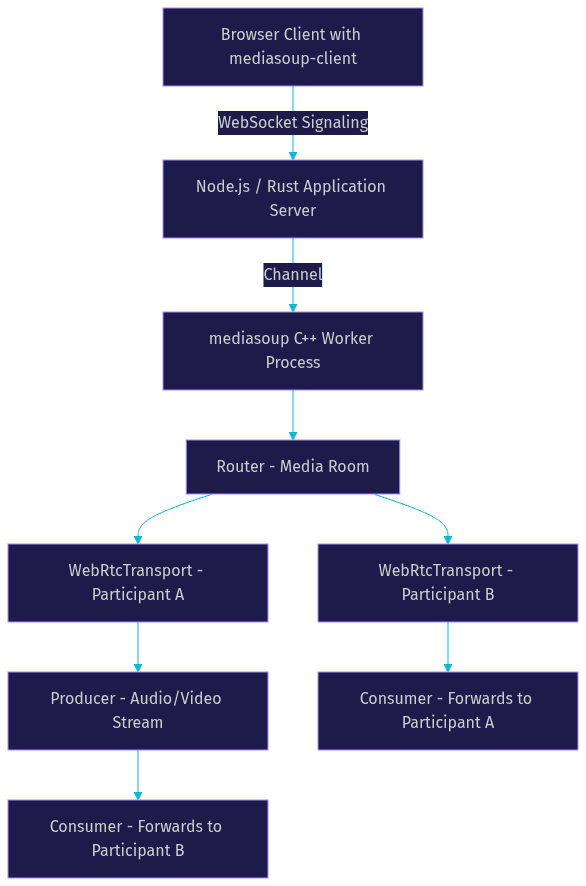
mediasoup handles ICE candidate exchange, DTLS handshake, and SRTP encryption at the transport level. Once a WebRtcTransport is established, the browser sends RTP packets encrypted with SRTP. The worker decrypts them, inspects RTP headers for routing decisions, and re-encrypts before forwarding to consumers. The server never decodes the media payload, which is why CPU stays low even with many participants.
Workers and Routers: Core Building Blocks
A worker is a standalone C++ process spawned by the mediasoup library. Each worker pins to a single CPU core and operates independently. If one worker crashes, others continue serving their rooms. This isolation is critical for production reliability.
A router lives inside a worker and represents a single media room or session. The router holds RTP capabilities, which describe what codecs and features (like simulcast or SVC) the room supports. When a participant joins, their RTP capabilities are matched against the router's capabilities to determine compatible codecs and transport parameters.
Transports, Producers, and Consumers
mediasoup provides three transport types. WebRtcTransport is the standard transport for browser-based participants using ICE and DTLS. PlainTransport handles unencrypted RTP for server-to-server scenarios or when integrating with external media pipelines. PipeTransport connects routers across different workers, enabling horizontal scaling when a single worker cannot handle all participants in a large room.
A producer represents an incoming media stream from a participant. A consumer represents an outgoing stream forwarded to another participant. The router maps producers to consumers based on what each participant wants to receive. If participant A is sending simulcast video with three spatial layers, the router can forward different layers to different consumers depending on their available bandwidth.
Key mediasoup Features for WebRTC Applications
mediasoup provides a set of features that make it suitable for demanding real-time video scenarios. These features are not optional add-ons. They are core to how the SFU manages quality and bandwidth in multi-participant calls.
The platform supports simulcast and Scalable Video Coding (SVC), both of which allow the server to send different video quality levels to different receivers based on their network conditions. It implements congestion control through bandwidth estimation (BWE), adjusting forwarding bitrates in real time. DataChannel support enables low-latency messaging alongside audio and video. Full RTP and RTCP handling means the server correctly processes feedback packets for packet loss, jitter, and bandwidth reports.
mediasoup is also IPv6-ready and supports both encrypted SRTP and plain RTP, making it flexible for mixed environments where some traffic is browser-facing and some is server-to-server.
Simulcast and SVC Explained
Simulcast means the sender encodes multiple versions of the same video stream at different resolutions and bitrates simultaneously. The SFU then forwards the appropriate version to each receiver based on their bandwidth. A participant on a fast connection receives the high-resolution stream, while one on mobile receives a lower-resolution version.
SVC (Scalable Video Coding) achieves a similar outcome but with a single encoded stream containing multiple layers. The sender encodes one base layer and multiple enhancement layers. The SFU can drop enhancement layers for receivers with limited bandwidth without needing separate encodings. SVC is more bandwidth-efficient than simulcast but requires codec support (VP9 or AV1) on both sender and receiver.
Use simulcast when you need broad browser compatibility, as VP8 simulcast works across all major browsers. Use SVC when you can mandate VP9 or AV1 support and want better encoding efficiency.
Congestion Control and BWE
mediasoup implements bandwidth estimation on the server side using RTCP feedback from receivers. When a consumer's network degrades, the server detects increased packet loss or jitter through RTCP reports. It then requests a lower spatial or temporal layer from the sender's simulcast stream, or adjusts the forwarding bitrate.
This happens automatically once you configure the consumer with the appropriate maximum bitrate and layer preferences. The algorithm adapts within seconds, preventing quality collapse on fluctuating networks. For developers building low-latency video conferencing applications, this adaptive behavior is what keeps calls stable when participants are on mobile data or congested WiFi.
Choosing mediasoup for Your WebRTC Project
mediasoup is not the only WebRTC SFU available. Janus, LiveKit, and Pion are popular alternatives, each with different trade-offs. The mediasoup GitHub repository documents the project's philosophy of minimal abstraction and maximum control.
Here is when mediasoup is the right choice:
- You need fine-grained control over media routing and transport management
- You want to build a custom signaling layer rather than using an imposed protocol
- You are comfortable managing server infrastructure (Docker, Kubernetes, monitoring)
- Your use case involves group video chat, live streaming, or RTP broadcasting with many simultaneous participants
- You need simulcast or SVC for adaptive quality across heterogeneous receivers
When mediasoup might not be the right choice:
- You want a turnkey solution with prebuilt UI and minimal server management
- You need rapid prototyping and fast time-to-market without deep WebRTC knowledge
- Your team lacks Node.js or Rust expertise for the signaling layer
For teams that want the performance of an SFU without building the signaling and infrastructure from scratch, VideoSDK's video calling API provides a managed alternative with SDKs across React, React Native, Flutter, iOS, Android, and JavaScript.
Integrating mediasoup into a WebRTC Application
Building a mediasoup WebRTC application involves several conceptual steps. The process requires coordination between a signaling server, the mediasoup worker processes, and client-side logic using the mediasoup-client library.
The high-level flow works as follows. First, the client connects to your signaling server (typically over WebSocket). The signaling server creates a mediasoup worker and a router. The server and client exchange RTP capabilities to determine compatible codecs. The server creates a WebRtcTransport and sends its ICE parameters and DTLS fingerprint to the client. The client creates a matching transport using mediasoup-client and completes the ICE and DTLS handshake. Once the transport is established, the client creates a producer to send media and the server creates consumers to forward that media to other participants.
Server-Side Setup
On the server side, you install the mediasoup package for Node.js or the Rust crate depending on your preferred runtime. The server application manages worker lifecycle, creates routers for each room, and handles signaling messages from clients. In a Docker deployment, you build an image that includes the mediasoup native dependencies and your application code. The container exposes the WebSocket port for signaling and the UDP port range for WebRTC media traffic.
The server is responsible for creating transports, negotiating ICE candidates, and wiring producers to consumers. It also handles room state management: tracking which participants are in which room and what media they are producing.
Client-Side Interaction
On the client side, you use the mediasoup-client library, which provides a Device object that manages RTP capabilities and transport creation. The client loads its device with the router's RTP capabilities, creates a send transport and a receive transport, and then produces or consumes media tracks.
Signaling is entirely your responsibility. You send transport parameters, producer IDs, and consumer IDs over your WebSocket connection. The client uses these parameters to create local transport and producer/consumer objects that connect to the server-side counterparts. This separation of signaling and media is what makes mediasoup flexible but also what makes the initial setup more involved than a turnkey SDK.
Production-Ready Considerations
Running mediasoup in production requires attention to scaling, monitoring, security, and deployment infrastructure. A single worker can handle a surprising number of participants on a modern CPU, but eventually you need to scale horizontally.
Scaling Workers with Load Balancing
Each mediasoup worker is pinned to one CPU core. On a 16-core server, you can run up to 16 workers. A room with 20 participants might fit comfortably in one worker, but a platform with hundreds of concurrent rooms needs a strategy for distributing load.
The common approach is round-robin worker assignment. When a new room is created, the signaling server assigns it to the worker with the fewest active rooms. For rooms that grow too large for a single worker, PipeTransport connects routers across workers on the same machine or even across machines, allowing media to flow between them without re-encoding.
For multi-server scaling, you place a load balancer (like HAProxy or NGINX) in front of your signaling servers. Each signaling server runs its own set of mediasoup workers. Participants in the same room must be routed to the same server, or you use PipeTransport to bridge rooms across servers.
Monitoring and Observability
mediasoup provides a built-in stats API on every transport, producer, and consumer. You can query inbound and outbound bitrate, packet loss, jitter, round-trip time, and byte counts at any interval. This data is essential for detecting degraded calls before users complain.
For production monitoring, teams typically poll these stats every few seconds and export them to a time-series database. Prometheus and Grafana are the most common pairing. You create dashboards showing per-worker CPU usage, total active transports, aggregate bitrate, and packet loss distribution. Alerting on sustained packet loss above a threshold (say, 5% for more than 10 seconds) lets you catch network issues proactively.
Security Best Practices
Security in a mediasoup deployment covers three areas: signaling authentication, transport security, and network hardening.
For signaling authentication, generate short-lived JWT tokens on your backend and require them for WebSocket connections. Each token should encode the participant's identity, the room they are authorized to join, and an expiry timestamp. Never allow anonymous room creation in production.
For transport security, mediasoup uses DTLS and SRTP by default for WebRtcTransport. All media is encrypted in transit. For additional security, you can implement End-to-End Encryption (E2EE) where media is encrypted on the client before reaching the SFU, though this requires Insertable Streams API support in the browser and prevents the server from doing simulcast layer selection.
For network hardening, configure ICE-lite if your server has a public IP address to simplify ICE negotiation. Open the UDP port range that mediasoup uses for WebRTC media (typically a configurable range like 40000-49000) in your firewall or security group. Restrict WebSocket access to your domain origin to prevent cross-site signaling abuse.
Common Pitfalls and How to Avoid Them
Several issues recur in mediasoup deployments, and most stem from configuration oversights rather than fundamental architecture problems.
Misconfiguring ICE and TLS is the most common issue. If your server is behind a NAT or firewall and you have not properly configured the announced IP address, ICE negotiation fails silently. The client connects to signaling but never establishes a media transport. Always set the server's public IP in the transport options when running behind NAT.
Forgetting to set a maximum bitrate on consumers leads to one participant consuming excessive bandwidth, degrading the experience for others on shared networks. Always set a reasonable maximum bitrate per consumer based on the participant's role and network conditions.
Handling participant reconnection poorly causes duplicate producers and orphaned consumers. When a participant disconnects unexpectedly and reconnects, the server may still have their old producer objects. Implement a cleanup timeout that removes producers and consumers after a grace period, and ensure reconnection logic closes old transports before creating new ones.
Real-World Example: Building a 10-Participant Video Conference
Consider a team building a group video calling platform for remote interviews. They need 10 participants per room, simulcast for adaptive quality, and active speaker detection. Here is how a mediasoup architecture handles this.
The server creates one worker per room on a 4-core machine, allowing up to 4 concurrent rooms. Each room has one router. When a participant joins, the server creates a WebRtcTransport for them and the client produces an audio track and a simulcast video track with three spatial layers (low, medium, high).
The server creates consumers for each participant, initially forwarding the low layer for video to keep bandwidth conservative. As bandwidth estimation reports good conditions for a given consumer, the server upgrades that consumer to the medium or high layer. Active speaker detection runs on the client side by analyzing audio volume, and the UI requests the high-resolution layer only for the active speaker.
In practice, this setup achieves end-to-end latency under 200 milliseconds on a well-provisioned network. CPU usage per participant averages around 3-5% on a modern server core, meaning a single worker handles 10 participants with headroom to spare. Total bandwidth per participant ranges from 400 Kbps (receiving low-layer video from 9 others) to 2.5 Mbps (receiving high-layer video from the active speaker).
For comparison, VideoSDK's Prebuilt UI Kit handles the same 10-participant scenario with zero server management, automatic active speaker detection, and network-adaptive streaming built in. The trade-off is control: mediasoup gives you raw RTP routing, while VideoSDK gives you a production-ready interface in a single embed.
Definitions Glossary
SFU (Selective Forwarding Unit): A media server architecture that receives encoded RTP streams from each participant and forwards selected streams to others without decoding or re-encoding. mediasoup is an SFU, not an MCU.
mediasoup Worker: A C++ process spawned by the mediasoup library that handles RTP packet forwarding on a single CPU core. Each worker is isolated, so one worker crashing does not affect others.
Router: A media room inside a mediasoup worker. The router holds RTP capabilities and manages all transports, producers, and consumers for participants in that room.
WebRtcTransport: The standard mediasoup transport type for browser participants, handling ICE, DTLS, and SRTP encryption for secure media delivery.
Simulcast: A technique where the sender encodes multiple versions of the same video at different resolutions and bitrates, allowing the SFU to forward the appropriate version to each receiver based on bandwidth.
PipeTransport: A mediasoup transport type that connects routers across different workers or machines, enabling horizontal scaling for large rooms without re-encoding media.
Key Takeaways
- mediasoup is a high-performance, low-level WebRTC SFU that gives developers direct control over RTP routing, transport management, and media forwarding without imposing a signaling protocol.
- The architecture centers on per-core C++ worker processes, each hosting routers that manage transports, producers, and consumers for individual media rooms.
- Simulcast and SVC support, combined with server-side bandwidth estimation, allow mediasoup to adapt video quality per receiver in real time, keeping calls stable on heterogeneous networks.
- Production deployment requires careful attention to ICE configuration, UDP port management, worker load balancing, and monitoring through the built-in stats API.
- For teams that need video calling without managing SFU infrastructure, VideoSDK offers a managed alternative with multi-platform SDKs, Prebuilt UI, and network-adaptive streaming built in.
Conclusion
mediasoup remains one of the strongest open-source choices for developers who need a WebRTC SFU with granular control over media routing. Its C++ worker architecture, simulcast and SVC support, and signaling-agnostic design make it well-suited for group video conferencing, live streaming, and RTP broadcasting at scale. The trade-off is infrastructure complexity: you build and maintain the signaling layer, monitoring, and deployment pipeline yourself.
If you want to skip that complexity and ship video calling faster, VideoSDK provides SDKs for React, React Native, Flutter, iOS, Android, and JavaScript with built-in recording, transcription, and network-adaptive streaming. You can start free with a generous credit on the VideoSDK dashboard.
What are you building with mediasoup WebRTC? Drop a comment below, I would love to hear what kind of real-time video use case you are working on.
Free $20 Balance for AI Voice Agents & Video Calls
FAQ