


Frame recording is the process of capturing video at precise per-frame granularity, preserving exact timing, visual fidelity, and optional metadata like cursor position. Unlike standard screen capture, frame recording ensures every individual frame is accounted for, making it essential for debugging, cinematic capture, and scientific visualization. VideoSDK supports frame-accurate recording through its participant and composite recording APIs, giving developers programmatic control over capture quality and output format.
A game developer ships a build to QA, and a particle effect glitches for exactly one frame. The tester reports it, but when they try to reproduce it on video, the screen recorder drops the frame entirely. The bug disappears into the gap between what happened and what was captured. That single missing frame costs the team two days of investigation.
This scenario plays out across studios, research labs, and demo rooms every day. Standard screen recorders prioritize smooth playback over exact fidelity, dropping or duplicating frames to maintain a target bitrate. For most content that tradeoff is fine. But when you need to prove what happened, frame by frame, that approach fails.
Frame recording solves this by treating every frame as a first-class unit of data. Whether you are debugging a rendering pipeline, capturing a cinematic sequence in Unity, or archiving a terminal session for compliance, the ability to record and replay at frame-level granularity changes what you can verify and what you can ship.
This guide breaks down the technologies behind frame recording, compares the best tools across Linux, macOS, and game engines, and walks through best practices so you never lose a critical frame again.
What Is Frame Recording?
Frame recording is defined as the capture of video output at a precise, per-frame granularity, where each frame is timestamped and preserved independently rather than interpolated or dropped to meet a target frame rate. Frame recording works by pulling individual frames directly from the display buffer or rendering pipeline, optionally compositing cursor metadata, and encoding each frame with a deterministic timing relationship to the source.
Unlike conventional screen capture tools that prioritize smooth playback and may skip frames under load, frame recording guarantees that every frame the GPU renders is captured. This makes it suitable for scenarios where visual completeness matters more than file size or encoding speed.
VideoSDK provides frame-accurate recording capabilities through its recording APIs, which allow developers to capture participant streams with precise timing control and multi-track output.
Why Frame Accuracy Matters
Frame accuracy is the difference between seeing a bug and missing it entirely. In game debugging, a single frame can reveal a physics glitch, a z-fighting artifact, or a shader compilation spike that disappears by the next frame. Without frame-accurate capture, these issues become invisible in recordings.
In visual QA workflows, testers need to scrub through recordings frame by frame to identify exact moments where UI elements misalign or animations stutter. Cinematic capture in game engines demands frame-perfect output because even one dropped frame creates a visible judder in the final render.
Scientific visualization adds another dimension. Researchers rendering fluid dynamics simulations or molecular interactions need every frame preserved to validate that their visualization matches the underlying computation. A dropped frame in this context is not just a visual gap; it is missing data.
Core Technologies Behind Frame Recording
Modern frame recording stacks combine GPU-accelerated capture, platform-specific backends, and hardware encoders to achieve frame-accurate output without overwhelming system resources. Understanding each layer helps you choose the right tool and diagnose performance issues when they arise.
GPU-Accelerated Capture
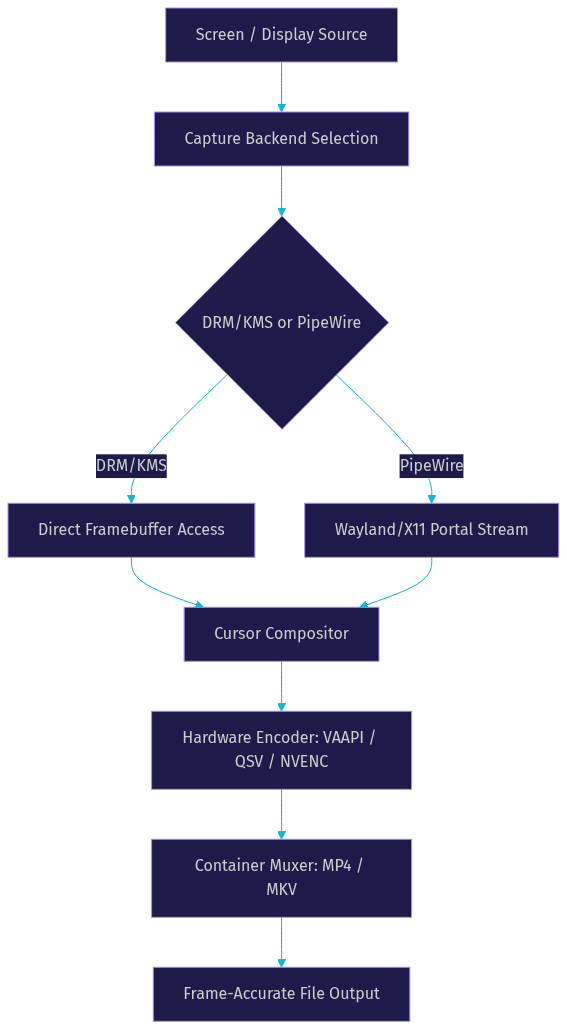
Modern frame recording relies on zero-copy pipelines that pull frames directly from GPU memory without transferring them to system RAM first. This eliminates a major bottleneck and allows capture at native display refresh rates. Hardware encoders like VAAPI (Video Acceleration API for Intel and AMD), QSV (Quick Sync Video for Intel), and NVENC (NVIDIA Encoder) handle the compression on dedicated silicon, freeing the CPU for application workloads. The result is a capture pipeline that can sustain high frame rates with minimal impact on the application being recorded.
Capture Backends
On Linux, the two dominant capture backends are DRM/KMS (Direct Rendering Manager and Kernel Mode Setting) and PipeWire. DRM/KMS provides direct access to the display framebuffer at the kernel level, offering the lowest latency and highest fidelity but requiring elevated permissions. PipeWire, the modern multimedia server for Wayland and X11, offers a more secure and flexible capture path through its screen cast portal, making it the preferred choice for desktop applications that need user-space access.
On macOS, the ScreenCaptureKit framework (introduced in macOS 12.3) provides GPU-accelerated capture with per-frame metadata, replacing the older CGWindowList API. ScreenCaptureKit supports cursor composition, audio capture, and filter-based stream configuration, making it the foundation for modern macOS screen recorders.
Encoding and Codec Choices
Codec selection directly affects frame fidelity. H.264 remains the most widely compatible option with broad hardware encoding support. H.265 (HEVC) offers better compression ratios at the same quality but requires newer hardware for efficient encoding. AV1 is the emerging standard, providing superior compression for complex content, though hardware encoding support is still maturing. ProRes is the professional choice for post-production workflows, preserving maximum quality at the cost of large file sizes.
Choosing the Right Frame Recording Tool
Selecting the right frame recording tool depends on your platform, use case, and required level of frame accuracy. The tools below cover the most common scenarios developers encounter.
Linux Native Solutions
Linux offers several frame recording tools with different tradeoffs. OBS Studio remains the most popular screen capture tool on Linux, supporting PipeWire capture, VAAPI and NVENC encoding, and multi-track audio. SimpleScreenRecorder provides a lightweight alternative with a straightforward interface, though it lacks some advanced features. Framepipe is a newer project focused specifically on zero-copy GPU capture with frame-accurate timing, appealing to developers who need minimal overhead.
macOS Options
On macOS, Reframed offers frame-accurate capture built on ScreenCaptureKit, with cursor tracking and multi-track output. QuickTime Player provides basic screen recording but lacks frame-level control. ScreenFlow remains a popular choice for content creators, offering editing and annotation features alongside capture, though it is less suited for frame-accurate debugging workflows.
Game Engine Integrations
Game engines require specialized capture tools that hook directly into the rendering pipeline. Unity Recorder is the standard solution for Unity developers, offering frame-by-frame capture with deterministic timing. Framecast provides in-editor capture with GPU acceleration. Unreal Engine's Sequencer includes cinematic capture with support for high-resolution renders and custom frame rates, making it ideal for producing trailer-quality footage directly from the editor.
Terminal and Text-Based Recordings
For terminal session recording, tools like asciinema and Termless capture terminal output as structured text rather than video, enabling exact replay and searchability. These tools are ideal for creating reproducible bug reports and documentation.
Deep Dive: Linux GPU-Accelerated Frame Recorder
Building a frame-accurate recorder on Linux requires careful selection of capture backend, cursor handling, and encoding path. Each decision affects latency, quality, and system resource usage.
Capture Backends: DRM/KMS vs PipeWire
Choosing between DRM/KMS and PipeWire depends on your deployment context. DRM/KMS gives you direct framebuffer access with the lowest possible latency, making it ideal for embedded systems, kiosks, and headless capture scenarios where you control the full stack. However, it requires root or appropriate group permissions and does not integrate well with compositors that manage their own buffers.
PipeWire, by contrast, works through the desktop portal system, requesting capture permission from the user session. This makes it the right choice for desktop applications and any scenario where security boundaries matter. PipeWire also handles multi-monitor setups and compositor-specific quirks more gracefully than raw DRM/KMS access.
Cursor Composition and Smoothing
Cursor metadata is often captured as a separate track and composited onto the video during encoding or playback. This separation allows post-recording editing tools to adjust cursor visibility, size, or smoothing without re-encoding the entire video. Some capture pipelines composite the cursor directly into the framebuffer before encoding, which is simpler but loses the ability to modify cursor presentation later.
Encoding Paths: VAAPI, QSV, CPU Fallback
The encoding path determines your quality-to-performance ratio. VAAPI provides hardware encoding on Intel and AMD GPUs, offering H.264 and H.265 encoding with minimal CPU overhead. QSV is Intel-specific and offers similar capabilities with fine-grained control over bitrate and quality presets. NVENC is the NVIDIA equivalent and generally offers the best hardware encoding performance on Linux.
When hardware encoding is unavailable, CPU fallback using x264 or x265 provides the highest quality at a given bitrate but significantly increases CPU usage. For frame-accurate recording where performance matters, always prefer hardware encoding when available.
Performance Tips and Resource Management
To maintain frame accuracy under load, pin the capture process to a dedicated CPU core, use a real-time or high-priority scheduling policy, and ensure the encoder buffer is large enough to absorb frame spikes. Monitor GPU memory usage to avoid eviction during capture, and prefer writing to an SSD to prevent I/O bottlenecks from causing frame drops in the encoder pipeline.
Frame Recording in Game Development
Game development presents unique challenges for frame recording because the rendering pipeline is fully under developer control, enabling deterministic capture that is impossible with general-purpose screen recorders.
Unity Recorder Overview
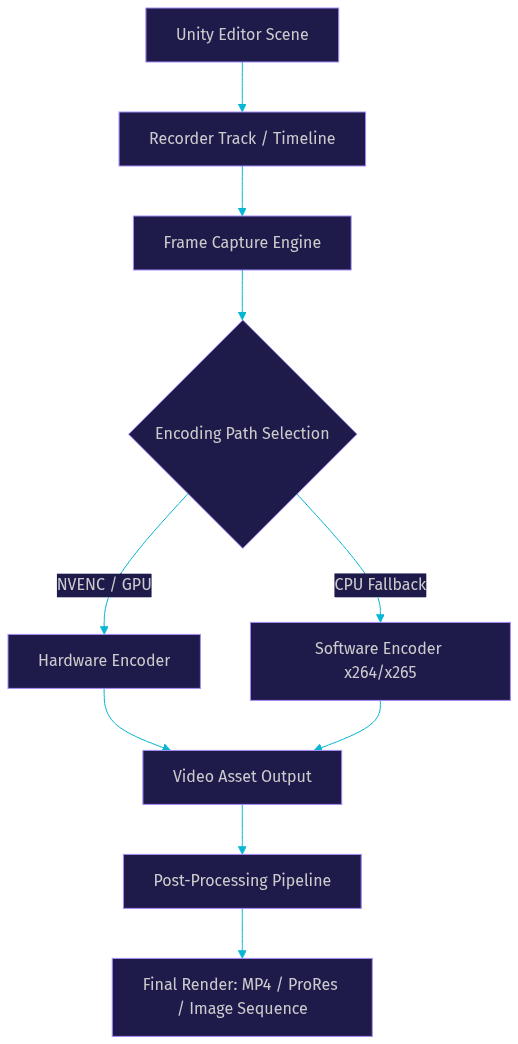
Unity Recorder is a package that hooks directly into Unity's rendering pipeline, allowing developers to capture gameplay or cinematic sequences with frame-perfect accuracy. It supports multiple output formats including image sequences, video files, and ProRes for professional workflows. The recorder can be triggered manually or driven by a Timeline track, enabling automated capture of complex sequences.
Frame-Accurate Timing and Variable Frame Rate
One of the key decisions in game development frame recording is choosing between constant and variable frame rate capture. Constant frame rate ensures every frame is captured at a fixed interval, which is essential for cinematic output and post-production compatibility. Variable frame rate captures frames as they are rendered, which preserves the actual gameplay experience but can cause playback issues in standard video players.
Unity Recorder handles this by allowing developers to set a target frame rate and capture mode. In fixed frame rate mode, Unity renders and captures at the specified rate regardless of actual performance, ensuring consistent output. This is critical for producing trailer footage or cinematic content where visual consistency matters more than real-time accuracy.
Export Formats and Post-Processing
For maximum quality, exporting as an image sequence (PNG or EXR) allows frame-by-frame editing in tools like DaVinci Resolve or Adobe Premiere without any codec compression artifacts. For faster workflows, ProRes provides a high-quality intermediate format that balances file size and editing flexibility. H.264 and H.265 are suitable for final delivery but should be avoided during the editing stage to prevent generational quality loss.
Using Framecast for In-Editor Capture
Framecast offers a streamlined in-editor capture experience for Unity, with GPU-accelerated encoding and automatic cursor tracking. It is particularly useful for capturing quick gameplay clips for bug reports or social media sharing, where the full Unity Recorder pipeline would be overkill.
Frame-by-Frame Debugging for Interactive Applications
Frame-by-frame debugging tools let developers scrub through recordings one frame at a time, isolating the exact moment a visual artifact appears. This is invaluable for tracking down rendering bugs that occur too quickly to observe in real time.
Tools like Frame by Frame (available as standalone applications or integrated into game engine debuggers) provide timeline scrubbing, frame comparison, and state inspection. Developers can step forward and backward through frames, compare consecutive frames to spot subtle changes, and export specific frames as images for bug reports.
For web and real-time communication applications, VideoSDK's post-call transcription and summary capabilities can complement frame-by-frame debugging by providing synchronized audio and text context alongside the visual capture, making it easier to correlate user-reported issues with specific visual events.
Best Practices for High-Quality Frame Recordings
Following established best practices ensures your frame recordings are usable for debugging, editing, and archival purposes without requiring re-capture.
Selecting Frame Rate and Resolution
Match your capture frame rate to the source content. For 60fps gameplay, capture at 60fps. For cinematic content, 24fps or 30fps may be appropriate. Capturing at a higher frame rate than the source wastes storage and encoding resources without improving quality. Always capture at native resolution when possible; downscaling during capture introduces artifacts that are difficult to remove in post-processing.
Audio Sync and Multi-Track Management
Audio synchronization is one of the most common issues in frame recording. Use timecode-based synchronization when available, and capture audio as a separate track from video to allow independent editing. Multi-track recordings that include video, system audio, microphone input, and cursor metadata provide the most flexibility for post-production and debugging workflows.
Choosing the Right Codec and Bitrate
For capture and intermediate storage, prefer high-bitrate H.264 or ProRes to minimize compression artifacts. For final delivery, H.265 or AV1 can reduce file size significantly while maintaining quality. As a general rule, capture at a bitrate 2 to 3 times higher than your final delivery target to preserve headroom for editing and re-encoding.
Post-Recording Editing and Captioning
Use non-destructive editing workflows that preserve the original capture. Add captions and annotations as metadata layers rather than burning them into the video, so they can be modified or removed later. For accessibility and searchability, consider generating transcripts from audio tracks using automated transcription services.
Common Pitfalls and How to Avoid Them
Several issues commonly plague frame recording workflows. VAAPI H.264 encoding on some Intel and AMD drivers can produce visual artifacts at certain bitrate presets. Testing with your specific hardware and driver combination is essential before relying on it for production capture.
DRM/KMS capture requires appropriate permissions and can fail silently if the user lacks access to the render device. Always verify permissions and handle capture failures gracefully with informative error messages.
Cursor lag occurs when cursor metadata is captured at a different rate than the video frames. To avoid this, ensure the cursor compositor runs at the same frequency as the frame capture pipeline, or capture the cursor as a separate metadata track for post-recording compositing.
Variable frame rate mismatches happen when a recording is captured at variable frame rate but played back or edited in a tool that expects constant frame rate. This can cause audio drift and visual stutter. Always convert VFR recordings to CFR before editing, or capture in CFR mode from the start.
Future Trends: Real-Time Frame Capture and AI-Enhanced Editing
The future of frame recording is moving toward real-time analysis and AI-enhanced post-processing. AI-driven auto-zoom can track the most relevant region of a recording and dynamically crop the output, reducing file sizes while maintaining focus on important content.
Real-time transcription is becoming standard in capture pipelines, allowing developers to search recordings by spoken content and correlate verbal bug reports with visual events. Cloud-based frame analysis services can automatically detect visual anomalies, dropped frames, and rendering artifacts, flagging them for review without manual inspection.
As hardware encoding support for AV1 matures and GPU-accelerated capture pipelines become more efficient, we can expect frame recording to become standard practice in CI/CD pipelines for visual regression testing, not just a manual debugging tool.
Definitions Glossary
Frame Recording: The capture of video output at per-frame granularity, where each frame is individually timestamped and preserved without interpolation or dropping.
Zero-Copy Capture: A pipeline architecture where frames are pulled directly from GPU memory and passed to the encoder without transiting system RAM, minimizing latency and CPU overhead.
DRM/KMS: Direct Rendering Manager and Kernel Mode Setting, the Linux kernel subsystem that provides direct access to display framebuffers at the kernel level.
PipeWire: The modern Linux multimedia server that handles audio and video routing, including screen capture through desktop portal APIs for Wayland and X11.
Variable Frame Rate (VFR): A capture mode where frames are recorded as they are rendered rather than at fixed intervals, preserving real-time behavior but potentially causing playback issues in standard video players.
Hardware Encoder: A dedicated silicon component (VAAPI, QSV, NVENC) that handles video compression, freeing the CPU for application workloads and enabling high-frame-rate capture with minimal system impact.
Key Takeaways
- Frame recording captures every individual frame with precise timing, making it essential for debugging, cinematic capture, and scientific visualization where dropped frames mean missing data.
- GPU-accelerated zero-copy pipelines using VAAPI, QSV, or NVENC are the foundation of modern frame recording, enabling high-frame-rate capture with minimal CPU overhead.
- Linux developers should choose DRM/KMS for low-latency headless capture and PipeWire for secure desktop applications, while macOS developers should build on ScreenCaptureKit.
- Game engine integrations like Unity Recorder and Unreal Engine Sequencer provide frame-accurate capture by hooking directly into the rendering pipeline with deterministic timing control.
- VideoSDK's recording APIs offer frame-accurate participant and composite recording with multi-track output, giving developers programmatic control over capture quality for real-time communication applications.
Conclusion
Frame recording is not just a better screen recorder. It is a fundamentally different approach to capturing visual output, one that treats every frame as irreplaceable data. Whether you are debugging a one-frame physics glitch in Unity, archiving a terminal session for compliance, or producing cinematic footage from a game engine, the right frame recording tool ensures you never lose the frame that matters.
Pick the tool that matches your platform and accuracy needs. Linux developers have powerful GPU-accelerated options with DRM/KMS and PipeWire backends. macOS developers can leverage ScreenCaptureKit for modern, metadata-rich capture. Game developers have purpose-built tools like Unity Recorder and Unreal Sequencer. And for applications that need embedded real-time recording, VideoSDK's recording capabilities provide frame-accurate capture with multi-track output and programmatic control.
What are you building that needs frame-accurate capture? Drop a comment below, and explore VideoSDK's code samples to get started with recording integration today.
Free $20 Balance for AI Voice Agents & Video Calls
FAQ