


Interactive live streaming technology is the combination of low-latency video delivery and a real-time interaction layer that lets viewers respond, vote, and even join the stream while it is happening. Unlike traditional HLS streaming, which buffers 10 to 30 seconds behind the live moment, interactive live streaming keeps latency under a second using WebRTC-based transport. VideoSDK's Interactive Live Streaming (ILS) mode delivers exactly this, with built-in polls, Q&A, chat, and viewer-to-speaker promotion on the same SDK surface as its video calling API.
A half-second delay decides whether a live auction feels electric or broken. When a viewer taps a poll, bids on an item, or raises a hand to join the stage, the experience only works if the stream and the interaction arrive together. Traditional HTTP-based streaming, built for one-way broadcast, cannot do this. Interactive live streaming technology was engineered for it, and adoption has accelerated through live shopping, virtual events, and community platforms. In this guide, you will learn how interactive live streaming works end to end, which technologies make sub-second latency possible, how to plan and build an interactive stream, and the challenges you will face in production.
What Is Interactive Live Streaming Technology?
Interactive live streaming technology is defined as the set of protocols, infrastructure, and software layers that deliver live video with low enough latency that the audience can meaningfully participate in real time. It works by replacing the buffered, chunk-based delivery of traditional streaming with real-time media transport, typically WebRTC, and pairing it with a bidirectional interaction channel for chat, polls, reactions, and stage control.
The critical distinction is latency. Standard HLS (HTTP Live Streaming) segments video into chunks of several seconds, and players buffer multiple chunks before playback begins. The result is a 10 to 30 second gap between what the host says and what the viewer sees. Interactive live streaming, sometimes called ILS, keeps that gap under a second, which is fast enough for genuine conversation.
Three core components make this possible: a low-latency transport layer that moves media in near real time, an interaction layer that carries viewer actions back to the host and broadcast server, and a distribution layer that scales delivery to large audiences without sacrificing speed. VideoSDK provides all three through its Interactive Live Streaming mode, which runs on the same rooms-based architecture as its video calling SDKs and switches modes with a single SDK call.
Core Architecture of an Interactive Live Stream
Every interactive live stream is a pipeline with five stages: ingest, encoding, interaction, distribution, and playback. Understanding how media and metadata flow through this pipeline is the foundation for debugging latency and designing engaging experiences.
The host's camera and microphone feed enters the system through an ingest endpoint. The media is encoded and, in production systems, transcoded into multiple quality levels. From there it flows into a real-time media server, which routes it to viewers over low-latency transport while simultaneously feeding an interaction service that handles chat, polls, and role changes. Distribution happens through edge infrastructure close to each viewer. Finally, the player renders video while the interaction layer renders overlays, and viewer actions travel back upstream to the server.
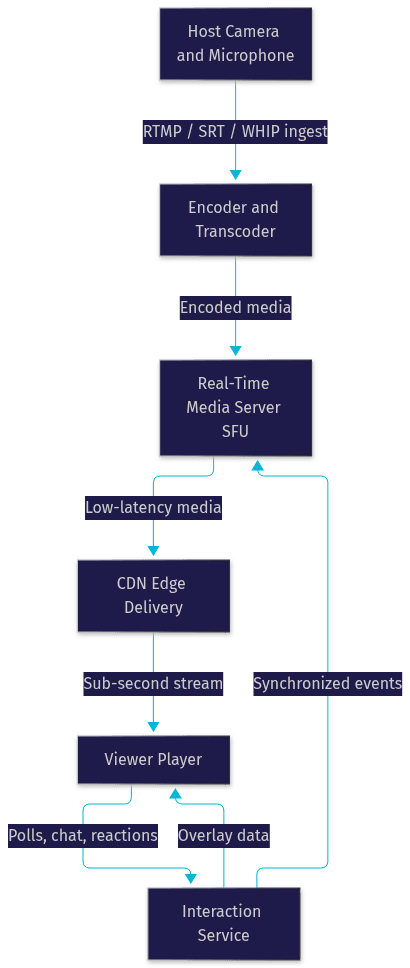
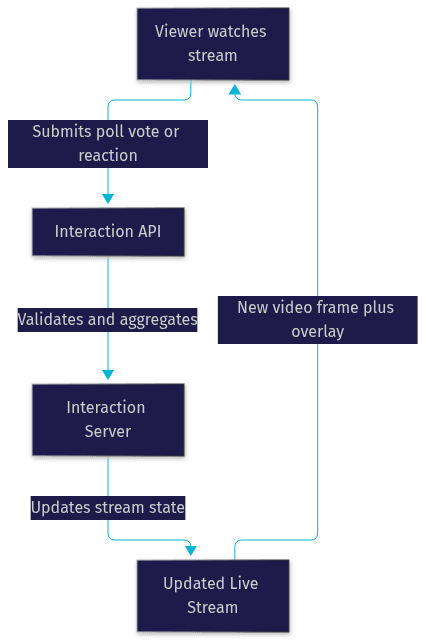
The return path matters as much as the forward path. When a viewer submits a poll vote, that action travels to the interaction service, which aggregates responses, updates state, and pushes the result back to every connected player as a synchronized event. The overlay the audience sees must line up with the video frame the host is producing, which is why interaction events are timestamped against the media timeline.
Ingest and Encoding Layer
The ingest layer is where latency is either won or lost. Traditional RTMP remains widely supported by encoders and streaming platforms, but it adds handshake and buffering overhead. Newer options like SRT offer error correction for unreliable networks, and WHIP (WebRTC-HTTP Ingestion Protocol) lets a browser-based host publish directly over WebRTC, cutting ingest latency to milliseconds.
Encoding for interactive streams favors small frames over large ones. Instead of two- or four-second segments, real-time pipelines push tiny media units as soon as they are encoded, often at the cost of slightly lower compression efficiency. Transcoding into multiple bitrate ladders lets viewers on weak connections drop to a lower resolution instead of stalling, which is essential when your audience spans mobile networks and fiber connections.
Interaction Engine
The interaction engine is the bidirectional brain of the system. It captures viewer actions, such as poll votes, chat messages, hand raises, emoji reactions, or add-to-cart clicks, validates them, aggregates them, and broadcasts the resulting state to all participants.
WebRTC data channels are a common transport for this because they ride the same connection as the media, avoiding a separate websocket handshake and inheriting the same congestion control. VideoSDK's ILS implementation exposes this as a pub/sub messaging layer, so every viewer receives poll updates and chat overlays with the same sub-second timing as the video itself. Role management, including promoting a viewer to speaker, also flows through this engine.
CDN and Edge Delivery
Scaling interactive streams to tens of thousands of concurrent viewers requires edge delivery. The media server fans out to edge nodes positioned close to viewers, so the final hop is short and fast.
Several techniques keep edge delivery sub-second. Small chunk or frame-sized delivery means players start rendering almost immediately. Modern transport protocols like HTTP/2 and QUIC reduce connection overhead and head-of-line blocking compared to older HTTP versions. Edge caching applies to both media and interaction metadata, so a poll result computed once can be served to every viewer in a region without hitting the origin. VideoSDK's cloud infrastructure handles this distribution automatically, including network-adaptive streaming that adjusts each viewer's bitrate and resolution based on real-time bandwidth conditions.
Key Technologies Enabling Low-Latency Interaction
Four technology categories do the heavy lifting in interactive live streaming: real-time transport, adaptive bitrate, server-side composition, and AI-enhanced overlays.
WebRTC is the foundation. Originally built for peer-to-peer video calls, its media transport and data channels provide the sub-second latency that interactive experiences demand. In production ILS systems, WebRTC typically runs through an SFU (Selective Forwarding Unit) rather than pure peer-to-peer, because a host cannot maintain direct connections with 50,000 viewers.
Adaptive bitrate streaming, delivered through formats like fMP4 and CMAF, lets the same stream serve viewers on wildly different networks. The encoder produces a ladder of quality levels, and each viewer's player climbs or descends that ladder as bandwidth fluctuates.
Server-side composition mixes multiple sources, such as the host camera, a screen share, and a guest speaker, into a single rendered layout on the server before distribution. This keeps every viewer's stream identical and removes the need for each client to composite locally. VideoSDK supports custom layouts and server-side composition as part of its ILS feature set.
Real-time transcription and AI overlays are increasingly common additions. Live captions, auto-generated summaries, and AI-driven highlight detection can be layered onto the stream, and VideoSDK offers real-time transcription built into the SDK.
WebRTC vs Traditional HTTP-Based Streaming
The choice between WebRTC and HTTP-based streaming comes down to latency versus scale-per-dollar. WebRTC delivers sub-second latency and bidirectional channels, making it the right fit for interactive live streaming where participation is the point. HLS and LL-HLS deliver higher latency, typically 2 to 30 seconds, but scale to very large audiences at lower cost per viewer because CDN caching does most of the work.
Many production platforms use both: WebRTC for the interactive core audience and stage participants, with RTMP output simultaneously broadcasting to YouTube or Twitch for passive viewers. VideoSDK ILS supports this hybrid pattern natively through its RTMP output feature.
How to Build an Interactive Live Stream: Step-by-Step Guide
Building an interactive live stream is a design exercise as much as an engineering one. The steps below walk through the full process, from planning the experience to verifying latency in production.
Step 1: Plan the Interactive Experience
Decide what interactivity means for your event. A live shopping stream needs product cards, add-to-cart actions, and inventory state. A webinar needs polls, Q&A queues, and hand-raise mechanics. A virtual concert might let viewers vote on lighting or song order. Define each interaction, what data it sends, and what the audience should see in return. Sketching this loop early prevents retrofitting interaction onto a one-way stream later.
Step 2: Choose a Platform That Supports ILS Natively
Select a streaming platform or SDK that treats interaction as a first-class feature rather than an add-on. VideoSDK's Interactive Live Streaming provides host, co-host, and viewer roles, dynamic promotion of viewers to speakers, real-time chat overlay, polls, Q&A, screen sharing, recording, and RTMP output, all on SDKs for React, React Native, Android, Flutter, JavaScript, and Python. Building the same stack on raw WebRTC would require you to implement signaling, an SFU, role management, and an event bus yourself.
Step 3: Set Up Authentication and Room Creation
Interactive streams need access control. Generate authentication tokens server-side using your API credentials, create the room through the REST API before the event, and issue scoped tokens to hosts and viewers with different permissions. Never expose API secrets in client-side code. VideoSDK's REST API reference covers room creation, participant management, and token validation endpoints for this orchestration layer.
Step 4: Configure the Ingest Endpoint
Point your encoder or the host's browser client at the platform's ingest endpoint. If the host broadcasts from a browser, WebRTC-based ingest via the SDK keeps latency lowest. If you use professional encoding hardware or software, RTMP or SRT ingest feeds the same pipeline. Configure your bitrate ladder so viewers on mobile networks can drop to a lower quality gracefully.
Step 5: Enable the Interaction Layer
Activate the interaction features your plan requires: chat, polls, Q&A, reactions, and role switching. With VideoSDK, these are enabled through the SDK's ILS mode, and viewer actions flow through the same pub/sub infrastructure as the media, keeping overlays synchronized with video. Define what happens when a viewer is promoted to speaker, including whether their camera and microphone activate immediately.
Step 6: Deploy Edge and CDN Configuration
If your platform manages distribution, as VideoSDK does, this step is mostly verification. Confirm which regions your edge delivery covers, especially if your audience is global, and check whether geo-fencing or cloud proxy options are needed for viewers behind restrictive networks. For self-managed infrastructure, configure edge nodes in each major region your audience lives in.
Step 7: Test Latency and Interaction Sync
Before going live, measure the round trip: have someone on the host side speak a marker word and timestamp when a remote viewer hears it, then submit a poll and timestamp when the result renders. Anything under one second for both is production-ready for interactive use. Also test role promotion, reconnection after network drops, and behavior when a viewer joins mid-stream. VideoSDK's code samples include working ILS examples you can use as a test harness.
Common Challenges and How to Overcome Them
Interactive live streaming technology introduces problems that one-way streaming never had to solve. Knowing them in advance is the difference between a smooth launch and a public failure.
Latency spikes and network jitter. Real-time transport is sensitive to network conditions. A viewer on a congested mobile network may see stutter or drift. Mitigate this with adaptive bitrate, smaller buffer windows, and automatic quality laddering. VideoSDK's network-adaptive streaming handles bitrate and resolution adjustment automatically based on detected bandwidth.
Scaling to millions of concurrent participants. An SFU that comfortably routes 5,000 viewers will not route 500,000 without architectural changes. Plan a cascading edge topology where the origin media server feeds regional servers, which feed local edges. Alternatively, use the hybrid pattern: WebRTC for the interactive core, RTMP output to a CDN-backed platform for the mass audience.
Synchronizing overlays across regions. A poll result that renders in Singapore two seconds after London breaks the shared-experience illusion. Timestamp interaction events against the media timeline and let each region's edge deliver them in order with the video frames, rather than delivering them on an independent channel.
Security and abuse prevention. Any system accepting viewer input attracts abuse. Rate-limit interaction submissions per participant, require authenticated tokens for any write action, and use role-based access control so only designated hosts can promote speakers or end streams. Waiting rooms and moderation queues help for high-profile events.
Production versus development differences. A stream that works on localhost can fail in production because browsers require HTTPS for camera and microphone access, and corporate firewalls can block the UDP ports WebRTC prefers. Verify TURN server fallback, HTTPS deployment, and firewall traversal before launch day. These are exactly the gaps that quickstarts skip and production incidents expose.
Real-World Use Cases for Interactive Live Streaming
The best way to understand the technology is to see where sub-second latency changes the business model.
Live shopping. A host presents a product, and viewers tap to add it to their cart while the presentation is still happening. If the stream lags 15 seconds, viewers lose the urgency that drives conversion. Chinese live commerce platforms demonstrated years ago that real-time interaction dramatically lifts purchase rates, and Western retailers have followed. VideoSDK's ILS mode, with its chat overlay and pub/sub event layer, is a natural fit for this pattern.
Interactive webinars and classrooms. Presenters run live polls, answer Q&A in the moment, and promote audience members to speak. The interactive live streaming flow keeps questions relevant to what is on screen right now, rather than what was on screen 20 seconds ago.
Virtual concerts. Audience-driven effects, such as voting on lighting colors or the next song, turn passive viewers into participants. The interaction engine aggregates thousands of votes per second and renders the outcome in sync with the performance.
Sports and betting streams. Real-time odds updates overlaid on live action only work when the stream and the data feed arrive together. A 10-second lag means a viewer sees a goal after the odds have already moved, which destroys trust in the platform.
Future Trends in Interactive Live Streaming Technology
Three trends will shape the next few years of interactive streaming.
AI-driven personalization is arriving in overlays. Instead of every viewer seeing the same poll or product card, systems can tailor overlays to individual viewers based on their behavior, language, or purchase history, all rendered server-side and delivered through the same interaction channel.
5G and edge computing are pushing latency lower still. When media processing happens at a network edge a few milliseconds from the viewer, sub-second becomes sub-100-millisecond, opening genuinely conversational broadcast formats.
Standardization is maturing. WHIP and WHEP, the IETF-backed protocols for WebRTC ingest and playback over HTTP, are making interoperability between encoders, servers, and players far simpler than the proprietary integrations of the early 2020s. Meanwhile, immersive XR experiences are beginning to use interactive streaming pipelines to deliver shared virtual spaces with live video embedded inside them.
Definitions Glossary
Interactive Live Streaming (ILS): A streaming mode that combines sub-second latency video delivery with a real-time interaction layer, allowing viewers to respond, vote, or join the stage while the stream is live. VideoSDK provides ILS through the same SDK surface as its video calling products.
WebRTC: An open standard for real-time peer-to-peer media and data exchange in browsers and apps. It is the transport foundation of most interactive live streaming systems because it delivers sub-second latency and bidirectional data channels.
HLS (HTTP Live Streaming): A chunk-based HTTP streaming protocol that buffers multiple seconds of video before playback, producing 10 to 30 seconds of latency. It scales cheaply but is unsuitable for real-time audience interaction.
SFU (Selective Forwarding Unit): A media server that receives streams from participants and forwards them selectively to others, enabling one host to reach thousands of viewers without direct peer connections.
Adaptive Bitrate Streaming: A technique where the encoder produces multiple quality levels and each viewer's player switches between them based on real-time bandwidth, preventing stalls on weak connections.
RTMP Output: Simultaneously broadcasting an interactive stream to external platforms like YouTube or Twitch, letting a hybrid audience of interactive and passive viewers watch the same event.
Key Takeaways
- Interactive live streaming technology pairs sub-second WebRTC-based video delivery with a bidirectional interaction layer, making real-time audience participation technically feasible where HLS cannot.
- The architecture has five stages, ingest, encoding, interaction, edge distribution, and playback, and the return path for viewer actions is as important as the forward media path.
- WebRTC wins for interactive core audiences, while HLS and RTMP output remain the right choice for scaling to massive passive audiences, and hybrid deployments use both.
- Production challenges, including latency spikes, regional overlay synchronization, abuse prevention, and HTTPS and firewall requirements, must be planned for before launch, not discovered during it.
- VideoSDK's Interactive Live Streaming mode delivers host, co-host, and viewer roles, real-time polls, Q&A, chat overlays, and RTMP output across React, React Native, Android, Flutter, JavaScript, and Python SDKs.
Conclusion
Interactive live streaming technology has moved from a niche capability to a competitive requirement for live shopping, virtual events, education, and community platforms. The winning formula is consistent: sub-second latency, a synchronized interaction layer, and edge delivery that scales. Building this from raw WebRTC is a multi-month engineering project, but platforms like VideoSDK collapse it into a single SDK integration. Explore the Interactive Live Streaming documentation, try a working example from the code samples, or sign up free at app.videosdk.live to test sub-second streaming yourself. What are you building with interactive live streaming technology? Drop a comment, I'd love to hear what kind of interactive experience you're working on.
Free $20 Balance for AI Voice Agents & Video Calls
FAQ