


Play HLS online by pasting an .m3u8 URL into a browser-based player that supports Media Source Extensions; the player fetches the playlist, streams the segmented video, and adapts quality to your connection. VideoSDK's low-latency streaming offers a real-time alternative.
You click a live stream link, and instead of video, you get a download prompt or a blank player. That moment of friction is what sends thousands of viewers and developers searching for ways to play HLS online every day.
For broadcasters and developers, the stakes are higher than convenience. A stream that forces downloads loses viewers in seconds, and a player that breaks on half your audience's devices kills engagement entirely. Understanding how browser-based HLS playback works, where it fails, and what alternatives exist is core knowledge for anyone shipping video in 2026.
This guide covers the technology behind HLS, device-specific playback steps, the most common errors and their fixes, and when a low-latency option like VideoSDK Interactive Live Streaming beats traditional HLS.
What Is HLS and How Does It Work?
HTTP Live Streaming (HLS) is Apple's adaptive streaming protocol that delivers video as a sequence of short segments described by a text playlist. HLS works by splitting video into small chunks (typically 2 to 10 seconds each), listing those chunks in an M3U8 playlist file, and serving everything over ordinary HTTP. The player fetches the playlist, downloads segments one after another, and stitches them into continuous playback.
Because segments are plain HTTP files, HLS passes through CDNs, proxies, and firewalls without special server configuration. That simplicity is why it became the default for live events, video-on-demand platforms, and app-embedded streams.
Adaptive bitrate is the second half of the story. An HLS encoder produces the same video at multiple quality levels, each with its own playlist. A master playlist references all variants, and the player switches between them as network conditions change. On a strong connection you get 1080p; on congested Wi-Fi the player quietly drops to 480p instead of buffering forever.
VideoSDK provides HLS delivery as part of its streaming stack, but its Interactive Live Streaming (ILS) mode goes further: it is built on WebRTC and delivers sub-second latency, so audiences can react, vote, and join the conversation in real time rather than waiting 10 to 30 seconds behind the action.
How to Play HLS Online on Different Devices
Playing HLS online is a device-specific problem because browser support for the protocol is uneven. Here is what works where, and what you need when native support is missing.
Desktop Browsers
Safari is the only major desktop browser with native HLS support. Paste an .m3u8 URL directly into Safari's address bar, and it plays the stream using the built-in media stack, no extensions or players required.
Chrome, Edge, and Firefox take a different path. None of them natively understand HLS playlists, but all of them support Media Source Extensions (MSE), a browser API that lets JavaScript feed video data into the standard HTML5 video element. That is why online HLS players built on a JavaScript library like hls.js work everywhere: the library downloads the segments, and MSE handles the rendering. Any reputable web-based HLS player you use in these browsers is doing exactly that under the hood.
Mobile Browsers
On iOS, Safari plays HLS natively, which makes sense given Apple created the protocol. An .m3u8 link opened on an iPhone or iPad streams directly, and iOS also enforces a rule worth knowing: on cellular networks, streams must offer a variant at or below a certain bitrate or playback may be blocked.
Android Chrome behaves like desktop Chrome. It has no native HLS support, so playback depends on a JavaScript-based player using MSE. If you are testing a stream on Android and it will not play in a bare link, open it in a web player that includes an HLS library rather than expecting the browser to handle it alone.
Smart TVs and Set-Top Boxes
Most smart TVs manufactured in recent years, including those running tvOS, Android TV, and many web-based TV platforms, include native HLS support in their media frameworks. Apps like YouTube-style services and native TV apps rely on this constantly.
When native support is missing, or when you want to view a stream on a TV without installing an app, a web-based player is the fallback. Many developers building TV-friendly web apps embed a player directly in a page the TV's browser can open. If you are building that experience yourself, VideoSDK's Prebuilt UI Kit lets you embed a working video interface with zero custom UI code, which is useful when you need something that renders cleanly on large screens and limited TV browsers.
Why Play HLS Online Instead of Downloading Files?
Streaming beats downloading for four practical reasons.
First, there is no storage overhead. Segments are fetched, played, and discarded. A two-hour event consumes a few seconds of buffer at any moment instead of gigabytes on disk.
Second, live events are only available as streams. A live auction, sports match, or product launch exists as an ongoing HLS feed; there is no file to download until the event ends and someone produces one.
Third, adaptive bitrate saves bandwidth. A downloaded file is fixed quality, so a viewer on a weak connection downloads the same heavy file as a viewer on fiber. An online HLS player shifts quality down and up dynamically, which means fewer stalls and lower data usage on mobile networks.
Fourth, streaming supports security models that downloads cannot. HLS streams can be encrypted with AES-128, protected by DRM systems, token-gated, and geo-fenced. Once a file is downloaded, all of that control is gone. For content owners, online playback is not just convenient, it is the enforcement point for access control.
Play HLS Online: Understanding the Underlying Technology
To play HLS online reliably, it helps to understand what the browser is actually doing. The whole pipeline rests on Media Source Extensions.
MSE is a browser API that allows JavaScript to append media data into a buffer attached to the HTML5 video element. Without it, a web page could only point the video element at a single static file. With it, a JavaScript library can download segments continuously and keep the video element fed, which is what makes segmented streaming possible in Chrome, Firefox, Edge, and Android Chrome.
When a player loads an M3U8 manifest, it parses the text playlist to discover the available bitrate variants and the segment URLs for the chosen variant. It then requests the first few segments, appends them to the MSE buffer, and starts playback once enough buffered content exists to ride out short network hiccups.
Adaptive bitrate logic runs throughout playback. The player measures download speed and buffer level, and when the buffer is healthy and bandwidth is spare, it requests a higher-quality variant. When downloads slow, it steps down before the buffer empties. The result is playback that degrades gracefully instead of freezing.
The diagram below contrasts this pipeline with VideoSDK's ILS, which skips segmentation entirely and delivers media over a persistent WebRTC connection:
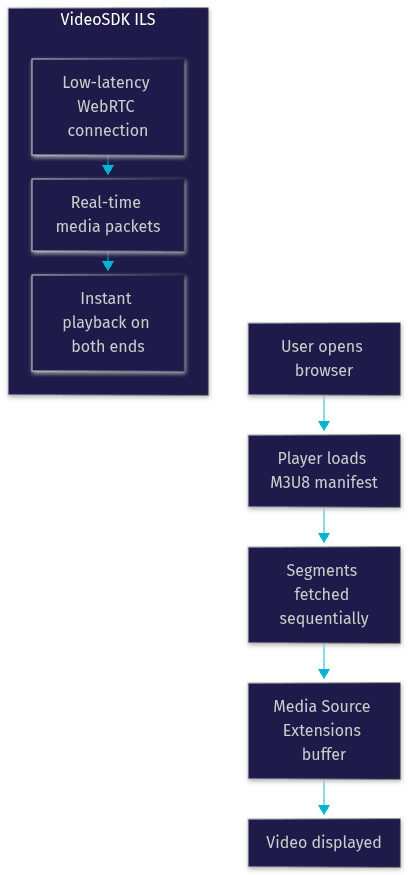
The key difference is latency. HLS adds delay at every stage: encoding, segmentation, playlist publication, and player buffering stack up to 10 to 30 seconds or more. VideoSDK ILS delivers media packets in real time over WebRTC, keeping end-to-end delay under a second.
Common Issues When Playing HLS Online and How to Fix Them
Most HLS playback failures fall into four categories. Here is how to diagnose each one in plain terms.
CORS errors. When a web player hosted on one domain tries to fetch segments from another domain, the streaming server must explicitly allow that origin through Cross-Origin Resource Sharing headers. If the headers are missing, the browser blocks the requests and playback fails before a single frame appears. The fix is on the server side: the CDN or origin serving the playlist and segments must send permissive CORS headers for the domains that need access. If you control the player page but not the stream, there is nothing you can do client-side except ask the stream owner to fix their headers.
404 or broken segment URLs. A playlist can reference segments that no longer exist, especially for expired live streams or misconfigured VOD assets. The symptom is playback that starts and then stalls, or fails immediately with a stream error. Verify the playlist URL is current, open the playlist text and confirm the segment paths resolve, and check whether the stream has simply ended. For live streams, an outdated playlist URL is the most common cause.
AES-128 encryption. Encrypted HLS streams include a key URL in the playlist, and the player must be able to fetch that key. If the key server blocks the request, or the key requires authentication the player does not have, playback fails. The fix is ensuring the key endpoint is reachable and permits the player's origin.
DRM-protected streams. Streams protected by commercial DRM systems such as Widevine or FairPlay cannot be played in generic web players. DRM requires licensed playback environments and proper license servers. If a stream refuses to play in every standard player you try, DRM is a likely explanation, and there is no legitimate workaround in a generic player.
A practical troubleshooting order: confirm the playlist URL opens in Safari (native support), test it in a known-good web player (rules out your player), check the browser console for CORS or 404 messages, and only then investigate encryption and DRM.
When to Choose VideoSDK Interactive Live Streaming Over Traditional HLS
Traditional HLS is the right tool for one-to-many broadcast where a delay of tens of seconds is acceptable. But a growing class of applications cannot tolerate that delay, and that is where VideoSDK ILS wins.
Choose VideoSDK ILS when:
- Your audience needs to react in real time, such as live shopping where a viewer taps to buy before the item sells out, or live auctions where bids must land instantly.
- Viewers become participants. ILS supports host, co-host, and viewer roles, and viewers can be promoted to speakers on the fly, which HLS cannot do at all.
- You need real-time chat, polls, and Q&A overlaid on the stream, all built into the SDK rather than bolted on separately.
- Two-way audio and video matters, as in live tutoring, remote interviews, or interactive webinars.
- You want RTMP output to simultaneously broadcast the same session to YouTube or Twitch while keeping the interactive experience low-latency.
Stick with traditional HLS when:
- Your content is strictly one-directional, like a sports feed or a linear channel.
- Your audience is massive and passive, and scale matters more than interaction.
- Your playback targets are devices where HLS is deeply embedded, such as older smart TVs.
The decision rule is simple: if the audience only watches, HLS is fine. If the audience participates, you need sub-second latency, and VideoSDK's interactive live streaming is built for exactly that. You can explore working examples in the VideoSDK code samples or join the VideoSDK Discord community to talk through your use case.
Definitions Glossary
HLS (HTTP Live Streaming): Apple's adaptive streaming protocol that delivers video via short segments listed in an M3U8 playlist, served over ordinary HTTP.
M3U8: Text-based playlist file used by HLS to describe segment URLs, durations, and available bitrate variants.
Media Source Extensions (MSE): Browser API that allows JavaScript to feed downloaded video data into the HTML5 video element's buffer, enabling segmented streaming in non-Safari browsers.
Adaptive Bitrate (ABR): Technique that switches video quality on the fly based on measured network conditions and buffer health, preventing stalls on weak connections.
VideoSDK Interactive Live Streaming (ILS): VideoSDK's low-latency streaming mode built on WebRTC, offering sub-second interaction, viewer role promotion, and built-in chat and polls compared to HLS's 10 to 30 second delay.
Key Takeaways
- HLS works by delivering short video segments listed in an M3U8 playlist; browsers need either native support (Safari, iOS) or a JavaScript player using Media Source Extensions.
- Online HLS players avoid downloads, adapt quality to network conditions, and work across desktop, mobile, and smart TV platforms with the right setup.
- Most playback failures stem from CORS headers, expired segment URLs, AES-128 key access, or DRM protection; fixing server headers and verifying playlist integrity resolves the majority of issues.
- For interactive experiences like live shopping, auctions, and Q&A, VideoSDK's Interactive Live Streaming delivers sub-second WebRTC latency that traditional HLS cannot match.
Conclusion
Playing HLS online is straightforward once you understand the playlist format, browser requirements, and the usual failure points. Safari and iOS handle HLS natively; Chrome, Firefox, Edge, and Android rely on JavaScript players built on Media Source Extensions. Most errors trace back to CORS, broken segments, or encryption, and each has a clear fix.
When your use case outgrows broadcast-style delay and demands real-time interaction, VideoSDK's Interactive Live Streaming gives you sub-second latency, viewer-to-speaker promotion, and built-in engagement features on the same SDK surface. Ready to test a stream? Grab an .m3u8 URL, open it in a browser-based HLS player, and see the difference for yourself. Then explore the VideoSDK quickstart or sign up free at app.videosdk.live to build your own low-latency streaming experience.
What are you building with VideoSDK? Drop a comment, I'd love to hear what kind of streaming use case you're working on.
Free $20 Balance for AI Voice Agents & Video Calls
FAQ