


The HTTPS protocol vs RTSP protocol comparison comes down to purpose: HTTPS secures web transactions over TCP with TLS encryption, while RTSP controls streaming media sessions over UDP or TCP with RTP for transport. HTTPS prioritizes confidentiality and integrity for web traffic, whereas RTSP prioritizes low-latency media delivery for video surveillance and live streaming. VideoSDK bridges both worlds by offering WebRTC-based real-time communication that eliminates the protocol tradeoffs developers face when choosing between them.
Introduction
Every developer who builds a video streaming pipeline eventually hits the same fork in the road: do you use HTTPS for everything, or do you reach for RTSP when real-time media enters the picture? The HTTPS protocol vs RTSP protocol question is not academic. It directly affects latency, security posture, firewall traversal, and the complexity of your streaming stack.
In 2026, the lines between web communication and real-time media have blurred further. Browser-based video applications, IP camera networks, and cloud-native streaming services all demand different protocol choices. HTTPS handles secure web API calls, authentication flows, and encrypted file transfers. RTSP manages session control for IP cameras, surveillance systems, and live media ingest pipelines.
Understanding where each protocol excels, where it falls short, and how they can work together in hybrid architectures gives you a practical edge. Whether you are building a video surveillance dashboard, a live streaming platform, or a telehealth application, the protocol layer shapes your entire system.
HTTPS Protocol vs RTSP Protocol: Overview
HTTPS and RTSP serve fundamentally different layers of the networking stack. HTTPS is an application-layer protocol that wraps HTTP in TLS encryption, designed for secure client-server web communication. RTSP is a network control protocol designed for orchestrating streaming media sessions between clients and media servers.
Think of HTTPS as the protocol that securely delivers your web pages, API responses, and file downloads. Think of RTSP as the protocol that tells a media server to start playing, pause, or tear down a video stream. They are not competitors in the traditional sense. They solve different problems that often coexist in the same application.
What is HTTPS?
HTTPS is defined as HTTP over TLS (Transport Layer Security), providing encrypted communication between a web client and a server. It is the standard protocol for secure web traffic, used by virtually every modern website, API, and web application.
When you load a banking website, submit a form, or call a REST API, HTTPS ensures that the data in transit cannot be read, modified, or impersonated by a third party. The protocol operates over TCP, which guarantees ordered, reliable delivery of packets. This reliability comes at the cost of latency, especially during the initial TLS handshake.
For developers building video applications, HTTPS is the backbone for authentication, room creation, token exchange, and API calls to services like VideoSDK's REST APIs. It is not designed to carry real-time media streams, but it is essential for the control plane that manages those streams.
How HTTPS Works
HTTPS works by establishing a TCP connection, negotiating a TLS session, and then exchanging HTTP requests and responses over that encrypted tunnel. The process begins with a TCP three-way handshake, where the client and server exchange SYN, SYN-ACK, and ACK packets to establish a reliable connection.
Once TCP is established, the TLS handshake takes over. The client sends a ClientHello message with its supported cipher suites and TLS version. The server responds with a ServerHello message, selects a cipher suite, and presents its digital certificate. The client verifies the certificate against a trusted certificate authority, then both sides derive shared encryption keys.
After the TLS session is established, standard HTTP traffic flows through the encrypted channel. Each request and response is encrypted before transmission and decrypted upon arrival. This adds computational overhead but ensures confidentiality and integrity for every byte transferred.
Security Features of HTTPS
HTTPS provides three core security guarantees: confidentiality, integrity, and authentication. Confidentiality means the payload is encrypted and unreadable to intermediaries. Integrity means any tampering with the data in transit is detected through message authentication codes. Authentication means the server proves its identity through a certificate validated by a trusted CA.
Certificate validation is the cornerstone of HTTPS security. Browsers and HTTP clients check that the certificate was issued by a trusted authority, that it has not expired, and that the domain name matches. This prevents man-in-the-middle attacks where an attacker could otherwise impersonate a legitimate server.
For streaming applications, HTTPS also enables secure token exchange and API authentication. When you generate a VideoSDK meeting token server-side, that token travels over HTTPS to the client, ensuring it cannot be intercepted.
What is RTSP?
RTSP is defined as a network control protocol designed for orchestrating streaming media sessions between a client and a media server. It does not transport media itself. Instead, it acts like a remote control for media streams, sending commands to set up, play, pause, and tear down sessions.
RTSP was originally defined in IETF RFC 2326 and later updated in RFC 7826 (RTSP 2.0). It is the dominant protocol in IP camera ecosystems, video surveillance systems, and professional broadcast ingest pipelines. If you have ever connected to a security camera feed or a networked DVR, RTSP was likely working behind the scenes.
For developers, RTSP matters when you need to ingest live video from hardware sources like IP cameras, encoders, or broadcast equipment. It gives you granular control over the media session without tying you to a specific transport mechanism.
How RTSP Works
RTSP works by exchanging text-based control messages between a client and a media server, similar in syntax to HTTP. A typical session begins with a DESCRIBE request, where the client asks the server for media information. The server responds with a Session Description Protocol (SDP) payload that describes the available streams, codecs, and transport parameters.
Next, the client sends a SETUP request to configure the transport. This is where the client and server agree on how media will be delivered, typically via RTP over UDP. The server responds with a session identifier that the client uses for all subsequent commands.
The client then sends a PLAY request to begin streaming. The server starts sending media packets via RTP, while RTCP provides quality feedback. When the session ends, the client sends a TEARDOWN request to close the session and release resources.
RTSP Ecosystem: RTP, RTCP, SRTP
RTSP does not work alone. It relies on a family of protocols that handle media transport, quality monitoring, and security. Understanding this ecosystem is essential for developers building streaming pipelines.
RTP (Real-time Transport Protocol) carries the actual media data, typically over UDP. It timestamps and sequences each packet so the receiver can reconstruct the stream and handle jitter. RTCP (RTP Control Protocol) runs alongside RTP, providing feedback on packet loss, jitter, and bandwidth. This lets senders adjust their encoding in real time.
SRTP (Secure Real-time Transport Protocol) adds encryption, authentication, and replay protection to RTP packets. It is the streaming equivalent of TLS for HTTPS. When you need secure RTSP, you combine RTSPS (RTSP over TLS) for the control channel with SRTP for the media channel.
HTTPS Handshake and RTSP Session Flow
The following diagram illustrates how HTTPS and RTSP differ at the protocol level. The left side shows the HTTPS TLS handshake process, while the right side shows the RTSP session control flow with RTP media delivery.
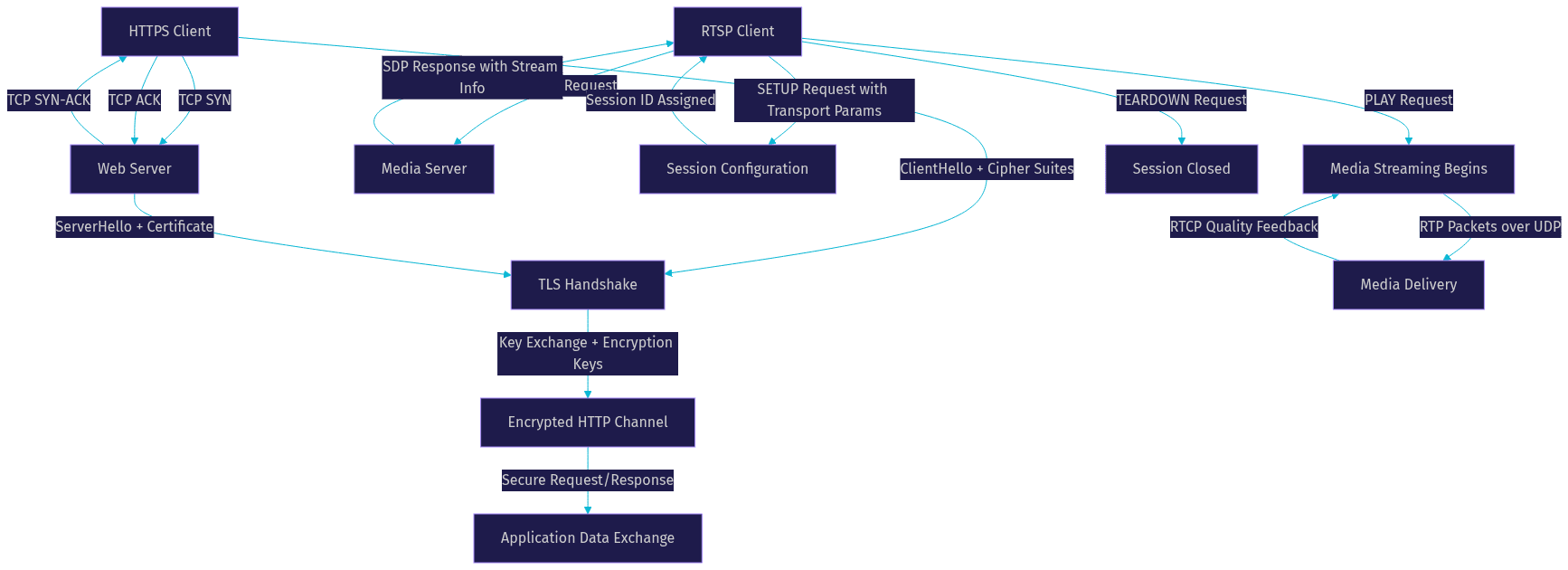
This diagram makes the architectural difference clear. HTTPS establishes a single encrypted channel for all communication. RTSP separates control (the RTSP commands) from data (the RTP media stream), which is why it can achieve lower latency for media delivery.
Latency and Performance Comparison
Latency is where the HTTPS protocol vs RTSP protocol comparison gets interesting for developers building real-time applications.
HTTPS adds overhead at multiple layers. The TCP handshake requires a round trip before any data flows. The TLS handshake adds one to two more round trips depending on the TLS version and whether session resumption is used. For HTTP/2 and HTTP/3, connection setup is optimized but still involves cryptographic negotiation. Typical HTTPS round-trip latency ranges from 50 to 300 milliseconds depending on network conditions and server proximity.
RTSP with RTP over UDP skips the reliability overhead entirely. Once the session is established, media packets flow directly from server to client with no acknowledgment overhead. This reduces transport latency to the physical network delay, typically 10 to 50 milliseconds for local networks and 50 to 150 milliseconds for wider deployments. The tradeoff is that UDP does not guarantee delivery, so packet loss can cause video artifacts or audio gaps.
For interactive applications like video calling, neither HTTPS nor RTSP is ideal. WebRTC, which VideoSDK uses as its transport layer, combines the best of both approaches: encrypted media over UDP with sub-300 millisecond end-to-end latency. When you build with VideoSDK's video calling SDK, you get WebRTC's low-latency transport without managing the protocol complexity yourself.
Security Considerations
Security is a critical dimension in the HTTPS protocol vs RTSP protocol comparison, and the two protocols take very different approaches.
HTTPS has security built in by default. Every HTTPS connection requires a valid TLS certificate, and modern browsers refuse to connect to sites with invalid or expired certificates. TLS 1.3, the current standard, provides forward secrecy, strong cipher suites, and reduced handshake round trips. Certificate management is handled through established authorities like Let's Encrypt, DigiCert, or cloud provider certificate managers.
RTSP security is optional and often poorly implemented in practice. Basic RTSP supports authentication through username and password, but this is frequently sent in cleartext unless RTSPS is used. Many IP cameras ship with default credentials or no authentication at all, which is why RTSP cameras are a common target in security research.
For production streaming pipelines, developers should use RTSPS for the control channel and SRTP for the media channel. This provides encryption equivalent to HTTPS but requires more configuration. Firewall traversal is another challenge: RTSP and RTP typically use dynamic UDP ports, which firewalls and NATs often block. HTTPS uses port 443, which is universally open in most network environments.
Use-Case Matrix: When to Choose HTTPS vs RTSP
Choosing between HTTPS and RTSP depends on what you are building. Here is a practical comparison of common scenarios developers encounter:
| Scenario | Best Protocol | Why |
|---|---|---|
| Web API authentication | HTTPS | TLS encryption, certificate validation, universal firewall support |
| Secure file transfer | HTTPS | Reliable TCP delivery, built-in encryption, resumable downloads |
| IP camera ingest | RTSP | Native camera support, low-latency RTP transport, session control |
| Video surveillance dashboard | RTSP + HTTPS | RTSP for camera feeds, HTTPS for web UI and API |
| Live streaming to browsers | HTTPS (HLS) or WebRTC | Browsers cannot play RTSP natively, need repackaging |
| Real-time video calling | WebRTC (via VideoSDK) | Sub-second latency, encrypted media, browser-native |
| Media server control API | HTTPS | RESTful patterns, JSON payloads, standard auth |
| Broadcast equipment ingest | RTSP | Professional hardware support, SDP negotiation, RTP transport |
The pattern is clear: HTTPS wins for control planes, APIs, and browser-facing delivery. RTSP wins for hardware ingest, camera networks, and low-latency media transport from non-browser sources. For browser-based real-time communication, neither is optimal. WebRTC, which VideoSDK implements across 10+ platform SDKs, is the right choice.
Hybrid Architectures
Most production video pipelines do not pick one protocol. They use both HTTPS and RTSP in a hybrid architecture that leverages each protocol where it excels.
A common pattern in video surveillance platforms works like this: IP cameras stream via RTSP to a media server. The media server decodes the RTSP feed and repackages it for browser consumption, typically as HLS over HTTPS or as WebRTC for low-latency viewing. The web application uses HTTPS for user authentication, session management, and API calls. The browser player receives the repackaged stream over HTTPS or WebRTC.
Another hybrid pattern appears in live streaming platforms. A broadcaster sends video via RTSP or SRT to an ingest server. The ingest server transcodes the feed and delivers it to viewers through a CDN using HLS or DASH over HTTPS. For interactive streaming where viewers need to participate in real time, VideoSDK's Interactive Live Streaming mode provides sub-second latency by switching from HLS to WebRTC transport.
The key insight is that RTSP and HTTPS are not either-or choices. They are complementary tools in a well-designed streaming stack. RTSP handles the ingest side where hardware and low latency matter. HTTPS handles the delivery side where browser compatibility and security matter. WebRTC bridges the gap when interactivity is required.
Best-Practice Checklist
Here are practical steps developers should follow when working with HTTPS and RTSP in streaming pipelines:
- Use TLS 1.3 for all HTTPS endpoints and disable older protocol versions to maintain strong encryption standards.
- Automate certificate renewal using tools like certbot or your cloud provider's certificate manager to avoid expired certificate outages.
- For RTSP camera deployments, always change default credentials and enable RTSPS with SRTP if the camera supports it.
- Configure RTSP and RTP ports explicitly on your media server and open only those ports on your firewall to reduce attack surface.
- Use a TURN server for WebRTC fallback when UDP is blocked by corporate firewalls, which VideoSDK includes in its infrastructure.
- Monitor RTSP session health using RTCP feedback metrics like packet loss and jitter to detect degrading camera connections early.
- Separate your control plane (HTTPS APIs) from your media plane (RTSP or WebRTC) to isolate failures and scale independently.
- Test your streaming pipeline under poor network conditions using throttling tools to verify adaptive bitrate behavior.
- Log all RTSP session events (SETUP, PLAY, TEARDOWN) for audit trails in surveillance and compliance scenarios.
- Consider using VideoSDK's Prebuilt UI Kit for browser-based video delivery to skip protocol-level complexity entirely.
Definitions Glossary
HTTPS (HyperText Transfer Protocol Secure): HTTP wrapped in TLS encryption, providing confidential, authenticated, and integrity-protected web communication over TCP port 443.
RTSP (Real-Time Streaming Protocol): A network control protocol for orchestrating streaming media sessions, sending commands like DESCRIBE, SETUP, PLAY, and TEARDOWN to a media server.
RTP (Real-time Transport Protocol): The protocol that carries actual media data over UDP, with timestamps and sequence numbers for stream reconstruction and jitter handling.
RTCP (RTP Control Protocol): A companion protocol to RTP that provides quality feedback on packet loss, jitter, and bandwidth, enabling real-time stream adjustments.
SRTP (Secure Real-time Transport Protocol): An encrypted version of RTP that adds confidentiality, authentication, and replay protection to media streams.
TLS (Transport Layer Security): The cryptographic protocol that secures HTTPS connections through certificate-based authentication and symmetric key encryption.
SDP (Session Description Protocol): A text-based format used by RTSP to describe media streams, codecs, and transport parameters during session negotiation.
Key Takeaways
- HTTPS and RTSP serve different purposes: HTTPS secures web communication over TCP with TLS, while RTSP controls streaming media sessions over UDP or TCP with RTP transport.
- HTTPS provides built-in security through TLS encryption and certificate validation, whereas RTSP security is optional and requires RTSPS plus SRTP for encrypted streaming.
- RTSP with RTP over UDP achieves lower latency (10 to 150 milliseconds) than HTTPS (50 to 300 milliseconds) because it avoids TCP reliability overhead, but at the cost of guaranteed packet delivery.
- Most production video pipelines use both protocols in hybrid architectures: RTSP for camera and hardware ingest, HTTPS for APIs and browser delivery.
- For browser-based real-time video applications, neither HTTPS nor RTSP is optimal. WebRTC, which VideoSDK implements across 10+ platform SDKs, delivers sub-300 millisecond encrypted media that bridges the gap.
Conclusion
The HTTPS protocol vs RTSP protocol comparison is not about picking a winner. It is about understanding which tool fits which job in your streaming architecture. HTTPS handles secure web communication, API authentication, and browser-facing delivery with robust encryption. RTSP manages media session control for IP cameras, surveillance systems, and hardware ingest with low-latency RTP transport.
For developers building modern video applications, the real opportunity is combining these protocols effectively and then bridging to WebRTC for interactive, browser-native experiences. VideoSDK eliminates the protocol complexity by providing WebRTC-based video calling, interactive live streaming, and audio calling SDKs across React, Flutter, Android, iOS, React Native, and more. You can start building for free with VideoSDK's free tier at app.videosdk.live/login.
What are you building with VideoSDK? Drop a comment. I would love to hear what kind of streaming pipeline or video application you are working on.
Free $20 Balance for AI Voice Agents & Video Calls
FAQ