


An HD HLS encoder is a hardware device or software pipeline that captures high-definition video, compresses it in real time using codecs like H.264 or HEVC, and packages it into HTTP Live Streaming segments and manifests ready for CDN delivery. The best HD HLS encoders in 2026 combine adaptive bitrate ladders, CMAF packaging, and sub-second segment durations to minimize latency. If you are building interactive streaming experiences, also consider VideoSDK's interactive live streaming, which keeps audience-to-stage latency low enough for real interaction, unlike traditional HLS delivery with its multi-second buffer delay.
A live sports fan sees a goal on social media seconds before it appears in their player. An e-learning student asks a question and waits through an awkward pause while the stream catches up. These moments are not edge cases; they are the direct consequence of encoder and packaging choices made upstream. For live sports, e-learning, and virtual events, the difference between a 20-second delay and a 2-second delay decides whether the experience feels live or pre-recorded.
HTTP Live Streaming (HLS) remains the most widely compatible delivery protocol on the internet, supported natively by iOS, Android, and every major browser and smart TV. But HLS does not encode anything itself. It is a packaging and delivery format. The heavy lifting of capturing HD video, compressing it in real time, and slicing it into segments belongs to the encoder. That encoder is where latency, quality, and cost are won or lost.
By the end of this article, you will understand what an HD HLS encoder actually does, which features matter when evaluating one, how to choose between hardware and software options, how to set one up and troubleshoot it, and how to tune it for the lowest possible latency.
What Is an HD HLS Encoder?
An HD HLS encoder is defined as a device or software pipeline that captures a high-definition video source, compresses it in real time using a codec such as H.264 or H.265, and packages the compressed output into HLS segments and playlists for delivery over standard HTTP infrastructure. It differs from a generic video encoder, which only produces a compressed stream, and from a pure HLS packager, which only segments an already-encoded stream. The HD HLS encoder does both jobs in one continuous real-time workflow.
Every HD HLS encoder, whether a rack-mounted appliance or a cloud process, is built from four core components. The capture stage ingests the source, whether that is an HDMI or SDI feed from a camera, an IP stream, or a screen capture. The codec stage compresses each frame according to the configured profile, resolution, and bitrate. The packetizer slices the compressed stream into short media segments, typically between one and six seconds each. The manifest generator writes the master and media playlists that tell players which segments exist, at which bitrates, and in what order.
The encoder is also where the adaptive bitrate ladder is born. When the encoder produces multiple renditions of the same content, for example 1080p at 6 Mbps, 720p at 3 Mbps, and 480p at 1 Mbps, the manifest generator lists them all in a master playlist so each viewer's player can switch up or down as network conditions change. This is why encoder quality has an outsized effect on the final viewer experience.
Core Encoding Technologies
H.264 remains the default codec for HD HLS encoding because of its universal playback support and mature hardware acceleration on nearly every GPU and mobile chipset. H.265, also called HEVC, delivers roughly 30 to 50 percent better compression at the same visual quality, which matters a lot for 4K and for bandwidth-constrained audiences, but it carries licensing complexity and weaker support on some older devices. In 2026, most production ladders pair H.264 for the lower renditions with HEVC optionally layered in for the highest rendition.
On the processing side, there are two paths. Hardware acceleration uses dedicated silicon, such as Intel Quick Sync, NVIDIA NVENC, or purpose-built ASICs, to encode frames with minimal CPU load and very consistent frame pacing. Software-only encoding on a general-purpose CPU offers finer quality control per bitrate but consumes significant compute and can struggle to sustain multiple simultaneous HD renditions on a single machine.
Key Features to Look for in an HD HLS Encoder
The features below separate a production-grade HD HLS encoder from a demo-grade one. Evaluate every candidate against this list before committing.
Real-time HD and 4K support. The encoder must sustain your target resolution and frame rate without dropping frames. A unit that handles 1080p60 comfortably may still choke on 4K60 or on multiple simultaneous renditions. Always check the vendor's stated concurrent-stream capacity at your exact resolution, not just the headline maximum.
Adaptive bitrate ladder generation. The encoder should produce a full ABR ladder in a single pass, meaning one decode of the input feeds all output renditions, rather than running separate encode jobs per rendition. Single-pass laddering dramatically reduces compute cost and keeps renditions frame-aligned, which prevents player glitches during quality switches.
Low-latency segmenting. Traditional HLS uses six-second segments, which alone contributes 12 to 18 seconds of end-to-end delay. A modern HD HLS encoder should support one-second or even partial segments, the foundation of Low-Latency HLS, bringing glass-to-glass delay into the two to five second range.
Multi-protocol output. HLS should be the primary output, but simultaneous RTMP output for social platforms and DASH output for broader device coverage gives you fallback and distribution flexibility without re-encoding.
CDN-ready packaging. Support for CMAF and fragmented MP4 means the same media segments can serve both HLS and DASH players, halving storage and origin egress when you deliver to mixed audiences.
Monitoring and API control. Production encoders expose health metrics, dropped-frame counters, and per-rendition bitrate graphs, and offer REST APIs so you can automate start, stop, and configuration changes from your own orchestration layer. VideoSDK's REST APIs follow this same philosophy: infrastructure should be programmable, not just configurable through a dashboard.
Reliability and Redundancy
Live events do not tolerate single points of failure. Look for fail-over stream support, where a backup encoder takes over automatically if the primary stalls, and hot-swappable inputs, where a secondary SDI or IP feed is ingested in parallel and switched without visible interruption. Error correction at the ingest layer, such as FEC on IP contribution feeds, protects the encode from upstream packet loss. For mission-critical broadcasts, running two encoders in parallel into the origin, a common pattern in sports production, is cheaper than one minute of dead air.
Choosing Between Hardware and Software HD HLS Encoders
The hardware-versus-software decision comes down to where your streams originate, how many you run, and how fast your requirements change.
Dedicated hardware encoders, such as compact appliance-style units used in broadcast contribution, excel at fixed-location workflows. They boot fast, encode with deterministic latency, draw little power, and rarely need patching. The trade-offs are upfront cost per channel, limited codec agility when new standards like VVC emerge, and vendor lock-in on firmware update cycles.
Software encoders running on commodity servers or cloud instances, from platforms like Wowza or Unified Streaming, flip those trade-offs. One beefy GPU server can encode dozens of concurrent ABR ladders, scale elastically with event size, and adopt new codecs with a software update. The costs are ongoing compute spend, more operational complexity, and the need for engineering time to keep the pipeline healthy.
Use this decision framework to map your situation:
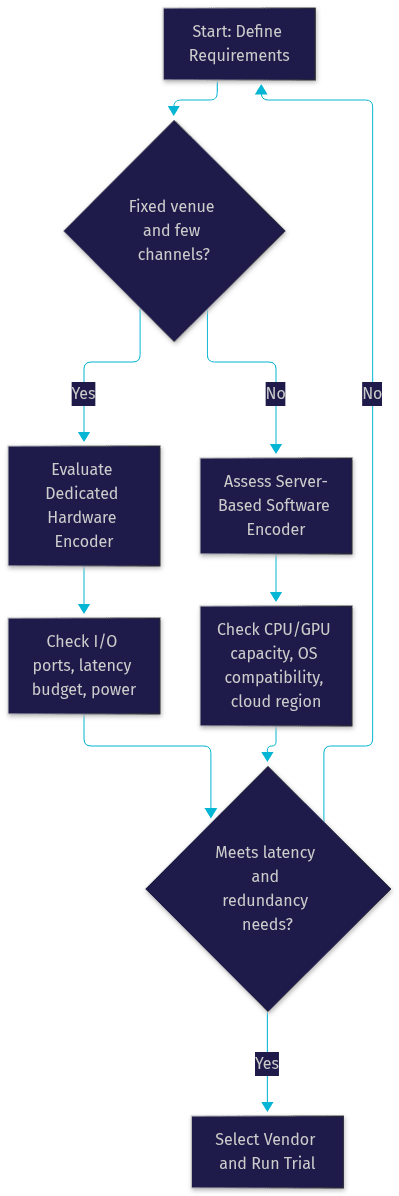
In practice, cost per channel is the deciding metric. A hardware box amortizes well when it runs the same venue event every week for years. Software wins when channel count fluctuates, because you pay for compute only during events. Maintenance also differs in kind: hardware fails are swapped, software fails are debugged, so staff skills should influence the choice as much as price.
Setting Up an HD HLS Encoder: Step-by-Step Guidance
The setup process below applies to both hardware appliances and software pipelines, with the differences noted where they matter.
Step 1: Prepare the input source. Connect your HDMI, SDI, or IP capture feed and confirm the encoder sees the correct resolution, frame rate, and color space. Mismatches here, such as a camera outputting 1080i when the encoder expects 1080p, cause subtle motion artifacts that are hard to trace later. For IP sources, verify network bandwidth headroom of at least twice the source bitrate to absorb jitter.
Step 2: Configure the encode profile. Set your target resolution, codec, bitrate, and keyframe interval. The keyframe interval, or GOP length, must align exactly with your segment duration: a two-second segment requires a keyframe every two seconds, or players will fail to switch renditions cleanly. For low latency, favor shorter GOPs and disable B-frames, which introduce decode-order delay.
Step 3: Enable the ABR ladder and CMAF packaging. Define three to five renditions spanning your audience's bandwidth range, from a low fallback around 480p up to your top HD tier. Enable CMAF or fragmented MP4 packaging so the same segments serve HLS and DASH players, and confirm each rendition's keyframes stay aligned so quality switches are seamless.
Step 4: Connect to your CDN or origin server. Point the encoder's publish target at your origin, whether that is an S3-compatible bucket, a dedicated origin server, or a streaming platform's ingest endpoint. The encoder writes segments and updated manifests continuously; the CDN pulls and caches them at the edge. Verify the master manifest URL plays in a reference player before the event, and confirm the CDN is configured to cache segments aggressively but revalidate manifests on every request.
Step 5: Test under real conditions. Run a full rehearsal at production bitrate, on the production network, for at least the expected event duration. Rehearsals expose the failure modes that short tests hide.
Common pitfalls worth knowing in advance: token expiration on authenticated ingest endpoints kills the stream mid-event if tokens are not refreshed; network jitter between encoder and origin causes segment upload gaps that players interpret as buffering; and mismatched segment durations across renditions break ABR switching entirely. All three are preventable with a rehearsal and a checklist.
Monitoring and Troubleshooting
Watch four metric groups during every live event. CPU and GPU load reveal whether the encoder has headroom; sustained load above roughly 80 percent predicts dropped frames. Buffer health on the player side shows whether delivery keeps pace with playback. End-to-end latency, measured by pointing a camera at a running clock, is your ground truth. Dropped-frame counters on the encoder are your earliest warning sign.
When something goes wrong, read the encoder logs chronologically. Dropped frames at ingest point to a capture or bandwidth problem; dropped frames during encode point to insufficient compute; segment upload failures point to the origin or CDN. Alert on dropped frames rather than on stream death, because the former precedes the latter by minutes.
Optimizing Performance and Reducing Latency
Latency optimization is a chain, and the encoder is the first link. Every tuning decision below compounds with CDN and player settings downstream.
Tune the encode for low delay. Shorten the GOP to match your segment length, disable B-frames, and use a low-delay rate-control mode. These changes cost a small amount of compression efficiency but remove hundreds of milliseconds of pipeline delay. For interactive use cases where even Low-Latency HLS is not fast enough, sub-second delivery requires a different transport entirely; VideoSDK's interactive live streaming mode keeps audience interaction in real time, with HLS available as a scalable fallback layer for large passive audiences.
Leverage hardware acceleration and multi-core scaling. Distribute renditions across multiple GPU encode sessions or CPU cores so no single unit is saturated. Hardware encoders often sustain more concurrent HD streams per dollar than CPU encoding, at a modest quality-per-bit trade-off that most live audiences cannot perceive.
Use chunked HLS and modern transport. Chunked transfer of segments, where the encoder uploads each segment while still encoding it, lets the CDN and player begin work before the segment is complete. Combined with one-second or partial segments and HTTP/2 multiplexing between origin and CDN, this alone can cut several seconds of delay.
Optimize CDN edge caching. Cache segments at the edge with long TTLs, since segments are immutable once written, but never cache manifests. Pre-warm the CDN before major events by pushing the first segments of a test stream to edge nodes in the regions where your audience concentrates.
Real-World Use Cases
Live sports broadcasting. A regional sports network feeding camera SDI into a hardware HD HLS encoder with a five-rung ABR ladder and one-second CMAF segments can reach glass-to-glass latency under five seconds at scale, close enough to live that second-screen social sync feels natural. Redundant parallel encoders into the origin handle the zero-downtime requirement.
Interactive e-learning classrooms. An online tutoring platform serving students on mixed mobile networks depends on the ABR ladder: students on strong connections get 1080p while others drop to 480p without leaving the session. Here, encoder-side multi-bitrate output is not a luxury but the mechanism that keeps every student in the room. Platforms building classroom-style interaction often combine this with real-time communication SDKs, like VideoSDK's video calling, for the interactive stage and HLS for the passive viewing tier.
Corporate webinars with VOD. A company running an all-hands webinar configures the encoder to write segments to storage as it publishes to the CDN. The same segments become the on-demand replay within minutes of the event ending, with no separate post-production encode pass. This dual-write pattern is one of the most underused capabilities of a well-configured HD HLS encoder.
Future Trends for HD HLS Encoding
Three shifts are reshaping encoder roadmaps through 2026 and beyond. First, next-generation codecs: HEVC improvements and early VVC support promise another meaningful compression step, which matters most for 4K and HDR ladders, though playback support remains the gating factor. Second, AI-assisted bitrate adaptation: encoders are beginning to apply per-scene analysis, spending bits on complex sports action and saving them on static slides, achieving better perceived quality at lower average bitrate. Third, protocol convergence: Low-Latency HLS is narrowing the gap with real-time transports, and hybrid architectures that pair WebRTC-class interactivity for participants with HLS scale for audiences are becoming the standard pattern for live commerce, auctions, and interactive events.
Definitions Glossary
HD HLS Encoder: A hardware device or software pipeline that captures high-definition video, compresses it in real time with a codec such as H.264 or HEVC, and packages it into HLS segments and playlists for HTTP delivery.
Adaptive Bitrate (ABR) Ladder: A set of multiple quality renditions of the same stream, produced by the encoder and listed in the master playlist, allowing each player to switch quality as its network conditions change.
CMAF: The Common Media Application Format, a packaging standard using fragmented MP4 so the same media segments can serve both HLS and DASH players, reducing storage and egress costs.
GOP (Group of Pictures): The interval between keyframes in an encoded stream, which must align with segment duration for clean ABR switching and directly influences latency.
Low-Latency HLS (LL-HLS): An extension of HLS using partial segments and blocking playlist reloads that reduces end-to-end delay from the traditional 15 to 30 seconds down to roughly two to five seconds.
Key Takeaways
- An HD HLS encoder combines three jobs in one real-time pipeline: capturing HD video, compressing it with H.264 or HEVC, and packaging it into HLS segments and manifests for CDN delivery.
- Hardware encoders win for fixed venues with few channels and deterministic latency; software encoders win for fluctuating channel counts and elastic scaling, with cost per channel as the deciding metric.
- Latency is tuned at the encoder first: short GOPs, no B-frames, one-second or partial segments, and chunked uploads compound into multi-second savings.
- CMAF packaging and a single-pass ABR ladder cut infrastructure cost and keep rendition switching seamless across mixed-device audiences.
- For use cases where even Low-Latency HLS is too slow for real interaction, pair HLS delivery with a real-time layer such as VideoSDK's interactive live streaming, which keeps audience-to-stage latency sub-second.
Conclusion
Choosing an HD HLS encoder in 2026 comes down to five criteria: real-time capacity at your target resolution, single-pass ABR ladder generation, low-latency segmenting with CMAF packaging, multi-protocol output for flexibility, and monitoring plus API control for production operations. Map those against the hardware-versus-software decision framework above, then validate with a real rehearsal before your first event. If your use case needs genuine real-time interaction rather than near-live delivery, explore VideoSDK's interactive live streaming docs and try the platform free at app.videosdk.live. What are you building with HD streaming? Drop a comment, I'd love to hear what kind of encoder workflow you're working on.
Free $20 Balance for AI Voice Agents & Video Calls
FAQ