


Introduction to OpenAI Voice
OpenAI Voice is a cutting-edge technology poised to revolutionize how we interact with machines and consume digital content. Leveraging advanced artificial intelligence, OpenAI Voice offers a powerful platform for speech synthesis, ai voice generation, and custom voice generation. This technology has the potential to transform numerous industries, from accessibility and education to content creation and customer service.
What is OpenAI Voice?
OpenAI Voice encompasses a range of AI-powered speech synthesis technologies developed by OpenAI. It provides the ability to convert text into natural-sounding speech, create custom voices, and integrate voice functionalities into various applications through the openai voice api. It leverages deep learning models to generate speech that mimics human intonation and emotion.
OpenAI Voice's Capabilities and Limitations
OpenAI Voice boasts an impressive array of capabilities, including realistic speech synthesis, voice cloning (with proper ethical safeguards), and customizable voice parameters. However, it also has limitations. Generating highly nuanced emotional expressions remains a challenge, and ensuring responsible ai voice usage is crucial to prevent misuse. OpenAI voice security and safety are also paramount concerns that are actively being addressed.
The Promise and Peril of Synthetic Voices
The promise of OpenAI Voice lies in its ability to enhance accessibility, personalize user experiences, and unlock new creative possibilities. However, the technology also presents potential perils, such as the creation of misinformation through deepfake voice technology and the erosion of trust in audio information. Ethical considerations openai voice development are critical to navigate these challenges and ensure responsible innovation.
How OpenAI Voice Works
OpenAI Voice relies on sophisticated machine learning techniques to achieve its impressive speech synthesis capabilities. Understanding the underlying technology is key to appreciating its potential and addressing its challenges.
The Technology Behind OpenAI Voice
At its core, OpenAI Voice utilizes deep neural networks trained on vast datasets of human speech. These networks learn to map text to corresponding acoustic features, enabling them to generate realistic and expressive speech. The models are constantly refined and improved through ongoing training and feedback. The openai voice engine continues to evolve, pushing the boundaries of ai voice technology. Below is a python script example that uses openai api for text-to-speech:
python
1import openai
2import os
3
4# Set your OpenAI API key
5openai.api_key = os.getenv("OPENAI_API_KEY")
6
7# Text to convert to speech
8text = "Hello, this is a demonstration of OpenAI's text-to-speech capabilities."
9
10# Call the OpenAI API for speech synthesis
11try:
12    response = openai.audio.speech.create(
13        model="tts-1",
14        voice="alloy",
15        input=text
16    )
17
18    # Save the generated speech to a file
19    response.stream_to_file("output.mp3")
20
21    print("Speech saved to output.mp3")
22
23except Exception as e:
24    print(f"An error occurred: {e}")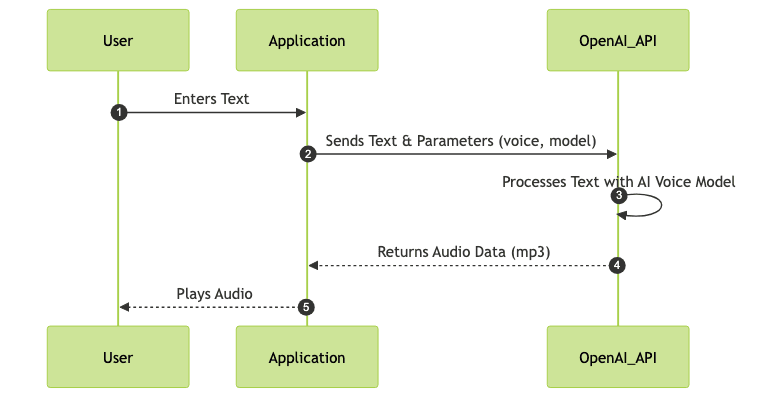
Training Data and Model Architecture
The quality of OpenAI Voice is heavily dependent on the data used to train its models. OpenAI employs massive datasets comprising diverse accents, speaking styles, and languages. The model architecture typically involves transformer networks, which are adept at capturing long-range dependencies in text and mapping them to corresponding acoustic features. Continual learning and fine-tuning are essential to improve the accuracy and naturalness of the synthetic voices.
Voice Customization and Personalization
One of the most compelling aspects of OpenAI Voice is the ability to customize and personalize voices. Developers can fine-tune parameters such as pitch, speed, and intonation to create unique vocal identities. Furthermore, voice cloning technology, when used ethically and with consent, allows for the creation of custom voices based on existing recordings. This opens up exciting possibilities for personalized user experiences and brand voice development using a custom voice api.
Applications of OpenAI Voice
OpenAI Voice has a wide range of potential applications across various industries. Its ability to generate realistic and customizable speech makes it a valuable tool for enhancing accessibility, creating engaging content, and improving customer service. Here are some examples.
Accessibility and Inclusivity
OpenAI Voice can play a crucial role in enhancing accessibility for individuals with disabilities. By converting text to speech, it enables visually impaired users to access digital content more easily. Furthermore, it can generate audio descriptions for videos and other multimedia content, making it more inclusive for a wider audience. The benefits of openai voice extend to making information accessible to everyone.
Content Creation and Media Production
In the realm of content creation, OpenAI Voice can be used to generate narration for videos, podcasts, and audiobooks. It can also be used to create synthetic voices for virtual characters and avatars, adding a new dimension to storytelling and entertainment. It offers a cost-effective and efficient way to produce high-quality audio content.
Business and Customer Service
Businesses can leverage OpenAI Voice to automate customer service interactions, provide personalized voice assistance, and create engaging marketing campaigns. Virtual assistants powered by OpenAI Voice can handle a wide range of tasks, from answering frequently asked questions to providing product recommendations. This can improve customer satisfaction and reduce operational costs.
Education and E-Learning
OpenAI Voice can enhance the e-learning experience by providing audio narration for online courses, creating interactive learning modules, and generating personalized feedback for students. It can also be used to create virtual tutors and language learning tools. This makes learning more engaging and accessible for students of all ages and backgrounds.
Ethical Considerations and Responsible Use
The power of OpenAI Voice comes with significant ethical responsibilities. It's crucial to address potential risks such as misinformation, privacy violations, and bias to ensure responsible development and deployment. There are ethical considerations openai voice and ai voice technology usage.
Misinformation and Deepfakes
One of the most pressing ethical concerns is the potential for OpenAI Voice to be used to create misinformation and deepfakes. Realistic synthetic voices can be used to impersonate individuals, spread false information, and manipulate public opinion. It's crucial to develop robust deepfake voice detection technologies and implement measures to prevent the misuse of OpenAI Voice for malicious purposes.
Privacy and Data Security
The use of OpenAI Voice raises privacy concerns, particularly when it comes to voice cloning and custom voice generation. It's essential to obtain informed consent before creating a synthetic voice based on an individual's recordings. Additionally, robust data security measures must be in place to protect voice data from unauthorized access and misuse. Privacy and data security are critical concerns.
Bias and Fairness in AI Voice
AI voice models can inherit biases from the data they are trained on, leading to unfair or discriminatory outcomes. It's crucial to carefully curate training data to minimize bias and ensure that OpenAI Voice is fair and equitable for all users. Ongoing monitoring and evaluation are essential to identify and address any potential biases in the system.
Mitigating Risks and Promoting Responsible AI
To mitigate the risks associated with OpenAI Voice, it's essential to adopt a responsible AI framework that prioritizes transparency, accountability, and ethical considerations. This includes implementing safeguards to prevent misuse, promoting user awareness, and engaging in ongoing dialogue with stakeholders. Responsible ai voice usage is critical.
The Future of OpenAI Voice
OpenAI Voice is a rapidly evolving technology with the potential to transform various aspects of our lives. As ai voice technology advances, we can expect even more realistic, customizable, and versatile synthetic voices. Here's a look at some of the exciting developments on the horizon.
Advancements in Speech Synthesis
Future advancements in speech synthesis will focus on improving the naturalness, expressiveness, and robustness of synthetic voices. We can expect to see more sophisticated models that can accurately capture nuanced emotional expressions and adapt to different speaking styles and accents. Text to speech api's will be much better.
Integration with Other AI Technologies
OpenAI Voice is likely to be integrated with other AI technologies such as natural language processing (NLP), computer vision, and robotics. This will enable the creation of more intelligent and interactive AI systems that can seamlessly understand and respond to human input in a variety of modalities. Furthermore, it can be used to generate personalized experiences using ai voice generation.
Potential for Breakthrough Applications
The future holds immense potential for breakthrough applications of OpenAI Voice. We can expect to see it used in new and innovative ways across industries such as healthcare, education, entertainment, and manufacturing. For example, it could be used to create personalized virtual health assistants, immersive educational experiences, and interactive virtual training simulations.
OpenAI Voice vs. Competitors
While OpenAI Voice is a leading player in the field of AI-powered speech synthesis, it's important to compare it with other solutions in the market to understand its strengths and weaknesses. Here's a comparison with some leading text-to-speech solutions.
Comparison with Leading Text-to-Speech Solutions
Several other companies offer text-to-speech APIs, including Google Cloud Text-to-Speech, Amazon Polly, and Microsoft Azure AI Speech. Each of these solutions has its own strengths and weaknesses in terms of voice quality, customization options, pricing, and ease of use. OpenAI Voice stands out for its highly realistic voice generation, customizable voice parameters, and integration with other OpenAI services.
Strengths and Weaknesses of OpenAI Voice
Strengths:
- Highly realistic and natural-sounding speech
- Customizable voice parameters
- Integration with other OpenAI services
- Active development and ongoing improvements
Weaknesses:
- Potential for misuse and deepfakes
- Ethical concerns related to voice cloning
- Pricing may be a barrier for some users
Conclusion
OpenAI Voice represents a significant step forward in the field of AI-powered speech synthesis. Its realistic voice generation, customizable voice parameters, and potential for integration with other AI technologies make it a valuable tool for a wide range of applications. However, it's crucial to address the ethical considerations and potential risks associated with this technology to ensure its responsible and beneficial use. Learn more about OpenAI's approach to synthetic voice technology from OpenAI's official website on Voice Engine and explore ethical dilemmas surrounding the development and use of AI-generated voices in articles discussing the ethical considerations of AI voice. Compare OpenAI's offering with other leading providers in the market through articles comparing OpenAI's offering to competing text-to-speech API's.
Free $20 Balance for AI Voice Agents & Video Calls
FAQ