


OpenAI speech-to-speech is an end-to-end audio processing capability that takes spoken input and generates spoken output, bypassing the traditional text intermediary. It combines speech recognition, large language model reasoning, and high-quality speech synthesis into a unified pipeline. Developers can integrate it using OpenAI's audio API endpoints and pair it with platforms like VideoSDK to build real-time voice agents that respond naturally in conversation.
Voice-first applications are no longer a novelty. They are becoming the default interface for customer support, accessibility tools, interactive gaming, and hands-free productivity. The reason is straightforward: speaking is faster than typing, and hearing a response feels more natural than reading one on a screen.
OpenAI speech-to-speech represents a shift from the traditional cascaded pipeline (speech-to-text, then text generation, then text-to-speech) toward a more unified approach where audio input flows through a model and produces audio output with minimal intermediate steps. This reduces latency, preserves prosody, and opens the door to conversational AI that actually sounds conversational.
In this guide, you will learn what OpenAI speech-to-speech is, how the underlying pipeline works, which developer use cases benefit most, and how to get started without writing a single line of code. We will also cover best practices, current limitations, and how platforms like VideoSDK's AI Voice Agents extend these capabilities into production-grade real-time voice applications.
What Is OpenAI Speech-to-Speech?
OpenAI speech-to-speech is defined as a set of API capabilities that allow developers to send audio input to OpenAI models and receive synthesized speech as output. Unlike traditional text-to-speech systems that require a text prompt, speech-to-speech can accept spoken audio directly, process it through a language model, and generate a spoken response.
The core offering centers on several models. The gpt-4o-mini-tts model is OpenAI's text-to-speech model optimized for generating natural-sounding speech from text instructions. The OpenAI Realtime API extends this further by enabling real-time, low-latency audio interactions where the model can listen and respond in a continuous stream. Developers should verify current model names and availability through OpenAI's official documentation before integration.
OpenAI provides a built-in voice catalog with several preset voices, each tuned for different tones and personalities. Developers can also craft detailed prompt instructions to control pacing, emotion, accent, and speaking style. Custom voice support has been discussed as a roadmap item, though developers should check OpenAI's official channels for the latest availability status.
Here is a high-level architecture diagram showing how the speech-to-speech pipeline flows from user input to audio output:
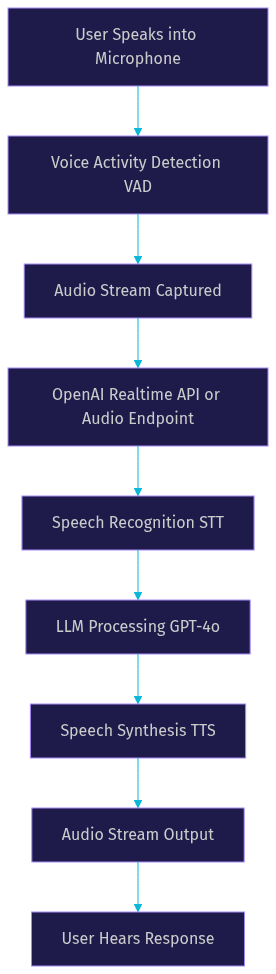
VideoSDK provides speech-to-speech capabilities through its AI Voice Agent SDK, which wraps the entire pipeline into a managed Python-based agent worker. This means you can connect OpenAI's models to a VideoSDK room and have users interact with the agent from any web, mobile, or phone interface.
How It Works Under the Hood
Understanding the internal mechanics of OpenAI speech-to-speech helps you make better architectural decisions when building voice applications. The pipeline can operate in two modes: cascaded and end-to-end.
In a cascaded pipeline, audio goes through three distinct stages. First, a speech-to-text model transcribes the incoming audio. Second, a large language model processes the transcript and generates a text response. Third, a text-to-speech model converts that response into audio. Each stage adds latency because the output of one stage must fully complete before the next begins.
In an end-to-end approach, the model handles audio input and audio output within a single inference pass. The OpenAI Realtime API moves closer to this model by maintaining a persistent WebSocket connection where audio chunks stream in both directions. The model can start generating a response before the user finishes speaking, which dramatically reduces perceived latency.
Several optional components enhance the pipeline. Voice activity detection determines when the user starts and stops speaking, allowing the system to trigger response generation at the right moment. Streaming response delivery sends audio chunks to the client as they are generated rather than waiting for the full response. Speed control lets developers adjust how fast the synthesized speech plays back.
The table below compares traditional text-to-speech with full speech-to-speech across key dimensions:
| Dimension | Text-to-Speech | Speech-to-Speech |
|---|---|---|
| Input format | Text string | Audio stream or text |
| Latency profile | Higher (cascaded stages) | Lower (streaming, end-to-end) |
| Prosody preservation | Limited (text loses vocal cues) | Better (audio input retains cues) |
| Flexibility | High (full text control) | Moderate (model interprets intent) |
| Real-time conversation | Not suitable | Designed for it |
| Multilingual support | Depends on TTS model | Broader with real-time models |
| Cost per interaction | Lower (text tokens) | Higher (audio tokens) |
The key takeaway is that speech-to-speech trades some control for a more natural conversational experience. If you need precise control over every word the system says, traditional TTS is still the right choice. If you want fluid, real-time voice interaction, speech-to-speech is the path forward.
Key Use Cases for Developers
OpenAI speech-to-speech unlocks several categories of applications that were previously difficult or expensive to build. Here are the most impactful use cases developers are building today.
Real-Time Voice Assistants and Customer Support Bots
Voice assistants powered by speech-to-speech can handle customer inquiries without requiring users to navigate phone menus or wait for human agents. The model listens to the customer's question, processes it, and responds with spoken instructions or answers. When integrated with VideoSDK's telephony capabilities, these agents can receive inbound phone calls and conduct natural conversations with callers using SIP trunk providers like Twilio, Telnyx, or Plivo.
Interactive Audio-Only Games and Virtual Agents
Game developers are using speech-to-speech to create non-player characters that players can talk to in real time. Instead of selecting dialogue options from a menu, players speak naturally and the character responds with voice. This creates immersive experiences for mystery games, role-playing adventures, and educational simulations where the conversation itself is the gameplay mechanic.
Multilingual Narration for E-Learning
Educational platforms use speech-to-speech to generate narrated content in multiple languages without hiring voice actors for each language. A single lesson can be delivered in English, Spanish, Japanese, and other supported languages by switching the voice and language parameters. This dramatically reduces production costs while expanding global reach for edtech products.
Accessibility Tools with Spoken Feedback
Accessibility applications benefit enormously from speech-to-speech. Users with visual impairments can interact with applications using voice commands and receive spoken feedback. The reduction in latency compared to cascaded pipelines makes these tools feel responsive enough for daily use. Developers building accessibility features should consider pairing OpenAI's models with VideoSDK's video and audio calling SDK for low-latency audio delivery across web and mobile platforms.
Getting Started Without Code
You do not need to write code to understand how to integrate OpenAI speech-to-speech. The integration follows a clear sequence of steps that you can plan before implementation.
Step 1: Obtain Your OpenAI API Key
Start by creating an OpenAI developer account and generating an API key from the dashboard. This key authenticates every request you make to OpenAI's endpoints. Store it securely in environment variables or a secrets manager. Never expose the API key in client-side code or public repositories. OpenAI uses bearer token authentication, meaning each request includes the key in an authorization header.
Step 2: Choose Your Model and Voice
Select the appropriate model based on your latency and quality requirements. For text-to-speech generation, the gpt-4o-mini-tts model offers a balance of speed and quality. For real-time speech-to-speech interaction, the OpenAI Realtime API provides the lowest latency path. Verify current model names and capabilities through OpenAI's official documentation before committing to a specific model.
Next, choose a voice from OpenAI's built-in catalog. Each voice has a distinct personality and tone. Some are warm and conversational, others are clear and professional. Test multiple voices with your target content to find the best match for your application's personality.
Step 3: Craft Your Prompt Instructions
The prompt you send to the model controls not just what it says but how it says it. You can specify tone, pacing, emotion, and speaking style. For example, you might instruct the model to speak in a calm, reassuring tone for a healthcare application, or an energetic, enthusiastic tone for a fitness coaching app. Detailed prompt instructions produce more consistent voice output across interactions.
Step 4: Configure the Audio Endpoint
The OpenAI audio speech endpoint accepts a text prompt, a model selection, a voice selection, and optional parameters for response format and speed. You send an HTTP POST request to the endpoint with these parameters in the request body. The response is an audio file or audio stream, depending on whether you use the standard or streaming response mode.
For real-time applications, use the streaming response option. This sends audio chunks back as they are generated, allowing the client to start playback before the full response is complete. Streaming is essential for conversational interfaces where users expect immediate feedback.
Step 5: Connect to a Real-Time Communication Layer
For production voice applications, you need a real-time communication layer that handles audio streaming between users and the AI model. This is where VideoSDK's AI Voice Agent SDK comes in. The agent worker runs as a Python process inside a VideoSDK room. Users connect via web, mobile, or phone. The agent receives audio from the user, forwards it to OpenAI's models, and sends the synthesized response back through the VideoSDK room.
Here is how the full production architecture looks:
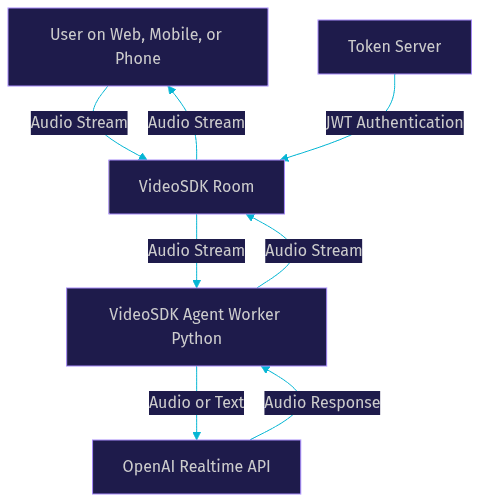
This architecture separates concerns cleanly. VideoSDK handles the real-time transport layer. OpenAI handles the intelligence layer. Your application logic ties them together through the agent worker, which manages the session lifecycle, pipeline hooks, and observability.
Best Practices and Gotchas
Building with OpenAI speech-to-speech requires attention to several practical details that separate working prototypes from production-ready applications.
Prompt Engineering for Voice Output
The instructions you give the model directly affect speech quality. Be specific about tone, pacing, and personality. Avoid vague instructions like "sound natural." Instead, use concrete descriptions like "speak at a moderate pace with a warm, professional tone, pausing briefly between sentences." Test your prompts with different input types to ensure consistency. Remember that the same prompt can produce different results depending on the input content, so validate across your expected input range.
Managing Latency and Bandwidth
Latency is the single most critical metric for voice applications. Users notice delays above 500 milliseconds and find conversations above one second uncomfortable. To minimize latency, use streaming responses rather than waiting for the full audio to generate. Choose the smallest model that meets your quality requirements. If you are using the cascaded pipeline, consider overlapping stages where possible, such as starting TTS generation before the LLM finishes its full response.
Bandwidth matters for mobile users on cellular networks. Audio streaming consumes significant bandwidth, especially at higher quality settings. Choose an audio format that balances quality and size. Opus is widely used for real-time audio because it adapts to available bandwidth, which is why VideoSDK uses it as the default codec for audio streams.
Voice Selection and Custom Voice IDs
OpenAI's built-in voices cover a range of tones, but they may not match your brand identity perfectly. If custom voice support is available for your account, generate and manage voice IDs carefully. Store voice IDs in configuration rather than hardcoding them into application logic. This makes it easier to swap voices for A/B testing or localization. Verify custom voice availability through OpenAI's official documentation before designing your architecture around it.
Rate Limits, Error Handling, and Fallback Strategies
OpenAI enforces rate limits on audio endpoints. Monitor your usage and implement exponential backoff for retry logic. Always have a fallback strategy: if the speech-to-speech endpoint fails, your application should gracefully degrade rather than crash. A common pattern is to fall back to a simpler text-to-speech model or a pre-recorded audio message. Log errors with enough context to diagnose issues without exposing sensitive data.
For production deployments using VideoSDK, the Agent SDK includes a fallback adapter that automatically switches to a backup TTS provider if the primary provider fails. This is the kind of resilience layer that separates demos from production systems. You can learn more about this in the VideoSDK AI Agents documentation.
Limitations and Future Outlook
OpenAI speech-to-speech is powerful but not without constraints. Understanding these limitations helps you set realistic expectations and plan your architecture accordingly.
Current Constraints
Supported languages depend on the specific model in use. While the Realtime API supports a growing list of languages, not all languages have equal quality. Input length is bounded by token limits, which means very long audio inputs may need to be chunked and processed sequentially. The system does not yet accept true multimodal input, meaning you cannot send an image alongside audio in a single speech-to-speech request through the standard audio endpoints.
Pricing for audio models is higher than text-only models because audio processing requires more compute. Developers building high-volume applications should model their costs carefully, including the cost of failed requests and retries. Verify current pricing through OpenAI's official pricing page before estimating production costs.
Roadmap and Ecosystem
OpenAI has signaled continued investment in real-time multimodal models. The Realtime API is actively evolving, with improvements to latency, language coverage, and voice quality expected in subsequent releases. Developers should monitor OpenAI's changelog and developer announcements for updates.
The broader ecosystem complements OpenAI's offering. Open-source projects like MOSS-Speech and other community-driven speech models provide alternatives for developers who need self-hosted or offline speech-to-speech capabilities. For production voice agent deployments, platforms like VideoSDK wrap these models into managed infrastructure, handling the real-time transport, session management, and observability layers that OpenAI's APIs do not address directly.
According to Artificial Analysis's Speech Arena benchmark, the gap between proprietary and open-source speech models is narrowing, but proprietary models like OpenAI's still lead in naturalness and conversational quality as of mid-2026. Developers should verify current benchmark results at Artificial Analysis before making provider decisions.
Definitions Glossary
Speech-to-Speech: A processing pipeline that accepts audio input and produces audio output, potentially bypassing text as an intermediate representation. VideoSDK's AI Voice Agent SDK supports speech-to-speech by connecting user audio streams to models like OpenAI's Realtime API.
Voice Activity Detection (VAD): A technique that determines when a user starts and stops speaking, enabling the system to trigger response generation at the correct moment. VideoSDK's Agent SDK includes built-in VAD as part of its pipeline hooks.
OpenAI Realtime API: A WebSocket-based API that enables continuous, low-latency audio streaming between a client and OpenAI models, supporting real-time speech-to-speech interactions without the need for separate STT and TTS calls.
Cascaded Pipeline: A speech processing architecture where audio goes through separate speech-to-text, language model, and text-to-speech stages sequentially, adding latency at each transition compared to an end-to-end approach.
Agent Worker: The Python process in VideoSDK's AI Voice Agent architecture that manages the session lifecycle, processes audio streams, and coordinates between the user, the VideoSDK room, and AI model providers like OpenAI.
Streaming Audio Response: A delivery mode where audio chunks are sent to the client as they are generated, allowing playback to begin before the full response is complete, reducing perceived latency in conversational applications.
Key Takeaways
- OpenAI speech-to-speech enables voice-first applications by processing audio input and generating audio output with lower latency than traditional cascaded text-to-speech pipelines.
- The OpenAI Realtime API provides the lowest latency path for real-time conversations, while gpt-4o-mini-tts serves high-quality text-to-speech generation use cases.
- Developers should use streaming responses, choose the smallest sufficient model, and implement fallback strategies to manage latency and reliability in production.
- VideoSDK's AI Voice Agent SDK wraps OpenAI's speech models into a managed real-time communication layer, handling audio transport, session management, and provider failover across web, mobile, and telephony interfaces.
- Current limitations include language coverage gaps, token length bounds, and higher costs compared to text-only models, but the roadmap points toward broader multimodal support.
Conclusion
OpenAI speech-to-speech is reshaping how developers build voice-first applications. By reducing the distance between user speech and AI response, it makes conversational interfaces feel natural and responsive. Whether you are building a customer support agent, an interactive game character, or an accessibility tool, the combination of OpenAI's audio models and VideoSDK's real-time infrastructure gives you a production-ready foundation. Start by exploring the OpenAI Realtime API documentation, then connect it to VideoSDK's AI Voice Agents to ship a working voice application. You can sign up for free at app.videosdk.live/login and join the VideoSDK Discord community to connect with other developers building voice agents. What are you building with OpenAI speech-to-speech? Drop a comment below, I would love to hear what kind of voice-first use case you are working on.
FAQ