


OpenAI speech to text is a set of API services that convert spoken audio into written text using models like whisper-1, gpt-4o-transcribe, and gpt-live-transcribe. It supports both batch file transcription and real-time streaming over WebSockets, covering everything from voicemail processing to live captioning. Developers building production voice features often pair it with a real-time communication layer like VideoSDK to deliver transcripts inside live video and audio sessions.
Every voice-enabled product eventually hits the same wall: turning raw audio into accurate, low-latency text. A support agent needs live captions to follow a frustrated caller. A podcast platform needs searchable transcripts within minutes of publishing. A voice assistant needs to understand a spoken question before it can answer. In each case, the quality of the speech-to-text layer determines whether the product feels responsive or broken.
OpenAI's speech-to-text offerings have matured into a family of models and endpoints that cover batch transcription, real-time streaming, and agent pipelines. But choosing among them is not obvious. The wrong mode, audio format, or streaming approach can double your latency, inflate your costs, or silently degrade accuracy.
This guide walks through the full decision path: what OpenAI speech to text actually offers, how to pick between file-upload and streaming modes, how to prepare audio for maximum accuracy, how to structure your integration, and where developers most often get burned. By the end, you will have a clear architecture for your transcription feature and a checklist you can apply before shipping.
What Is OpenAI Speech-to-Text?
OpenAI speech to text is defined as a set of hosted transcription services exposed through OpenAI's API, converting audio input into text output using models trained on large multilingual speech corpora. The core models include whisper-1, the long-standing general-purpose transcription model; gpt-4o-transcribe, a newer model with improved accuracy and better handling of noisy, real-world audio; and gpt-live-transcribe, designed for low-latency, streaming-style transcription scenarios.
OpenAI speech to text works by accepting either an uploaded audio file or a live audio stream, decoding it into internal audio features, and generating text predictions, optionally with timestamps, language detection, and translation. The service supports dozens of languages, multiple response formats, and both blocking (wait for the full result) and streaming (receive incremental deltas) interaction patterns. For developers, this means one API surface can serve voicemail transcription, meeting captions, and voice assistant input, with the model and mode chosen per use case.
Choosing the Right Transcription Mode
The single most consequential decision in your OpenAI speech-to-text integration is the interaction mode, because it determines your latency profile, cost structure, and application architecture.
File-Upload (Blocking) Transcription
File-upload, or blocking, transcription sends a complete audio file to the API and waits for the finished transcript in a single response. Latency is measured in seconds to minutes, depending on file length, which makes it unsuitable for anything interactive.
This mode is ideal for non-real-time workloads: transcribing recorded meetings, processing voicemail backlogs, generating subtitles for uploaded videos, or building searchable archives of podcast episodes. You get the full transcript, including timestamps and segment metadata if requested, in one payload. File-size limits apply per request, so long recordings typically need to be split into chunks before upload. The trade-off is simple: maximum accuracy and simplicity in exchange for zero interactivity.
Streaming (Real-Time) Transcription
Streaming transcription sends audio incrementally and receives partial transcripts back as the speech happens. Latency to first token drops from seconds to well under a second, which is the difference between captions that feel live and captions that feel delayed.
This mode is ideal for live captioning in video calls, voice assistants that must respond while the user is still speaking, and any interface where the user sees their own words appearing as they say them. The architecture is more demanding: you maintain a persistent connection, push audio frames continuously, and reconcile partial results as the model refines its predictions. Cost is typically metered per audio minute, and you must handle connection drops and reconnection logic. Use streaming when the user is present and waiting; use batch when they are not.
Realtime WebSocket Transcription
For true live scenarios, OpenAI exposes a realtime WebSocket interface where your client maintains a bidirectional session: audio flows up, transcript deltas flow down. This is the backbone of live captioning for webinars, broadcast overlays, and in-call transcription.
The technical constraints matter. Sessions have maximum durations, so long events require reconnect-and-resume logic. Audio must be sent in a supported raw format, commonly PCM-16 at 24 kHz mono, rather than compressed container formats. You also need to decide how to display partial versus final transcripts, because the model revises earlier words as more context arrives. In practice, teams building live captioning into video apps handle this by pairing the WebSocket transcription layer with a real-time communication SDK such as VideoSDK's audio and video calling platform, which delivers the raw participant audio streams that feed the transcription pipeline.
Agents SDK VoicePipeline
OpenAI's Agents SDK includes a voice pipeline abstraction, currently a Python-based beta, that chains speech-to-text, a language model, and text-to-speech into a single conversational loop. Instead of wiring transcription, reasoning, and synthesis yourself, you define the agent's behavior and the pipeline handles the audio round-trip.
This path is best suited for internal help-desk assistants and voice bots where the goal is a full conversation, not just a transcript. The trade-off is flexibility: you are buying speed of assembly at the cost of control over each pipeline stage. If your product needs custom turn detection, multi-agent routing, or deterministic conversation flows, a more composable orchestration layer such as VideoSDK's AI agent infrastructure gives you per-stage control over STT, LLM, and TTS providers while still handling the real-time transport.
Preparing Your Audio for Optimal Accuracy
Transcription accuracy is determined more by what happens before the API call than by the model choice itself. Clean audio in, clean text out.
Supported Formats and Sampling Rates
OpenAI speech to text accepts common compressed formats such as MP3, MP4, WAV, and WebM for file uploads, with per-file size limits that vary by endpoint. For streaming and realtime interfaces, raw audio is required, and the recommended configuration is PCM-16 encoded, 24 kHz sample rate, single channel (mono).
Why these numbers matter: the model was trained on audio at specific sampling characteristics, and resampling or stereo-to-mono mishandling introduces artifacts that degrade word accuracy. If your source audio arrives at 44.1 kHz stereo, downsample and mix to mono before sending. If you control the capture side, such as in a browser microphone stream, configure it to capture at 24 kHz mono from the start so no conversion is needed mid-stream.
Pre-Processing Tips
Four pre-processing steps consistently improve accuracy in production systems. First, noise reduction: apply a suppression filter to remove steady background noise like fans, traffic, or keyboard clicks. Second, volume normalization: bring all audio to a consistent level so quiet speakers are not under-transcribed. Third, voice activity detection (VAD): use VAD to strip silence and non-speech segments before sending audio, which cuts cost and prevents the model from hallucinating words during pauses. Fourth, speaker separation: for multi-speaker audio, diarization or channel separation before transcription dramatically improves readability, because the model otherwise merges overlapping voices.
Many of these steps are built into modern communication SDKs. VideoSDK, for example, includes built-in noise suppression on participant streams, so audio arriving at your transcription worker is already cleaned before it reaches the STT call.
Step-by-Step Integration Overview
This section walks through the integration path in natural language, covering what happens at each stage and what decisions you make.
Authentication and API Key Management
OpenAI speech to text authenticates requests using API keys issued from your OpenAI account. The key is passed with every request as a credential header. The critical rule: never embed the key in client-side code or ship it inside a mobile or browser bundle. Store it as an environment variable on your server, and route all transcription requests through a backend proxy you control. This also gives you a single point to enforce rate limits, log usage, and rotate keys when needed.
Creating a Transcription Request
A transcription request involves four decisions. First, endpoint selection: the file-based transcription endpoint for batch work, or the realtime session endpoint for live audio. Second, model choice: whisper-1 for broad compatibility and translation support, gpt-4o-transcribe for higher accuracy on difficult audio, or the live model for streaming. Third, parameters: you can specify the source language or let the model auto-detect it, choose a response format ranging from plain text to verbose JSON with timestamps, and request segment-level or word-level timing. Fourth, optional instructions: newer models accept steering hints, such as domain vocabulary or expected names, which improve accuracy on jargon-heavy audio.
For example, a telemedicine platform transcribing clinician-patient calls would set the language explicitly, request word-level timestamps for searchable records, and pass medical terminology as a steering hint. The expected result is a structured transcript you can store, index, and display.
Handling Streaming Responses
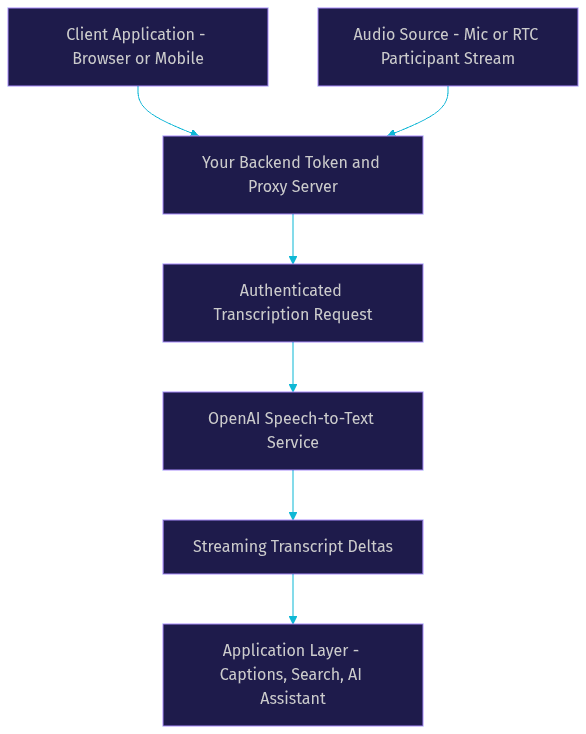
Streaming responses arrive as a sequence of events rather than one final payload. The pattern is: the connection opens, you push audio frames, and the service returns incremental transcript deltas, each representing the model's best current guess for the most recent speech. As more audio context arrives, earlier partial text is revised, and eventually a finalized segment event confirms the stable text.
Your application layer must handle three things. First, display logic: show partials with a visual cue (such as lighter text) and swap in finalized text as it arrives. Second, assembly: maintain an ordered buffer of finalized segments to build the complete transcript. Third, error recovery: if the connection drops, reconnect and resume from the last finalized segment rather than restarting the session. Teams building this into live call products typically place the transcription worker server-side, receiving audio from their RTC layer, so browser clients never hold API credentials.
The overall architecture looks like this:
Managing Costs and Rate Limits
OpenAI prices speech to text per audio minute, with different rates per model, and the newer transcription models are metered separately from whisper-1. [UPDATE-style guidance: always check the current OpenAI pricing page before estimating, as per-minute rates change.] Streaming and realtime sessions are also metered by audio duration, including any silence you send, which is why VAD-based trimming directly reduces cost.
Three strategies keep costs predictable. First, trim before you send: strip silence and non-speech audio so you only pay for actual speech. Second, pick the cheapest model that meets your accuracy bar: use whisper-1 for clean single-speaker audio and reserve the premium models for noisy or domain-heavy content. Third, monitor usage through OpenAI's usage dashboards and set soft limits with alerts, so a runaway loop in your code does not silently transcribe hours of dead air overnight.
Rate limits are tiered by account level and expressed in requests per minute and audio minutes per minute. Batch workloads should queue and throttle requests rather than firing them in parallel bursts, which avoids limit errors mid-batch.
Common Pitfalls and How to Avoid Them
Token Expiry and Session Timeouts
Realtime WebSocket sessions have maximum durations, and long-running events like webinars or all-day meetings will exceed them. The failure mode is subtle: the session ends, and your client keeps sending audio into a closed connection, losing transcription silently. The fix is proactive session management: track elapsed session time, close and re-establish the connection before the limit, and buffer any audio sent during the switch so no speech is lost.
Audio Format Mismatches
The most common cause of garbled or empty transcripts is sending audio in a format the endpoint does not expect, such as compressed audio to a raw-only streaming interface, or stereo audio where mono is required. Validate your audio pipeline end to end before launch: confirm sample rate, channel count, and encoding at every hop, from microphone capture through any processing worker to the API call.
Unexpected Latency
If latency to first token is higher than expected, the cause is usually upstream of the model: audio being batched into large chunks before sending, excessive pre-processing on the hot path, or network routing through an extra server hop. Send audio in small, frequent frames, keep pre-processing lightweight, and place your transcription worker geographically close to both your users and the API endpoint.
Real-World Use Cases
Three patterns show up repeatedly in production.
Live webinar captions. An events platform runs interactive sessions and needs captions that appear within a second of speech. The architecture routes each speaker's audio from the RTC layer to a server-side transcription worker holding a realtime session, with partials pushed to all viewers over the same live connection. VideoSDK's interactive live streaming mode is a natural fit here, since speaker audio and caption delivery ride the same low-latency transport.
Voicemail transcription. A business phone system stores voicemails as audio files and transcribes them in batch overnight, attaching searchable text to each message. Blocking file transcription with whisper-1 handles this at low cost, with no latency pressure.
Voice-driven AI assistants. A support product lets users speak questions and get spoken answers. The pipeline chains streaming STT, an LLM, and TTS, with turn detection deciding when the user has finished speaking. Building this on a composable agent framework, such as VideoSDK's AI agents with Conversational Graph flows, keeps the conversation logic deterministic while the STT layer handles raw understanding.
Best Practices Checklist
- Generate and store API keys server-side only; never ship them to clients.
- Match your mode to the use case: batch for recordings, streaming for live interaction.
- Standardize on PCM-16, 24 kHz mono for streaming audio paths.
- Apply noise suppression, normalization, and VAD before transcription.
- Display partials as provisional and swap in finalized segments.
- Implement reconnect-and-resume logic for long realtime sessions.
- Monitor per-minute usage and set spending alerts.
- Validate audio format at every pipeline hop before launch.
Definitions Glossary
whisper-1: OpenAI's long-standing general-purpose speech-to-text model, supporting transcription and translation across many languages, commonly used for batch file processing.
Streaming transcription: An interaction pattern where audio is sent incrementally and partial transcript deltas are returned in near real time, enabling live captions and voice assistants.
VAD (voice activity detection): A preprocessing technique that detects which audio segments contain speech, used to strip silence, reduce cost, and prevent hallucinated words during pauses.
Speaker diarization: The process of separating and labeling who spoke when in multi-speaker audio, improving transcript readability and downstream analytics.
Latency to first token: The time between sending the first audio and receiving the first transcript output, the key responsiveness metric for live transcription features.
Key Takeaways
- OpenAI speech to text spans batch models (whisper-1, gpt-4o-transcribe) and realtime streaming interfaces, and choosing the right mode is your biggest architectural decision.
- Streaming delivers sub-second latency for live captioning and assistants, while file-upload transcription offers simplicity and accuracy for recorded content.
- Audio preparation, including PCM-16 at 24 kHz mono, noise suppression, and VAD, improves accuracy and reduces cost more than model upgrades do.
- Server-side key management, session-resume logic, and per-minute usage monitoring are what separate a demo from a production deployment.
- Pairing OpenAI speech to text with a real-time communication layer like VideoSDK lets you deliver transcripts inside live video and audio sessions without building transport from scratch.
Conclusion
OpenAI speech to text gives developers a flexible set of models and modes, from whisper-1 batch transcription to realtime streaming sessions, but the production outcome depends on the decisions around the API: mode selection, audio preparation, session handling, and cost control. Get those right and transcription becomes a reliable feature rather than a recurring incident. For deeper details, start with the official OpenAI audio documentation, and if you are delivering transcripts inside live calls, explore how VideoSDK's real-time communication SDKs and AI agent infrastructure handle the transport layer for you. What are you building with speech to text? Drop a comment, I'd love to hear what kind of transcription use case you're working on.
Free $20 Balance for AI Voice Agents & Video Calls
FAQ