


OpenAI speech is the family of audio APIs covering text-to-speech, speech-to-text, and real-time bidirectional voice, built around models like GPT-4o audio, TTS, and Whisper. Developers use these endpoints to generate natural voices, transcribe audio, and run live conversations. For production voice experiences, pairing OpenAI speech with a real-time communication layer like VideoSDK delivers sub-second interactive sessions.
Voice is becoming the default interface for a growing share of applications, from customer support lines to AI assistants embedded in mobile apps. OpenAI has moved fast here: what started as a single text-to-speech endpoint has grown into a full stack covering transcription, voice generation, and real-time conversational audio through the GPT-4o realtime models. If you are building anything with a voice layer in 2026, understanding how these pieces fit together is table stakes.
This guide walks through the full OpenAI speech surface: what each capability covers, how to set up the API, which model to pick for which job, how to architect a production integration, and how to keep latency and cost under control. By the end, you will know how to combine OpenAI speech models into a working voice pipeline, and how to deliver the resulting audio to users in real time.
Understanding OpenAI Speech Capabilities
OpenAI speech spans three distinct but complementary capabilities, and treating them as one thing is the most common conceptual mistake developers make. Each capability has its own endpoints, its own models, and its own latency and pricing profile.
What OpenAI Speech Covers: Text-to-Speech, Speech-to-Text, and Real-Time Voice
OpenAI speech is defined as the set of OpenAI APIs that convert between text and audio in both directions. Text-to-speech (TTS) turns written text into natural-sounding spoken audio, with controllable voice, speed, and delivery style. Speech-to-text, powered by the Whisper model family, transcribes recorded audio into text and supports translation across dozens of languages. Real-time voice, built on the GPT-4o realtime models, goes further: it handles speech input and speech output in a single bidirectional session, so a user can talk to a model and hear it respond in a continuous audio loop without any intermediate text step.
The distinction matters architecturally. TTS and transcription are request-response services you call when you need them. Realtime voice is a session-based protocol where you maintain a persistent connection and stream audio both ways. Choosing the wrong pattern for your use case is the fastest way to end up with either bloated latency or a fragile connection management problem.
Supported OpenAI Speech Models and Their Strengths
The current lineup covers several models, each tuned for a different job. The GPT-4o audio models handle multimodal speech understanding and generation, including tone and emotion. The GPT-4o mini TTS model is a lighter, cheaper voice generation option optimized for instruction-following, letting you direct the delivery with natural-language style prompts. The dedicated TTS models are the workhorses for straightforward narration. Whisper remains the transcription standard, with strong accuracy on noisy, accented, and multilingual audio. The GPT-Realtime models power live conversational sessions with sub-second response targets.
Setting Up OpenAI Speech API
Getting OpenAI speech running is straightforward, but a few setup decisions affect everything downstream, from security to latency. This section covers the prerequisites, the request flow, and the pitfalls that catch most first-time integrators.
Prerequisites: API Keys, Authentication, and Region Availability
OpenAI speech uses token-based authentication. You create an API key in your OpenAI account dashboard, and every request carries that key in its authorization header. The critical rule: never embed that key in a client application. Browser bundles, mobile binaries, and desktop apps can all be inspected, and a leaked key means someone else's usage on your bill. The standard pattern is a small backend service that holds the key, receives requests from your clients, and forwards them to OpenAI. For realtime sessions, OpenAI also supports short-lived session tokens that you mint server-side and hand to the client, so the long-lived key never leaves your infrastructure.
Region availability is worth checking early. OpenAI's audio endpoints are served globally, but enterprise deployments on Azure OpenAI get region-specific deployments with their own capacity and compliance boundaries. If your organization routes through Azure, you provision a deployment per model per region, which changes how you plan failover. Rate limits differ by tier as well, and realtime audio sessions consume concurrent-connection limits rather than simple request counts, so plan capacity accordingly.
Request Flow Diagram: From Client Request to OpenAI Speech Response
The typical production flow has four moving parts: the client application, your token or proxy server, the OpenAI speech endpoint, and whatever real-time transport carries audio to the end user. The diagram below shows the standard architecture, including where a service like VideoSDK fits when you need live two-way voice.
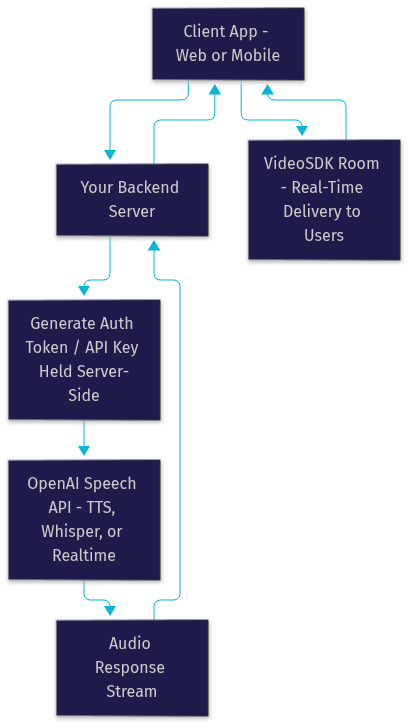
The key insight from this flow: your backend is the trust boundary. Clients never talk to OpenAI directly with raw credentials, and audio destined for live playback flows through a real-time transport rather than plain HTTP responses.
Common Pitfalls During Setup and How to Avoid Them
Three failures account for most broken setups. First, exposing the API key in client code, which you avoid with the server-side proxy pattern above. Second, hitting rate limits on realtime sessions because concurrent connections were not budgeted. Third, assuming audio formats just work: OpenAI speech endpoints expect specific input formats for transcription and return specific output formats for TTS, and mismatches produce silent failures or errors that look like network problems. Validate formats at the boundary of your system.
Choosing the Right OpenAI Speech Model
Model choice drives cost, latency, and capability more than any other decision in an OpenAI speech integration. Picking the most capable model for everything is the most expensive mistake in this space.
Model Comparison Table: GPT-4o Audio, GPT-4o Mini TTS, TTS, Whisper, and GPT-Realtime
The table below maps each OpenAI speech model to its best-fit use case.
| Model | Primary Job | Latency Profile | Relative Cost | Best For |
|---|---|---|---|---|
| GPT-4o audio | Multimodal speech understanding and generation | Medium | High | Apps needing tone, emotion, and audio reasoning |
| GPT-4o mini TTS | Directed voice generation | Low | Low-Medium | Narration with style control on a budget |
| TTS models | Standard text-to-speech | Low | Lowest | High-volume, straightforward narration |
| Whisper | Transcription and translation | Batch or low | Low | Post-call and real-time speech-to-text |
| GPT-Realtime | Live bidirectional voice sessions | Sub-second target | Highest | Conversational agents and phone-style interactions |
The most important row for most builders is GPT-Realtime. It is the only option when the user expects a live conversation, because stitching separate STT, LLM, and TTS calls together adds hundreds of milliseconds of orchestration overhead that users perceive as lag.
Decision Framework for Selecting a Model
Use this simple decision sequence. If your users speak and expect spoken replies in real time, use GPT-Realtime. If you only need to convert stored or streamed audio into text, use Whisper. If you need to turn text into audio for playback, start with the standard TTS models, and move to GPT-4o mini TTS when you need style direction, or GPT-4o audio when the application must understand or reason about the audio itself. A common production pattern is a hybrid: GPT-Realtime for live sessions, Whisper for post-call transcription and analytics, and TTS for notifications and pre-recorded prompts.
Integrating OpenAI Speech into Applications
Integration architecture is where OpenAI speech projects succeed or fail. The model calls are the easy part; the hard part is moving audio between users and the API reliably, securely, and fast.
Architectural Patterns: Server-Side Token Generation and Client-Side Streaming
Two patterns dominate production OpenAI speech integrations. The first is the proxy pattern: every audio request flows through your backend, which authenticates, calls OpenAI, and returns results. It gives you full control over logging, rate limiting, and cost attribution, at the cost of added latency and backend load. The second is the ephemeral token pattern for realtime sessions: your backend mints a short-lived session token and hands it to the client, which then connects directly to the realtime endpoint and streams audio. This cuts your backend out of the audio path entirely, which is the right call for latency-sensitive live voice.
For delivering the resulting audio to users in interactive applications, you need a real-time transport. This is where a platform like VideoSDK fits: the VideoSDK Agent SDK connects OpenAI speech models into a room-based real-time session, so users on web, mobile, or even regular phone lines via SIP telephony can talk to your voice agent. The agent worker, a Python process, manages the session lifecycle while participants join through standard VideoSDK rooms.
Real-Time Voice with GPT-Realtime: How the Bidirectional Audio Loop Works
GPT-Realtime works by maintaining a persistent, bidirectional audio session between the client and the model. The client streams microphone audio in small chunks over the session connection. The model continuously processes incoming audio, detects when the user has finished speaking, formulates a response, and streams synthesized speech back over the same connection. There is no separate transcription call, no separate text generation call, and no separate TTS call: the loop is one session.
The diagram below shows how this loop typically sits inside a production voice agent built on VideoSDK, where the agent worker bridges the OpenAI realtime session and the room that end users connect to.
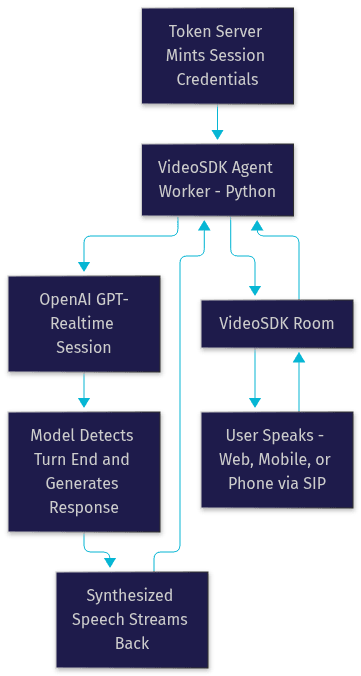
Two details deserve attention. Turn detection, deciding when the user has stopped talking, is handled by the model's voice activity detection rather than your code, which simplifies the loop but means you should test interruption behavior carefully. And session state is ephemeral: if the connection drops, you need your own reconnection and context restoration logic if the conversation should survive.
Best-Practice Tips for Error Handling and Retry Logic
Treat OpenAI speech calls as fallible network operations. Retry transient failures with exponential backoff, but never retry a realtime session blindly mid-conversation; instead, tear down and re-establish the session with preserved context. For TTS and transcription, implement client-side timeouts so a stalled request cannot hang your whole pipeline. Log the request ID that OpenAI returns with each response, because it is the fastest path to support when something goes wrong.
Optimizing Performance and Cost for OpenAI Speech
Latency and cost are the two constraints that shape every OpenAI speech deployment. Both are manageable, but only if you measure them deliberately.
Latency Considerations: Network, Chunk Size, and Streaming Mode
Perceived voice latency has three components: time to send audio upstream, model processing time, and time to deliver the response downstream. You control the first and third more than the second. Place your backend or session origin close to OpenAI's serving infrastructure, since cross-region hops add tens to hundreds of milliseconds per round trip. For transcription and TTS, prefer streaming modes over batch responses whenever the user is waiting: streaming TTS begins playing the first audio chunk while later chunks are still generating, which can cut perceived wait time dramatically. Chunk size matters too: smaller audio chunks upstream reduce time-to-first-response, while larger chunks reduce per-chunk overhead. Most teams land on small chunks for live sessions and larger batches for offline processing.
When you deliver voice through a real-time layer, the transport matters as much as the model. WebRTC-based delivery, which is what VideoSDK rooms use, keeps end-to-end voice latency in the sub-second range that live conversation requires, whereas HTTP-based polling or HLS-style delivery introduces delays users immediately notice.
Cost Management: Pricing Tiers, Token Usage, and Budgeting Strategies
OpenAI speech pricing is usage-based, and audio is priced differently from text: realtime audio sessions bill on input and output audio, transcription bills per minute of audio, and TTS bills per character of input text. The practical budgeting levers are model selection, since mini variants cost a fraction of the flagship models, session length, since realtime sessions bill for their full duration, and hybrid routing, where cheap models handle routine turns and capable models handle complex ones. Set per-key spending limits in your OpenAI account, and attribute costs per customer or per feature by tagging requests with metadata your logging layer can group on.
Monitoring and Scaling: Using Metrics and Alerts
Track four metrics from day one: time-to-first-audio, session error rate, concurrent session count against your rate limits, and cost per session. Alert on error rate spikes and approaching concurrency ceilings, because realtime voice failures are user-visible instantly. If you run agents on a managed runtime like VideoSDK Agent Cloud, use its pipeline observability to trace each session through the full speech loop rather than reconstructing timing from scattered logs.
Future Trends in OpenAI Speech Technology
The OpenAI speech surface is moving quickly, and the direction of travel is toward richer, more controllable, and more multimodal voice.
Emerging Features: Multilingual Voice Switching, Voice-Style Control, and Avatar Integration
Three trends stand out for 2026. First, multilingual voice switching is getting smoother, with models maintaining a consistent voice identity across languages rather than sounding like a different speaker per language. Second, voice-style control keeps deepening: the newer TTS models accept natural-language direction about delivery, tone, and pacing, which turns voice design from a parameter-tuning exercise into a prompting exercise. Third, voice is converging with visuals. Avatar providers can now lip-sync generated speech in real time, and VideoSDK's agent framework supports avatar integration alongside voice, pointing toward agents that speak and appear on camera simultaneously.
How Developers Can Stay Ahead: Community Resources, Upcoming Releases, and Roadmap Signals
The reliable way to track this space is primary sources. Watch the official OpenAI documentation and changelog for endpoint and model updates, since deprecations here are frequent and breaking. Follow the VideoSDK Discord community and the VideoSDK GitHub repositories for practical integration patterns, and check independent benchmarks like Artificial Analysis for objective comparisons between speech models as they evolve. When a new model lands, re-run your own latency and cost measurements rather than trusting vendor numbers, because your traffic profile is unique.
Definitions Glossary
Text-to-Speech (TTS): The conversion of written text into synthesized spoken audio. OpenAI's TTS models support voice selection and natural-language style direction, and stream audio chunks as they are generated.
Speech-to-Text (STT): The transcription of audio into text. OpenAI's Whisper model family handles transcription and translation across many languages, in both batch and streaming modes.
GPT-Realtime: OpenAI's session-based model family for live bidirectional voice, processing incoming speech and streaming spoken responses over a single persistent connection.
Turn Detection: The mechanism that decides when a user has finished speaking and the model should respond. In GPT-Realtime sessions this is handled by built-in voice activity detection rather than application code.
Agent Worker: The Python process that runs a voice agent and manages its session lifecycle. In VideoSDK's agent framework, the worker bridges AI models and the real-time room that users connect to.
Ephemeral Session Token: A short-lived credential minted server-side that lets a client connect directly to a realtime session without ever holding the long-lived API key.
Key Takeaways
- OpenAI speech spans three distinct capabilities, text-to-speech, speech-to-text, and real-time bidirectional voice, and each requires a different architectural pattern.
- Never expose your OpenAI API key in client code; use a server-side proxy or ephemeral session tokens for realtime sessions.
- Use GPT-Realtime for live conversations, Whisper for transcription, and the TTS family for narration, with mini variants where cost matters.
- Streaming modes and WebRTC-based delivery, such as VideoSDK rooms, are what keep perceived voice latency in the sub-second range users expect.
- Monitor time-to-first-audio, error rates, concurrency, and cost per session from day one, because voice failures are instantly user-visible.
Conclusion
OpenAI speech has matured into a complete audio stack: Whisper for understanding, TTS for generation, and GPT-Realtime for live conversation. The developers who ship successful voice products are the ones who treat model selection, authentication, latency, and cost as first-class engineering decisions rather than afterthoughts, and who pair the speech models with a real-time transport built for sub-second interaction. If you are building a voice agent, the fastest path is combining OpenAI speech models with the VideoSDK AI Agents framework, which handles the room, the transport, and the session lifecycle so you can focus on the conversation itself. Explore the official OpenAI speech documentation and the VideoSDK quickstart to get building. What are you building with OpenAI speech? Drop a comment, I would love to hear what kind of voice experience you are working on.
Free $20 Balance for AI Voice Agents & Video Calls
FAQ