


Buffering is a video player downloading media ahead of the playhead and holding it in memory, so playback survives short network slowdowns. When media arrives slower than it plays, the buffer empties and playback pauses to refill: that pause is rebuffering. Live streams stall more easily because a player can only buffer up to the newest published segment.
This guide is for developers and streaming engineers whose viewers see the spinner. When viewers ask what does buffering mean, they usually mean that pause. The everyday buffering meaning and the technical one are the same thing seen from two sides: the viewer sees a wait, the player sees an empty buffer. This page covers the playback buffer in HTTP streaming players, not the jitter buffer inside video calls. It adds what viewer-focused explainers skip: the spec rules behind stalls, player settings, and how to measure rebuffering.
What does buffering do inside a video player?
Buffering does one job: it keeps media ready before the playhead needs it. A streaming player downloads segments, appends them to the media element, and plays from the front of that store. Players buffer video ahead of the playhead because network throughput varies from second to second, while playback consumes exactly one second of media per second.
The browser exposes this store directly. The buffered property on HTMLMediaElement, documented by MDN, returns the time ranges the browser holds. The forward buffer is the distance from the current playback position to the end of the range that contains it.
Three phases decide what the viewer sees. At startup, the player waits until enough media arrives to cross a start threshold. In steady state, each downloaded segment adds its duration and playback drains the store continuously. When downloads fall behind for long enough, the buffer reaches zero, playback pauses, and the player waits until it crosses the threshold again.
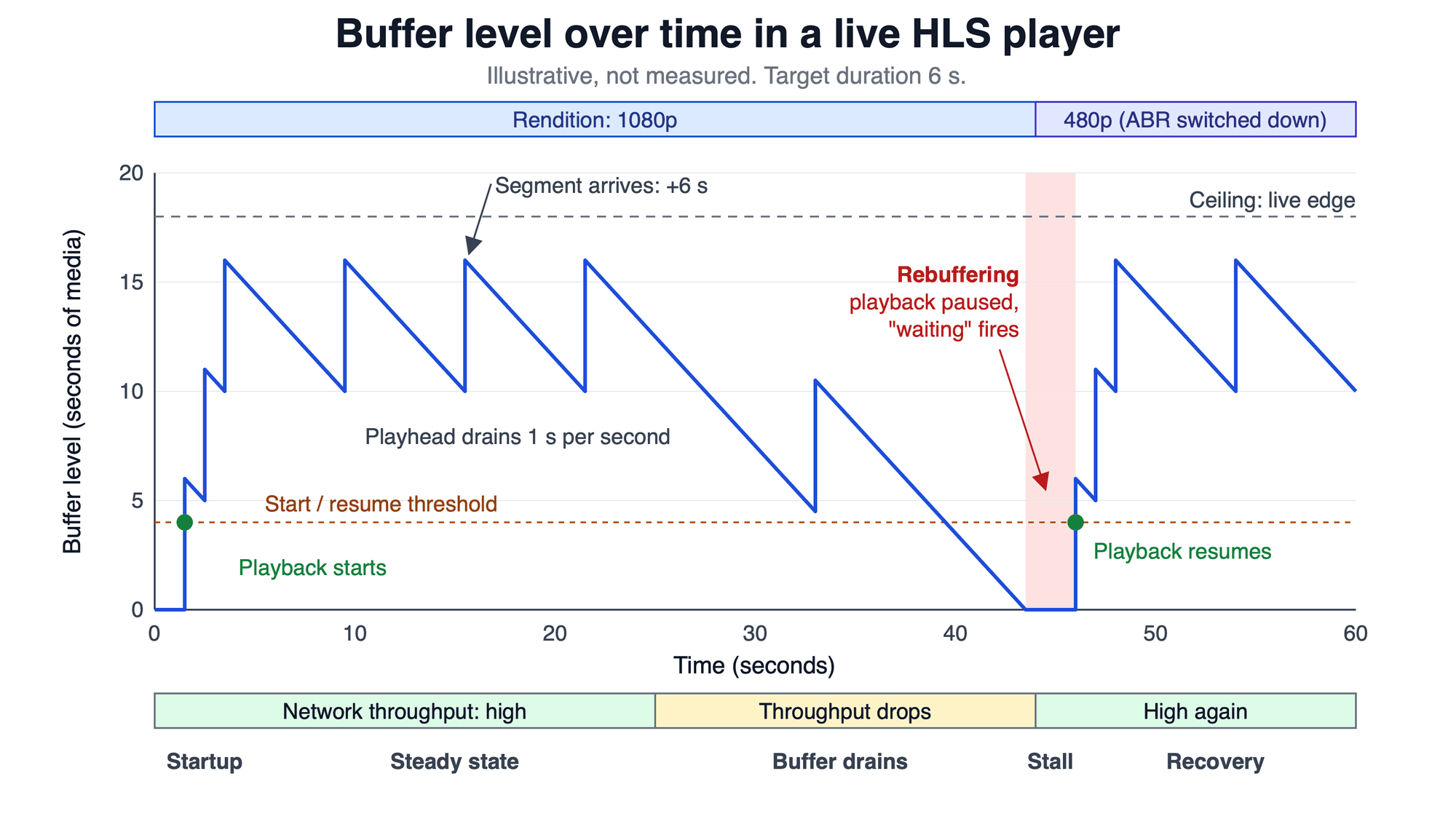
Illustrative, not measured: each 6-second segment adds one target duration, the playhead drains one second per second, and the stall lasts until the buffer refills past the resume threshold.
Why live streams buffer more than recorded video
Live streams buffer more than recorded video because the player cannot download what has not been encoded yet. A video on demand (VOD) player can fill minutes ahead. A live player's buffer is capped by the live edge, the newest segment listed in the playlist.
HTTP Live Streaming (HLS) sets that cap in its spec. RFC 8216, the HLS specification, says in section 6.3.3 that a client should not start playback less than three target durations from the end of a live playlist, because doing so can trigger playback stalls. Apple's HLS Authoring Specification recommends 6-second target durations (requirement 7.5), so three target durations is about 18 seconds of cushion.
Every second of that cushion is also a second of delay behind the live edge. Low-Latency HLS (LL-HLS) shrinks it with partial segments: Apple recommends a one-second part target (14.2c) and a hold-back of at least three parts (14.3). A smaller cushion means less delay and less room to absorb a slow download.
Real-time streams avoid segments altogether. WebRTC (Web Real-Time Communication) receivers hold incoming frames in a jitter buffer, and MDN documents the jitterBufferDelay statistic that measures time spent there. See how HLS and WebRTC trade delay for scale.
What causes rebuffering on a live stream
Rebuffering on a live stream happens when the next segment is not in the buffer when the playhead reaches it. The table maps each common cause to where it starts, what viewers see, and the rule it breaks. An IDR (instantaneous decoder refresh) frame is the keyframe a decoder can start from.
| Cause | Where it starts | What viewers see | Rule or source |
|---|---|---|---|
| Throughput below the lowest rendition's bitrate | Viewer network | Stalls even at the lowest quality | Apple 9.9: provide multiple bit rates |
Encoder peaks above the declared BANDWIDTH | Encoder | Stalls on high-motion scenes | Apple 1.29: live peak under 125% of BANDWIDTH |
| Segments longer than the target duration | Encoder or packager | Stalls near segment boundaries | RFC 8216, 4.3.3.1 |
| Segments that do not start on an IDR frame | Encoder | Rendition switches that cannot start cleanly | Apple 7.4 |
| Playlist updates published late | Origin or content delivery network (CDN) | Waiting at the live edge | Apple 8.24: stale after three target durations |
| Player starts too close to the live edge | Player settings | A stall soon after joining | RFC 8216, 6.3.3 |
Five of the six causes start on the publisher side, so the fix usually sits in the pipeline, not on the viewer's device. RFC 8216 section 4.3.3.1 states that segments longer than the target duration "can trigger playback stalls or other errors."
Viewers can still check their own side: a congested Wi-Fi network or other large downloads on the same connection both cut the throughput the player gets.
How to stop buffering on a live stream
To stop buffering on a live stream, give the player a lower rung to fall to, keep the encoder inside its declared bitrate, and give the buffer enough cushion. In order:
- Offer an adaptive bitrate (ABR) ladder with a low rung. Apple requirement 9.9 makes multiple variants mandatory. The player can then drop quality instead of stalling; this is how adaptive bitrate streaming picks a rendition.
- Cap peak bitrate. For live content, Apple 1.29 requires the measured peak to stay under 125% of the declared
BANDWIDTH. Capped rate control keeps it there; see constant vs variable bitrate for live streaming. - Fix the keyframe interval to the segment length. Apple 7.4 requires every segment to start with an IDR frame; see what a keyframe is and why segments start on one.
- Serve playlists and segments from a CDN. A CDN serves cached copies from servers placed close to viewers; see using a CDN for live streaming.
- Give the player hold-back. In the hls.js API documentation (v1.7.3),
liveSyncDurationCountdefaults to 3 target durations, and the docs warn that decreasing it "is likely to cause playback stalls." - Measure before and after. Change one setting at a time and compare stall counts.
Raise hold-back first when stalls cluster right after viewers join, and fix the ladder first when they cluster on weak networks.
How to measure rebuffering?
Rebuffering is measured from player events. In the browser, the waiting event, documented by MDN, fires when playback stops because of a temporary lack of data, and the playing event fires when it resumes. The stalled event is different: it fires when the browser is fetching data that unexpectedly does not arrive. hls.js adds a BUFFER_STALLED_ERROR when playback is stuck because the buffer ran out.
Two numbers cover most of the picture. Rebuffer ratio is total stall time divided by watch time: 36 seconds of stalls in a 60-minute session is 36 / 3,600, or 1%. Startup time is the gap between pressing play and the first frame.
Both matter to viewers. In a 2012 study of 23 million views on Akamai's network by Krishnan and Sitaraman, a viewer whose rebuffer delay equalled 1% of the video's duration played 5% less of it than a similar viewer with no rebuffering. Viewers began abandoning after 2 seconds of startup delay, and each extra second raised abandonment by 5.8%. The data is from 2012; treat it as direction, not a current benchmark. For the wider metric set, see quality of experience (QoE) metrics.
What is the video buffer window?
The video buffer window means one of two things, depending on who uses the phrase. In a player, it is how far ahead the player may buffer: in hls.js, maxBufferLength (default 30 seconds) is the length it tries to reach, and maxMaxBufferLength (default 600 seconds) is a limit it never exceeds.
In a live playlist, it is the sliding window of segments the server lists. Apple requirement 8.11 calls for at least six segments in a live playlist, so with 6-second targets the window spans at least 36 seconds. That window limits how far back a viewer can seek, not how far ahead the player can buffer.
Buffer settings in a VideoSDK HLS player
HLS buffer settings belong to the viewer app: in a browser without native HLS playback, the app plays the stream through a JavaScript library such as hls.js and passes it a buffer configuration. VideoSDK's React guide, Setup HLS Player, plays hlsUrls.playbackHlsUrl with hls.js once hlsState is HLS_PLAYABLE.
The guide's example config sets maxBufferLength: 0, maxMaxBufferLength: 1, liveSyncDurationCount: 1, maxStarvationDelay: 1 and startLevel: 0. Against the hls.js defaults (30, 600, 3 and 4), that keeps the player close to the live edge with almost no forward buffer: it favours a short delay over stall resistance. startLevel: 0 starts on the lowest rendition, which shortens startup.
If your viewers rebuffer, raise liveSyncDurationCount toward 3 first, then maxBufferLength.
Glossary
Playhead (playback position): the point in the media timeline that is on screen now. The forward buffer is measured from it.
Forward buffer (buffer length): seconds of downloaded media ahead of the playhead. It is what the player spends during a slow download.
Rebuffering (stall): a pause in playback because the forward buffer reached zero. Browsers signal it with the waiting event.Target duration (EXT-X-TARGETDURATION): the maximum segment duration an HLS media playlist declares, in whole seconds.
Live edge (hold-back): the newest media a live playlist lists. Hold-back is how far behind it the player starts.
Jitter buffer: a short queue in real-time receivers that evens out packet arrival times. It is a different mechanism from the playback buffer.
Key takeaways
- Buffering is a player storing media ahead of the playhead; rebuffering is the pause when that store runs dry.
- Live streams are more exposed than recorded video because the buffer can never extend past the live edge.
- Five of the six common causes start with the publisher: bitrate peaks, long segments, missing IDR frames, late playlists or too little hold-back.
- Decision rule: if stalls cluster right after joining, raise hold-back; if they cluster on weak networks, add a lower rung.
Start by logging waiting events and computing the rebuffer ratio for a week, so every change has a baseline. To build an HLS stream with its own player, start with the VideoSDK HLS guide; a new account includes a $20 credit.
Frequently asked questions
What is buffering?
Buffering is when a video player loads media before it is needed and keeps it in memory, so short drops in network speed do not interrupt playback. In computing, a data buffer is memory that holds data temporarily while it moves from one place to another, and a player's buffer is one example. If downloads fall behind for long enough, the stored media runs out and playback pauses until more arrives.
What is the purpose of buffering?
The purpose of buffering is to absorb the gap between how fast media arrives and how fast it plays. Throughput changes from moment to moment and downloads land in segment-sized bursts, so without stored media the player would pause at every dip. The buffer also guides quality choices: hls.js's adaptive logic picks renditions it predicts will not drain the buffer before the next segment arrives.
Is buffering the same as latency?
No. Latency is the delay between an event being captured and being shown; buffering is media held ahead of the playhead. The two meet on live streams, where a deeper buffer can only come from sitting further behind the live edge. Stalls add latency as well: by default, hls.js adds one second to its target delay after each stall (liveSyncOnStallIncrease), so a stream that stalls often drifts further behind.