


CBR vs VBR is a choice between a predictable rate and efficient quality. Use CBR (constant bit rate) for live contribution feeds, where the receiving service or network expects a steady rate. Use VBR (variable bit rate) for recordings and on-demand files, where quality per byte matters more. For live streaming renditions, capped VBR sits between the two.
This guide is for developers who have to pick a rate-control mode in an encoder or streaming pipeline. It covers what each mode does, the peak limits in HTTP Live Streaming (HLS), and where the choice sits when you build on a video SDK. For the definition of bitrate itself, see what bitrate is and how it behaves in a WebRTC call.
How Constant Bit Rate (CBR) encoding works
Constant bit rate (CBR) encoding holds the encoder's output at one target rate, second after second, whatever the picture contains. The encoder gives a static slide the same budget as a crowd scene and changes how coarsely it quantizes each frame to stay on that budget. When a scene needs fewer bits than the target, a strict CBR stream adds stuffing packets to keep the rate up, as the Wikipedia entry on constant bitrate describes.
The payoff is predictability. A 2,500 kbps CBR stream needs 2,500 kbps of uplink at every moment, so you can size a connection or a content delivery network (CDN) ingest once and trust the number. At 30 frames per second that budget averages about 83 kilobits per frame (2,500 / 30), which is why frame rate matters as much as bitrate when you set one.
The cost is quality in the hard parts: the same Wikipedia entry notes that CBR may not allocate enough data to complex sections and wastes data on simple ones.
Because the rate never changes, CBR also makes size and bandwidth arithmetic exact:
file size (bytes) = bitrate (bits per second) x duration (seconds) / 8
A one-hour video stream at 2,500 kbps is 2,500,000 x 3,600 / 8 = 1,125,000,000 bytes, about 1.13 GB before audio and container overhead. Uncompressed pulse-code modulation (PCM) audio is constant by nature: 48,000 samples per second x 16 bits x 2 channels is 1,536,000 bits per second, or 1,536 kbps.
How variable bit rate (VBR) encoding works
Variable bit rate (VBR) encoding lets the output rate rise and fall with the content: more bits for complex or fast-moving scenes, fewer for static ones. According to the Wikipedia entry on variable bitrate, VBR gives a better quality-to-space ratio than a CBR file of the same data, at the price of a more complex encode that can take longer.
VBR comes in three common forms:
- Quality-targeted VBR. The encoder aims for a steady quality instead of a rate. In FFmpeg's libx264 encoder this is
-crf, the constant rate factor (CRF), which the FFmpeg codec documentation describes as the quality setting for constant quality mode. The file size is unknown until the encode ends. - Average-bitrate VBR, usually two-pass. The encoder hits a target average across the whole file. A first pass analyses the content and a second pass spends the bits. The same Wikipedia entry notes that multi-pass encoding cannot be used for live streaming, because each pass reads the whole input.
- Capped VBR (constrained VBR). This is VBR with a ceiling. FFmpeg's
-maxratesets the maximum and requires-bufsize, the rate-control buffer the encoder measures itself against. It keeps most of VBR's efficiency while bounding the peaks a network or player has to absorb.
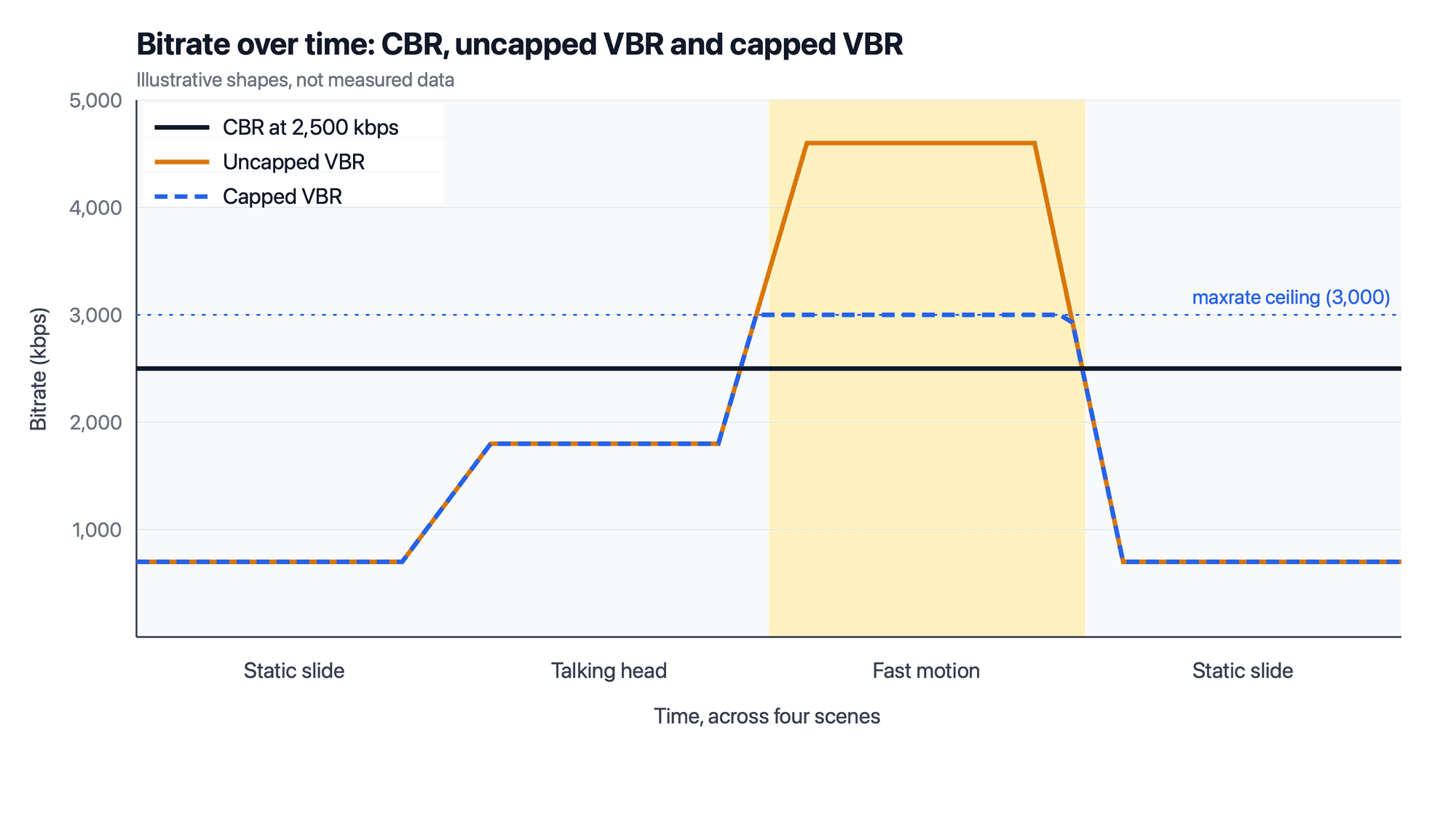
Illustrative, not measured: capped VBR tracks scene complexity until it meets the ceiling that maxrate and bufsize set.
CBR vs VBR Compared
The table compares CBR vs VBR, with capped VBR as the middle option, on the attributes that decide a streaming setup.
| Attribute | CBR | Uncapped VBR | Capped VBR |
|---|---|---|---|
| Bitrate over time | Flat at the target | Follows scene complexity | Varies below a set maximum |
| Quality over time | Drops in complex scenes | Most even | Even until a scene hits the cap |
| Bandwidth planning | Exact | Peaks unknown in advance | Peak bounded by maxrate |
| Encoding passes | One, real time | One (quality mode) or two (files only) | One, real time |
| Typical use | Live contribution feeds | Recordings, uploads, archives | HLS renditions, live or on demand |
| Fit with adaptive bitrate (ABR) ladders | Works, but spends bits on simple scenes | Peaks can overshoot the rate the playlist declares | Peaks stay near the declared rate |
The row that decides most setups is bandwidth planning: CBR and capped VBR give you a number to plan a network around, and uncapped VBR does not.
CBR or VBR for live streaming?
For a live contribution feed, the stream you push from an encoder to a platform or media server, use CBR unless the receiving service asks for something else. YouTube's live encoder settings list "Bitrate encoding: CBR", as of 25 September 2026. A steady input also means your uplink never sees a spike your encoder chose. Hardware and desktop encoders expose the same modes under their own setting names, so check which label maps to CBR before you go live. For the bitrate each platform accepts, see streaming bitrate settings for Twitch, YouTube and OBS.
For live HLS renditions that you encode and package yourself, capped VBR is allowed, within limits. RFC 8216, section 4.3.4.2, defines the playlist's BANDWIDTH attribute as the peak segment bit rate and AVERAGE-BANDWIDTH as the average segment bit rate, and warns that an inaccurate value can cause playback stalls. Apple's HLS Authoring Specification adds numbers for live (linear) content: the measured peak bit rate must be less than 125% of BANDWIDTH, and the average over about an hour must be less than 110% of AVERAGE-BANDWIDTH (requirements 1.28 and 1.29). Players pick renditions from those declared rates, which is how adaptive bitrate streaming switches between renditions, so each rung's maxrate should sit inside what its playlist line promises.
WebRTC calls and interactive streams fit neither label. The sender's congestion controller keeps recomputing a target bitrate from network feedback, as the Internet Engineering Task Force (IETF) Google Congestion Control draft describes, so the rate moves with the network rather than with the scene.
VBR vs CBR for recordings and on-demand video
For files watched on demand, VBR vs CBR usually favours VBR, because a player can buffer ahead and absorb short peaks. HLS still bounds it. For video on demand (VOD), Apple's specification requires the measured peak bit rate to be within 10% of BANDWIDTH and the average segment bit rate to be within 10% of AVERAGE-BANDWIDTH (requirements 1.26 and 1.27). It also says the peak SHOULD be no more than 200% of the average (requirement 1.30).
That gives a simple rule for on-demand work:
- For an archive master that nobody streams directly, use quality-targeted VBR with no cap.
- For a file you will upload to a platform that re-encodes it, use quality-targeted or two-pass VBR at a generous rate.
- For HLS renditions you serve yourself, use capped VBR or two-pass VBR, with the peak no more than twice the average.
Where the rate-control choice sits when you build on a video SDK
An app built on a real-time video SDK usually involves three encoders, and you control a different amount of each:
- Encoders you run yourself (OBS Studio, FFmpeg, hardware): you pick the rate mode, and CBR is the safe default for a live feed.
- The SDK's in-app encoder for camera and screen share: it follows congestion control, so you pick a resolution and a quality profile.
- The platform's server-side encoder for HLS and recordings: the platform picks the mode, and you pick a quality tier.
In VideoSDK, those three map to documented settings. The JavaScript SDK's custom video track guide (updated 11 September 2026) passes an encoderConfig such as "h720p_w1280p" and a bitrateMode of BANDWIDTH_OPTIMIZED, BALANCED (the default) or HIGH_QUALITY to createCameraVideoTrack(). Its table lists 1,000, 1,500 and 2,000 kbps for those three modes at 1280x720 and 30 fps. The guide describes these as quality profiles and does not document a CBR or VBR switch.
For your own encoders, VideoSDK documents WebRTC-HTTP Ingestion Protocol (WHIP) ingest from OBS Studio into a room (updated 10 July 2026). The rate mode is set in OBS, and the guide does not recommend one. [CONFIRM: recommended rate control and bitrate for WHIP ingest into VideoSDK, with product team] For HLS output, the start HLS API takes a quality of "low", "med" or "high" rather than a rate mode.
Glossary
Rate control (bitrate mode): The encoder logic that decides how many bits each frame gets to meet a target rate, quality or ceiling.
VBV buffer (video buffering verifier, bufsize): The model buffer an encoder measures its output against, set in FFmpeg with -bufsize.CRF (constant rate factor): The libx264 quality-targeted mode, set with -crf, which aims for a quality level instead of a bitrate.Capped VBR (constrained VBR): Variable bit rate with a maximum rate and buffer, so peaks stay bounded while simple scenes still save bits.
Two-pass encoding (multi-pass): An encode that analyses the whole file before spending bits, so it suits files but not live streams.
BANDWIDTH and AVERAGE-BANDWIDTH: HLS playlist attributes that declare a rendition's peak and average segment bit rates.
Key takeaways
- CBR vs VBR comes down to predictability against efficiency: CBR holds one rate, and VBR moves the rate to hold quality.
- Use CBR for live contribution feeds; YouTube's live encoder settings list CBR as of 25 September 2026.
- Use capped VBR for HLS renditions, and for live content on Apple devices keep the measured peak under 125% of the declared BANDWIDTH.
- Use quality-targeted or two-pass VBR for recordings and on-demand files, where the whole file can be analysed and buffered.
Set the rate mode where each encoder sits: your own encoder for ingest, the SDK's quality profile for in-app video, and the platform's tier for HLS. To see how an interactive stream becomes HLS output in VideoSDK, start with the interactive livestream HLS guide.
Frequently asked questions
What is CBR?
CBR stands for constant bit rate, an encoding mode that keeps the output at one fixed number of bits per second whatever the scene contains. It makes bandwidth and file size predictable, which suits live contribution feeds, at the cost of lower quality in complex scenes and wasted bits in simple ones. Outside media encoding, the same three letters also name unrelated things, such as a comic-book archive format.
What is VBR?
VBR stands for variable bit rate, an encoding mode that raises the bitrate for complex or fast scenes and lowers it for simple ones to keep quality steady. It gives better quality per byte than CBR at the same average rate, but its peaks are less predictable. Capped VBR adds a maximum rate and buffer so those peaks stay bounded for streaming.
Does VBR use less bandwidth than CBR?
On average, often yes: at the same visual quality, VBR usually needs a lower average bitrate because it saves bits on simple scenes. Its peaks can be higher than a CBR stream's, though, so the bandwidth a viewer needs at the worst moment may rise. That is why HLS playlists declare both a peak BANDWIDTH and an AVERAGE-BANDWIDTH for each rendition.