


Video transcoding is decoding an already encoded video and encoding it again with different settings, such as another codec, resolution or bitrate. Live streams need it because one incoming feed must become a ladder of versions while the event runs, so each viewer's player can pick the version its screen and network can handle.
This guide is for developers building live video. It covers transcoding for streaming, not video editing: how it differs from encoding and transmuxing, how a live transcoder builds an aligned HTTP Live Streaming (HLS) ladder, what each rung costs in compute, and where the work runs.
What is video transcoding?
Video transcoding is the process of decoding a stream and then encoding it again, as the FFmpeg manual defines it in section 3.2. In streaming, it turns the stream you have into one a given device, network or player can use.
A transcoding workflow has three steps:
- Decode the compressed video into raw frames.
- Process the frames: scale, change the frame rate, deinterlace or overlay.
- Encode the frames again with the target codec, resolution and bitrate.
The types of transcoding are named by what changes. AWS's guide to video transcoding calls a bitrate-only change transrating and a resolution or aspect-ratio change transizing. A codec change, such as H.264 to AV1, swaps the encoder. The FFmpeg manual advises transcoding only when you need to, because encoding is computationally expensive and in most cases lossy.
Transcoding vs encoding: what is the difference?
Transcoding vs encoding comes down to the input. Encoding compresses raw frames from a camera or screen; transcoding starts from compressed video, so it must decode first. That difference between encoding and transcoding explains the quality cost: a transcoder never sees the original picture. For codecs, containers and encoder settings, see how video encoding works.
The table adds transmuxing, a third process often confused with both.
| Process | Input | Output | Quality cost | Typical place in a live pipeline |
|---|---|---|---|---|
| Encoding | Raw frames | Compressed stream | Lossy with streaming codecs | The broadcaster's app or hardware encoder |
| Transcoding | Compressed stream | New codec, size or bitrate | A second round of loss | The server that builds the ladder |
| Transmuxing | Compressed stream | Same stream in a new container | None, nothing is re-encoded | The packager that writes HLS segments |
Read it by the Input column: encoding vs transcoding is a question of where your video comes from.
Transmuxing vs transcoding
Transmuxing vs transcoding is repackaging vs re-encoding. Transmuxing, or remuxing, moves encoded video and audio into a new container without decoding them. The FFmpeg manual calls this streamcopy and notes that, with no decoding or encoding, it is very fast and loses no quality. It cannot resize the picture or change the bitrate. One live example: an H.264 feed arriving over the Real-Time Messaging Protocol (RTMP) is cut into HLS segments unchanged.
What is video transcoding for live streaming?
Video transcoding for live streaming, or live transcoding, turns one incoming stream into several versions of the same content while the event is still running. The broadcaster sends one high-quality stream, and a transcoder produces lower resolutions and bitrates in real time for viewers on smaller screens and slower connections.
In HLS (HTTP Live Streaming), each version is a variant stream. RFC 8216, the HLS specification, describes a master playlist that lists the variant streams, each at its own bitrate, format and resolution, and says clients should switch between them to adapt to network conditions. That set is the adaptive bitrate (ABR) ladder; the transcoder builds it, and how players choose a rung is the player's half.
Sending the source to everyone fails three ways: it stalls slower connections, wastes pixels on phones, and may use a codec some devices cannot decode.
How live transcoding builds an ABR ladder
Live transcoding builds the ladder by decoding the incoming stream once and encoding it several times.
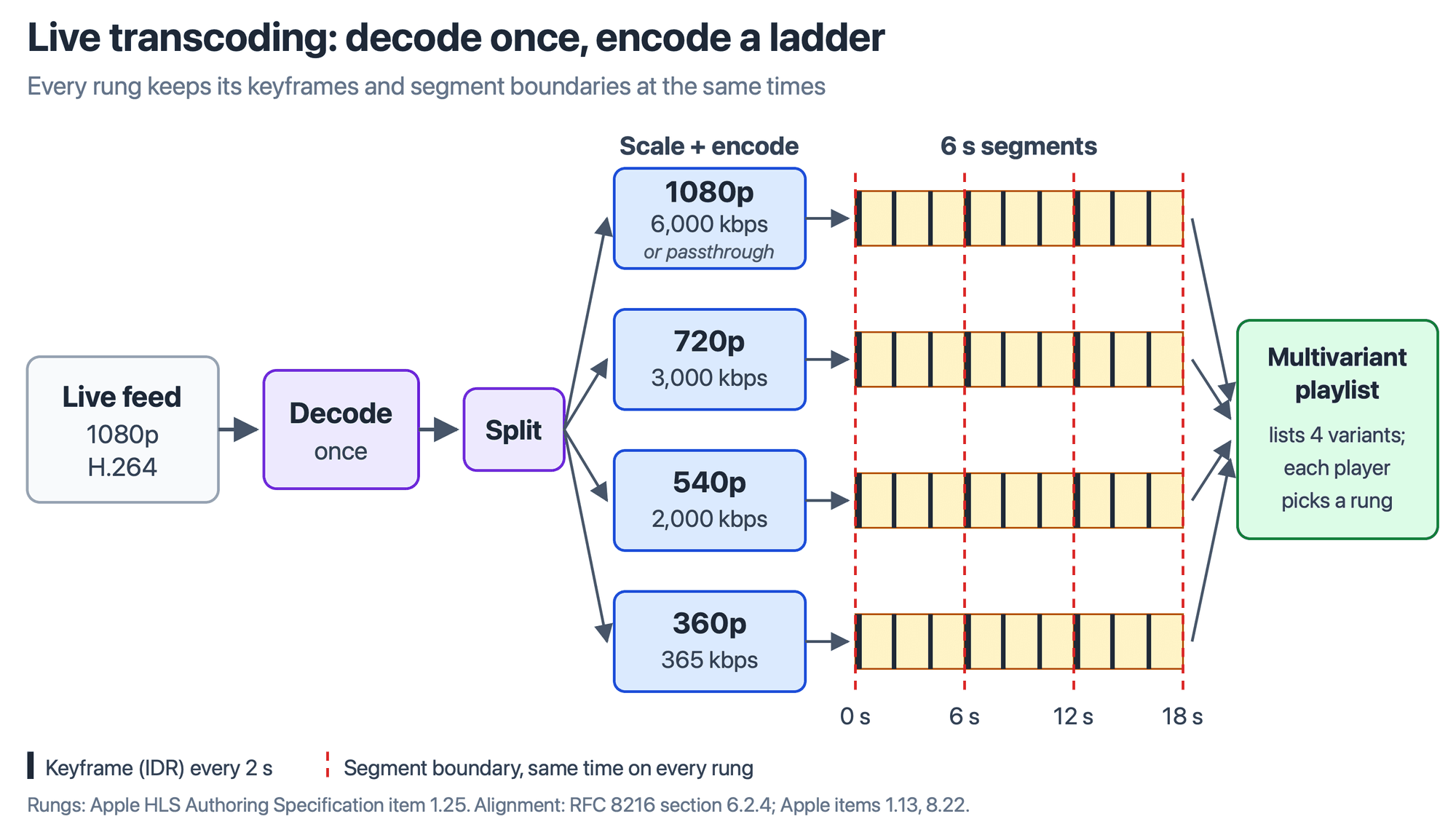
One decode feeds every rung (the top one can pass through), and keyframes and segment boundaries share timestamps, so players can switch cleanly.
The decoded frames are split into one copy per rung, and each copy is scaled and encoded at its own bitrate. FFmpeg's split filter makes the copies; four separate transcodes would decode the same frames four times.
The rungs must also line up, or players cannot switch cleanly:
- RFC 8216, section 6.2.4, requires the same content with matching timestamps in every variant stream, and the same target duration in every media playlist.
- Apple's HLS Authoring Specification recommends keyframes, or instantaneous decoder refresh (IDR) frames, every two seconds (item 1.13), 6-second target durations (item 7.5) and segment boundaries at the same times in every variant (item 8.22).
Alignment is a keyframe problem. The FFmpeg formats documentation says its HLS muxer cuts a segment at the next keyframe after hls_time has passed, so every rung needs keyframes at the same timestamps, forced by time. For the encoder side, see what a keyframe interval controls.
Code quickstart: build a live ABR ladder with FFmpeg
This FFmpeg command builds the four rungs used in the cost table below from one input: it decodes once, splits the frames into four copies, and writes an HLS ladder whose rungs share keyframe times and segment boundaries.
ffmpeg -re -i input.mp4 \
  -filter_complex "[0:v]split=4[v1][v2][v3][v4];[v1]scale=w=1920:h=1080[v1out];[v2]scale=w=1280:h=720[v2out];[v3]scale=w=960:h=540[v3out];[v4]scale=w=640:h=360[v4out]" \
  -map "[v1out]" -c:v:0 libx264 -b:v:0 6000k \
  -map "[v2out]" -c:v:1 libx264 -b:v:1 3000k \
  -map "[v3out]" -c:v:2 libx264 -b:v:2 2000k \
  -map "[v4out]" -c:v:3 libx264 -b:v:3 365k \
  -map a:0 -map a:0 -map a:0 -map a:0 -c:a aac -b:a 128k \
  -force_key_frames "expr:gte(t,n_forced*2)" -sc_threshold 0 \
  -f hls -hls_time 6 -hls_playlist_type event \
  -hls_segment_filename "stream_%v/segment_%03d.ts" \
  -master_pl_name master.m3u8 \
  -var_stream_map "v:0,a:0 v:1,a:1 v:2,a:2 v:3,a:3" \
  stream_%v/index.m3u8
What each part of the command does:
-rereads the input at its native frame rate, so a file behaves like a live feed. Replaceinput.mp4with your live source.split=4makes four copies of the decoded frames, and eachscalefilter sizes one copy, so the input is decoded only once.-b:v:0to-b:v:3set each rung's bitrate, taken from Apple's example ladder.-force_key_frames "expr:gte(t,n_forced*2)"puts a keyframe every 2 seconds in every rung, and-sc_threshold 0stops libx264 from adding extra keyframes at scene changes.-hls_time 6asks for 6-second segments,-var_stream_mappairs each video rung with a copy of the audio, and-master_pl_namewrites the multivariant playlist that lists the four rungs.
We ran this command with FFmpeg 9.0.1 on a 20-second 1080p, 30 fps test file on 5 October 2026. It wrote a master playlist listing the four renditions, every rung's segments were 6, 6, 6 and 2 seconds long, and keyframes landed every 2 seconds at the same timestamps in the 1080p and 360p rungs.
Live transcoding scale and cost: a worked ladder calculation
Live transcoding cost is mostly compute, and pixel rate (width times height times frames per second) gives a first estimate. The table applies it to four rungs of Apple's example H.264 ladder (item 1.25), for a hypothetical 30 fps source. It is a proxy: real encode time also depends on codec, preset and hardware.
| Rung | Resolution | Bitrate (Apple example) | Pixels per second at 30 fps | Share of encode work |
|---|---|---|---|---|
| 1080p | 1920 x 1080 | 6,000 kbps | 62.2 million | 55% |
| 720p | 1280 x 720 | 3,000 kbps | 27.6 million | 25% |
| 540p | 960 x 540 | 2,000 kbps | 15.6 million | 14% |
| 360p | 640 x 360 | 365 kbps | 6.9 million | 6% |
The top rung is more than half the encode work, so it is the first place to save: when the source's codec, bitrate and keyframe cadence already fit, pass it through with streamcopy and encode only the lower rungs. How tightly each rung holds its bitrate is a choice between constant and variable bitrate.
The compute runs for every live minute, whatever the audience size, because the ladder is made once for everyone. A decision rule follows:
- Transmux when the source already plays on your viewers' devices and one bitrate is enough.
- Transcode the lower rungs when viewers differ in screen and network, as in a broadcast.
- Move the work to the sender with simulcast when the audience is small and interactive, as in a video call.
How live transcoding cost scales
Live transcoding cost scales with channels and minutes, while delivery cost scales with viewers. Each live channel needs its own ladder for as long as it runs, so 10 simultaneous events need about 10 times the encode compute of one, however many people watch each. Sending the renditions to viewers is the part that grows with the audience.
For a sense of the compute, the FFmpeg command above kept pace with real time on an Apple M2 laptop using about 2.5 CPU cores: 49 CPU-seconds for 20 seconds of 1080p, 30 fps video, with libx264 at its default preset, on 5 October 2026. A synthetic test pattern is not your content, so measure with your own footage before sizing servers.
On a managed service the same split shows up in the bill. Worked example, with hypothetical inputs, at VideoSDK's rates as of 5 October 2026: a 2-hour event encoded at 1080p costs 120 minutes × $0.08 = $9.60 of HLS encoding. If 200 viewers watch the whole event at 1080p, viewing adds 200 × 120 × $0.001 = $24.00, for $33.60 in total. Doubling the audience doubles only the viewing line.
Concurrent viewers and simultaneous HLS encodings are capped per plan, with packs to add more, on the VideoSDK quotas and limits page.
Where live transcoding runs, and how VideoSDK handles it
Live transcoding can run in three places. At the source, the sender encodes several versions itself: RFC 8853 defines simulcast as sending multiple encoded streams of the same media source, so a selective forwarding unit (SFU) picks one per receiver. On your own server, FFmpeg or a media server runs the pipeline above. In a cloud service, the provider runs it, and AWS notes that local transcoding means maintaining the infrastructure yourself.
VideoSDK's HLS output is the cloud case. Its HLS overview says the platform uses a default theme or your template to compose and encode the live stream, delivered as an M3U8 playlist that adapts to viewers' bandwidth. You choose a quality setting rather than building the ladder: the React start-HLS guide lists low, med and high (SD, HD and FHD), and the Server SDK HLS reference says there is no resolution option.
As of 5 October 2026, VideoSDK's pricing page bills HLS encoding per livestream minute: $0.04 at 720p and $0.08 at 1080p. The Server SDK's Transcodings resource handles finished recordings and HLS streams (merging, HLS to MP4), not live feeds.
Start a transcoded HLS stream with VideoSDK
In the React SDK, a host who has joined the room starts HLS with startHls() from the useMeeting hook. This example from the start-HLS guide asks for the high (FHD) quality:
import { useMeeting } from "@videosdk.live/react-sdk";

const MeetingView = () => {
  const { startHls, stopHls } = useMeeting();

  const handleStartHls = async () => {
    // Start Hls
    try {
      await startHls({
        layout: {
          type: "GRID",
          priority: "SPEAKER",
          gridSize: 4,
        },
        theme: "DARK",
        mode: "video-and-audio",
        quality: "high",
        orientation: "landscape",
      });
    } catch (err) {
      console.error("startHls failed:", err);
    }
  };

  return (
    <>
      <button onClick={handleStartHls}>Start Hls</button>
    </>
  );
};
When onHlsStateChanged reports HLS_PLAYABLE, the event carries playbackHlsUrl and livestreamUrl for your viewers' player. The guide also lists the layout, theme, mode and orientation options.
Glossary
Variant stream (rendition): One version of the content in an HLS ladder, with its own bitrate, resolution and media playlist.
Multivariant playlist (master playlist): The top-level HLS playlist that lists every variant stream with its bandwidth and resolution.
IDR frame (keyframe): A frame a decoder can start from without earlier frames, which is why segments and rung switches begin on one.
Transrating: Transcoding that changes only the bitrate, keeping the codec and resolution.
Transizing (transsizing): Transcoding that changes the resolution or aspect ratio without changing the codec.
Passthrough rung: A ladder rung that carries the source stream as it arrived, by streamcopy, instead of re-encoding it.
Key takeaways
- Video transcoding decodes an already encoded stream and encodes it again with a different codec, resolution or bitrate, and each pass costs compute and some quality.
- Transcode only when the output must differ; transmux when only the container changes, and use sender-side simulcast for small interactive audiences.
- Live transcoding decodes the feed once and encodes a ladder whose rungs share timestamps, target duration and keyframe times, with keyframes every 2 seconds as Apple recommends.
- In a four-rung ladder the 1080p rung is about 55% of the encode work, so passing a suitable source through is the first saving.
- Transcoding cost grows with live channels and minutes, and delivery cost with viewers: at VideoSDK's rates as of 5 October 2026, a hypothetical 2-hour 1080p event for 200 viewers costs $9.60 of encoding and $24.00 of viewing.
Check whether your source already fits your top rung, then size the lower rungs from your viewers' devices and networks. To see how VideoSDK delivers a live stream over HLS, read the interactive live streaming documentation; there is a $20 credit on a new account.
Frequently asked questions
Does transcoding reduce video quality?
Yes, in most cases. A transcode is a second lossy encode of an already degraded picture, so detail lost the first time cannot come back, and a higher output bitrate limits further loss without restoring any. When only the container must change, transmux instead and keep the original quality.
Does live transcoding add latency?
Yes, some. NVIDIA's FFmpeg guide for its GPUs keeps B-frames and look-ahead for latency-tolerant work and disables B-frames for low-latency uses, where it says latency can be as low as 16 ms. HLS delivery adds far more: RFC 8216 requires a listed segment to be downloadable at once, and tells players not to start within three target durations of the live edge, 18 seconds at 6-second segments.
Do WebRTC video calls use transcoding?
They can avoid it. For Web Real-Time Communication (WebRTC) media, RFC 8853 describes simulcast as a trade-off: the sender encodes a few differently configured streams and a forwarding server picks one per receiver, instead of a mixer creating individual transcodings for each participant. The work moves to the sender's device, which suits small rooms where every participant is also a viewer.
Can a GPU transcode a live stream?
Yes. NVIDIA's FFmpeg guide shows its hardware decoder and encoder (NVDEC and NVENC) transcoding one input into several resolutions and bitrates, scaling on the GPU so frames stay in video memory. Its low-latency mode lowers encoding quality, NVIDIA warns, so compare quality at your target bitrates first.