



TL;DR: Cooperative banks regulated by the Reserve Bank of India (RBI), including urban cooperative banks (UCBs) and state cooperative banks, are required to implement Video Customer Identification Process (V-CIP) as a valid KYC method. This guide shows you how to build a production-ready video KYC cooperative bank India system using VideoSDK, with verified SDK method names, real code, and compliance guidance.
Introduction
V-CIP (Video Customer Identification Process) is a live, interactive video call between a bank official and a customer, during which identity documents are verified in real time. Cooperative banks regulated by the RBI are required to comply with the Master Direction on KYC (2016, updated 2025), which explicitly includes V-CIP as an approved identification method.
This guide covers the full technical implementation: architecture, the VideoSDK React Native member app, the React-based agent interface, OCR and face verification, network handling, and audit compliance.
RBI V-CIP applicability to cooperative banks
The RBI Master Direction on Know Your Customer (KYC), 2016 applies to all entities regulated by RBI, not just commercial banks. This includes:
- Urban cooperative banks (UCBs): Regulated directly by RBI since 2020 under the Banking Regulation (Amendment) Act, 2020. UCBs above the Tier 1 threshold must implement digital KYC channels including V-CIP.
- State cooperative banks and district central cooperative banks (DCCBs): Regulated by both RBI and NABARD. The KYC Master Direction applies to them for accounts opened with them as primary banks.
- Multi-state cooperative societies with banking operations: Subject to RBI's KYC norms for deposit-taking activities.
The RBI circular dated January 9, 2020 (RBI/2019-20/128) and subsequent updates allow V-CIP as a method to establish customer identity without physical presence. The process requires a live video call, capture of the customer's Officially Valid Document (OVD), a liveness check, and mandatory recording and storage of the session.
Note: Cooperative societies that are not registered under the Banking Regulation Act and do not take deposits are outside RBI's KYC jurisdiction. Verify your entity's regulatory status before implementation.
Technical architecture
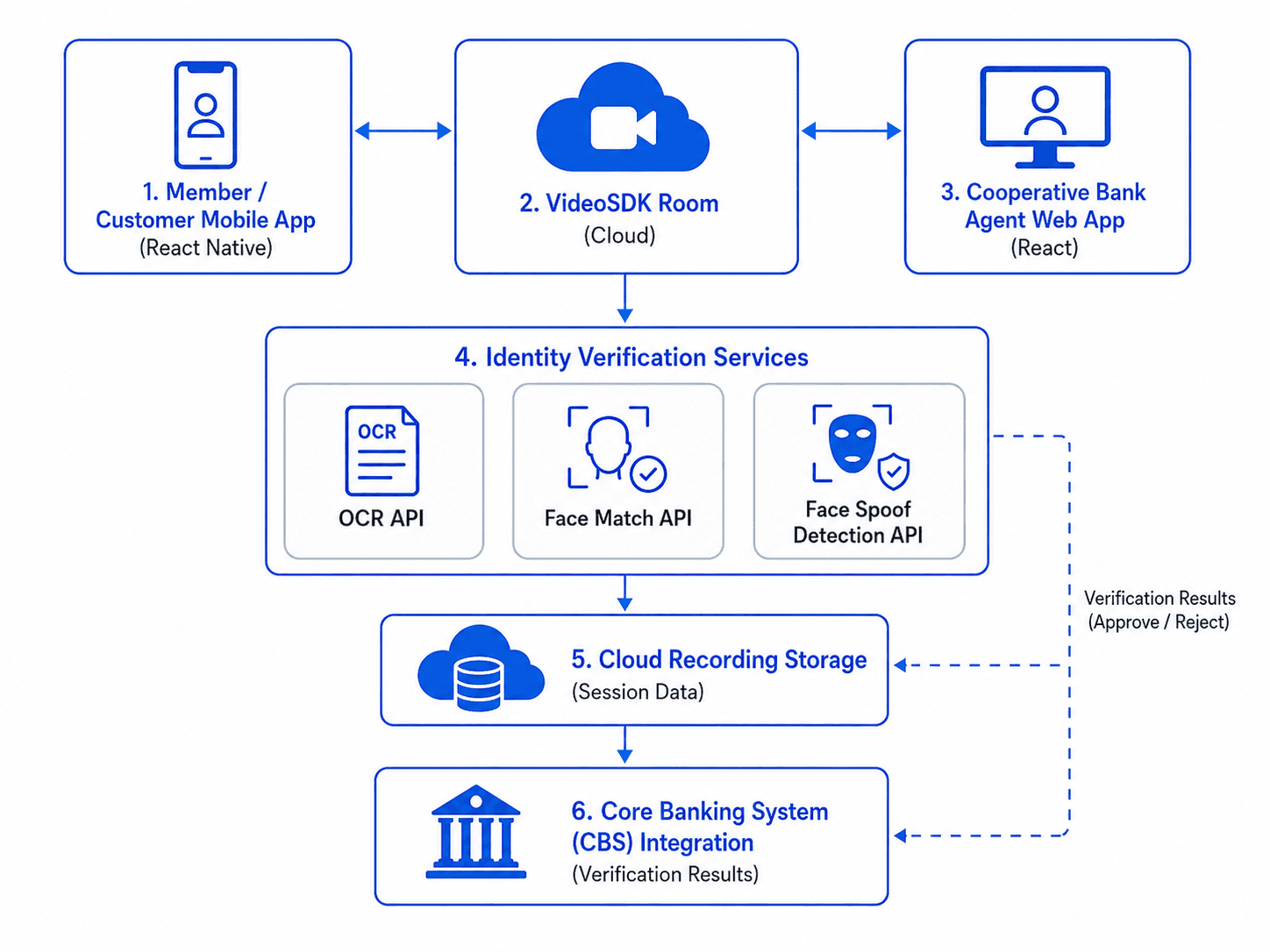
The system has six components:
VideoSDK Room: A Room in VideoSDK is the isolated session space where participants communicate using WebRTC. Each V-CIP session maps to one Room, identified by a meetingId (also called roomId in the REST API). Rooms are created via a POST request to https://api.videosdk.live/v2/rooms.
Member mobile app: Built with @videosdk.live/react-native-sdk. The customer joins the Room, streams their camera, and holds up their Aadhaar, PAN, or other OVD for document capture.
Agent web app: Built with @videosdk.live/react-sdk. The bank official sees the remote participant video, captures document frames, triggers verification, and controls recording.
Identity verification services: VideoSDK exposes OCR, Face Match, and Face Spoof Detection as REST APIs. The agent app calls these after capturing document images during the live session.
Cloud recording storage: startRecording() is called from useMeeting and accepts a webhookUrl and awsDirPath. Completed recordings are accessible via the VideoSDK developer dashboard and can also be routed to the bank's own S3-compatible bucket.
Core banking integration: Verified identity data and the recording reference are written back to the CBS via an internal API call after the session ends.
Building the member app with React Native
Installation
Create a new React Native project and install the required packages:
npx react-native init VKYCMemberApp
npm install "@videosdk.live/react-native-sdk" "@videosdk.live/react-native-incallmanager"
Register the VideoSDK service in index.js before any other import:
// index.js
import { AppRegistry } from "react-native";
import App from "./App";
import { name as appName } from "./app.json";
import { register } from "@videosdk.live/react-native-sdk";

register();
AppRegistry.registerComponent(appName, () => App);
Creating and joining a room
The MeetingProvider component wraps the session. It accepts a config object and an authentication token. The meetingId is obtained from your backend, which calls POST https://api.videosdk.live/v2/rooms using your VideoSDK API key.
// App.js
import React, { useState } from "react";
import {
  MeetingProvider,
  useMeeting,
  useParticipant,
  MediaStream,
  RTCView,
} from "@videosdk.live/react-native-sdk";

export default function App() {
  const [meetingId, setMeetingId] = useState(null);

  // meetingId comes from your backend after calling POST /v2/rooms
  return meetingId ? (
    <MeetingProvider
      config={{
        meetingId,
        name: "Customer",
        micEnabled: true,
        webcamEnabled: true,
        maxResolution: "hd",
      }}
      token={"<your-auth-token>"}
    >
      <KYCSessionView />
    </MeetingProvider>
  ) : (
    <JoinScreen onJoin={setMeetingId} />
  );
}
Streaming the camera and joining
Inside MeetingProvider, use the useMeeting hook to call join() and access participants:
// KYCSessionView.js
import { useMeeting, useParticipant, MediaStream, RTCView } from "@videosdk.live/react-native-sdk";
import { View, Button } from "react-native";

function ParticipantView({ participantId }) {
  const { webcamStream, webcamOn } = useParticipant(participantId);

  return webcamOn && webcamStream ? (
    <RTCView
      streamURL={new MediaStream([webcamStream.track]).toURL()}
      objectFit="cover"
      style={{ height: 300, marginVertical: 8 }}
    />
  ) : (
    <View style={{ height: 300, backgroundColor: "#ccc" }} />
  );
}

function KYCSessionView() {
  const { join, leave, participants } = useMeeting({
    onMeetingJoined: () => console.log("Session started"),
    onParticipantLeft: (participant, reason) => {
      // reason.code maps to Constants.leaveReason values
      console.log("Participant left, reason code:", reason.code);
    },
    onError: (data) => {
      const { code, message } = data;
      console.error(`VideoSDK error ${code}: ${message}`);
    },
  });

  const participantIds = [...participants.keys()];

  return (
    <View style={{ flex: 1 }}>
      {participantIds.map((id) => (
        <ParticipantView key={id} participantId={id} />
      ))}
      <Button title="Join Session" onPress={() => join()} />
      <Button title="End Session" onPress={() => leave()} />
    </View>
  );
}
The onParticipantLeft callback receives a reason object. The SDK documents reason code 1001 as WEBSOCKET_DISCONNECTED and 1102 as WEBSOCKET_CONNECTION_ATTEMPTS_EXHAUSTED. Use these to distinguish intentional disconnects from network drops, which is important for V-CIP audit trail continuity.
Document verification with VideoSDK OCR and face APIs
During the live session, the agent captures a frame of the customer's document. VideoSDK provides three REST APIs for identity verification. These are called from your server or the agent app's backend, not directly from the client.
OCR API: Extracts text fields from an image of an Aadhaar, PAN, Voter ID, or Passport. The agent captures a screenshot frame during the live call and sends it as a base64 image to the OCR endpoint.
Face Match API: Compares two facial images, typically the live video frame and the photo on the document. Returns a similarity score. Use this to confirm the person on the call matches the document holder.
Face Spoof Detection API (Liveness Check): Detects whether the face presented is a live person or a static image or video replay. This is an explicit requirement in the RBI V-CIP guidelines, which state that liveness must be verified during the session.
Note: The specific request/response schemas for these APIs (endpoint paths, field names, and response structure) are listed under the Identity Verification section in the VideoSDK developer dashboard and API reference. The navigation link for this section appeared in the VideoSDK docs quickstart page as "Identity Verification OCR API / Face Match API / Face Spoof Detection API / Number of Face Detection API". Verify the exact endpoint paths from your VideoSDK dashboard API reference before implementation, as they may require a separate entitlement under your VideoSDK plan.
A typical server-side call pattern in Node.js:
// server/verifyDocument.js
async function runOCR(base64Image, documentType) {
  const response = await fetch("https://api.videosdk.live/v2/ocr", {
    method: "POST",
    headers: {
      "Content-Type": "application/json",
      Authorization: `${process.env.VIDEOSDK_TOKEN}`,
    },
    body: JSON.stringify({
      image: base64Image,
      documentType, // e.g. "aadhaar", "pan"
    }),
  });
  return response.json();
}
Store the OCR result, face match score, and liveness result against the session's meetingId. This becomes part of the V-CIP audit record.
Agent interface with React
The bank agent uses a browser-based React app. The @videosdk.live/react-sdk package provides the same useMeeting and useParticipant hooks as the React Native SDK. The agent can see the customer's video stream, trigger recording, and capture frames.
// AgentApp.jsx
import {
  MeetingProvider,
  useMeeting,
  useParticipant,
  MediaStream,
} from "@videosdk.live/react-sdk";

function AgentView() {
  const { startRecording, stopRecording, participants } = useMeeting({
    onRecordingStarted: () => console.log("Recording started"),
    onRecordingStopped: () => console.log("Recording stopped"),
    onParticipantJoined: (p) => console.log("Customer joined:", p.displayName),
    onParticipantLeft: (participant, reason) => {
      // reason.code 1102 means connection attempts exhausted (network loss)
      if (reason.code === 1102) {
        alert("Customer connection lost. Session may need to be restarted.");
      }
    },
  });

  const handleStartRecording = () => {
    const webhookUrl = "https://your-bank-backend.com/webhooks/recording";
    const awsDirPath = `kyc-recordings/${new Date().toISOString().slice(0, 10)}/`;
    startRecording(webhookUrl, awsDirPath);
  };

  const participantIds = [...participants.keys()];

  return (
    <div>
      <button onClick={handleStartRecording}>Start Recording</button>
      <button onClick={() => stopRecording()}>Stop Recording</button>
      {participantIds.map((id) => (
        <RemoteVideo key={id} participantId={id} />
      ))}
    </div>
  );
}
The startRecording method accepts webhookUrl and awsDirPath as verified from the React Native docs (same API surface exists in the React SDK). The webhookUrl receives a POST callback when the recording is processed and ready for download. This is how the bank backend gets notified to archive the file.
Network resilience for rural areas
Many cooperative bank members are in semi-urban or rural areas where bandwidth fluctuates. VideoSDK uses WebRTC's built-in adaptive bitrate (ABR) mechanism. ABR adjusts resolution and frame rate automatically based on available bandwidth without any SDK configuration. The maxResolution field in MeetingProvider config sets the ceiling but the actual bitrate adapts downward as needed.
For session continuity, handle the onError callback and the onParticipantLeft reason codes:
const { join } = useMeeting({
  onError: (data) => {
    const { code, message } = data;
    // Code 1102: WEBSOCKET_CONNECTION_ATTEMPTS_EXHAUSTED
    // Prompt the user to check their network and rejoin
    if (code === 1102) {
      setSessionStatus("Connection lost. Please check your internet and tap Rejoin.");
    }
  },
  onParticipantLeft: (participant, reason) => {
    if (reason.code === 1001) {
      // WEBSOCKET_DISCONNECTED: transient drop, may auto-reconnect
      setSessionStatus("Connection interrupted. Attempting to restore...");
    }
    if (reason.code === 1102) {
      // Multiple reconnect attempts exhausted: user must manually rejoin
      setSessionStatus("Session disconnected. Please rejoin.");
    }
  },
});
For V-CIP compliance, if a session drops before the document capture and liveness check are complete, the session must be marked incomplete in your CBS. Do not mark the KYC as verified based on a partial session.
A minimum recommended connection for V-CIP is around 1 Mbps upload and download for standard definition video. For HD video with maxResolution: "hd", plan for at least 2.5 Mbps. These are practical estimates based on WebRTC codec behaviour.
Compliance and audit
Recording
startRecording(webhookUrl, awsDirPath) initiates server-side cloud recording. The awsDirPath argument tells VideoSDK where to store the file in an S3-compatible bucket you specify. Recording state changes fire onRecordingStarted, onRecordingStopped, and onRecordingStateChanged events, all verified from the docs.
The onRecordingStateChanged callback receives a status field. Status values map to Constants.recordingEvents.RECORDING_STARTING, RECORDING_STARTED, RECORDING_STOPPING, and RECORDING_STOPPED.
Geo-fencing
VideoSDK provides two built-in location controls, both documented under "Geo Fencing & Proxy Controls" for both the React and React Native SDKs, and both available on the Enterprise plan only.
Geo Fencing pins the session's media servers to a specific region (INDIA, USA, UAE, EUROPE, SINGAPORE, or AUSTRALIA), ensuring that media data does not traverse outside that region regardless of where participants physically connect from. For a cooperative bank's V-CIP deployment, set this to INDIA to ensure all session data stays on VideoSDK's India-region infrastructure.
Geo IP Restriction goes further: it checks each participant's IP address at connection time and denies the join attempt if their IP resolves to a country outside the allowed region. Configuring this to INDIA means a customer attempting to join from an overseas IP will be blocked at the platform level before the session starts.
Both features are configured at the room/session level on the VideoSDK platform and require the Enterprise plan. Contact VideoSDK sales for access. Note that IP-based geolocation is not infallible. A customer using a VPN with a non-India exit node could be incorrectly blocked, or a VPN user abroad could slip through. For full RBI V-CIP compliance, supplement Geo IP Restriction with a device-side GPS check using React Native's Geolocation API as a secondary control.
End-to-end encryption
VideoSDK uses DTLS-SRTP for all media in transit as the baseline security layer. Beyond this, VideoSDK also supports E2EE (end-to-end encryption) as a documented SDK feature, available from React Native SDK version 0.2.1 onwards.
E2EE encrypts media entirely on the sender's device using a shared key you manage. VideoSDK servers never access or store the encryption key, so the media content is opaque to VideoSDK's infrastructure.
To enable E2EE in the agent's React app, pass an ExternalE2EEKeyProvider instance as the keyProvider prop to MeetingProvider:
import {
  MeetingProvider,
  ExternalE2EEKeyProvider,
} from "@videosdk.live/react-sdk";
import { useMemo } from "react";

const keyProvider = useMemo(() => {
  const _keyProvider = new ExternalE2EEKeyProvider();
  // Key must be fetched securely from your server, never hardcoded
  _keyProvider.setSharedKey("<secure-key-from-your-server>");
  return _keyProvider;
}, []);

return (
  <MeetingProvider
    config={{ meetingId, micEnabled: true, webcamEnabled: true, name: "Agent" }}
    token={"<auth-token>"}
    keyProvider={keyProvider || null}
  >
    {/* agent view */}
  </MeetingProvider>
);
The same keyProvider prop pattern applies in the React Native member app using @videosdk.live/react-native-sdk.
You can verify whether E2EE is active using const { isE2EEEnabled } = useMeeting(), and monitor per-participant encryption state via the onE2EEStateChanged callback on useParticipant, which returns stateInfo.state values such as EncryptionSuccess, DecryptionFailed, and MissingKey.
You are fully responsible for generating, distributing, and rotating the encryption key. VideoSDK recommends generating the key on your server when creating a session and delivering it to clients via a secured HTTPS call alongside the meeting token.
Critical constraint for V-CIP: The VideoSDK docs explicitly state that recording and transcription are not supported when E2EE is enabled. Since RBI V-CIP requires mandatory session recording, you cannot enable E2EE and startRecording() in the same session. Cooperative banks must choose between E2EE and compliant cloud recording. For most V-CIP deployments, DTLS-SRTP in transit combined with encrypted storage of recordings at rest is the practical path. If your security policy mandates E2EE, consult your compliance team on whether a locally recorded and encrypted session satisfies the RBI storage requirement.
Data retention
RBI V-CIP guidelines require be maintained for at least five years after the business relationship ends, or five years from the date of the transaction, whichever is later. Implement a lifecycle policy on your S3 bucket to move recordings to lower-cost storage tiers after 90 days and retain them for five years minimum. The RBI Master Direction explicitly states that the data and recordings of V-CIP must be stored in India-based, safe, and secure systems. All audio-video recordings must be stored securely in India. VideoSDK's developer dashboard also stores recordings but retention periods there are governed by your VideoSDK plan, not by RBI rules. Use awsDirPath to route recordings to your own bucket for full control.
Audit log fields
For each completed V-CIP session, write the following to your CBS:
meetingId(VideoSDK session identifier)- Customer account number and name
- Agent employee ID
- Session start and end timestamps
- OCR result and extracted document fields
- Face match score
- record the concurrent audit status and auditor ID
- Liveness check result (pass/fail)
- Recording file URL or object path
- Customer geo-coordinates at session start
Key takeaways
- Cooperative banks regulated by RBI, including UCBs and state cooperative banks, must comply with the RBI KYC Master Direction, which permits V-CIP as a valid identification method.
- VideoSDK's
@videosdk.live/react-native-sdkprovidesMeetingProvider,useMeeting,useParticipant, andRTCViewas the core primitives for the member app. startRecording(webhookUrl, awsDirPath)fromuseMeetingstarts server-side recording and can route files to your own S3 bucket for compliant long-term storage.onParticipantLeft(participant, reason)with reason codes1001(WEBSOCKET_DISCONNECTED) and1102(WEBSOCKET_CONNECTION_ATTEMPTS_EXHAUSTED) lets you distinguish transient drops from terminal disconnects and respond accordingly in the UI.- VideoSDK provides Geo Fencing (server region pinning) and Geo IP Restriction (IP-based participant blocking) as built-in platform features under the Enterprise plan, both available for React Native and React SDK projects.
- VideoSDK supports E2EE as a documented SDK feature from React Native 0.2.1 onwards, using
ExternalE2EEKeyProviderpassed askeyProvidertoMeetingProvider. However, the docs explicitly state that recording is not supported when E2EE is enabled, which conflicts directly with RBI's V-CIP mandatory recording requirement. Cooperative banks must choose one or the other per session.
Frequently asked questions
Q1. Is VideoSDK suitable for cooperative banks with limited IT infrastructure?
Yes. VideoSDK is a cloud-hosted service. The bank does not need to provision or operate media servers or TURN/STUN infrastructure. The React Native member app runs on any Android 8.0+ or iOS 12.0+ device. The agent interface runs in a modern browser. Your bank's IT team needs to maintain only the application layer: the frontend apps, a lightweight token-generation backend, and the CBS integration script. This makes it practical for cooperative banks that do not have a dedicated DevOps team.
Q2. What is the minimum internet speed required for a V-CIP session?
A reliable V-CIP session requires approximately 1 Mbps symmetric (upload and download) for standard definition. For HD sessions set via maxResolution: "hd" in MeetingProvider, plan for around 2.5 Mbps. VideoSDK's WebRTC-based adaptive bitrate will reduce resolution automatically on constrained connections. Sessions below roughly 300 Kbps will likely result in frozen frames or disconnection. RBI does not specify a minimum bandwidth in its V-CIP guidelines, but the practical minimum is dictated by WebRTC codec behaviour.
Q3. Can V-CIP sessions be conducted in regional languages?
Yes. VideoSDK handles only audio and video transport. The language spoken during the session is entirely determined by the bank agent and customer. Your agent application can display prompts, instructions, and UI labels in any language. For text overlays or real-time translation features, those must be built at the application layer. The SDK itself is language-agnostic.
Q4. How long are V-CIP recordings retained?
VideoSDK's platform stores recordings for a period determined by your VideoSDK plan. However, RBI V-CIP guidelines require that cooperative banks retain KYC records for at least five years after the account relationship ends. You must use the awsDirPath parameter in startRecording() to route recordings to your own S3-compatible bucket and apply a five-year retention policy there. Do not rely on VideoSDK's platform storage as your primary archive for regulatory compliance.
Q5. Is there a free tier available for VideoSDK?
VideoSDK offers a free tier for development and testing. Check the current limits at videosdk.live/pricing, as quota and plan details change. For production V-CIP deployments at a cooperative bank, you will need a paid plan that supports cloud recording, the Identity Verification APIs (OCR, Face Match, Liveness), and the participant counts appropriate for your projected session volume.
Conclusion
Building a compliant video KYC system for a cooperative bank in India requires accurate regulatory context, verified SDK integration, and a clear data retention strategy. Cooperative banks subject to the RBI KYC Master Direction can use VideoSDK to implement a full V-CIP workflow: a React Native member app for customers, a React web app for agents, server-side recording with startRecording(), and identity verification via the OCR, Face Match, and Spoof Detection APIs. For any cooperative bank implementing video KYC in India, the RBI V-CIP circular (RBI/2019-20/128 and subsequent updates) remains the authoritative compliance reference, and this technical implementation must be reviewed against your bank's legal and compliance team's interpretation of those guidelines.