


Live audio rooms are defined as real-time voice sessions where a few hosts and speakers talk, a larger audience listens, and listeners can raise a hand to be invited on stage. On VideoSDK, speakers join in SEND_AND_RECV mode and listeners in RECV_ONLY mode, and audio-only listener minutes are listed at $0.0005 each.
A live audio room looks simple from the outside: a stage, an audience, and a raise-hand button. Behind it are three separate problems. Speakers need two-way, real-time audio. Hundreds of listeners need to hear them without each one adding load to every speaker's connection. And the app has to move a listener onto the stage without dropping the room.
This guide covers how live audio rooms work, the features users expect, and what a voice chat API costs per listener minute. It then shows how to build one on VideoSDK with Flutter, React Native, or JavaScript, and ends with the quotas that decide how large a room can grow.
What are live audio rooms?
A live audio room is a voice-only broadcast with an open stage, where the audience can join the conversation instead of only hearing it.
Live audio rooms are defined as real-time voice sessions with two classes of participant: people on stage who publish audio, and listeners who only receive it. They work by routing each speaker's audio through a media server that forwards it to every listener, while a separate signalling channel carries requests such as raised hands.
Clubhouse made the format popular, and X Spaces, Discord Stage channels, and Facebook Live Audio Rooms followed. The same pattern now runs inside apps that are not audio products at all: a fitness class Q&A, a live shopping stream with voice, or a community town hall.
It helps to separate three terms that often get mixed up:
- An audio call is symmetric. Everyone in a voice call application can speak, as in a phone call or a team huddle.
- Live audio streaming software, such as an internet radio or podcast broadcaster, is one-way. Listeners cannot talk back.
- A live audio room sits between them. A small group speaks, a large group listens, and the line between them moves during the session.
VideoSDK supports all three patterns on one SDK. Its live audio room product page covers the commercial overview, and this guide covers the architecture and the build.
How live audio rooms work
A live audio room runs on three layers: speakers publish audio, a media server forwards it, and a signalling channel handles who is allowed to speak.
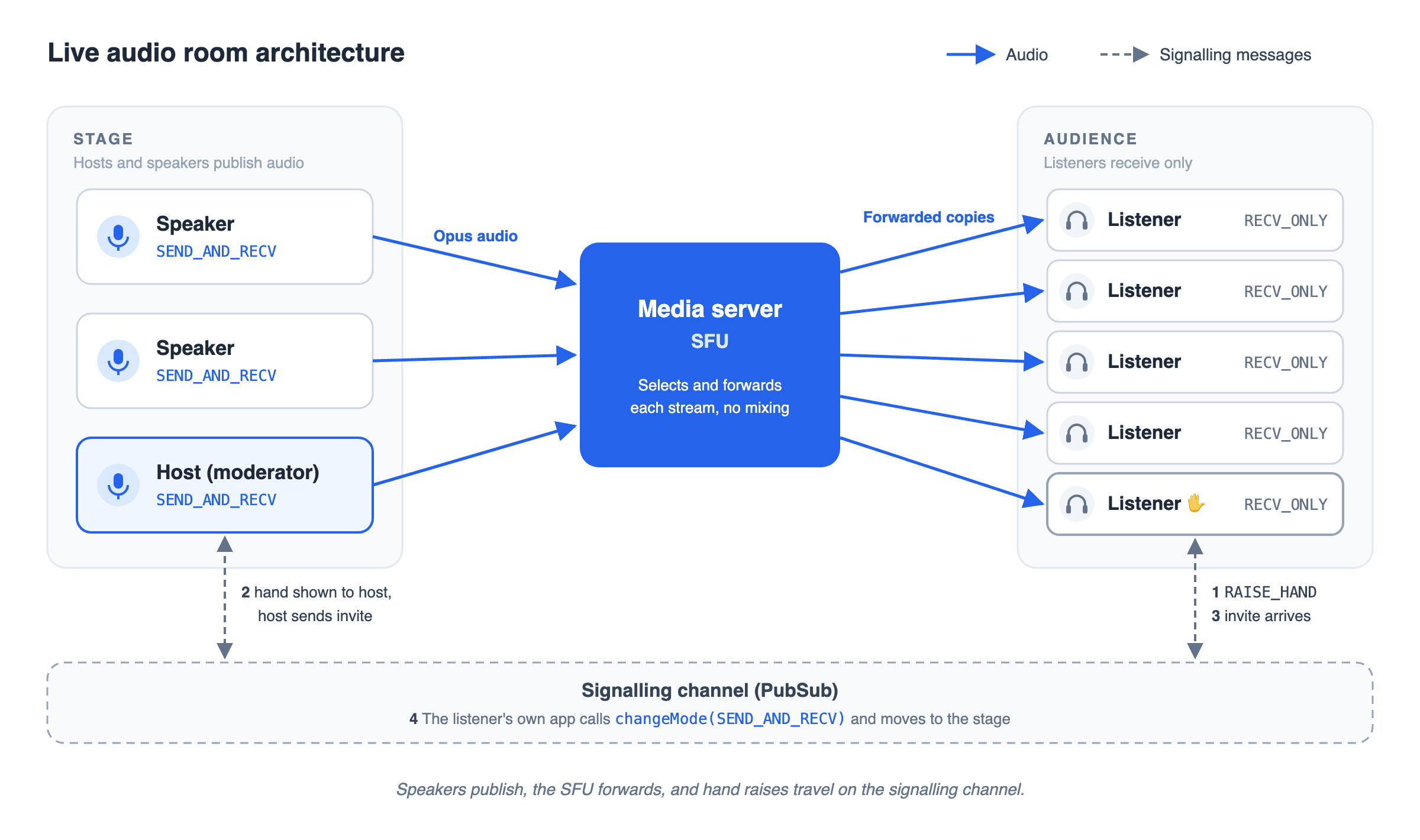
The diagram below shows those layers in one room. Speakers send audio up to the media server, and the server forwards a copy to every listener. A raised hand travels as a message on the signalling channel rather than as audio.
Speakers publish, listeners subscribe
Each person on stage captures their microphone and sends one audio stream to the media server. Browsers and WebRTC apps encode that stream with Opus, which RFC 7874 makes mandatory for every WebRTC endpoint. RFC 6716 defines Opus from 6 kb/s speech up to 510 kb/s stereo music, so one codec covers a quiet talk and a live DJ set.
Listeners send nothing. They open a receive-only connection and play whatever the server forwards. On VideoSDK, that is the difference between SEND_AND_RECV mode for the stage and RECV_ONLY mode for the audience, as the Flutter interactive live streaming quickstart sets out.
Why the media server forwards instead of mixing
The media server is usually a Selective Forwarding Unit (SFU). RFC 7667, the IETF document on RTP topologies, calls it a Selective Forwarding Middlebox: it selects which incoming streams go to each endpoint. A mixer, by contrast, decodes the streams and generates a new combined one.
Forwarding keeps each speaker's upload constant however many people listen, because the speaker sends one stream and the server makes the copies. VideoSDK describes its media layer as an SFU architecture.
The hand-raise-to-speaker flow
Moving a listener onto the stage is a short conversation over the signalling channel. On VideoSDK it runs in five steps:
- The listener raises a hand. Their app publishes a message on the RAISE_HAND topic using PubSub.
- The host sees the request. The host's app subscribes to RAISE_HAND and shows the raised hand in a queue.
- The host sends an invitation. The host publishes to a topic addressed to that listener, as the invite-on-stage guide shows.
- The listener's own app switches mode. It calls changeMode with SEND_AND_RECV. The change-mode docs note that changeMode only ever changes the mode of the participant who calls it, so the host cannot force it.
- The new speaker turns on the microphone. Everyone now hears them through the same forwarding path.
Moving someone back off stage reverses the flow: the host asks, and the speaker's app switches to RECV_ONLY.
Features users expect in a live audio room
Users judge a live audio room on control and continuity: who can speak, who can be silenced, and whether the audio survives a locked phone.
| Feature | Why users expect it | How VideoSDK provides it |
|---|---|---|
| Hand raise | Listeners need a polite way to ask to speak | A message on the RAISE_HAND PubSub topic (docs) |
| Speaker promotion | The host decides who joins the stage | PubSub invitation, then changeMode on the listener's app (docs) |
| Mute controls | Hosts must silence a speaker who drifts off topic | Remote muteMic, which needs the allow_mod permission in the host's token (docs) |
| Room chat | Listeners without a microphone still want to take part | Text messages over PubSub, which the docs describe as currently free (docs) |
| Active speaker indicator | Listeners need to know who is talking | A speakerChanged event that names the current dominant speaker (tutorial) |
| Recording | Rooms become podcasts and replays | Audio-only recording, $0.015 per recorded minute (docs) |
| Background audio on mobile | People lock their phones and keep listening | Background handling for iOS and Android (docs) |
| Noise suppression | Speakers join from kitchens, cars, and cafes | The media effects plugin (docs) |
The two features that most often break in production are mute controls and background audio. Mute controls fail when the host's token was minted without allow_mod, so give moderators that permission server-side and nobody else.
Keeping audio alive when the phone is locked
Background audio is an operating system rule, not an SDK setting, and each platform enforces it differently.
On iOS, the app must declare the audio background execution mode and use an audio session category such as playAndRecord, which Apple describes as suited to VoIP apps. Without the background mode, audio stops when the screen locks.
On Android, a speaker's microphone has to run inside a foreground service. From Android 14 (API level 34), every foreground service must declare its service type, so a speaker needs the microphone type and a listener needs mediaPlayback. Android also blocks creating a microphone foreground service while the app is already in the background, so start it when the user joins the stage.
Voice Chat API vs Voice SDK
A voice chat API runs on your server and manages rooms and tokens, while a voice SDK runs in the app and handles the microphone and speakers.
Every API voice call has both halves. The table shows which half owns each job.
| Voice chat API (server) | Voice SDK (client) | |
|---|---|---|
| Runs on | Your backend | The user's phone or browser |
| Creates rooms and tokens | Yes | No |
| Captures and plays audio | No | Yes |
| Switches listener and speaker modes | No | Yes, with changeMode |
| Starts recording | Yes, over REST | Yes, from the host's app |
| Holds your API secret | Yes | Never |
What a live audio room costs
VideoSDK prices audio by the minute and bills people on stage and people in the audience at different rates.
As of September 15, 2026, VideoSDK's pricing page lists voice at $0.001 per participant minute for people in a real-time call. For interactive live streaming it lists voice streaming, meaning audio-only viewer minutes, at $0.0005 per viewer minute.
Here is a worked example: a one-hour room with one host, three speakers, and 500 listeners.
- Stage: 4 people x 60 minutes = 240 participant minutes x $0.001 = $0.24
- Audience: 500 listeners x 60 minutes = 30,000 viewer minutes x $0.0005 = $15.00
- Total for the session: $15.24
The audience is 98% of the bill, so the viewer rate matters far more than the speaker rate when you compare any audio streaming solution. Recording the session adds $0.015 per recorded minute, or $0.90 for the hour.
Is there a free voice call API?
VideoSDK gives new accounts a $20 free credit, which covers the first session above with room to spare. For more providers side by side, see the 10 best audio calling APIs and the top voice chat SDKs.
Build it: a Flutter live audio room example
The fastest way to a working live audio room is VideoSDK's step-by-step Flutter live audio room tutorial, which builds speakers, listeners, and raised hands from an empty project.
The tutorial follows six steps:
- Install the SDK. Add the videosdk package and set the Android and iOS microphone permissions.
- Get a token and room ID. Your app fetches a token from your server, which also creates the room through the VideoSDK REST API.
- Join with the camera off. Speakers join with the microphone on, and listeners with it off.
- Add the raise-hand button. Listeners publish a RAISE_HAND message, and the host's screen lists them.
- Promote and demote speakers. The host unmutes an invited listener and mutes them again later, using the allow_mod permission.
- Highlight the active speaker and record. A speaker-changed event drives the highlight, and one call starts a recording.
Two things to change when you follow it today. The tutorial was written against version 2 of the Flutter package, and the current release on pub.dev is 4.0.1, published September 8, 2026. It also puts everyone in the same call mode, which caps a room at 100 participants. For a larger audience, join listeners in RECV_ONLY mode as the Flutter quickstart shows.
The same room on other platforms:
- React Native: the React Native audio rooms tutorial and the React Native quickstart
- JavaScript: the JavaScript audio rooms tutorial and the JavaScript quickstart
Ready to try it? Create a VideoSDK account, use the $20 free credit, and run the Flutter quickstart with two phones in one room.
Prefer to watch first? This 4-minute VideoSDK walkthrough builds the simplest version of an audio room in plain JavaScript: the video calling quickstart with the camera removed, and two people talking in one room. Add listener mode and raise hand from the guides above to turn it into a live audio room.
Scaling live audio rooms: quotas and audience sizes
How large a live audio room can grow depends on two sets of limits: per room, and across your whole VideoSDK account at once.
VideoSDK's quota documentation sets these defaults, read September 15, 2026:
| Limit | Free plan | Pay-as-you-go | Add-on |
|---|---|---|---|
| Concurrent hosts, account-wide | 50 | 500 | 100 more for $20 per month |
| Concurrent viewers, account-wide | 100 | 200 | 200 more for $20 per month |
| Active speakers per room | 15 | 15 | |
| Participants per room | 100 | 100 | |
| Interactive live streaming viewers per room | 1,000 | 1,000 |
The numbers that shape a live audio room are 15 active speakers and 1,000 listeners per room. A stage larger than 15 needs a rotation, and an audience larger than 1,000 needs a second room or HLS playback.
The account-wide viewer limit bites first. The 500-listener room from the pricing example fits inside one room, but on pay-as-you-go it exceeds the default 200 concurrent viewers. Two add-on packs lift that to 600 for $40 a month.
These are defaults rather than hard ceilings. Pay-as-you-go accounts raise them by buying add-on packs from the VideoSDK dashboard, so size the packs before a launch event rather than during it.
Definitions glossary
SFU (selective forwarding unit): A media server that forwards selected incoming streams to each participant instead of mixing them into one. It keeps a speaker's upload the same size however many people listen.
Participant mode: The VideoSDK setting that decides what a participant sends. SEND_AND_RECV publishes and receives audio for hosts and speakers, while RECV_ONLY only receives it, for listeners.
changeMode: The VideoSDK method a participant calls to switch between RECV_ONLY and SEND_AND_RECV. It only changes the caller's own mode, so the host invites and the listener's app makes the switch.
PubSub: VideoSDK's publish-subscribe messaging inside a room, used here for raised hands, stage invitations and chat. VideoSDK's pricing FAQ lists PubSub messaging and signaling as currently free.
Opus: The audio codec defined in RFC 6716, which RFC 7874 makes mandatory for every WebRTC endpoint. It runs from 6 kb/s speech up to 510 kb/s stereo music.
Key takeaways
- Live audio rooms split participants into speakers who publish audio and listeners who only receive it, joined by an SFU that forwards each speaker's stream.
- A raised hand is a signalling message, not audio, and the listener's own app switches into speaker mode when the host accepts.
- On VideoSDK, the audience drives the cost: audio-only listener minutes are $0.0005 each, so a 500-listener hour costs about $15.
- Background audio needs platform work: the iOS audio background mode and, on Android 14 and later, a typed foreground service.
Conclusion
Live audio rooms combine a small real-time stage with a large listening audience, and the engineering follows that split. Speakers publish, the SFU forwards, and hand raises travel as messages. Most of the product decisions come down to moderation, background audio, and the viewer quota.
VideoSDK covers the room, the modes, and the signalling on Flutter, React Native, and JavaScript. Start with the $20 free credit at VideoSDK and the Flutter quickstart. What kind of live audio room are you building? Tell us in the comments.
Frequently asked questions
What is an audio stream?
An audio stream is a continuous flow of encoded sound sent over a network and played as it arrives, rather than downloaded first. In a live audio room, each speaker produces one audio stream, usually Opus-encoded, and the media server forwards it to every listener.
How do I stream my voice live to an audience?
Live streaming voice to an audience needs an app that captures your microphone and a service that forwards the audio to listeners. With VideoSDK, you join a room in SEND_AND_RECV mode as the host, and your audience joins in RECV_ONLY mode to listen.
How many listeners can a live audio room have?
A single VideoSDK room supports up to 1,000 interactive live streaming listeners and 15 active speakers by default. On pay-as-you-go, the account-wide limit is 200 concurrent viewers, raised in packs of 200 for $20 a month.
What is the difference between an audio call and a live audio room?
The difference is who can speak. In an audio call, every participant can talk at any time. In a live audio room, only people on stage talk, listeners join receive-only, and a listener speaks only after the host invites them.
How do listeners become speakers?
A listener raises a hand, which publishes a message the host sees. If the host accepts, the listener's own app switches from RECV_ONLY to SEND_AND_RECV mode and turns on the microphone, because VideoSDK only lets a participant change their own mode.
Is there a free voice call API?
VideoSDK includes a one-time $20 free credit for new accounts, which covers about 40,000 listener minutes at the audio-only viewer rate. Open-source media servers are free to license but not to host.