



Flutter WebSockets enable persistent, bi-directional communication between a Flutter app and a server over a single TCP connection, replacing inefficient HTTP polling with instant data delivery. The websocketchannel package provides the foundational cross-platform Dart API, while adapter_websocket adds production-grade features like auto-reconnect and heartbeat monitoring. For developers needing higher-level real-time video and audio, VideoSDK's Flutter SDK builds on similar low-latency principles with a complete meeting room architecture.
Modern Flutter apps rarely operate in isolation. Whether you are building a chat application, a live sports scoreboard, a collaborative whiteboard, or a real-time trading dashboard, your users expect data to appear the moment it changes on the server. Traditional HTTP request-response cycles were never designed for this. They force clients to repeatedly ask the server for updates, wasting bandwidth and adding latency with every round trip.
Flutter WebSockets solve this problem by opening a single persistent connection that stays open for the lifetime of the session. The server can push data to the client at any time, and the client can send messages back without establishing a new connection each time. This article walks through everything you need to know about implementing WebSockets in Flutter, from package selection to production deployment.
What Are Flutter WebSockets?
Flutter WebSockets are the Flutter ecosystem's implementation of the WebSocket protocol, a communication standard that creates a full-duplex, persistent TCP connection between a client and a server. Unlike HTTP, which follows a request-response pattern where the client must initiate every interaction, WebSockets allow either side to send data at any time over the same open connection.
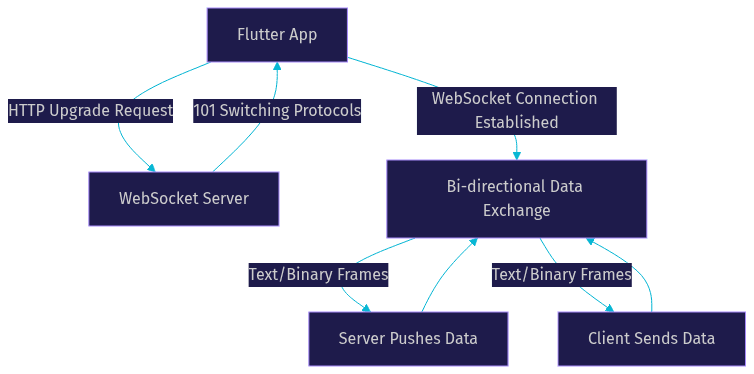
The WebSocket protocol, formally defined in RFC 6455 by the IETF, works by starting with an HTTP handshake. The client sends an HTTP request with an upgrade header, asking the server to switch protocols. If the server agrees, the connection transforms from a standard HTTP link into a WebSocket connection. From that point forward, both sides can exchange frames of text or binary data freely until either side closes the connection.
This architecture contrasts sharply with two common alternatives. HTTP polling requires the client to repeatedly send requests to the server at fixed intervals, asking if anything new exists. Most of those requests return empty responses, wasting bandwidth and battery. Server-Sent Events (SSE) improve on polling by allowing the server to push updates, but SSE only supports one-way communication from server to client. WebSockets are the only option that provides true bi-directional, real-time data flow in a single connection.
For Flutter developers, this matters because Dart's asynchronous programming model aligns naturally with WebSocket data streams. The Dart language treats incoming WebSocket data as a Stream, which means you can use the same stream-handling patterns you already know from working with files, user input events, and other asynchronous data sources.
Why Use Flutter WebSockets in Your App?
Flutter WebSockets deliver four concrete advantages over HTTP polling for mobile and desktop applications: lower latency, reduced bandwidth consumption, better battery life, and a smoother user experience.
Latency drops dramatically because the connection stays open. With HTTP polling, every update requires a fresh TCP handshake, TLS negotiation, and HTTP request-response cycle. That adds hundreds of milliseconds of overhead per request. With WebSockets, the handshake happens once, and subsequent messages travel over the existing connection with minimal framing overhead, often delivering data in under 50 milliseconds.
Bandwidth savings come from eliminating redundant HTTP headers. Every HTTP request includes headers for content type, authorization, cookies, user agents, and more. Over a polling interval of one second, those headers accumulate into significant overhead. WebSocket frames carry only a small header of 2 to 14 bytes plus the actual payload, which means more of your data budget goes to real content rather than protocol overhead.
Battery life improves on mobile devices because the radio does not need to wake up as frequently. HTTP polling forces the device to power up its cellular or Wi-Fi radio at regular intervals, even when no new data exists. WebSockets keep a single connection alive, and the operating system can manage that connection efficiently without constant wake-ups.
The user experience benefit is the most visible. Messages arrive instantly rather than on the next polling cycle. A chat message, a stock price update, or a game state change appears the moment it happens, which is the difference between an app that feels alive and one that feels sluggish.
Core Flutter WebSockets Packages
Choosing the right package is the first and most important decision when implementing Flutter WebSockets. Three packages dominate the ecosystem, each with different strengths and trade-offs.
websocketchannel Package
The websocketchannel package is the official Dart package for WebSocket communication. It provides a cross-platform API that works on iOS, Android, web, and desktop, abstracting away the platform-specific WebSocket implementations underneath.
This package exposes a StreamChannel interface, which gives you a Stream for incoming messages and a Sink for outgoing messages. It handles the WebSocket handshake, frame encoding, and connection management at a low level. It does not include higher-level features like automatic reconnection, heartbeat monitoring, or message queuing. Developers building simple use cases or who want full control over connection management will find this package sufficient.
For most Flutter developers, websocketchannel is the starting point. It is maintained as part of the Dart ecosystem, receives regular updates, and has the broadest platform support of any WebSocket package in the Flutter ecosystem.
adapter_websocket Package
The adapter_websocket package takes a different approach by implementing an adapter pattern on top of WebSocket connections. This design separates the connection logic from the business logic, making it easier to test, mock, and swap implementations.
Where this package shines is in production features. It includes automatic reconnection with configurable retry strategies, heartbeat ping-pong mechanisms to detect stale connections, an offline message queue that buffers outgoing messages when the connection drops, and connection state monitoring that integrates cleanly with Flutter's widget tree.
If you are building a production app where connection reliability matters more than minimal dependencies, adapterwebsocket saves you from implementing these features yourself. The reconnection logic alone, with exponential backoff and jitter, would take significant effort to build correctly on top of raw websocket_channel.
socketioclient Package
The socketioclient package provides a Flutter client for Socket.IO servers. Socket.IO is not raw WebSockets. It is a higher-level protocol that uses WebSockets as a transport layer when available and falls back to HTTP long-polling when WebSockets are not supported.
The main reason to choose this package is compatibility. If your backend already runs a Socket.IO server, socketioclient is the natural choice. It handles rooms, namespaces, automatic reconnection, and event-based messaging out of the box.
The trade-off is that Socket.IO adds protocol overhead and complexity that raw WebSockets do not have. If your backend uses standard WebSockets, this package will not work. It also ties you to the Socket.IO ecosystem, which means you cannot easily switch to a different backend protocol without rewriting your client code.
Setting Up a WebSocket Connection
Setting up a Flutter WebSockets connection involves four logical steps: selecting your package, configuring the server URI, initializing the client, and handling connection lifecycle events.
First, choose your package based on your backend protocol and production requirements. If your server speaks raw WebSocket protocol, start with websocketchannel. If you need auto-reconnect and offline queuing, consider adapterwebsocket. If your server runs Socket.IO, use socketio_client.
Second, configure the URI. WebSocket URIs use the ws scheme for unencrypted connections and wss for encrypted connections secured with TLS. In production, always use wss. The URI also includes the host, port, and path to the WebSocket endpoint on your server.
Third, initialize the client by passing the URI to the package's connection method. This triggers the HTTP upgrade handshake described earlier. The connection attempt is asynchronous, so your code should handle both the success case where the connection is established and streams are ready, and the failure case where the connection is refused, times out, or fails DNS resolution.
Fourth, handle lifecycle events. Every WebSocket connection goes through a defined lifecycle: connecting, connected, disconnecting, disconnected, and error states. Your app should react to each state appropriately, updating the UI to show connection status and triggering reconnection logic when the connection drops unexpectedly.
The following diagram illustrates the handshake and connection establishment flow between a Flutter client and a WebSocket server:
Managing Streams and Messages
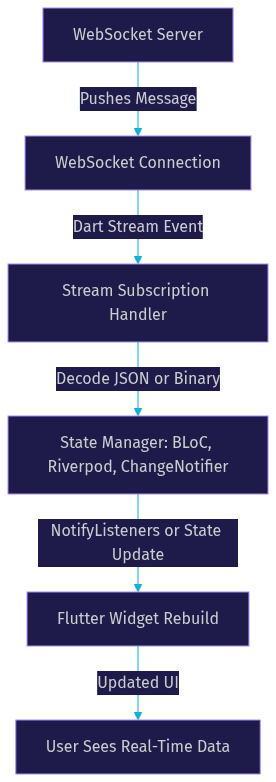
Dart's Stream-based architecture is what makes Flutter WebSockets feel natural to work with. When a WebSocket connection is established, incoming messages arrive as a Stream of data events. You subscribe to this Stream the same way you would subscribe to any other Stream in Dart, using listen methods and stream transformers.
Incoming messages from the server arrive as either text strings or binary data (lists of bytes). Your subscription handler processes each message as it arrives. For text messages, you typically decode JSON payloads and map them to Dart model classes. For binary messages, you might process image data, audio chunks, or serialized protocol buffers.
Outgoing messages work through a Sink. You add messages to the Sink, and the WebSocket package frames and transmits them to the server. The Sink is asynchronous, so adding a message does not block your UI thread. However, you should handle errors that occur when sending messages on a closed or broken connection.
A common pattern in Flutter is to wrap your WebSocket Stream in a ChangeNotifier or use a state management solution like Riverpod or BLoC to propagate incoming messages to the widget tree. This separation keeps your WebSocket logic testable and your UI reactive.
The diagram below shows how data flows from the server through the WebSocket Stream into your Flutter UI:
Reconnection and Heartbeat Strategies
Network connections on mobile devices are fragile. Users move between Wi-Fi and cellular networks, enter elevators, pass through tunnels, and experience momentary signal drops. A production Flutter WebSockets implementation must handle disconnections gracefully and reconnect automatically.
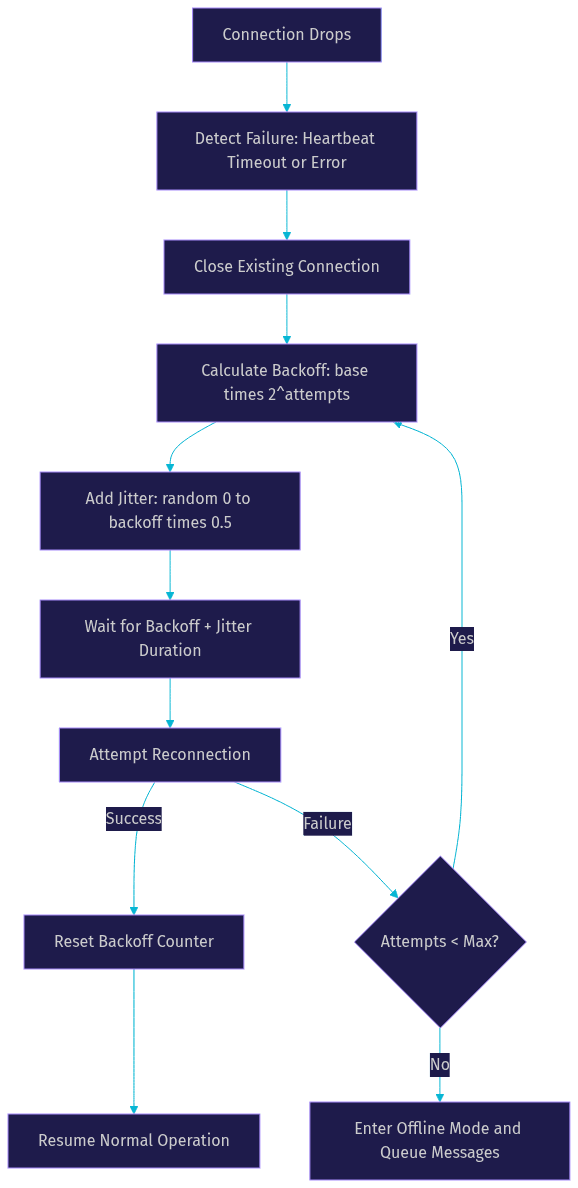
Exponential backoff is the standard reconnection strategy. Instead of retrying every second, the client waits one second before the first retry, two seconds before the second, four seconds before the third, and so on, doubling the wait time with each failure. This prevents overwhelming the server with retry requests during an outage. Most implementations cap the maximum backoff at 30 to 60 seconds.
Jitter adds randomness to the backoff interval. Without jitter, thousands of clients that lost connection simultaneously (during a server restart, for example) would all retry at exactly the same intervals, creating a thundering herd problem. Adding a random component of 0 to 50 percent of the backoff interval spreads retries across time and reduces server load spikes.
Heartbeat mechanisms detect stale connections. The client sends a ping frame at regular intervals, typically every 30 seconds. If the server does not respond with a pong frame within a timeout window, the client considers the connection dead and initiates reconnection. This is critical because TCP connections can appear alive to the operating system while actually being broken, a condition known as a half-open connection.
The adapterwebsocket package handles all of these strategies internally. If you are using websocket_channel directly, you will need to implement them yourself. The reconnection logic flowchart below illustrates a robust strategy:
Security Best Practices for Flutter WebSockets
WebSocket security in Flutter follows the same principles as any network communication, with a few protocol-specific considerations.
Always use wss (WebSocket Secure) in production. The wss scheme encrypts the WebSocket connection with TLS, the same encryption that protects HTTPS traffic. Never use ws outside of local development, because unencrypted WebSocket traffic can be intercepted and read by anyone on the same network.
Certificate validation must not be disabled. Some developers bypass certificate validation during development to test against self-signed certificates. This must never ship to production. Disabling certificate validation makes your app vulnerable to man-in-the-middle attacks, where an attacker intercepts the connection and poses as the server.
Token-based authentication is the standard approach for securing WebSocket connections. Since WebSocket connections start as HTTP requests, you can pass authentication tokens in the initial handshake. Common approaches include passing a bearer token in a query parameter, an authorization header, or a protocol-specific subprotocol header. The server validates the token during the handshake and rejects unauthenticated connections before the WebSocket upgrade completes.
Avoid insecure origins. Browsers and Flutter web enforce same-origin policies and may block WebSocket connections to origins that do not match the page's origin or are not explicitly allowed. Ensure your WebSocket server is accessible from the domains where your Flutter web app is hosted.
Testing and Debugging WebSockets
Testing WebSocket functionality in Flutter requires a different approach than testing HTTP requests, because WebSockets are stateful and long-lived connections.
Unit testing works best with mock adapters. Instead of connecting to a real WebSocket server, you create a mock that simulates the WebSocket interface. Your tests send messages to the mock, verify that the correct messages are sent, and inject simulated server responses. The adapterwebsocket package's adapter pattern makes this straightforward, but you can also mock websocket_channel by wrapping it in an abstract interface.
Integration testing involves connecting to a real WebSocket server, typically running locally. This validates that your connection logic, message parsing, and error handling work end-to-end. Use a test server that can be configured to drop connections, send malformed messages, and delay responses to test your error handling paths.
For debugging, Chrome DevTools provides excellent WebSocket inspection when running Flutter web. The Network tab shows WebSocket connections, lists every frame sent and received, and displays the payload contents. For iOS and Android, you can use platform-specific network debugging tools or add detailed logging to your WebSocket handler.
Production logging should capture connection state changes, reconnection events, message counts, and error details without logging sensitive message contents. Structured logging that sends these events to your analytics platform helps you monitor connection health across your user base.
Performance Considerations
Flutter WebSockets performance depends on three factors: latency, bandwidth overhead, and battery impact.
Latency for WebSocket messages is typically under 50 milliseconds on a healthy network connection, compared to 200 to 500 milliseconds for HTTP polling requests. The difference comes from eliminating the TCP handshake and TLS negotiation for each message. Once the WebSocket connection is established, messages travel with minimal protocol overhead.
Bandwidth overhead per WebSocket frame is 2 to 14 bytes, compared to 200 to 800 bytes of HTTP headers per polling request. For an app that polls every second, switching to WebSockets can save several megabytes of data per hour per user. On metered cellular connections, this matters to your users' data plans.
Battery impact is lower than HTTP polling because the device radio does not need to power up for each request. However, keeping a WebSocket connection alive does consume some power. To minimize this, avoid sending unnecessary heartbeat messages more frequently than needed, and consider closing the connection when the app goes into the background if real-time updates are not critical.
Payload optimization further improves performance. Compress large messages before sending them. Use binary formats like Protocol Buffers instead of JSON for high-frequency messages. Batch multiple small messages into a single frame when possible. Avoid sending full state updates when incremental updates suffice.
Production Checklist
Before shipping Flutter WebSockets to production, verify each item on this checklist:
Secure URI: Confirm every WebSocket connection uses wss with valid TLS certificates. No exceptions for production.
Reconnection logic: Implement exponential backoff with jitter and a maximum retry cap. Test behavior when the server is down for extended periods.
Error handling: Wrap all message sending and receiving in error-handling blocks. Handle the case where the Sink is closed before the Stream completes.
Heartbeat monitoring: Send ping frames at regular intervals and close connections that do not respond within the timeout window.
Authentication: Pass authentication tokens during the handshake and handle token expiry by reconnecting with a fresh token.
Message queuing: Buffer outgoing messages when the connection is down and flush them when reconnection succeeds.
Background behavior: Decide whether to keep the connection alive when the app is backgrounded or close it and reconnect on resume.
Monitoring and analytics: Log connection state changes, reconnection events, and error rates to your analytics platform.
Graceful shutdown: Close the WebSocket connection cleanly when the user logs out or the app exits, rather than letting the server detect the disconnection via timeout.
Load testing: Verify that your server can handle the expected number of concurrent WebSocket connections and that your Flutter app performs well under high message throughput.
If your real-time needs extend beyond raw WebSockets to full video and audio calling, VideoSDK's Flutter SDK provides a higher-level abstraction with room management, participant streams, and built-in recording. You can explore code samples to see how it compares to building from scratch with raw WebSocket connections.
Definitions Glossary
WebSocket: A communication protocol that creates a persistent, full-duplex TCP connection between a client and server, allowing bi-directional data exchange without repeated HTTP handshakes.
websocketchannel: The official Dart package providing a cross-platform StreamChannel-based API for WebSocket communication in Flutter applications.
adapter_websocket: A Flutter WebSocket package that implements an adapter pattern with built-in auto-reconnect, heartbeat monitoring, and offline message queuing for production use.
Exponential Backoff: A reconnection strategy where the wait time between retry attempts doubles with each failure, preventing server overload during outages.
Heartbeat (Ping/Pong): A mechanism where the client sends periodic ping frames and expects pong responses from the server to detect stale or broken connections.
wss (WebSocket Secure): The WebSocket Secure scheme that encrypts WebSocket traffic using TLS, equivalent to HTTPS for HTTP traffic.
Stream (Dart): A core Dart asynchronous programming construct that delivers a sequence of data events over time, used by Flutter WebSocket packages to deliver incoming messages.
Key Takeaways
- Flutter WebSockets provide persistent, bi-directional communication that eliminates the latency and bandwidth overhead of HTTP polling for real-time features.
- The websocketchannel package is the foundational starting point, while adapter_websocket adds production features like auto-reconnect and offline queuing that most apps need.
- Reconnection strategies must include exponential backoff with jitter and heartbeat monitoring to handle mobile network instability reliably.
- Security requires wss encryption, certificate validation, and token-based authentication during the WebSocket handshake.
- For real-time video and audio calling that goes beyond raw data messaging, VideoSDK's Flutter SDK offers a higher-level solution with room management, participant streams, and built-in recording.
Conclusion
Flutter WebSockets are the right tool for any app that needs real-time, bi-directional communication with a server. They reduce latency, save bandwidth, preserve battery life, and deliver the instant feedback users expect from modern applications. The key is choosing the right package for your use case: websocketchannel for simplicity and control, adapterwebsocket for production reliability, or socketio_client for Socket.IO server compatibility.
If your real-time needs include video calling, audio rooms, or interactive live streaming, VideoSDK's Flutter SDK handles the complex WebRTC layer for you with sub-300ms latency, cross-platform support, and a Prebuilt UI Kit for zero-code embedding. You can start building for free with VideoSDK's free tier and join the VideoSDK Discord community to connect with thousands of other developers building real-time apps.
What are you building with Flutter WebSockets? Drop a comment below, I would love to hear what kind of real-time use case you are working on.
Free $20 Balance for AI Voice Agents & Video Calls
FAQ