


Use WebRTC when you need sub-second latency in a browser, such as video calling, live dashboards, or interactive streaming. Use RTSP when you are ingesting video from IP cameras or other devices on a controlled local network where latency tolerance is higher. Use both together when a media server gateway converts RTSP camera feeds into WebRTC streams for remote, browser-based viewers. The most common mistake is forcing RTSP into browser delivery, which requires conversion anyway, or expecting WebRTC to natively pull from legacy surveillance hardware. VideoSDK handles the WebRTC delivery side of that hybrid pipeline with SDKs for ten-plus platforms, including a Prebuilt UI Kit for zero-code embedding.
Real-time video is quietly becoming the backbone of more products than ever. Surveillance operators want to check camera feeds from a browser tab. Telehealth platforms need consultations that feel face-to-face. Live dashboards, remote machine monitoring, and interactive streaming all share one requirement: video that arrives fast enough to act on.
That requirement forces a protocol decision early in the architecture: WebRTC or RTSP? Both move video across a network, but they were designed for opposite ends of the pipeline. RTSP was built in the late 1990s for controlled media sessions, typically between a client and a camera on the same network. WebRTC was standardized for the browser era, where peers sit behind unpredictable home routers and corporate firewalls.
This article breaks down how each protocol works, compares them across latency, NAT traversal, browser compatibility, transport, and scalability, then closes with a decision framework and the hybrid pattern most production systems actually end up using. By the end, you will know exactly which protocol fits your constraints, and when you need both.
Quick Answer: When to Use WebRTC and When to Use RTSP
The short verdict looks like this:
- Use RTSP for device-to-server ingest, especially IP cameras on a LAN, where you control the network and viewers are not in a browser.
- Use WebRTC for any browser-facing, interactive experience: video calls, live auctions, remote support, real-time monitoring dashboards.
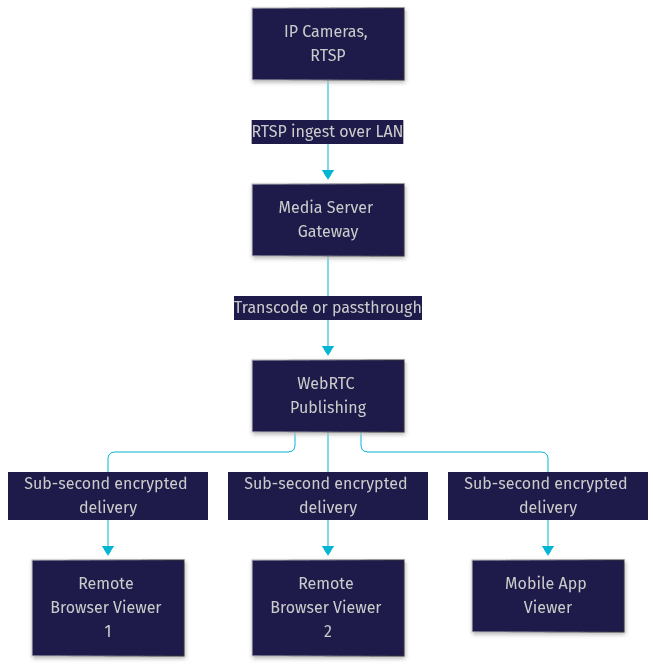
- Use both together when camera feeds must reach remote browser users. A media server ingests RTSP, transcodes if needed, and delivers WebRTC to viewers.
- Avoid trying to play RTSP directly in a browser. No major browser supports it natively, so a gateway is mandatory either way.
Most real deployments are hybrid. The camera speaks RTSP because that is what cameras speak. The viewer gets WebRTC because that is what browsers speak. The interesting engineering happens in the middle.
What Is RTSP?
RTSP Overview
RTSP, the Real Time Streaming Protocol, is defined as a control-plane protocol for managing streaming media sessions. It does not carry the video itself. Instead, it negotiates a session between a client and a media source, then hands actual media transport to a companion protocol, almost always RTP over UDP or TCP.
RTSP emerged in 1998 through RFC 2326, with a second version in RFC 7826, and it remains the lingua franca of IP cameras, encoders, and legacy streaming infrastructure. Nearly every surveillance camera, from a fifty-dollar indoor unit to an enterprise PTZ camera, exposes an RTSP endpoint. That ubiquity is RTSP's strongest asset: if you are building anything that touches cameras, you will ingest RTSP whether you planned to or not.
How RTSP Works Under the Hood
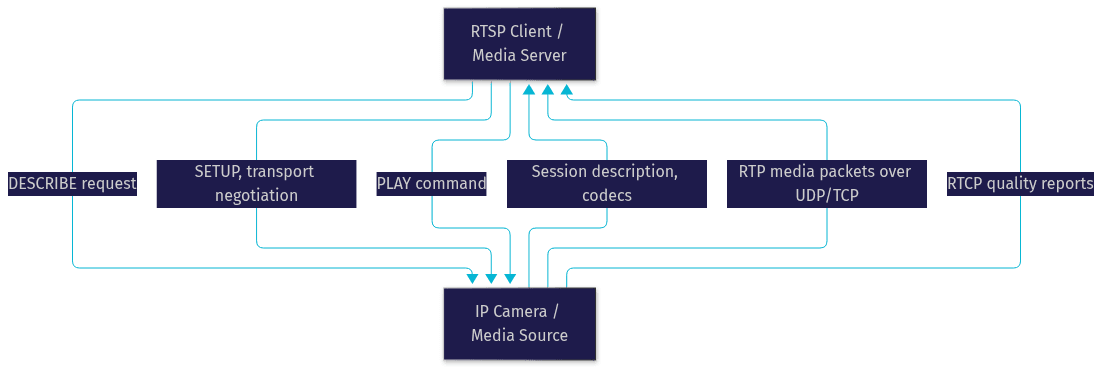
RTSP works by exchanging a small set of session commands with the media source before any video flows. The client sends a DESCRIBE request, and the camera replies with a session description listing available streams and codecs. The client then issues SETUP to negotiate transport parameters for each stream, followed by PLAY to start delivery. From that point, RTP packets carry the media, while RTCP sidecar packets report quality statistics like packet loss and jitter.
Because the control channel and the media channel are separate, RTSP sessions are lightweight to establish but fragile across networks. The RTP stream typically uses UDP with no built-in encryption in the base protocol, and any firewall between client and camera must be configured to allow both the control port and the dynamically negotiated media ports.
What Is WebRTC?
WebRTC Overview
WebRTC is defined as a browser-native framework and API set for real-time peer-to-peer exchange of audio, video, and arbitrary data. Unlike RTSP, WebRTC was designed from the start for hostile networks: peers behind NATs and firewalls, on unpredictable connections, with encryption mandatory rather than optional.
Every major browser, Chrome, Firefox, Safari, and Edge, ships WebRTC support natively, and the API surface extends to native mobile and embedded platforms through libraries and SDKs. VideoSDK, for example, builds its video calling SDKs on top of WebRTC, adding room management, participant handling, recording, and adaptive streaming so you do not have to wire the raw protocol yourself.
WebRTC Connection Process
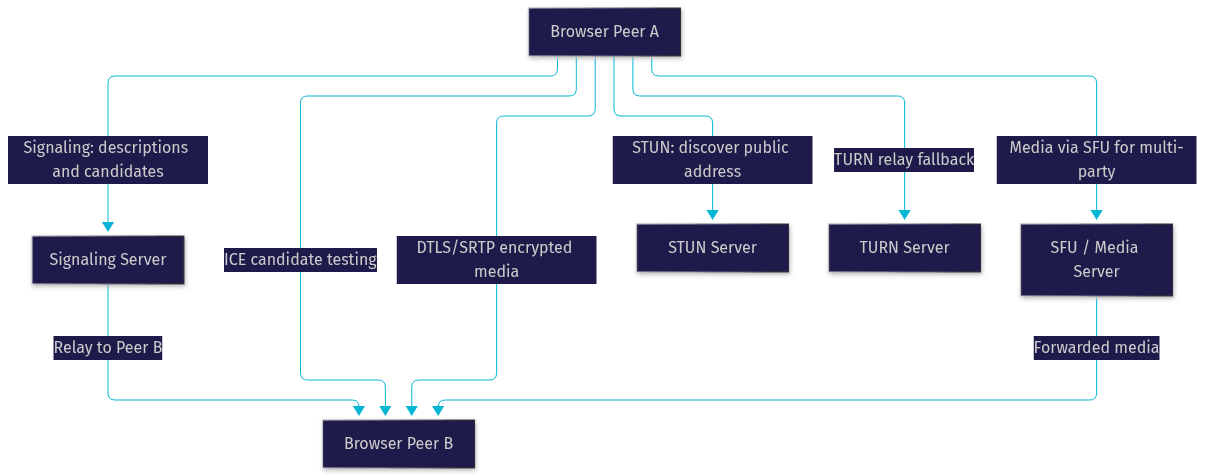
WebRTC works by completing three phases before media flows. First, signaling: the two peers exchange session descriptions and network candidates through a server you control or a service like VideoSDK, though the signaling channel itself is not standardized by the WebRTC spec. Second, ICE negotiation: the Interactive Connectivity Establishment framework gathers candidate addresses and tests direct UDP paths, falling back to a TURN relay when direct connection is impossible. Third, secure transport setup: DTLS handshake establishes keys, and SRTP encrypts every media packet from that point on.
The result is a connection that works across most home and corporate networks without manual configuration, with sub-second latency and mandatory encryption. The trade-off is complexity: signaling servers, STUN and TURN infrastructure, and often an SFU (Selective Forwarding Unit) for multi-party sessions.
Head-to-Head Technical Comparison
Latency Characteristics
WebRTC consistently delivers sub-second latency, typically 100 to 500 milliseconds end to end, because it prioritizes freshness over completeness, dropping late packets rather than buffering them. RTSP over RTP on a local LAN can achieve similarly low latency, often under 200 milliseconds, since there is no encryption handshake overhead per packet and the network is controlled. The gap opens on public networks: RTSP over TCP or through firewalls accumulates buffering, pushing latency to one or more seconds, while WebRTC's congestion control and jitter buffers keep it interactive. For surveillance monitoring, a two-second delay is usually acceptable. For a live auction or a telehealth consultation, it is not.
Network Traversal and NAT
RTSP requires manual network configuration to cross a NAT or firewall. You must forward the control port plus the RTP media ports, or force interleaved TCP mode, which hurts latency. This is why RTSP deployments overwhelmingly live on LANs or VPNs. WebRTC solves traversal automatically through ICE, which tries direct UDP, then STUN-assisted hole punching, then TURN relaying. According to the W3C WebRTC specification, ICE is a mandatory part of the connection process, and in practice roughly one in ten connections needs a TURN relay. That built-in traversal is the single biggest architectural difference between the two protocols.
Browser Compatibility
No major browser plays RTSP natively. Serving an RTSP stream to a browser always requires a gateway that converts to WebRTC, HLS, or MSE-friendly formats. WebRTC, by contrast, works in every major desktop and mobile browser with no plugins, exposed through a standardized JavaScript API. If your viewers are humans with browsers, this comparison is already decided: you are delivering WebRTC, the only question is what happens upstream. VideoSDK's Prebuilt UI Kit takes this further, embedding a complete video interface with a single component.
Transport and Protocol Stack
RTSP is a thin control protocol paired with RTP for media and RTCP for quality feedback, typically over UDP, with SRTP available as an optional extension. Encryption is not part of the base flow, which is fine on a physically secured LAN and a liability on the public internet. WebRTC mandates a full secure stack: DTLS for key exchange, SRTP for media, and SCTP over DTLS for data channels. Every packet is encrypted by default. RTSP's separation of control and media makes it efficient and inspectable; WebRTC's integrated stack makes it safe by default but heavier to operate.
Scalability and Server Roles
RTSP is ingest-oriented. A camera publishes one stream, and each viewer who connects directly consumes a slice of the camera's bandwidth, so direct RTSP viewing scales poorly beyond a handful of clients. WebRTC infrastructure is dual-role: the same SFU or media server that receives streams can also fan them out to hundreds or thousands of viewers, with adaptive bitrate per receiver. VideoSDK's cloud handles this fan-out automatically, including interactive live streaming where viewers can be promoted to active speakers. When scale matters, the server role, not the wire protocol, is what decides the outcome.
Use-Case Scenarios
Surveillance and LAN Camera Deployments
For pure surveillance, RTSP is usually the right choice, and arguing otherwise is over-engineering. Cameras speak RTSP natively, the network is controlled, latency tolerance is measured in seconds, and a network video recorder or media server can ingest dozens of RTSP streams cheaply. A security operations center viewing feeds on-site gains nothing from WebRTC's NAT traversal machinery, since nothing crosses a NAT. The practical architecture is cameras publishing RTSP into a recorder or gateway, with viewing handled by dedicated clients or a web gateway only when remote access is needed.
Interactive Browser-Based Applications
WebRTC shines wherever a human interacts with live video in a browser. Video calling, telehealth consultations, live tutoring, remote equipment inspection, live shopping, and real-time monitoring dashboards all need sub-second latency and native browser playback, which is exactly the combination WebRTC delivers and RTSP cannot. A telehealth platform, for example, cannot ask patients to configure port forwarding on their home routers. The ICE and TURN machinery that makes WebRTC operationally heavier is precisely what makes these products possible. VideoSDK provides this layer as managed infrastructure, with SDKs across React, Flutter, React Native, Android, iOS, and more, plus REST APIs for server-side room and recording control.
Hybrid Pipelines
The most common production pattern combines both protocols. A media server ingests RTSP from cameras, then re-publishes each stream as WebRTC for browser viewers anywhere in the world. This is the standard architecture for cloud surveillance products, remote fleet monitoring, and live operations dashboards. The gateway handles protocol conversion, optional transcoding between camera codecs like H.264 and browser-friendly profiles, authentication, and fan-out. One thing that bites teams here: transcoding is CPU-expensive, so prefer passthrough when camera codecs are already browser-compatible. VideoSDK sits naturally on the delivery side of this pipeline, and its Python SDK supports connecting custom media pipelines to VideoSDK rooms.
Choosing the Right Protocol: Decision Framework
Run your project through these five questions and the answer usually falls out cleanly:
- Latency tolerance: Under one second is required for interaction? WebRTC. Two to five seconds acceptable for monitoring? RTSP ingest with a gateway is fine.
- Viewer environment: Viewers in browsers or mobile apps? WebRTC delivery is mandatory. Dedicated clients or on-LAN viewing? RTSP works directly.
- Network environment: Public internet with NATs and firewalls between endpoints? WebRTC's ICE handles it. Controlled LAN or VPN? RTSP needs no traversal machinery.
- Scalability: More than a handful of concurrent viewers? You need a server-side fan-out regardless of protocol, so plan around an SFU or media server.
- Existing infrastructure: Cameras already publishing RTSP? Keep them, and add a gateway. Building interactive product features from scratch? Start with a WebRTC platform like VideoSDK rather than raw protocol work.
If your answers point in both directions, you are building the hybrid pipeline, and that is normal.
Common Pitfalls and How to Avoid Them
Four failure modes account for most of the pain in this space.
First, RTSP firewall issues: teams forget that RTP media ports are negotiated dynamically after SETUP, so forwarding only the control port breaks playback intermittently. Fix it by pinning media ports on the camera or forcing interleaved TCP, accepting the latency cost.
Second, WebRTC ICE failures: deployments skip TURN infrastructure, then discover that a meaningful fraction of users on restrictive corporate networks cannot connect at all. Budget for a TURN relay from day one.
Third, transcoding overhead in hybrid pipelines: converting every camera stream's codec burns CPU fast at scale. Prefer passthrough when the camera already emits a browser-compatible H.264 profile.
Fourth, codec mismatches: cameras shipping H.265 or proprietary profiles will not play through WebRTC without transcoding, since browser support for H.265 in WebRTC remains inconsistent. Verify camera codec output before committing to an architecture.
Future Trends
The protocol landscape keeps shifting. WebRTC continues to evolve, with ongoing work on improved congestion control and broader codec support in browsers. RTSP 2.0, defined in RFC 7826, modernized the spec, though camera adoption remains overwhelmingly first-generation. Meanwhile, low-latency HLS has emerged as a genuine third option, delivering two to five second latency at massive scale for one-to-many broadcasting, filling the gap between RTSP's ingest role and WebRTC's interactivity. For large-audience streaming where sub-second latency is not required, LL-HLS is often the pragmatic middle path, and VideoSDK supports HLS output alongside its sub-second interactive streaming mode.
Definitions Glossary
RTSP (Real Time Streaming Protocol): A text-based control protocol that negotiates streaming sessions with media sources like IP cameras, delegating actual media transport to RTP. It is the dominant ingest protocol for surveillance hardware.
WebRTC: A browser-native framework for encrypted, peer-to-peer real-time exchange of audio, video, and data, using ICE for connectivity and DTLS/SRTP for security. VideoSDK's video calling and live streaming SDKs are built on it.
ICE (Interactive Connectivity Establishment): The NAT traversal framework WebRTC uses to find a usable network path, trying direct UDP, STUN-assisted connections, and TURN relays in order.
RTP (Real-time Transport Protocol): The packet format that carries actual media in RTSP sessions and inside WebRTC's SRTP layer, with RTCP providing quality feedback.
SFU (Selective Forwarding Unit): A media server that receives streams from participants and forwards them selectively to others, enabling multi-party WebRTC scale without mesh topologies.
Media Server Gateway: A server that ingests one protocol, such as RTSP from cameras, and re-publishes as another, such as WebRTC for browser viewers, often handling transcoding and fan-out.
Key Takeaways
- RTSP is an ingest protocol for controlled networks and camera hardware; WebRTC is a delivery protocol for browsers and interactive experiences across hostile networks.
- No major browser supports RTSP natively, so any browser-facing camera product requires a gateway to WebRTC or HLS regardless of architecture.
- WebRTC delivers sub-second latency with mandatory encryption and automatic NAT traversal through ICE, at the cost of signaling and TURN infrastructure.
- The dominant production pattern is hybrid: RTSP ingest from cameras, converted by a media server, delivered as WebRTC to remote viewers.
- VideoSDK handles the WebRTC delivery layer with SDKs for ten-plus platforms, a Prebuilt UI Kit, and managed room, recording, and streaming infrastructure.
Conclusion
The WebRTC vs RTSP question is really a question about where your video comes from and who watches it. Cameras on controlled networks speak RTSP and should keep speaking it. Browsers and mobile users watching interactively need WebRTC, and most systems need both, stitched together by a media server gateway. Evaluate your latency tolerance, viewer environment, network conditions, and scale needs against the decision framework above before committing. If your product needs the WebRTC side of that pipeline, VideoSDK's quickstart guides get you to a working video experience in minutes, with a free tier to start on app.videosdk.live. What are you building with real-time video? Drop a comment, I'd love to hear whether you're wiring up camera feeds, interactive streaming, or both.
Free $20 Balance for AI Voice Agents & Video Calls
FAQ