


WebRTC ports are the network endpoints used for signaling, media transport, and NAT traversal during real-time communication sessions. Signaling typically uses HTTPS on port 443, STUN and TURN servers use ports 3478 and 5349, and media streams flow over UDP ports in the range 16384 to 32768. VideoSDK abstracts this complexity by managing port allocation, ICE candidate gathering, and TURN server fallback automatically through its video calling SDK.
If you have ever spent hours debugging a WebRTC call that works perfectly on your local machine but fails the moment you deploy it to production, you are not alone. The culprit is almost always ports. WebRTC relies on a combination of signaling ports, media ports, and relay ports to establish and maintain peer-to-peer connections. When any of those ports are blocked by a firewall, a NAT device, or a corporate proxy, the call drops silently or never connects at all.
Understanding WebRTC ports is critical for developers building real-time communication applications and for network engineers responsible for configuring firewalls. The port landscape spans multiple protocols (UDP, TCP, TLS), multiple server types (signaling, STUN, TURN), and multiple transport layers (RTP, SRTP, DTLS). Getting any layer wrong means degraded call quality or total connection failure.
This guide breaks down every port WebRTC uses, why each one matters, how to configure firewalls correctly, and how platforms like VideoSDK handle port management for you so you can focus on building features instead of debugging network topology.
What Are WebRTC Ports?
WebRTC ports are specific network endpoints that real-time communication sessions use to exchange signaling information, negotiate connections, and transmit audio and video media. In networking terms, a port is a logical endpoint identified by a number between 0 and 65535. WebRTC uses a subset of these numbers across multiple protocols to coordinate the complex dance of establishing a peer-to-peer media session.
WebRTC ports fall into two broad categories: signaling ports and media ports. Signaling ports carry the metadata and control messages needed to set up a call, including session descriptions, ICE candidates, and room state. Media ports carry the actual audio and video payloads after the connection is established. This separation exists because signaling and media have fundamentally different requirements: signaling needs reliability and security, while media needs speed and low latency.
VideoSDK manages both categories through its Rooms-based architecture. When participants join a VideoSDK room, the SDK handles signaling over secure HTTPS connections and allocates media ports dynamically, abstracting the entire port negotiation process away from the developer.
Signaling vs. Media Ports
Signaling and media ports serve distinct purposes in a WebRTC session, and confusing the two is one of the most common causes of connection failures.
Signaling Ports
Signaling is the process of exchanging control information between peers before media flows. This includes offering and answering session descriptions (SDP), exchanging ICE candidates, and managing room state like participant join and leave events. Signaling typically runs over HTTPS on port 443, which is the standard port for secure web traffic. Using port 443 is deliberate: it is almost universally open on corporate firewalls, proxy servers, and cloud environments, making it the most reliable choice for signaling transport.
VideoSDK uses secure WebSocket connections over port 443 for signaling. When a participant joins a meeting using the VideoSDK React SDK or any other platform SDK, the SDK establishes a secure signaling channel to the VideoSDK Cloud, which handles room management, participant coordination, and media negotiation.
Media Ports
Media ports carry the actual RTP (Real-time Transport Protocol) and SRTP (Secure Real-time Transport Protocol) packets containing audio and video data. The default media port range for WebRTC is 16384 to 32768, though this range can vary depending on the browser, operating system, and SDK implementation. UDP is the preferred protocol for media because it has lower overhead and latency compared to TCP. UDP does not guarantee delivery, but for real-time media, a dropped packet is better than a delayed packet.
When UDP is blocked by a firewall or NAT device, WebRTC falls back to TCP. This fallback typically uses port 443 as well, tunneling media over TLS to bypass restrictive network environments. However, TCP-based media introduces higher latency and jitter because of TCP's retransmission and congestion control mechanisms. VideoSDK's network-adaptive streaming automatically adjusts bitrate and resolution when these fallback scenarios occur, maintaining call quality even on degraded connections.
Standard Port Ranges Used by WebRTC
WebRTC uses several well-defined port ranges across different stages of connection establishment and media delivery. Each range serves a specific purpose, and understanding all of them is essential for configuring firewalls and diagnosing connection issues.
Port 443: Signaling and TCP Fallback
Port 443 is the standard HTTPS port and is used for signaling traffic in nearly all WebRTC implementations. It is also used as a fallback port for media transport over TCP when UDP is blocked. Because port 443 is open on virtually all networks, it is the most reliable path for both signaling and emergency media delivery.
Port 3478: STUN and TURN over UDP
Port 3478 is the standard port for STUN (Session Traversal Utilities for NAT) and TURN (Traversal Using Relays around NAT) servers. STUN servers help clients discover their public IP address and NAT type. TURN servers act as relays when direct peer-to-peer connections fail. Port 3478 supports both UDP and TCP, making it versatile for different network conditions.
Port 5349: TURN over TLS
Port 5349 is used for TURN over TLS, which encrypts the relay traffic between the client and the TURN server. This is particularly important in corporate environments where plain TURN traffic might be inspected or blocked. TURN over TLS ensures that relayed media remains encrypted end to end between the client and the TURN server.
Ports 16384 to 32768: RTP and SRTP Media
This is the primary media port range for WebRTC. Browsers and SDKs allocate UDP ports from this range to send and receive RTP and SRTP packets. The range provides approximately 16,000 available ports, which is sufficient for most deployments. Each media stream (audio, video, screen share) typically uses two consecutive ports: one for RTP and one for RTCP (RTP Control Protocol).
Ports 49152 to 65535: Dynamic and Relay Ports
This range is used for dynamic port allocation by TURN servers and some operating systems. When a TURN server relays media, it allocates ports from this range to forward packets to the remote peer. Some platforms also use this range for ICE candidate gathering when the standard media range is exhausted.
The following diagram shows how traffic flows across these ports during a typical WebRTC session:
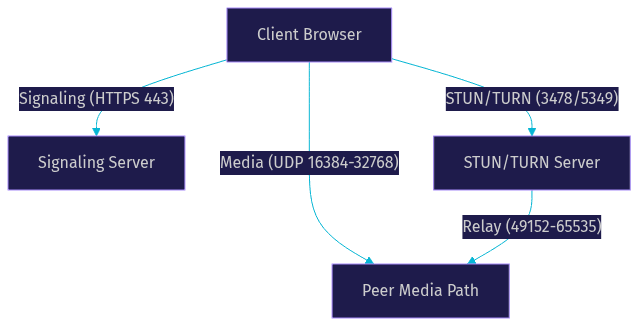
VideoSDK's cloud infrastructure manages all of these port ranges automatically. The VideoSDK Cloud handles STUN and TURN server provisioning, media port allocation, and relay fallback without requiring developers to configure any of these ports manually.
NAT Traversal and ICE Candidate Types
ICE (Interactive Connectivity Establishment) is the framework WebRTC uses to find the best path between two peers. ICE gathers candidates from multiple sources, and each candidate type corresponds to a different port allocation strategy.
Host Candidates
Host candidates are the local IP addresses and ports of the device running the WebRTC application. The browser or SDK binds a UDP port from the media range (typically 16384 to 32768) on each local network interface. Host candidates work when both peers are on the same network or when NAT is not involved. They are the fastest and most direct path but fail when NAT or firewalls block local IP access.
Server-Reflexive Candidates
Server-reflexive candidates are the public IP address and port that a STUN server observes when a client sends a binding request. The STUN server on port 3478 responds with the client's public-facing address, which the client then shares with the remote peer as an ICE candidate. This candidate type works for many NAT scenarios, including full-cone NAT and restricted-cone NAT, but fails for symmetric NAT environments where the NAT assigns a different public port for each destination.
Relay Candidates
Relay candidates are ports allocated by a TURN server when direct and server-reflexive connections fail. The TURN server allocates a port from the dynamic range (49152 to 65535) and relays all media between the peers. This is the most reliable candidate type because it works in virtually all network environments, but it is also the most expensive in terms of latency and bandwidth because media must travel through the TURN server.
Common NAT Scenarios
Different NAT types affect which ICE candidates succeed. Full-cone NAT allows any external host to send packets to the mapped port, making server-reflexive candidates reliable. Symmetric NAT assigns a different public port for each destination, breaking server-reflexive candidates and requiring TURN relay. Port-restricted NAT and address-restricted NAT fall between these extremes, allowing server-reflexive candidates only if the destination matches the STUN server's address and port.
VideoSDK handles all of this automatically. The SDK's ICE gathering process tries host candidates first, then server-reflexive candidates via VideoSDK's STUN infrastructure, and finally falls back to TURN relay through VideoSDK's cloud proxy. Developers using VideoSDK's Prebuilt UI Kit get this entire flow without writing a single line of network configuration code.
Firewall and Security Considerations
Configuring firewalls for WebRTC requires balancing openness with security. Media ports must be accessible for real-time communication, but exposing thousands of UDP ports creates a larger attack surface. Here are the best practices for securing WebRTC ports in production.
Firewall Rules for WebRTC
Open port 443 for both inbound and outbound TCP traffic. This handles signaling and TCP media fallback. Open port 3478 for both UDP and TCP traffic to allow STUN and TURN communication. Open port 5349 for TCP traffic to support TURN over TLS in restrictive environments. For media ports, open the UDP range 16384 to 32768 for both inbound and outbound traffic. If you are running a TURN server, also open the UDP range 49152 to 65535 for relay port allocation.
Restrict access to these ports by IP address where possible. Only allow traffic from known signaling server IPs, STUN/TURN server IPs, and participant IP ranges. Use stateful firewall rules that allow return traffic for established connections, reducing the need to open broad inbound port ranges.
Security Implications of Exposed Media Ports
Exposing UDP media ports does not mean the media itself is vulnerable. WebRTC encrypts all media using DTLS-SRTP, which combines Datagram Transport Layer Security for key exchange with Secure RTP for payload encryption. Even if an attacker intercepts packets on an open media port, they cannot decrypt the audio or video content without the DTLS session keys.
VideoSDK adds additional security layers on top of DTLS-SRTP. All VideoSDK rooms support end-to-end encryption, token-based authentication, role-based access control, and waiting rooms. The REST API allows server-side validation of meeting tokens before participants can join, ensuring that only authorized users access media streams.
Port-Based Access Control
For enterprise deployments, consider implementing port-based access control using network policies or cloud security groups. Restrict STUN and TURN server access to authenticated users only. VideoSDK's cloud proxy feature routes media through VideoSDK's infrastructure, which means you can restrict outbound traffic to VideoSDK's IP ranges rather than opening broad UDP port ranges to the entire internet.
Platform-Specific Port Behaviors
WebRTC port allocation behaves differently across browsers, Android, and iOS. Understanding these differences helps developers avoid platform-specific connection issues.
Browser Behavior
Browsers like Chrome, Firefox, and Safari allocate media ports from the 16384 to 32768 range by default. Browsers do not expose the specific port allocation logic to developers, and the exact port used for each media stream is determined at runtime by the browser's WebRTC stack. Browsers also handle ICE candidate gathering internally, trying host, server-reflexive, and relay candidates in parallel.
One quirk: browsers running in restrictive network environments (like corporate VPNs) may fail to gather host candidates because the VPN interface masks local IP addresses. In these cases, only server-reflexive and relay candidates are available, which means a working TURN server is essential.
Android Behavior
On Android, WebRTC port allocation depends on whether you are using a native SDK or a WebView. Native SDKs like the VideoSDK Android SDK have direct access to the operating system's network stack and can bind UDP ports from the standard media range. Android's networking API allows fine-grained control over socket binding, but most developers do not need to manage this manually when using a higher-level SDK.
Android also handles network transitions differently. When a device switches from Wi-Fi to cellular, existing UDP port bindings may be invalidated. VideoSDK's SDK handles reconnection automatically in these scenarios, re-establishing media streams on the new network interface.
iOS Behavior
iOS imposes stricter constraints on network access. Apple's App Transport Security (ATS) requires TLS for all network connections by default, which affects signaling transport. While WebRTC media over UDP is permitted, iOS applications must request the appropriate network entitlements. The VideoSDK iOS SDK handles these platform requirements internally, ensuring compliance with Apple's networking guidelines.
iOS also has quirks with ICE candidate timing. The platform may delay relay candidate gathering to preserve battery life, which can cause slower connection establishment on restrictive networks. Developers should ensure their TURN servers are responsive and geographically distributed to minimize this delay.
Troubleshooting Common Port-Related Issues
When WebRTC connections fail, the problem is almost always port-related. Here is a step-by-step diagnostic checklist for identifying and resolving port issues.
Step 1: Verify Signaling Connectivity
Confirm that the client can reach the signaling server over HTTPS on port 443. If signaling fails, no subsequent steps matter because the peers cannot exchange session descriptions or ICE candidates. Check for proxy interference, certificate issues, or DNS resolution failures.
Step 2: Check UDP Blockage
Determine whether UDP traffic is blocked on the network. If the client can establish a signaling connection but media never flows, UDP ports are likely blocked. Try connecting over a different network (like a mobile hotspot) to isolate the issue. If the call works on the alternate network, the original network is blocking UDP.
Step 3: Verify TURN Server Reachability
Confirm that the TURN server is reachable on ports 3478 and 5349. If the TURN server is unreachable, clients behind symmetric NAT or restrictive firewalls cannot relay media. Check TURN server logs for authentication failures, port exhaustion, or network connectivity issues.
Step 4: Inspect ICE Candidate Gathering
Review the ICE candidates gathered by the client. If only host candidates are present, STUN connectivity is failing. If no relay candidates appear, the TURN server is unreachable or authentication is failing. VideoSDK provides detailed logging through its SDK observability features, allowing developers to inspect ICE candidate gathering in real time.
Step 5: Check for Port Exhaustion
On high-concurrency deployments, port exhaustion can occur if too many simultaneous connections consume all available ports in the media range. Monitor port usage on the server and increase the media port range if necessary. VideoSDK's cloud infrastructure scales port allocation dynamically, avoiding this issue for developers using the managed platform.
Step 6: Validate Firewall Rules
Review firewall rules on both the client and server sides. Ensure that all required ports are open and that no rules are blocking traffic between the client and the STUN/TURN servers. Use network diagnostic tools to trace packet flow and identify where traffic is being dropped.
Quick Reference Table
Here is a summary of the standard WebRTC ports, their purposes, protocols, and typical configurations. This table serves as a quick lookup for firewall configuration and network troubleshooting.
| Port | Protocol | Purpose | Typical Configuration |
|---|---|---|---|
| 443 | TCP | Signaling (HTTPS/WSS) and TCP media fallback | Open inbound and outbound on all firewalls |
| 3478 | UDP/TCP | STUN and TURN server communication | Open for STUN/TURN server IPs only |
| 5349 | TCP | TURN over TLS for restrictive networks | Open for TURN server IPs only |
| 16384-32768 | UDP | RTP/SRTP media transport | Open for media traffic; restrict by IP where possible |
| 49152-65535 | UDP | TURN relay port allocation | Open on TURN servers for relay traffic |
The most critical row is port 443. If only one port can be opened on a restrictive network, it should be 443, because it handles both signaling and TCP media fallback. VideoSDK's cloud proxy feature can route all traffic through port 443 when UDP is completely blocked.
Definitions Glossary
WebRTC Port: A network endpoint used by WebRTC to exchange signaling, media, or relay traffic, identified by a number between 0 and 65535.
Signaling Port: The port used for exchanging control messages like SDP offers and ICE candidates, typically HTTPS on port 443.
Media Port: The port used for transmitting RTP or SRTP audio and video payloads, typically in the UDP range 16384 to 32768.
STUN Server: A server that helps WebRTC clients discover their public IP address and NAT type, typically running on port 3478.
TURN Server: A relay server that forwards media between peers when direct connections fail, using ports 3478 (UDP/TCP) and 5349 (TLS).
ICE Candidate: A potential connection path discovered by the ICE framework, classified as host, server-reflexive, or relay based on how the port is allocated.
DTLS-SRTP: The encryption protocol WebRTC uses to secure media payloads, combining Datagram Transport Layer Security for key exchange with Secure RTP for payload encryption.
Key Takeaways
- WebRTC uses multiple port ranges for different purposes: port 443 for signaling, ports 3478 and 5349 for STUN and TURN, and ports 16384 to 32768 for media transport.
- UDP is the preferred protocol for WebRTC media because it provides lower latency than TCP, but TCP fallback over port 443 ensures connectivity on restrictive networks.
- ICE candidate gathering determines which ports are used for media, with host candidates being fastest, server-reflexive candidates handling most NAT scenarios, and relay candidates providing universal connectivity through TURN servers.
- Firewall configuration for WebRTC requires opening specific ports for signaling, STUN/TURN, and media while restricting access by IP address to maintain security.
- VideoSDK's video calling SDK abstracts all port management, ICE negotiation, and TURN fallback, letting developers build real-time communication apps without managing network infrastructure.
Conclusion
Correctly configuring WebRTC ports is the difference between a call that connects instantly and one that fails silently. The port landscape spans signaling on 443, STUN and TURN on 3478 and 5349, media on 16384 to 32768, and relay allocation on 49152 to 65535. Each range serves a specific purpose, and missing any of them in your firewall configuration will create connection failures that are notoriously hard to diagnose.
The best practice is simple: open the required ports, restrict access by IP where possible, ensure TURN servers are reachable, and use DTLS-SRTP encryption to protect media payloads. For developers who want to skip the network engineering entirely, VideoSDK handles all of this through its managed cloud infrastructure. The VideoSDK React SDK, Android SDK, iOS SDK, and Prebuilt UI Kit all manage port allocation, ICE candidate gathering, and TURN fallback automatically. You can sign up for free at app.videosdk.live/login and start building production-grade video calling in minutes.
What are you building with WebRTC? Drop a comment below, I would love to hear what kind of real-time communication use case you are working on.
Free $20 Balance for AI Voice Agents & Video Calls
FAQ