



The Ultimate Guide to VoIP Software: Features, Security, and Top Solutions for 2025
Introduction to VoIP Software
VoIP software, or Voice over Internet Protocol software, revolutionizes how voice communications are handled in the digital era. Unlike traditional telephony, which relies on analog circuits, VoIP software transmits voice data as digital packets over IP networks. This shift enables flexible, cost-effective, and feature-rich communication for both individuals and businesses. As of 2025, VoIP software is at the core of modern business phone systems, offering robust integration capabilities, enhanced security, and multi-platform support. The evolution from legacy PBX systems to cloud-based VoIP has transformed voice communication, making it essential for organizations prioritizing scalability and remote collaboration. Developers and IT professionals are increasingly leveraging VoIP software to build custom communication solutions for diverse environments.
How VoIP Software Works
VoIP Protocols and Core Technologies (SIP, RTP, etc.)
VoIP software leverages a variety of protocols to ensure seamless, real-time voice communication across networks. The Session Initiation Protocol (SIP) is the most widely used signaling protocol in VoIP, responsible for initiating, maintaining, and terminating voice sessions. The Real-time Transport Protocol (RTP) handles the actual media stream—transmitting audio (and sometimes video) data packets with minimal latency.
For developers looking to integrate calling capabilities into their applications, utilizing a phone call api can streamline the process and provide robust features out of the box.
Here's an example of a SIP INVITE message initiating a VoIP call:
1INVITE sip:bob@example.com SIP/2.0
2Via: SIP/2.0/UDP pc33.example.com;branch=z9hG4bK776asdhds
3Max-Forwards: 70
4To: Bob <sip:bob@example.com>
5From: Alice <sip:alice@example.com>;tag=1928301774
6Call-ID: a84b4c76e66710@pc33.example.com
7CSeq: 314159 INVITE
8Contact: <sip:alice@pc33.example.com>
9Content-Type: application/sdp
10Content-Length: 142
Key Components of VoIP Systems
A typical VoIP system consists of several core components:
- SIP Client/Softphone: The application users interact with.
- SIP Server/PBX: Manages call routing, registration, and authentication.
- Media Gateway: Bridges VoIP calls to traditional PSTN if needed.
- VoIP Provider: Offers backbone connectivity and advanced features.
- VoIP Hardware: Headsets, VoIP phones, and routers optimized for VoIP traffic.
For those developing iOS VoIP apps, following a comprehensive callkit tutorial can help ensure seamless integration with native calling features.
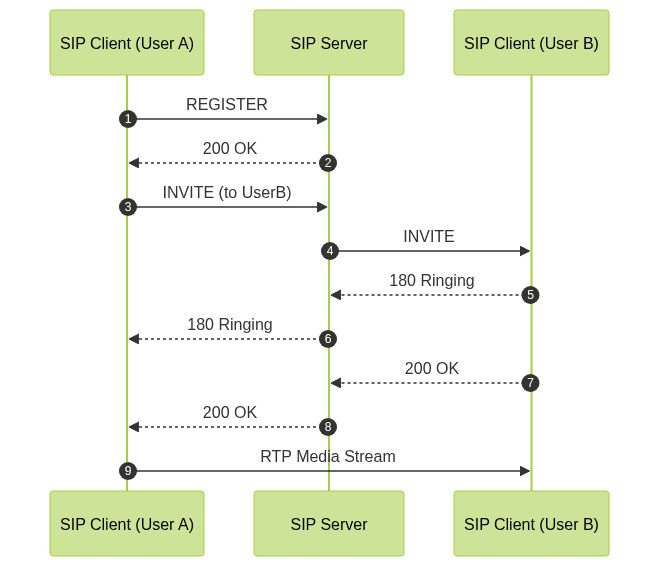
Below is a basic sequence diagram illustrating a VoIP call setup:
Essential Features of Modern VoIP Software
Multi-Platform Support & Integration
Modern VoIP software is built for flexibility, supporting multiple platforms including Windows, macOS, Linux, Android, and iOS. Leading solutions offer seamless integration with business tools such as CRM systems, email, and team collaboration platforms. This ensures that users can access their business phone system from any device, maximizing mobility and productivity.
Developers can leverage a Voice SDK to add real-time audio features to their applications, enabling interactive voice experiences across platforms.
Security and Encryption
VoIP security is crucial, as voice data traverses public and private IP networks. Top VoIP software implements end-to-end encryption using TLS (Transport Layer Security) for signaling and SRTP (Secure Real-time Transport Protocol) for media streams. Additional features include strong authentication, secure provisioning, and firewall traversal mechanisms to protect against eavesdropping, SIP attacks, and data breaches.
For those building video-enabled solutions, integrating a Video Calling API ensures secure and high-quality video communication alongside voice.
Call Management: Call Recording, Conferencing, and Analytics
Enhanced call management features are now standard in VoIP software. Call recording is essential for compliance, training, and quality assurance. VoIP conferencing enables multi-party collaboration, with advanced options for screen sharing and HD audio. Integrated VoIP analytics provide insights into call volumes, durations, user behavior, and help identify areas for operational improvement.
If you're developing on Android, exploring webrtc android can help you implement real-time communication features efficiently.
Business & Contact Center Features
VoIP solutions for businesses and contact centers include IVR (Interactive Voice Response), call queues, skill-based routing, and CRM integrations. Features like call whisper, barge, and monitor enable supervisors to coach and assist agents in real time. Cloud telephony and hosted VoIP solutions further enhance scalability and remote work capabilities, allowing organizations to manage their phone systems entirely from the cloud.
For cross-platform development, especially with Flutter, utilizing flutter webrtc can simplify the process of adding real-time voice and video capabilities.
Top VoIP Software Solutions in 2024
Open Source VoIP Solutions (Asterisk, Phoner)
Open source VoIP software empowers developers to build customized communication platforms. Asterisk is the industry standard, offering a powerful PBX framework with extensive SIP support, call routing logic, and integration APIs. Phoner is a lightweight SIP client, ideal for testing, development, and basic VoIP functionality. Both solutions support VoIP protocols, encryption, and can be extended with plugins or scripts.
If you want to embed video calling sdk into your application, there are prebuilt solutions that make integration quick and straightforward.
Business-Focused VoIP Platforms (3CX, NCH Express Talk)
For organizations seeking robust, enterprise-grade VoIP, platforms like 3CX and NCH Express Talk provide advanced PBX features, secure remote management, and scalable deployment options. 3CX offers a complete suite for unified communications including video, chat, and contact center modules. NCH Express Talk is known for its ease of use, stability, and integration with existing business systems.
Businesses looking to streamline their communications can benefit from integrating a reliable phone call api to automate and enhance their calling workflows.
Softphone Apps for Desktop & Mobile (Zoiper, PhonerLite)
Softphone applications such as Zoiper and PhonerLite deliver high-quality VoIP experiences across desktop and mobile devices. Zoiper supports a wide range of codecs, SIP and IAX protocols, and offers advanced encryption options. PhonerLite is lightweight yet feature-rich, with support for call recording, multiple identities, and user-friendly configuration interfaces. Both apps are essential tools for remote teams and BYOD (Bring Your Own Device) environments.
For iOS developers, a step-by-step callkit tutorial will help you integrate native call handling into your VoIP app, enhancing the user experience.
Comparison Table: Key Features, Pros, and Cons
| Solution | Platform | Key Features | Pros | Cons |
|---|---|---|---|---|
| Asterisk | Linux, Windows | Open source PBX, API, SIP support | Highly customizable, free | Complex setup |
| 3CX | Windows, Cloud | Unified comms, CRM, video | Easy UI, scalable, strong support | Licensing costs |
| Zoiper | Multi-platform | Softphone, encryption, codecs | Mobile & desktop, secure, intuitive | Limited PBX features |
| PhonerLite | Windows | SIP client, call recording | Lightweight, free, simple config | Windows-only, basic feature set |
| NCH Express Talk | Multi-platform | Softphone, conferencing | User-friendly, stable, affordable | Fewer enterprise features |
Implementing VoIP Software: Step-by-Step Guide
Choosing the Right VoIP Solution
Selecting VoIP software depends on your specific requirements—consider platform compatibility, feature set, integration capabilities, and security needs. Evaluate open source versus commercial offerings, and prioritize solutions with active community or vendor support.
Basic Setup Example (SIP Registration)
A fundamental step in VoIP setup is SIP registration. Here's a sample configuration snippet for registering a SIP client to a SIP server:
1[general]
2register => 1234:password@sip.provider.com/1234
3
4[1234]
5type=friend
6secret=password
7host=sip.provider.com
8context=from-sip
9canreinvite=no
10encrypt=yes
This configuration registers the SIP client with the provider using secure authentication and enables media encryption for secure VoIP communication.
Tips for Secure and Reliable Operation
- Network Configuration: Use a dedicated VoIP VLAN and configure QoS to prioritize voice traffic.
- Firewall & NAT: Implement a VoIP-aware firewall and SIP ALG, or use STUN/TURN servers for NAT traversal.
- Regular Updates: Keep all VoIP software and firmware updated to patch vulnerabilities.
- Monitoring & Analytics: Employ VoIP analytics to monitor call quality and detect anomalies.
- Strong Authentication: Enforce strong passwords and two-factor authentication for all VoIP endpoints.
Future Trends in VoIP Software
Looking ahead to 2025, VoIP software is set to benefit from rapid advancements in AI-powered analytics, which will enable real-time sentiment analysis and predictive call routing. Deep integration with CRM and business workflow tools will drive smarter automation and contextual communication. Cloud migration continues to dominate, reducing infrastructure overhead and enabling instant scalability. Mobile-first VoIP solutions will take center stage, as organizations support increasingly remote and distributed workforces.
Conclusion
VoIP software has become the foundation of modern communication, offering unparalleled flexibility, security, and feature depth. In 2025, organizations and developers can leverage VoIP software to build scalable, secure, and integrated business phone systems. As the technology evolves, staying informed about protocols, security, and platform options will ensure reliable and future-proof VoIP deployments.
Ready to experience next-generation VoIP features? Try it for free and see how modern VoIP solutions can transform your communication strategy.
Free $20 Balance for AI Voice Agents & Video Calls
FAQ